2015 MERCEDES-BENZ CLA-Class trunk release
[x] Cancel search: trunk releasePage 11 of 362

On-board computer ....................... 204
ECO start/stop function
Automatic engine start .................. 146
Automatic engine switch-off ..........1 45
Deactivating/activating ................. 146
General information ....................... 145
Important safety notes .................. 145
Introduction ................................... 145
Emergency
Automatic measures after an acci-
dent ................................................. 56
Emergency release
Driver's door ................................... .83
Trunk ............................................... 85
Vehicle ............................................. 83
Emergency Tensioning Devices
Activation ......................................... 54
Emissions control
Service and warranty information ....21
Engine
Check Engine warning lamp .......... .256
Display message ............................ 233
ECO start/stop function ................ 145
Engine number ............................... 353
Irregular running ............................ 147
Jump-starting ................................. 309
Starting problems .......................... 147
Starting the engine with the
SmartKey ....................................... 144
Starting with the Start/Stop but-
ton ................................................. 144
Switching off .................................. 161
Tow-starting (vehicle) ..................... 314
Engine electronics
Problem (malfunction) ................... 147
Engine oil
Adding .......................................... .288
Additives ........................................ 356
Checking the oil level ..................... 287
Checking the oil level using the
dipstick .......................................... 288
Display message ............................ 234
Filling capacity ............................... 356
Notes about oil grades ................... 356
Notes on oil level/consumption .... 287
Temperature (on-board computer, AMG vehicles) ................................ 214
Viscosity ........................................ 356 ESP
®
(Electronic Stability Pro-
gram)
Activating/deactivating (except
AMG vehicles) .................................. 68
Activating/deactivating (on-
board computer, except AMG
vehicles) ........................................ 210
AMG menu (on-board computer) ... 214
Characteristics ................................. 67
Deactivating/activating (button
in AMG vehicles) .............................. 68
Display message ............................ 218
ETS/4ETS ........................................ 67
Function/notes ................................ 67
General notes .................................. 67
Important safety information ........... 67
Trailer stabilization ........................... 70
Warning lamp ................................. 252
ETS/4ETS (Electronic Traction Sys-
tem) ...................................................... 67
Exhaust
see Exhaust pipe
Exhaust check ................................... 164
Exhaust pipe
Cleaning ......................................... 296
Exterior lighting
Cleaning ......................................... 295
see Lights
Exterior mirrors
Adjusting ....................................... 103
Dipping (automatic) ....................... 104
Folding in when locking (on-boardcomputer) ...................................... 213
Folding in/out (automatically) ....... 104
Folding in/out (electrically) ........... 103
Out of position (troubleshooting) ... 104
Setting ........................................... 104
Storing settings (memory func-
tion) ............................................... 106
Storing the parking position .......... 105
Eyeglasses compartment ................. 263 F
Filler cap see Fuel filler flap
Flat tire
MOExtended tire s.......................... 301 Index
9
Page 20 of 362

Tire tread (definition) ..................... 340
Total load limit (definition )............. 341
Traction ......................................... 334
Traction (definition) ....................... 340
Tread wear ..................................... 334
Uniform Tire Quality Grading
Standards ...................................... 333
Uniform Tire Quality Grading
Standards (definition) .................... 339
Wear indicator (definition) ............. 340
Wheel and tire combination ........... 347
Wheel rim (definition) .................... 339
see Flat tire
Top Tether ............................................ 59
Tow-starting
Emergency engine starting ............ 314
Important safety notes .................. 311
Installing the towing eye ................ 312
Removing the towing eye ............... 313
Towing a trailer
ESP ®
(Electronic Stability Pro-
gram) ............................................... 70
Towing away
Important safety guidelines ........... 311
Installing the towing eye ................ 312
Notes for 4MATIC vehicles ............ 314
Removing the towing eye ............... 313
Transporting the vehicle ................ 314
With both axles on the ground ....... 313
With front axle raised ..................... 313
Towing eye ......................................... 300
Transmission
see Automatic transmission
Transmission position display
(DIRECT SELECT lever) ...................... 149
Transporting the vehicle .................. 314
Trim pieces (cleaning instruc-
tions) .................................................. 297
Trip computer (on-board com-
puter) .................................................. 204
Trip odometer
Calling up ....................................... 203
Resetting (on-board computer) ...... 205
Trunk
Emergency release .......................... 85
Emergency release button ............... 86
Important safety notes .................... 83 Opening (automatically from out-
side) ................................................. 84
Opening automatically from
inside ............................................... 85
Opening/closing (manually from
outside) ............................................ 84
Trunk emergency release button ....... 86
Trunk lid
Display message ............................ 244
Opening dimensions ...................... 359
Trunk load (maximum) ...................... 359
Turn signals
Changing bulbs (front) ................... 119
Changing bulbs (rear) .................... 119
Display message ............................ 230
Switching on/of f........................... 112
Type identification plate
see Vehicle identification plate U
Unlocking Emergency unlocking ....................... 83
From inside the vehicle (central
unlocking button) ............................. 82
Upshift indicator (on-board com-
puter, AMG vehicles) ......................... 214 V
Vanity mirror (in the sun visor) ........ 269
Vehicle
Correct use ...................................... 25
Data acquisition ............................... 26
Display message ............................ 242
Equipment ....................................... 21
Individual settings .......................... 211
Limited Warranty ............................. 25
Loading .......................................... 329
Locking (in an emergency) ............... 83
Locking (SmartKey ).......................... 74
Lowering ........................................ 345
Maintenance .................................... 22
Parking for a long period ................ 163
Pulling away ................................... 144
Raising ........................................... 342
Reporting problems ......................... 25
Securing from rolling away ............ 342 18
Index
Page 76 of 362

Useful information
i This Operator's Manual describes all
models and all standard and optional equip- ment of your vehicle available at the time of
publication of the Operator's Manual.
Country-specific differences are possible.
Please note that your vehicle may not be
equipped with all features described. This
also applies to safety-related systems and
functions.
i Read the information on qualified special-
ist workshops (Y page 24). SmartKey
Important safety notes
G
WARNING
If children are left unsupervised in the vehicle, they could:
R open the doors, thus endangering other
people or road users.
R get out and disrupt traffic.
R operate the vehicle's equipment.
Additionally, children could set the vehicle in
motion if, for example, they:
R release the parking brake.
R shifting the automatic transmission out of
park position P
R Start the engine.
There is a risk of an accident and injury.
When leaving the vehicle, always take the
SmartKey with you and lock the vehicle. Never
leave children or animals unattended in the
vehicle. Always keep the SmartKey out of
reach of children. G
WARNING
If you attach heavy or large objects to the
SmartKey, the SmartKey could be uninten-
tionally turned in the ignition lock. This could
cause the engine to be switched off. There is a risk of an accident. Do not attach any heavy or large objects to the
SmartKey. Remove any bulky key rings before
inserting the SmartKey into the ignition lock.
! Keep the SmartKey away from strong
magnetic fields. Otherwise, the remote
control function could be affected.
Strong magnetic fields can occur in the
vicinity of powerful electrical installations.
Do not keep the SmartKey: R with electronic devices, e.g. a mobile
phone or another SmartKey.
R with metallic objects, e.g. coins or metal
foil.
R inside metallic objects, e.g. a metal case.
Vehicles with KEYLESS-GO start function: do not keep the SmartKey in the cargo com-
partment. Otherwise, the SmartKey may not
be detected, e.g. when starting the engine
using the Start/Stop button. SmartKey functions
:
& Locks the vehicle
; F Opens the trunk lid
= % Unlocks the vehicle
If you do not open the vehicle within approx-
imately 40 seconds of unlocking, the vehicle
will lock again.
If you do not open the vehicle within approx-
imately 40 seconds of unlocking:
R the vehicle is locked again
R protection against theft is reactivated. 74
SmartKeyOpening and closing
Page 79 of 362

tion lock. The SmartKey must be in the
vehicle.
or
X Lock or unlock the vehicle using KEYLESS-
GO. The SmartKey must be outside the
vehicle.
If you unlock the vehicle using the mechanical key, the fuel filler flap will not be unlocked
automatically.
X To unlock the fuel filler flap: insert the
SmartKey into the ignition lock.
Removing the mechanical key X
Push release catch :in the direction of
the arrow and at the same time remove
mechanical key ;from the SmartKey.
For further information about:
R unlocking the driver's door (Y page 83)
R unlocking the trunk (Y page 85)
R locking the vehicle (Y page 83)
Inserting the mechanical key X
Push mechanical key ;completely into
the SmartKey until it engages and release
catch :is back in its basic position. SmartKey battery
Important safety notes G
WARNING
Batteries contain toxic and corrosive substan- ces. If batteries are swallowed, it can result in
severe health problems. There is a risk of fatal injury.
Keep batteries out of the reach of children. If
a battery is swallowed, seek medical attention immediately.
The SmartKey batteries contain perchlorate
material, which may require special handling
and regard for the environment. National
guidelines must be observed during disposal.
In California, see www.dtsc.ca.gov/
HazardousWaste/Perchlorate/
index.cfm.
Mercedes-Benz recommends that you have
the battery replaced at a qualified specialist
workshop.
Checking the battery X
Press the &or% button.
The battery is working properly if battery
check lamp :lights up briefly.
The battery is discharged if battery check
lamp :does not light up briefly.
X Change the battery (Y page 78). SmartKey
77Opening and closing Z
Page 87 of 362
Opening automatically
You can open the trunk lid automatically
using the SmartKey or the handle in the trunk
lid.
X Press and hold the Fbutton on the
SmartKey until the trunk lid opens.
or
X If the trunk lid is unlocked, pull the trunk lid
handle and let it go again immediately. Opening automatically from inside
Important safety notes G
WARNING
Combustion engines emit poisonous exhaust
gases such as carbon monoxide. Exhaust
gases can enter the vehicle interior if the
trunk lid is open when the engine is running,
especially if the vehicle is in motion. There is a risk of poisoning.
Always switch off the engine before opening
the trunk lid. Never drive with the trunk lid
open.
! The trunk lid swings upwards when
opened. Therefore, make sure that there is
sufficient clearance above the trunk lid.
i The opening dimensions of the trunk lid
can be found in the "Vehicle data" section
(Y page 359).
Opening You can open the trunk lid from the driver's
seat when the vehicle is stationary and
unlocked.
X To open: pull remote operating switch for
trunk lid :until the trunk lid opens. Emergency release
General notes !
The trunk lid swings upwards when
opened. Therefore, make sure that there is sufficient clearance above the trunk lid.
i The opening dimensions of the trunk lid
can be found in the "Vehicle data" section
(Y page 359).
If the trunk lid can no longer be unlocked:
R using the SmartKey, or
R using the remote operating switch in the
door control panel:
Use the emergency release on the inside of
the trunk lid.
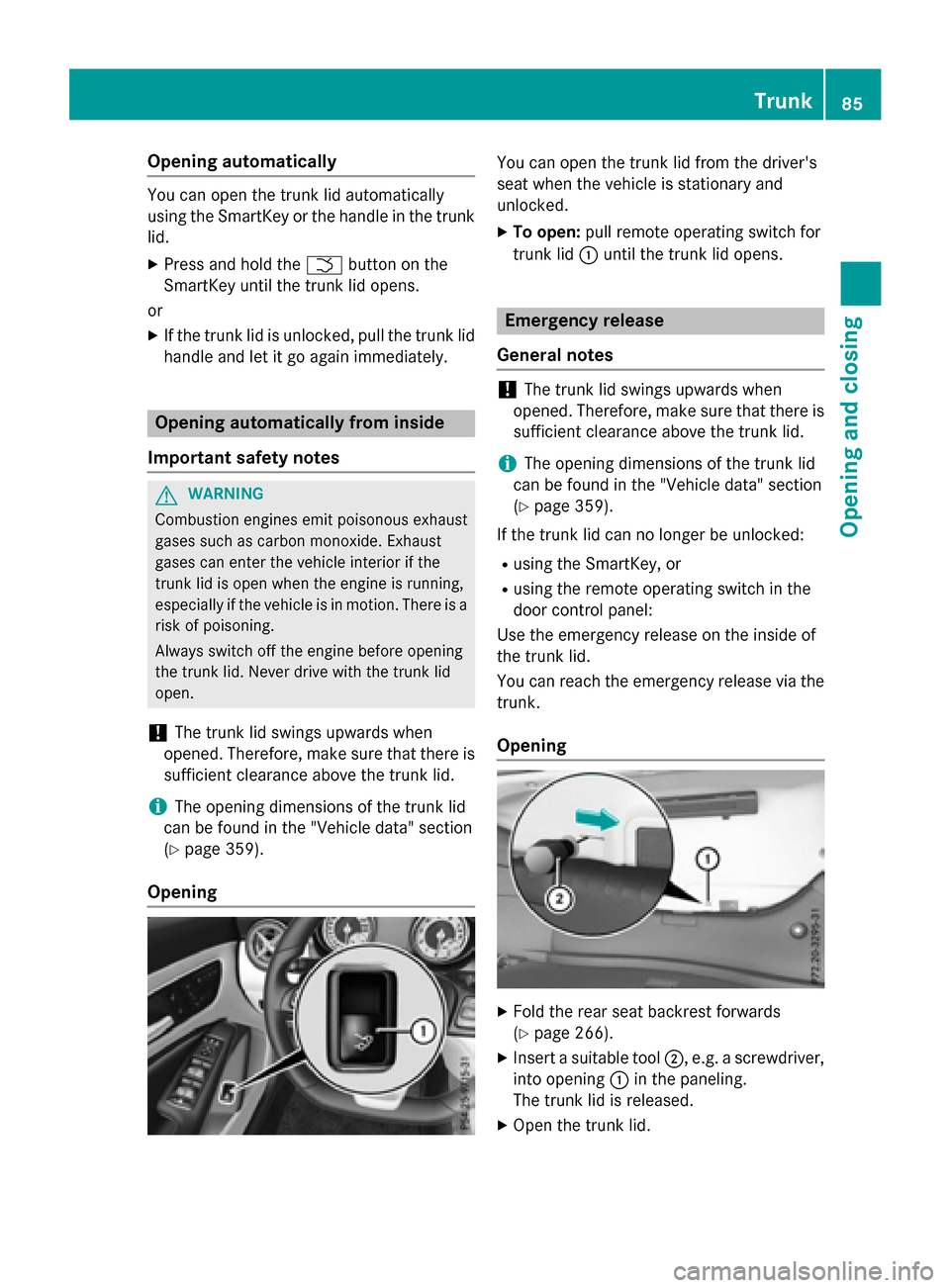
You can reach the emergency release via the trunk.
Opening X
Fold the rear seat backrest forwards
(Y page 266).
X Insert a suitable tool ;, e.g. a screwdriver,
into opening :in the paneling.
The trunk lid is released.
X Open the trunk lid. Trunk
85Opening and closing Z
Page 88 of 362

Emergency release button
You can open the trunk lid from inside the
vehicle with the emergency release button. X
Press emergency release button :briefly.
The trunk lid unlocks and opens.
The trunk lid can be unlocked and opened
with the trunk lid emergency release when
the vehicle is stationary or while driving.
The trunk lid emergency release does not
open the trunk lid if the battery is disconnec- ted or discharged.
Trunk lid emergency release light:
R emergency release button :flashes for
30 minutes after the trunk lid is opened.
R emergency release button :flashes for
60 minutes after the trunk lid is closed. Side windows
Important safety notes
G
WARNING
While opening the side windows, body parts
could become trapped between the side win- dow and the door frame as the side window
moves. There is a risk of injury.
Make sure that nobody touches the side win-
dow during the opening procedure. If some-
body becomes trapped, release the switch or pull the switch to close the side window again. G
WARNING
While closing the side windows, body parts in the closing area could become trapped. There is a risk of injury.
When closing make sure that no parts of the
body are in the closing area. If somebody
becomes trapped, release the switch or press
the switch to open the side window again. G
WARNING
If children operate the side windows they
could become trapped, particularly if they are left unsupervised. There is a risk of injury.
Activate the override feature for the rear side
windows. When leaving the vehicle, always
take the SmartKey with you and lock the vehi-
cle. Never leave children unsupervised in the
vehicle. Side window reversing feature
The side windows are equipped with an auto- matic reversing feature. If a solid object
blocks or restricts a side window from trav-
eling upwards during the automatic closing
process, the side window opens again auto-
matically. During the manual closing process,
the side window only opens again automati-
cally after the corresponding switch is
released. The automatic reversing feature is
only an aid and is no substitute for your atten- tion when closing a side window. G
WARNING
The reversing feature does not react:
R to soft, light and thin objects, e.g. small fin-
gers
R while resetting
This means that the reversing feature cannot
prevent someone being trapped in these sit-
uations. There is a risk of injury.
Make sure that no body parts are in close
proximity during the closing procedure. If
someone becomes trapped, press the switch
to open the side window again. 86
Side windowsOpening and closing
Page 121 of 362

Turn signals (halogen headlamps)
X
Switch off the lights.
X Open the hood.
X Turn bulb holder :counter-clockwise and
pull out.
X Take the bulb out of bulb holder :.
X Insert the new bulb into bulb holder :.
X Insert bulb holder :and turn it clockwise
until it engages.
Cornering light function (xenon bulbs) X
Switch off the lights.
X Open the hood.
X Turn housing cover :counter-clockwise
and remove it.
X Turn bulb holder ;counter-clockwise and
pull out.
X Take the bulb out of bulb holder ;.
X Insert the new bulb into bulb holder ;.
X Insert bulb holder ;and turn it clockwise.
X Press on housing cover :and turn it to the
right. Changing the rear bulbs
Opening and closing the side trim pan-
els View of right-hand side trim panel
You must open the side trim panel in the trunk
before you can change the bulbs in the tail
lamps.
X To open: release right or left side trim
panel :at the top and fold it down in the
direction of the arrow.
X To close: insert side panel :.
Tail lamps X
Switch off the lights.
X Open the trunk.
X Open the side trim panel (Y page 119). X
Press retaining clips :at the same time in
the direction of the arrows.
X Carefully remove the bulb holder with the
contacted connectors and the bulbs. Replacing bulbs
119Lights andwindshield wipers Z
Page 165 of 362

The electric parking brake is also engaged
automatically if:
R DISTRONIC PLUS brings the vehicle to a
standstill or
R the HOLD function is keeping the vehicle
stationary
R Active Parking Assist is keeping the vehicle
stationary
In addition, at least one of the following con-
ditions must be fulfilled:
R there is a system malfunction.
R the power supply is insufficient.
R the vehicle is stationary for a lengthy
period.
The red F(USA only) or !(Canada
only) indicator lamp in the instrument cluster goes out.
The electric parking brake is not automati-
cally engaged if the engine is switched off by
the ECO start/stop function.
Releasing automatically Your vehicle's electric parking brake is auto-
matically released if all of the following con-
ditions are met:
R the engine is running.
R the transmission is in position Dor R.
R the seat belt has been fastened.
R you depress the accelerator pedal.
If the transmission is in position R, the trunk
lid must be closed.
If your seat belt is not fastened, the following conditions must be fulfilled to automatically
release the electric parking brake:
R the driver's door is closed.
R you have shifted out of transmission posi-
tion Por you have previously driven faster
than 2 mph (3 km/h).
Ensure that you do not depress the acceler-
ator pedal unintentionally. Otherwise the
parking brake will be released and the vehicle will start to move. Emergency braking The vehicle can also be braked during an
emergency by using the electric parking
brake.
X While driving, push handle :of the electric
parking brake (Y page 162).
The vehicle is braked as long as you keep
handle :of the electric parking brake
pressed. The longer the electric parking
brake handle :is depressed, the greater
the braking force.
During braking:
R a warning tone sounds
R the Release park. brake
Release park. brake message
appears
R the red F(USA only) or !(Canada
only) indicator lamp in the instrument clus- ter flashes
When the vehicle has been braked to a stand- still, the electric parking brake is engaged. Parking the vehicle for a long period
If you leave the vehicle parked for longer than
four weeks, the battery may be damaged by
exhaustive discharging.
If you leave the vehicle parked for longer than
six weeks, the vehicle may suffer damage as a result of lack of use.
X Visit a qualified specialist workshop and
seek advice.
i You can obtain information about trickle
chargers from a qualified specialist work-
shop. Driving tips
General notes
Important safety notes G
WARNING
If you switch off the ignition while driving,
safety-relevant functions are only available Driving tips
163Driving and parking
Z