2015 MERCEDES-BENZ C-Class SEDAN locking
[x] Cancel search: lockingPage 162 of 406

lock and the SmartKey must be in the vehicle.
This mode for starting the engine operates
independently of the ECO start/stop auto-
matic engine start function.
You can start the engine if a valid SmartKey is in the vehicle. Switch off the engine and
always take the SmartKey with you when
leaving the vehicle, even if you only leave it for
a short time. Pay attention to the important
safety notes.
X Depress the brake pedal and keep it
depressed.
X Press the Start/Stop button once
(Y page 157).
The engine starts. Pulling away
Automatic transmission G
WARNING
If the engine speed is above the idling speed
and you engage transmission position Dor R,
the vehicle could pull away suddenly. There is a risk of an accident.
When engaging transmission position Dor R,
always firmly depress the brake pedal and do not simultaneously accelerate.
! If a warning tone sounds and the
Release Park. Brake
Release Park. Brake message appears
in the multifunction display, the parking
brake is still applied. Release the parking
brake.
X Depress the brake pedal and keep it
depressed.
X Shift the transmission to position Dor R.
X Release the brake pedal.
X Carefully depress the accelerator pedal.
The electric parking brake (Y page 176) is
automatically released.
The red 0049(USA only) or 0024(Canada
only) indicator lamp in the instrument clus-
ter goes out. It is only possible to shift the transmission
from position Pto the desired position if you
depress the brake pedal. Only then is the
parking lock released. If the brake pedal is not
depressed, the DIRECT SELECT lever can still be moved but the parking lock remains
engaged.
The vehicle locks centrally once you have
pulled away. The locking knobs in the doors
drop down.
You can open the doors from the inside at any
time.
You can also deactivate the automatic locking feature, see the Digital Operator's Manual.
i Upshifts take place at higher engine
speeds after a cold start. This helps the
catalytic converter to reach its operating
temperature more quickly.
Hill start assist Hill start assist helps you when pulling away
forwards or in reverse on an uphill gradient. It
holds the vehicle for a short time after you
have removed your foot from the brake pedal.
This gives you enough time to move your foot from the brake pedal to the accelerator pedal and to depress it before the vehicle begins to
roll. G
WARNING
After a short time, hill start assist will no lon-
ger brake your vehicle and it could roll away.
There is a risk of an accident and injury.
Therefore, quickly move your foot from the
brake pedal to the accelerator pedal. Never
leave the vehicle when it is held by hill start
assist.
X Remove your foot from the brake pedal.
The vehicle is then held for about a second.
X Pull away.
Hill start assist is not active if: R you are pulling away on a level road or on a
downhill gradient.
R the transmission is in position N.160
DrivingDriving and parking
Page 175 of 406

X
Press the fuel filler flap in the direction of
arrow 0043.
The fuel filler flap swings up.
X Turn the fuel filler flap counter-clockwise
and remove it.
X Insert the fuel filler cap into the holder on
the inside of fuel filler flap 0044.
X Completely insert the filler neck of the fuel
pump nozzle into the tank, hook in place
and refuel.
X Only fill the tank until the pump nozzle
switches off.
Do not add any more fuel after the pump
stops filling for the first time. Otherwise, fuel
may leak out.
Closing the fuel filler flap X
Replace the cap on the filler neck and turn
clockwise until it engages audibly.
X Close the fuel filler flap.
Close the fuel filler flap before locking the
vehicle.
If you are driving with the fuel filler cap open, the 00B6 reserve fuel warning lamp flashes. A
message appears in the multifunction display
(Y page 270). Refueling
173Driving and parking Z
Page 235 of 406

Multifunction display
Multifunction display
0043
Drive program (Y page 166)
0044 Transmission position (Y page 166)
0087 Display panel for display messages,
menus and menu lists
0085 Time
0083 Outside temperature (Y page 231)
0084 Additional speedometer (Y page 248)
The unit displayed in additional speedometer
0084 in the multifunction display is inverse to
the speedometer unit in the instrument clus-
ter.
X To call up the menu list in display panel
0087: press the 00E2button on the steering
wheel.
Display panel 0087shows the selected menu
or submenu and display messages.
The following messages may appear in the
multifunction display:
0097 Gearshift recommendation, when
shifting manually (automatic trans-
mission) (Y page 169)
0095005D0096 Active Parking Assist (Y page 202)
CRUISE
CRUISE Cruise control (Y
page 183)
00CE Adaptive Highbeam Assist
(Ypage 127) 00D6
ECO start/stop function
(Ypage 161)
00D9 HOLD function (Y page 196)
004F DISTRONIC PLUS Steering Assist
and Stop&Go Pilot (Y page 194) Head-up display
General notes The head-up display projects information
from the navigation system and the driver
assistance system above the dashboard into
the driver's field of vision.
A requirement for the display of the contents
is that the following functions are available in the vehicle and are switched on:
R Navigation
R DISTRONIC PLUS
R Cruise control
The head-up display allows the driver to see
all of the information without having to take
his eyes off the road.
Important safety notes The head-up display is only an aid and is not a
substitute for attentive driving.
The visibility of the head-up display is influ-
enced by the following conditions:
R the driver's seat position
R the positioning of the display image
R the general ambient light
R sunglasses with polarization filters
R wet roads
R blocking of sunlight by objects on the dis-
play cover
In the event of extreme sunlight, sections of
the display may fade. This can be reversed by
switching the head-up display off and on
again.
i Vehicles with the head-up display are
equipped with a special windshield. Should Displays and operation
233On-board computer and displays Z
Page 305 of 406

Middle rear seat backrest
X
Move the driver's or front-passenger seat
forward if necessary.
X Fold seat backrest 0043back until it engages.
Red lock status indicator 0044is no longer
visible.
X Adjust the head restraints if necessary
(Y page 111).
X Move the driver's or front-passenger seat
back if necessary.
You should always engage the rear seat
backrests if you do not need the through-
loading feature. This will prevent unauthor-
ized access to the trunk from the vehicle inte- rior.
Locking the center rear seat backrest In order to prevent the trunk from being
accessed by unauthorized persons, the cen-
ter seat backrest can be locked using a catch.
The center seat backrest can only be folded
forward together with the left seat backrest. X
To lock: fold the left and center seat backr-
ests forward. Make sure that the center and
left seat backrests are engaged and joined together.
X Slide catch 0043upwards.
The release mechanism of the center seat
backrest is locked.
X To unlock: fold back the left and center
rear seat backrests.
X Slide catch 0043downward from inside the
trunk. Securing cargo
Cargo tie-down rings General notes
Observe the following notes on securing
loads:
R Observe the loading guidelines
(Y page 298).
R Secure the load using the cargo tie-down
rings.
R Distribute the load on the cargo tie-down
rings evenly.
R Do not use elastic straps or nets to secure
a load, as these are only intended as an
anti-slip protection for light loads.
R Do not route tie-downs across sharp edges
or corners.
R Pad sharp edges for protection. Stowage areas
303Stowage and features Z
Page 318 of 406
A display message appears, asking
whether navigation should be started.
X Select Yes
Yes by turning 00790052007Aor sliding 009500520096
the controller and confirm with 0098.
The system calculates the route and sub-
sequently starts the route guidance with
the address entered.
If you select No Nothe address can be stored in
the address book.
If you have sent more than one destination address, each individual destination must
be confirmed separately.
Destination addresses are loaded in the same
order as the order in which they were sent.
If you own multiple Mercedes-Benz vehicles
with mbrace and activated mbrace accounts:
If multiple vehicles are registered under the
same e-mail address, the destination will be
sent to all the vehicles.
Vehicle remote opening You can use the vehicle remote opening if you
have unintentionally locked your vehicle and
a replacement SmartKey is not available.
The vehicle can be opened by the Mercedes-
Benz Customer Assistance Center.
The vehicle can be immediately opened
remotely within four days of the ignition being turned off. After this time, the remote unlock-
ing may be delayed by 15 to 60 minutes. After
30 days, the vehicle can no longer be opened remotely.
The vehicle remote unlocking feature is avail-
able if the relevant mobile phone network is
available and a data connection is possible.
X Contact the following service hotlines:
Mercedes-Benz Customer Assistance Cen- ter at 1-800-FOR-MERCedes
(1-800-367-6372) or 1-866-990-9007
You will be asked for your password.
X Return to your vehicle at the time agreed
upon with the Mercedes-Benz Customer
Assistance Center. Alternatively, the vehicle can be opened via:
R the Internet, under the "Owners Online"
section
R the telephone application (e .g. for iPhone ®
,
Android)
To do this, you will need your identification
number and password.
Vehicle remote closing The vehicle remote-closing feature can be
used when you have forgotten to lock the
vehicle and you are no longer nearby.
The vehicle can then be locked by the
Mercedes-Benz Customer Assistance Center.
The vehicle can be immediately remotely
locked within four days of the ignition being
turned off. After this time, remote closing may
be delayed by 15 to 60 minutes. After 30 days the vehicle can no longer be locked remotely.
The vehicle remote closing feature is availa-
ble if the relevant mobile phone network is
available and a data connection is possible.
X Contact the following service hotlines:
Mercedes-Benz Customer Assistance Cen-
ter at 1-800-FOR-MERCedes
(1-800-367-6372) or 1-866-990-9007
You will be asked for your password.
The next time you are inside the vehicle and
you switch on the ignition, the Doors Doors
Locked Remotely
Locked Remotely message appears in the
multifunction display.
Alternatively, the vehicle can be locked via:
R the Internet, under the "Owners Online"
section
R the telephone application (e .g. for iPhone ®
,
Android)
To do this, you will need your identification
number and password. 316
FeaturesStowage and features
Page 354 of 406
!
Secure the tow rope or tow bar to the
towing eye only. Otherwise, the vehicle
could become damaged.
! Do not use the towing eyes for recovery
purposes as this could damage the vehicle.
If in doubt, recover the vehicle with a crane.
! When towing, pull away slowly and
smoothly. If the tractive power is too high,
the vehicles could be damaged.
! Shift the automatic transmission to
Nand
do not open the driver's or front passeng-
er's door during towing. The automatic
transmission may otherwise shift to posi-
tion P, which could damage the transmis-
sion.
! Do not tow with sling-type equipment.
This could damage the vehicle.
! The vehicle can be towed a maximum of
30 miles (50km). The towing speed of
30 mph (50 km/h) must not be exceeded.
If the vehicle has to be towed more than
30 miles (50km), the entire vehicle must be raised and transported.
! If you tow or tow-start another vehicle, its
weight must not exceed the maximum per-
missible gross vehicle weight of your vehi-
cle.
Details on the permissible gross vehicle
weight of your vehicle can be found on the
vehicle identification plate (Y page 396).
It is better to have the vehicle transported
than to have it towed away.
If the vehicle has suffered transmission dam-
age, have it transported on a transporter or
trailer.
The automatic transmission must be in posi-
tion Nwhen the vehicle is being towed. If the
automatic transmission cannot be shifted to
position N, have the vehicle transported on a
transporter or trailer. The battery must be connected and charged.
Otherwise, you:
R cannot turn the SmartKey to position 2in
the ignition lock
R cannot release the electric parking brake
R cannot shift the automatic transmission to
position N
Disarm the automatic locking feature before
the vehicle is towed (Y page 88). You could
otherwise be locked out when pushing or
towing the vehicle. Installing/removing the towing eye
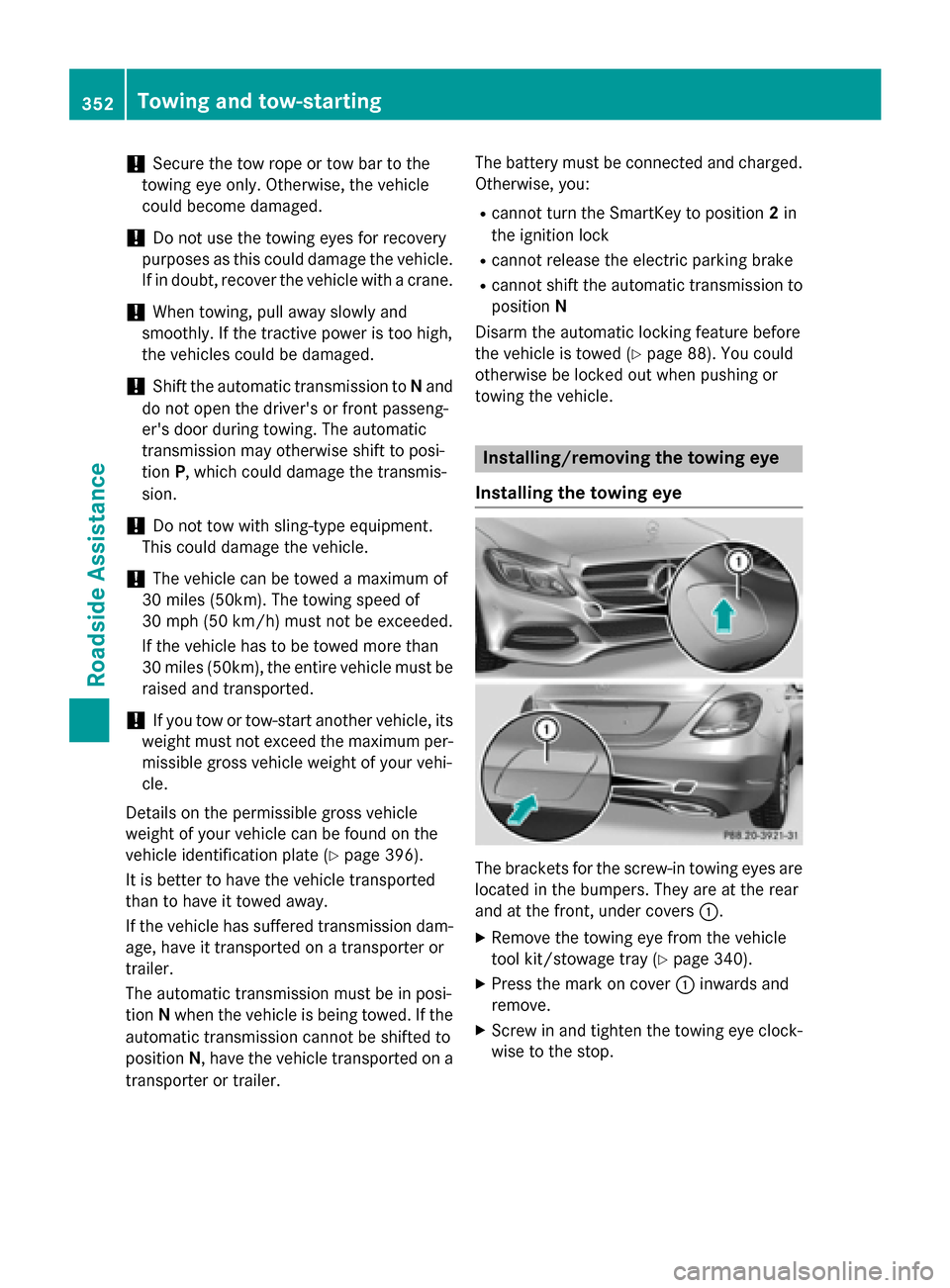
Installing the towing eye The brackets for the screw-in towing eyes are
located in the bumpers. They are at the rear
and at the front, under covers 0043.
X Remove the towing eye from the vehicle
tool kit/stowage tray (Y page 340).
X Press the mark on cover 0043inwards and
remove.
X Screw in and tighten the towing eye clock-
wise to the stop. 352
Towing and tow-startingRoadside Assistance