Page 251 of 385

X
Confir mbyp ressing aon thesteering
wheel.
X Press :or9 to select the Lights
Lights
submenu.
X Press ato confirm.
X Press :or9 to select the Dipped
Dipped
beams Settin gfor
beams Settin gforfunction.
You will see th eselected setting, right-
right-
sid et raffic
sid et raffic orleft-side traffic
left-side traffic.
X Press the abuttontos ave th esetting.
If you chang ethe setting, conversion does not
tak eplaceu ntil th enexttim et he vehicle is
stationary.
If you set th edipped-beam headlamps for driv-
ing on th eright/left ,the nm otorway mod eand
th ee xtended range foglamps are unavailable.
Thes eare only deactivate difthesettin gfor driv-
ing on th eleft/right is set opposit etoyour vehi-
cle's country version.
Aq ualified specialist worksho pcan set the
dipped-beam headlamps for driving on th eleft/
right.
Instrumen tcluster submenu Selecting th
edistance unit
The Display Display unit unitSpeed-/odometer
Speed-/odometer function
allows you to choos ewhether certain displays
appear in kilometres or mile sinthemultifunc-
tio nd isplay.
X Press òon thesteering wheel to open the
men ulist.
X Press the :or9 buttononthesteering
wheel to select the Settings
Settings menu.
X Confir mbyp ressing aon thesteering
wheel.
X Use : or9 to select the Instrument
Instrument
cluster
cluster submenu.
X Press ato confirm.
X Press :or9 to select the Display
Display
uni tS peed-/odometer
uni tS peed-/odometer function.
The curren tsetting km
kmorMiles
Miles appears.
X Press the abuttontos ave th esetting.
The selected unit of measuremen tfor distance
applies to the:
R digital speedometer in the Trip
Tripmenu
R total distanc erecorder and th etripm eter
R trip computer
R curren tconsum ption and th erange
R range R
navigation instruction sintheNavi
Navi menu
R Cruis econtrol
R SPEEDTRONIC
R DISTRONI CPLUSw ithS teering Assist and
Stop&Go Pilot
R ASSYS TPLUSs ervic einterval display
Switching th eadditiona lspeedometer
on/off
Unite dKingdom :thisf unction is unavailable.
The additional speedometer is always switched
on.
If th eadditional speedometer is switched on,
th es pee diss hown in th estatus bar of th emul-
tifunctio ndisplay instead of th eoutside tem-
perature.
The spee ddisplay is invers etoyour speedome-
ter.
X Press òon thesteering wheel to open the
men ulist.
X Press :or9 on thesteering wheel to
select the Settings Settings menu.
X Confir mbyp ressing aon thesteering
wheel.
X Press :or9 to select the Instru‐
Instru‐
men tc luster
men tc luster submenu.
X Press ato confirm.
X Press :or9 to select the Digital
Digital
speedo [km/h]
speedo [km/h] function.
The curren tselection appears.
X To activate/deactivate: press theabut-
to na gain.
Vehicle submenu Settin
gpermanent SPEEDTRONIC
X Press òon thesteering wheel to open the
men ulist.
X Press :or9 on thesteering wheel to
select the Settings Settings menu.
X Confir mbyp ressing aon thesteering
wheel.
X Press :or9 to select the Vehicle Vehicle
submenu.
X Press ato confirm.
X Press :or9 to select the Limit
Limit
speed (winte rtyres)
speed (winte rtyres) function.
The curren tsettin gappears.
X Press ato confirm. 248
Menu
sand submenusOn-boar dcomputer and displays
Page 268 of 385
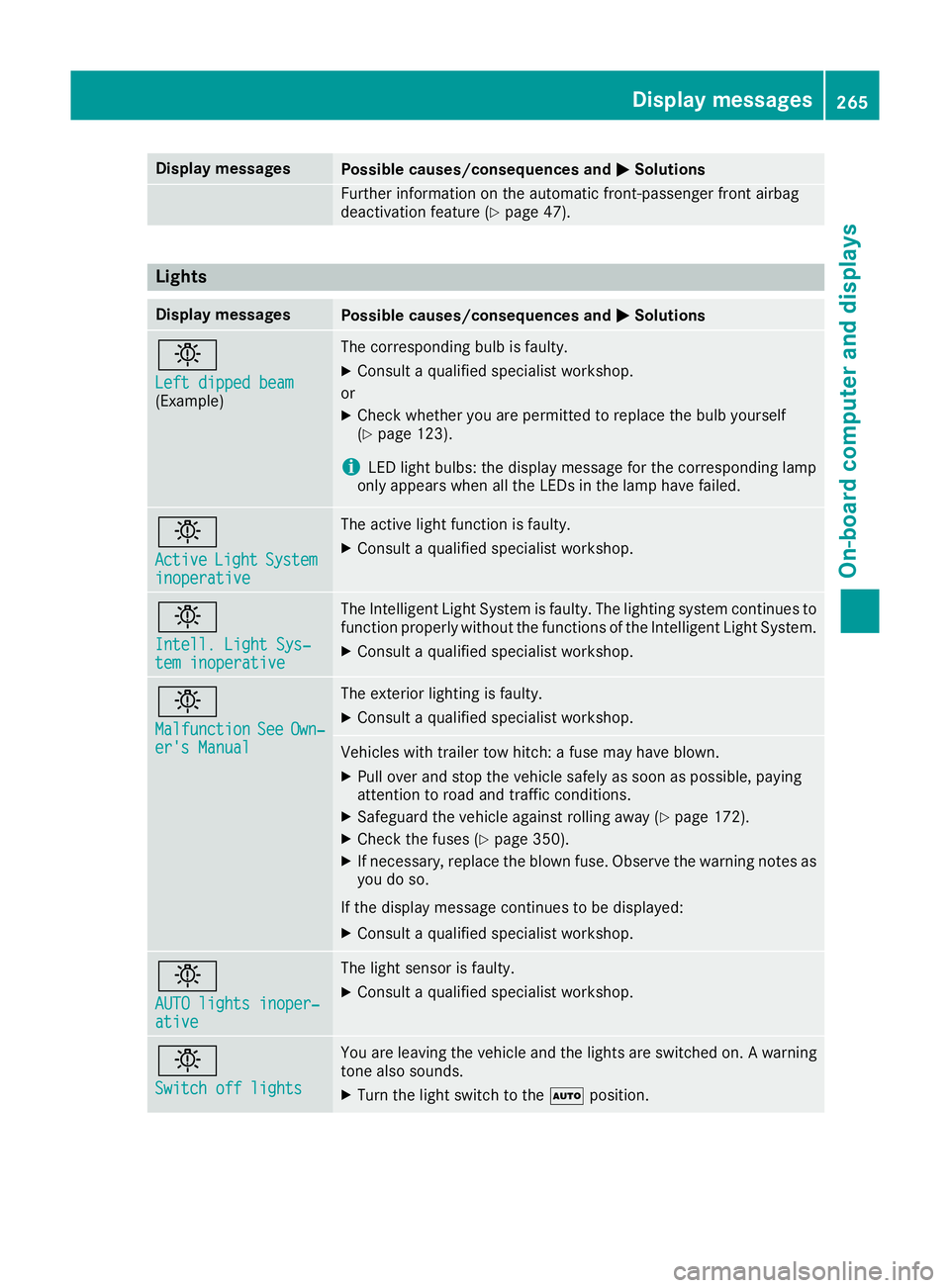
Display messages
Possible causes/consequences and
M
MSolutions Further information on th
eautomatic front-passenger fron tairbag
deactivation feature (Y page 47).Lights
Display messages
Possible causes/consequences and
M
MSolutions b
Lef
td ipped beam
Lef td ipped beam
(Example) The correspondin
gbulb is faulty.
X Consult aqualified specialist workshop.
or X Chec kwhether you are permitte dtoreplace th ebulb yourself
(Y page 123).
i LE
Dl igh tbulbs :the display message for th ecorre spondin glamp
only appear swhen all th eLEDsint helamp hav efailed. b
Active Active
Light
LightSystem
System
inoperative
inoperative The active ligh
tfunction is faulty.
X Consult aqualified specialist workshop. b
Intell
.Light Sys‐
Intell .Light Sys‐
tem inoperative tem inoperative The Intelligent Light Syste
misfaulty. The lighting system continues to
function properly without th efunction softheIntelligent Light System.
X Consult aqualified specialist workshop. b
Malfunction Malfunction
See
SeeOwn‐
Own‐
er' sM anual
er' sM anual The exterio
rlighting is faulty.
X Consult aqualified specialist workshop. Vehicles wit
htrailer to whitch :af usem ay hav eblown.
X Pull ove rand stop th evehicl esafely as soo naspossible, paying
attention to roa dand traffic conditions.
X Safeguar dthe vehicl eagainst rollin gaway (Y page 172).
X Chec kthe fuses (Y page 350).
X If necessary, replace th eblown fuse. Observ ethe warning note sas
you do so.
If th edisplay message continues to be displayed:
X Consult aqualified specialist workshop. b
AUT
Ol ights inoper‐
AUT Ol ights inoper‐
ative ative The ligh
tsensor is faulty.
X Consult aqualified specialist workshop. b
Switch off lights Switch off lights You are leaving th
evehicl eand th elights are switched on .Awarning
tone also sounds.
X Turn th eligh tswitch to the Ãposition. Display
messages
265On-boardcomputer an ddisplays Z
Page 269 of 385

Display messages
Possible causes/consequences and
M
MSolutions b
Switch on headlamps Switch on headlamps You are drivin
gwithout dipped-beam headlamps.
X Turn th eligh tswitch to the Lorà position. Adaptive Highbeam
Adaptive Highbeam
Assist Plu
sinoper‐
Assist Plu sinoper‐
ative ative Adaptive Highbea
mAssistisf aulty.
X Consult aqualified specialist workshop. Adaptive Highbeam
Adaptive Highbeam
Assist Plu
scur‐
Assist Plu scur‐
rently unavailable rently unavailable
See Owner' sManual
See Owner' sManual Adaptive Highbea
mAssistP lus is deactivated and temporarily inop-
erative .Possibl ecauses:
R thew indscree nisdirty in th ecamera' sfield of vision
R visibilit yisimpaire ddue to heav yrain ,sno worf og
X Clean th ewindscreen.
If th esystem detects that th ecamera is full yoperational, the Adap‐
Adap‐
tiv eH ighbeam Assist Plu savailable again
tiv eH ighbeam Assist Plu savailable again display message
is shown.
Adaptive Highbea mAssistP lus is operational again. Engine
Display messages
Possible causes/consequences and
M MSolutions +
Top up coolan
tSee
Top up coolan tSee
Owner’ sManual
Owner’ sManual The coolan
tlevel is to olow.
! Avoid making lon
gjou rneys wit htoo littl ecoolan tint heengine
coolin gsystem. The engin ewill otherwise be damaged.
X Top up th ecoolant, observing th ewarning note sbefore doin gso
( Ypage 324).
If you have to top up th ecoolant frequently:
X Contac taqualified specialist workshop and hav ethe engin ecooling
system checked. ? The fan motor is faulty.
X If th ecoolan ttem perature is belo w120†, you can continu edriving
to th eneares tqualified specialist workshop.
X Avoid heav yloads on th eengineasy ou do so, e.g. drivin ginmoun-
tainous terrain and stop-start traffic. 266
Display
messagesOn-boardcomputer an ddisplays