2015 MERCEDES-BENZ A-CLASS HATCHBACK light
[x] Cancel search: lightPage 167 of 417

the ECO start/stop function is not availa-
ble.
If indicator lamp ;on ECO button :is off,
the ECO start/stop function has been deac-
tivated manually or as the result of a mal-
function. The engine will then not be switched off automatically when the vehicle stops. AMG Performance exhaust system
(Mercedes-AMG vehicles)
You can choose between different AMG Per-
formance exhaust system volumes using the
position of the exhaust flap.
If the ignition is switched off for less than four hours, the previously selected setting is acti-
vated when the engine is next started. If the
ignition is switched off for more than four
hours, the quietest setting is activated when
the engine is next started. Setting the volume:
X Press button :.
If you select the loudest setting, indicator
lamp ;lights up.
The volume of the AMG Performance exhaust system can also be set using the DYNAMIC
SELECT controller (Y page 167).164
DrivingDriving an
d parking
Page 169 of 417

Problem
Possible causes/consequences and
M
MSolutions Vehicles with a petrol
engine:
The engine is not run-
ning smoothly and is
misfiring. There is a malfunction in the engine electronics or in a mechanical
component of the engine management system.
X Only depress the accelerator pedal slightly.
Otherwise, non-combusted fuel may get into the catalytic con-
verter and damage it.
X Have the cause rectified immediately at a qualified specialist
workshop. The coolant tempera-
ture display is showing
more than 120 †. The
coolant warning lamp
may also be on and a
warning tone may
sound. The coolant level is too low. The coolant is too hot and the engine
is no longer being cooled sufficiently.
X Stop as soon as possible and allow the engine and the coolant to
cool down.
X Check the coolant level (Y page 326). Observe the warning
notes as you do so and top up the coolant if necessary. If the coolant level is correct, the engine radiator fan may be faulty.
The coolant is too hot and the engine is no longer being cooled
sufficiently.
X If the coolant temperature is below 120 †, you can continue
driving to the nearest qualified specialist workshop.
X Avoid heavy loads on the engine as you do so, e.g. driving in
mountainous terrain and stop-start traffic. DYNAMIC SELECT button (all vehicles
except Mercedes-AMG vehicles)
Use the DYNAMIC SELECT button to change
the drive program. Depending on the drive
program selected, the following vehicle char- acteristics will change:
R the drive (engine and transmission man-
agement)
R the suspension (vehicles with damping sys-
tem or AMG RIDE CONTROL)
R the steering
R the availability of the ECO start/stop func-
tion
R the climate control
If the ignition is switched off for less than four hours, the previously selected drive program
is activated when the engine is next started. If the ignition is switched off for more than four hours, drive program
Cis activated when the
engine is next started. X
Press DYNAMIC SELECT controller :as
many times as necessary until the desired
drive program is selected.
The selected drive program appears in the
multifunction display. After five seconds
the display goes out and the status icon of the selected drive program appears. 166
DYNAMIC SELECT button (all vehicles except Mercedes-AMG vehicles)Driving and parking
Page 170 of 417

In addition, the current drive program set-
tings are displayed briefly in the Audio 20 or
COMAND Online display.
i In a few countries, the ECO start/stop
function is deactivated at the factory due to the quality of the available fuel. In this case,
the ECO start/stop function is not available in any drive program, regardless of the dis-
play in the Audio 20 or COMAND Online
display.
Available drive programs: C
Comfort Comfortable and econom-
ical driving characteristics S
Sport Sporty driving character-
istics
I
Individual Individual settings
E
Economy Particularly economical
driving characteristics
Additional information for drive programs
(Y page 175).
You can also change gear yourself using the
steering wheel gearshift paddles. Further
information on the manual drive program
(Y page 177). DYNAMIC SELECT controller
(Mercedes-AMG vehicles)
Use the DYNAMIC SELECT controller to
change the drive program. Depending on the drive program selected, the following vehiclecharacteristics will change:
R the drive
R the transmission management
R ESP ®
R the suspension (vehicles with AMG RIDE
CONTROL)
R the availability of the ECO start/stop func-
tion
R the availability of gliding mode If the ignition is switched off for less than four
hours, the previously selected drive program
is activated when the engine is next started. Ifthe ignition is switched off for more than four
hours, drive program Cis activated when the
engine is next started. X
Turn DYNAMIC SELECT controller :as
many times as necessary until the desired
drive program is selected.
The selected drive program appears in the
multifunction display. After five seconds
the display goes out and the status icon of the selected drive program appears.
The drive program indicator on DYNAMIC
SELECT controller :lights up in red.
Available drive programs: I
Individual Individual settings
C
Comfort Comfort-orientated,
engine and transmission
settings optimised for
economy
S
Sport Sporty engine and trans-
mission settings
S+
Sport Plus Particularly sporty trans-
mission settings
RACE
Maximum sportiness and
engine and transmission
settings suitable for the
racetrack
Additional information for drive programs
(Y page 175). DYNAMIC SELECT controller (Mercedes-AMG vehicles)
167Driving and parking Z
Page 189 of 417
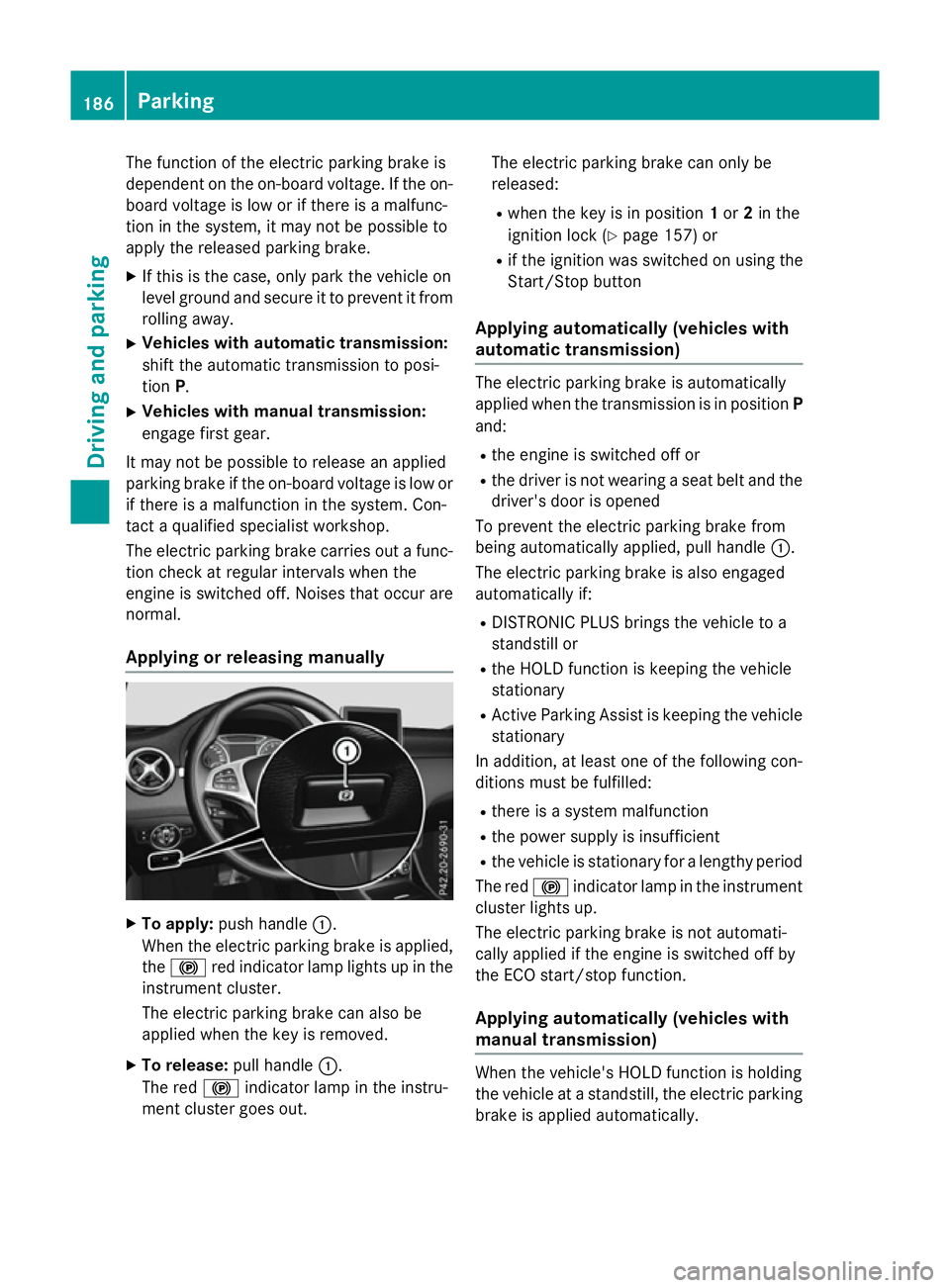
The function of the electric parking brake is
dependent on the on-board voltage. If the on-
board voltage is low or if there is a malfunc-
tion in the system, it may not be possible to
apply the released parking brake.
X If this is the case, only park the vehicle on
level ground and secure it to prevent it from
rolling away.
X Vehicles with automatic transmission:
shift the automatic transmission to posi-
tion P.
X Vehicles with manual transmission:
engage first gear.
It may not be possible to release an applied
parking brake if the on-board voltage is low or
if there is a malfunction in the system. Con-
tact a qualified specialist workshop.
The electric parking brake carries out a func-
tion check at regular intervals when the
engine is switched off. Noises that occur are
normal.
Applying or releasing manually X
To apply: push handle :.
When the electric parking brake is applied, the ! red indicator lamp lights up in the
instrument cluster.
The electric parking brake can also be
applied when the key is removed.
X To release: pull handle:.
The red !indicator lamp in the instru-
ment cluster goes out. The electric parking brake can only be
released:
R when the key is in position 1or 2in the
ignition lock (Y page 157) or
R if the ignition was switched on using the
Start/Stop button
Applying automatically (vehicles with
automatic transmission) The electric parking brake is automatically
applied when the transmission is in position P
and:
R the engine is switched off or
R the driver is not wearing a seat belt and the
driver's door is opened
To prevent the electric parking brake from
being automatically applied, pull handle :.
The electric parking brake is also engaged
automatically if:
R DISTRONIC PLUS brings the vehicle to a
standstill or
R the HOLD function is keeping the vehicle
stationary
R Active Parking Assist is keeping the vehicle
stationary
In addition, at least one of the following con-
ditions must be fulfilled:
R there is a system malfunction
R the power supply is insufficient
R the vehicle is stationary for a lengthy period
The red !indicator lamp in the instrument
cluster lights up.
The electric parking brake is not automati-
cally applied if the engine is switched off by
the ECO start/stop function.
Applying automatically (vehicles with
manual transmission) When the vehicle's HOLD function is holding
the vehicle at a standstill, the electric parking
brake is applied automatically. 186
ParkingDriving and parking
Page 190 of 417

In addition, at least one of the following con-
ditions must be fulfilled:
R the engine is switched off
R the driver is not wearing a seat belt and the
driver's door is open
R there is a system malfunction
R the power supply is insufficient
R the vehicle is stationary for a lengthy period
The red !indicator lamp in the instrument
cluster lights up.
The electric parking brake is not automati-
cally applied if the engine is switched off by
the ECO start/stop function.
Releasing automatically The electric parking brake can only be
released automatically in vehicles with auto-
matic transmission.
The electric parking brake of your vehicle is
released automatically when all of the follow-
ing conditions are fulfilled:
R the engine is running
R the transmission is in position Dor R
R the seat belt is fastened
R you depress the accelerator pedal
If the transmission is in position R, the tailgate
must be closed.
If your seat belt is not fastened, the following conditions must be fulfilled to automatically
release the electric parking brake:
R the driver's door is closed
R you have shifted out of transmission posi-
tion Por you have previously driven faster
than 3 km/h
Ensure that you do not depress the acceler-
ator pedal unintentionally. Otherwise, the
parking brake will be released and the vehicle will start to move.
Emergency braking The vehicle can also be braked during an
emergency by using the electric parking
brake. X
While driving, push handle :of the electric
parking brake (Y page 185).
The vehicle is braked as long as you keep
handle :of the electric parking brake
pressed. The longer the electric parking
brake handle :is depressed, the greater
the braking force.
During braking:
R a warning tone sounds
R the Release park. brake Release park. brake message
appears
R the red !indicator lamp in the instru-
ment cluster flashes
When the vehicle has been braked to a stand- still, the electric parking brake is applied. Parking up the vehicle
If you leave the vehicle parked up for longer
than four weeks, the battery may be damaged by exhaustive discharging.
If you leave the vehicle parked up for longer
than six weeks, it may suffer from lack of use.
X Visit a qualified specialist workshop and
seek advice.
i You can obtain information about trickle
chargers from a qualified specialist work-
shop. Driving tips
General notes
Important safety notes G
WARNING
If you switch off the ignition while driving,
safety-relevant functions are only available
with limitations, or not at all. This could affect, for example, the power steering and the brake
boosting effect. You will require considerably
more effort to steer and brake. There is a risk of an accident.
Do not switch off the ignition while driving. Driving tips
187Driving and parking Z
Page 191 of 417

Drive sensibly – save fuel
Observe the following tips to save fuel:
R The tyres should always be inflated to the
recommended tyre pressure.
R Remove unnecessary loads.
R Remove roof racks when they are not nee-
ded.
R Warm up the engine at low engine speeds.
R Avoid frequent acceleration or braking.
R Have all maintenance work carried out as
indicated by the service intervals in the
Service Booklet or by the service interval
display.
Fuel consumption also increases when driv-
ing in cold weather, in stop-start traffic, on
short journeys and in hilly terrain. ECO display
The ECO display shows you how economical
your driving style is. The ECO display assists
you in achieving the most economical driving
style for the selected settings and prevailing
conditions. Consumption can be significantly influenced by your driving style. :
Acceleration
; Coasting
= Constant
? Additional range achieved
Range ?is shown under Bonus fr. start Bonus fr. start
and represents the additional range achieved
since the beginning of the journey as a result of an adapted driving style.
If the fuel level has dropped into the reserve
range, the Reserve fuel Reserve fuel message is shown
in the multifunction display instead of
range ?. In addition, the 8warning lamp in the instrument cluster lights up
(Y
page 301).
The ECO display consists of three sections,
with an inner and outer area. The sections
correspond to the following three categories: :
Acceleration
(evaluation of all
acceleration processes):
R the outer area fills up and the
inner area lights up green: mod-
erate acceleration, especially at
higher speeds
R the outer area empties and the
inner area is grey: sporty accel-
eration ;
Coasting
(evaluation of all decel-
eration processes):
R the outer area fills up and the
inner area lights up green: antic-
ipatory driving, keeping your dis- tance and early release of the
accelerator. The vehicle can
coast without use of the brakes.
R the outer area empties and the
inner area is grey: frequent heavy
braking =
Constant
(continuous evaluation
over the entire journey):
R the outer area fills up and the
inner area lights up green: con-
stant speed and avoidance of
unnecessary acceleration and
deceleration
R the outer area empties and the
inner area is grey: fluctuations in
speed The three inner areas display the current driv-
ing style and light up green as a result of a
particularly economical driving style.
Depending on the driving situation, up to two
areas may light up simultaneously.
At the beginning of the journey, the three
outer areas are empty and fill up as a result of 188
Driving tipsDriving and pa
rking
Page 192 of 417

economical driving. A higher level indicates a
more economical driving style. If the three
outer areas are completely filled at the same
time, the driver has adopted the most eco-
nomical driving style for the selected settings and prevailing conditions. The ECO display
border lights up.
The ECO display does not indicate the actual
fuel consumption. The additionally achieved
range displayed under Bonus fr. start
Bonus fr. start
does not indicate a fixed consumption reduc- tion.
In addition to driving style, the actual con-
sumption is affected by other factors, such
as:
R load
R tyre pressure
R cold start
R choice of route
R the use of electrical consumers
These factors are not included in the ECO dis-
play.
An economical driving style involves driving at a moderate engine speed.
To achieve a higher value in the categories
"Acceleration" and "Constant":
R observe the gearshift recommendation
R drive the vehicle in drive program Cor E
(vehicles with DYNAMIC SELECT button).
On long journeys at a constant speed, e.g. on
the motorway, only the outer area for "con-
stant" will change.
The ECO display summarises the driving style from the start of the journey to its completion.
Therefore, there are more marked changes in the outer areas at the start of a journey. Dur-
ing a prolonged driving time, these changes
are smaller. For more marked changes, per-
form a manual reset (Y page 243).
Further information on the ECO display
(Y page 242). Brakes
Important safety notes G
WARNING
If you shift down on a slippery road surface in an attempt to increase the engine's braking
effect, the drive wheels could lose their grip.
This increases the risk of skidding and having
an accident.
Do not shift down for additional engine brak-
ing on a slippery road surface.
Downhill gradients Change into a lower gear in good time on long
and steep downhill gradients. Take particular note of this when driving a laden vehicle and
when towing a trailer. For vehicles with auto-
matic transmission, you need to activate
manual gearshifting (Y page 177).
This also applies if you have activated cruise
control, SPEEDTRONIC or DISTRONIC PLUS.
This will use the braking effect of the engine,
so less braking will be required to maintain
vehicle speed. This relieves the load on the
brake system and prevents the brakes from
overheating and wearing too quickly.
Briefly depressing the accelerator pedal on
downhill gradients while the manual drive
program Mis temporarily activated (vehicles
with automatic transmission): the automatic
transmission may switch back to the last
active automatic drive program Eor S. The
automatic transmission may shift to a higher
gear. This can reduce the engine's braking
effect.
Heavy and light loads G
WARNING
The braking system can overheat if you leave your foot on the brake pedal while driving.
This increases the braking distance and could
even cause the braking system to fail. There is
a risk of an accident. Driving tips
189Driving and parking
Z
Page 195 of 417

of the braking effect of the engine. This
relieves the load on the brake system and
prevents the brakes from overheating and
wearing too quickly.
Use cruise control only if road and traffic con- ditions are appropriate for maintaining a
steady speed for a prolonged period. You can
store any road speed above 30 km/h.
The speed indicated in the speedometer may differ slightly from the speed stored.
Important safety notes If you fail to adapt your driving style, cruise
control can neither reduce the risk of an acci-
dent nor override the laws of physics. Cruise
control cannot take into account road,
weather or traffic conditions. Cruise control is only an aid. You are responsible for the dis-
tance to the vehicle in front, for vehicle speed,
for braking in good time, and for staying in
lane.
Do not use cruise control:
R in road and traffic conditions which do not
allow you to maintain a constant speed, e.g.
in heavy traffic or on winding roads
R on smooth or slippery roads. Braking or
accelerating can cause the drive wheels to lose traction and the vehicle could then
skid
R when there is poor visibility, e.g. due to fog,
heavy rain or snow
If there is a change of drivers, advise the new
driver of the speed stored. Cruise control lever :
To activate or increase speed
; LIM indicator lamp
= To activate at the current speed/last
stored speed
? To activate or reduce speed
A To switch between cruise control and var-
iable SPEEDTRONIC
B To deactivate cruise control
You can operate cruise control and variable
SPEEDTRONIC with the cruise control lever.
The LIM indicator lamp on the cruise control
lever indicates which system you have selec- ted:
R LIM indicator lamp off: cruise control is
selected
R LIM indicator lamp on: variable SPEED-
TRONIC is selected
When you activate cruise control, the stored
speed is shown in the multifunction display
for five seconds.
Selecting cruise control X
To select cruise control: check whether
LIM indicator lamp ;is on or off.
If it is off, cruise control is already selected.
X If it is not, press the cruise control lever in
the direction of arrow A.
LIM indicator lamp ;in the cruise control
lever goes out. Cruise control is selected. 192
Driving systemsDriving and parking