2015 LINCOLN MKZ HYBRID load
[x] Cancel search: loadPage 6 of 504

Starting and Stopping the
Engine
General Information......................................163
Keyless Starting.............................................163
Starting a Gasoline Engine.........................164
Engine Block Heater....................................166
Unique Driving Characteristics
Hybrid Electric Vehicle.................................168
Fuel and Refueling
Safety Precautions........................................174
Fuel Quality.....................................................175
Running Out of Fuel
......................................175
Refueling..........................................................178
Fuel Consumption
.........................................180
Emission Control System
.............................181
High Voltage Battery
General Information
......................................184
High Voltage Battery Cut-Off Switch.......185 Transmission
Automatic Transmission
...............................187
Brakes
General Information
......................................192
Hints on Driving With Anti-Lock Brakes..........................................................193
Electric Parking Brake..................................193
Hill Start Assist...............................................195
Traction Control
Principle of Operation..................................197
Using Traction Control.................................197
Stability Control
Principle of Operation
..................................199
Using Stability Control
................................200
Parking Aids
Parking Aid.....................................................201
Active Park Assist.........................................203
Rear View Camera.......................................208 Cruise Control
Principle of Operation..................................212
Using Cruise Control....................................212
Using Adaptive Cruise Control..................213
Driving Aids
Driver Alert
......................................................221
Lane Keeping System.................................222
Blind Spot Information System.................227
Steering..........................................................232
Collision Warning System..........................233
Drive Control
.................................................236
Load Carrying
Load Limit
.......................................................238
Towing
Towing a Trailer
.............................................247
Transporting the Vehicle.............................247
Towing the Vehicle on Four Wheels.......248
Driving Hints
Breaking-In.....................................................249
3
MKZ Hybrid (), enUSA Table of Contents
Page 72 of 504

From Outside Your Vehicle
Press the release button above the license
plate to unlatch the trunk. Your vehicle must
be unlocked or have an intelligent access
transmitter within 3 feet (1 meter) of the trunk.
Power Decklid (If Equipped)
WARNINGS
Make sure all persons are clear of the
power decklid area before using the
power decklid control. WARNINGS
Keep keys out of the reach of children.
Do not allow children to operate the
power decklid, or to play near to an open or
moving power decklid. Note:
Do not drive with the decklid open
unless you disable the power feature. Make
sure you secure the decklid to you vehicle.
You can enable or disable the power decklid
using the information display. The remote
control and instrument panel button will still
operate the decklid regardless of the setting.
Opening and Closing the Power Decklid
Note: You can reverse the decklid
movement. Press the instrument panel or
decklid button again, or press the remote
control button twice.
The decklid will only operate with your
vehicle in P. If the decklid reverses or starts to close after
an open request, you will hear a fast
continuous chime. This indicates excessive
load on the decklid or a possible torsion bar
failure. See your authorized dealer if you still
have a fast chime after you remove the load.
From Inside Your Vehicle Press the button on the
instrument panel.
With the Remote Control Press twice within three seconds.
69
MKZ Hybrid (), enUSA LocksE164806 E138633 E138630
Page 127 of 504

Action
Message
Displayed when the charging system needs servicing. If the warning stays\
on or continues tocome on, contact your authorized dealer as soon as pos")
Battery and Charging System (12 volt)
Action
Message
Displayed when the charging system needs servicing. If the warning stays\
on or continues tocome on, contact your authorized dealer as soon as possible.
Check Charging System
Displayed when the battery management system detects an extended low-vol\
tage condition.Various vehicle features will be disabled to help preserve the battery. Turn off as many of the electrical loads as soon as possible to improve system voltage. If the system voltage has recovered, the disabled features will operate again as normal
Low Battery Features Temporarily Turned
Off
Displayed when the battery management system determines that the battery\
is at a low state ofcharge. Turn the ignition off as soon as possible to protect the battery. This message will clear once the vehicle has been started and the battery state of charge has re\
covered. Turning off unnecessary electrical loads will allow faster battery state-of-charge r\
ecovery.
Turn Power Off to Save Battery
Battery and Charging System (High Voltage) Action
Message
Displays when the vehicle is ready to drive.
Ready to Drive
124
MKZ Hybrid (), enUSA Information Displays
Page 163 of 504

12 Volt DC Power Point
WARNING
Do not plug optional electrical
accessories into the cigar lighter
socket (if equipped). Improper use of the
lighter can cause damage not covered by
your warranty, and can result in fire or
serious injury. Note:
If used when the vehicle is not running,
the battery will discharge. There may be
insufficient power to restart your vehicle.
Note: Do not insert objects other than an
accessory plug into the power point. This
will damage the outlet and blow the fuse.
Note: Do not hang any type of accessory or
accessory bracket from the plug.
Note: Do not use the power point over the
vehicle capacity of 12 volt DC 180 watts or
a fuse may blow.
Note: Do not use the power point for
operating a cigar lighter element. Note:
Improper use of the power point can
cause damage not covered by your
warranty.
Note: Always keep the power point caps
closed when not in use.
Run the vehicle for full capacity use of the
power point. To prevent the battery from
discharging accidentally:
• Do not use the power point longer than
necessary when the vehicle is not
running.
• Do not leave devices plugged in
overnight or when you park your vehicle
for extended periods.
Locations
Power points may be in the following
locations:
• in the front of the center console
• inside the center console storage bin
• on the rear of the center console. 110 Volt AC Power Point (If Equipped) WARNING
Do not keep electrical devices plugged
in the power point whenever the
device is not in use. Do not use any
extension cord with the 110 volt AC power
point, since it will defeat the safety protection
design. Doing so my cause the power point
to overload due to powering multiple devices
that can reach beyond the 150 watt load limit
and could result in fire or serious injury. Note:
Keep the vehicle running to use the
power point. 160
MKZ Hybrid (), enUSA Auxiliary Power PointsE143941
Page 164 of 504
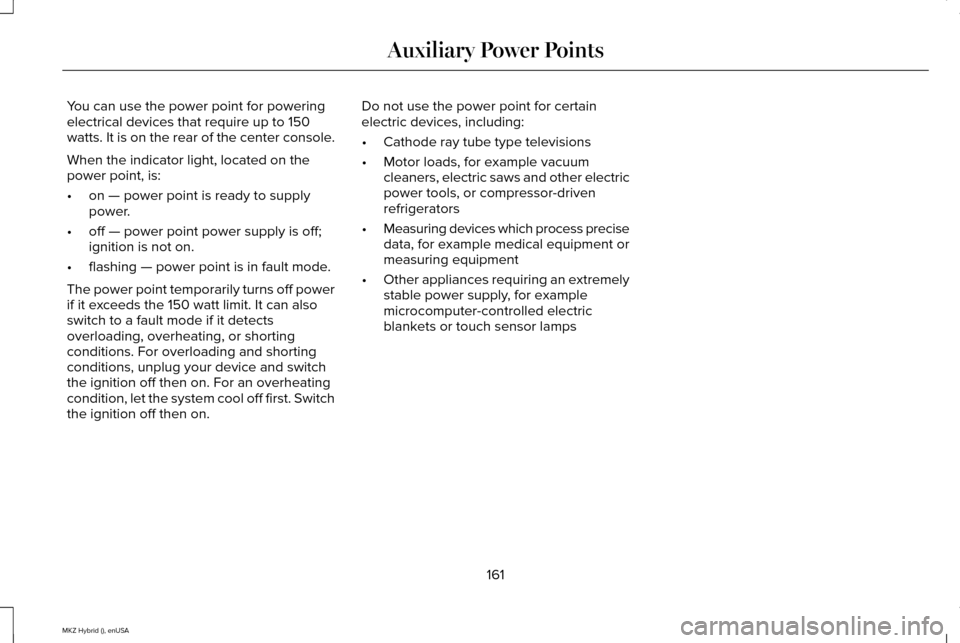
You can use the power point for powering
electrical devices that require up to 150
watts. It is on the rear of the center console.
When the indicator light, located on the
power point, is:
•
on — power point is ready to supply
power.
• off — power point power supply is off;
ignition is not on.
• flashing — power point is in fault mode.
The power point temporarily turns off power
if it exceeds the 150 watt limit. It can also
switch to a fault mode if it detects
overloading, overheating, or shorting
conditions. For overloading and shorting
conditions, unplug your device and switch
the ignition off then on. For an overheating
condition, let the system cool off first. Switch
the ignition off then on. Do not use the power point for certain
electric devices, including:
•
Cathode ray tube type televisions
• Motor loads, for example vacuum
cleaners, electric saws and other electric
power tools, or compressor-driven
refrigerators
• Measuring devices which process precise
data, for example medical equipment or
measuring equipment
• Other appliances requiring an extremely
stable power supply, for example
microcomputer-controlled electric
blankets or touch sensor lamps
161
MKZ Hybrid (), enUSA Auxiliary Power Points
Page 173 of 504
Your fuel economy should improve
throughout your hybrid's break-in period. As
with any vehicle, your driving habits and
accessory usage can significantly impact
your fuel economy. For best results, keep in
mind these tips:
•
Keep the tires properly inflated and only
use the recommended size.
• Aggressive driving increases the amount
of energy required to move your vehicle.
In general, you can achieve better fuel
economy with mild to moderate
acceleration and deceleration. Moderate
braking is particularly important since it
allows you to maximize the energy
captured by the regenerative braking
system. Additional Tips:
•
Do not carry extra loads.
• Be mindful of adding external
accessories that may increase
aerodynamic drag.
• Observe posted speed limits.
• Perform all scheduled maintenance.
• There is no need to wait for your engine
to warm up. The vehicle is ready to drive
immediately after starting. EV+ Mode
Your vehicle will recognize your frequent
destinations and allow for more EV driving
as you approach them. For example, when
nearing your home it should be easier to stay
in electric mode. The EV indicator will display
EV+ when this mode is active. You should
see this about 1/8 mile (200 meters) from a
frequent destination. See Information
Displays (page 109).
Note: Frequent destinations are learned by
your vehicle after two to four weeks of use.
You can clear these destinations with a
Driving History reset through the Settings
menu.
Note: The EV+ feature can be turned on or
off through the Driver Assist section of the
Settings menu.
170
MKZ Hybrid (), enUSA Unique Driving Characteristics
Page 180 of 504

The funnel is located in the rear of the
vehicle, inside the load compartment,
underneath the load floor carpet and is
accessible from the trunk.
1. Locate the portable funnel that comes
with your vehicle. 2. Slowly insert the funnel into the capless
fuel system.
177
MKZ Hybrid (), enUSA Fuel and RefuelingE163066 E157279
Page 208 of 504

When the system finds a suitable space, the
touch screen displays a message and a tone
sounds. Slow down and stop when the touch
screen displays a message and a chime
sounds (at approximately position A), then
follow the instructions on the touch screen.
Note:
You must observe that the selected
space remains clear of obstructions at all
times in the maneuver.
Note: Vehicles with overhanging loads (such
as a bus or a truck), active park assist may
not detect street furniture and other items.
You must make sure the system selects a
space suitable for parking. Note:
Drive the vehicle as parallel to other
vehicles as possible while passing a parking
space.
Note: The system always offers the last
detected parking space (for example, if the
vehicle detects multiple spaces while you
are driving, it offers the last one).
Note: If driven above approximately 22 mph
(35 km/h), the touch screen shows a
message to alert you to reduce vehicle
speed. Automatic Steering into Parking Space
Note:
If vehicle speed exceeds
6 mph
(10 km/h), the system turns off and you need
to take full control of the vehicle.
When you shift the transmission into reverse
(R), with your hands off the wheel (and
nothing obstructing its movement), the
vehicle steers itself into the space.
Instructions to safely move your vehicle back
and forth in the space display in the touch
screen and a tone sounds. 205
MKZ Hybrid (), enUSA Parking AidsE130108