Page 115 of 504
•
When power demand surpasses the
amber indicator, this level of demand and
associated fuel economy displays in
amber.
• When the engine is on, reducing power
demand to less than the threshold will
allow the engine to turn off.
You can also see an instantaneous fuel
economy gauge.
Note: Hold OK to reset average fuel
economy.
MyView
You can choose what to display in this view.
Selecting
Change MyView in the options
menu allows you to scroll through two
columns of content choices.
• Press the up or down arrow to view
content.
• Press OK to save your selected content
• You must select content in both columns
before you can save your new MyView. Unique content available in MyView:
•
Accessory Power— Indicates electrical
power demands from your vehicle ’s
accessory systems. Accessories use
power but do not contribute to propelling
your vehicle. The gauge separately
displays power demand in kilowatts (kW)
for climate and other accessories.
• Climate includes the power being
used by high voltage climate control
components such as the electric A/C
compressor.
• Other includes all power being used
by the low voltage accessories (cabin
fans, headlights and heated seats).
• Coolant Temp – Indicates engine coolant
temperature. At normal operating
temperature, the level indicator will be
white and will be in the normal range
(between H and C). If the engine coolant
temperature exceeds the normal range,
the level indicator will change to red to
indicate that the engine is overheating.
Stop your vehicle as soon as safely
possible, turn your vehicle off and let the
engine cool. •
Tach rpm x 1000 — When the gasoline
engine is running, the tachometer gauge
displays the engine speed in revolutions
per minute (RPM). When your vehicle is
operating on battery power only with the
engine off, EV displays and the
tachometer is greyed out.
Note: The trip data, and average fuel
economy cannot be reset in MyView.
Trip 1 & 2
Provides trip odometer, trip average fuel
economy and trip timer.
Distance traveled on battery power only with
the engine off is shown in blue next to total
trip distance.
Information In this mode, you can view
different vehicle system
information and perform a system
check.
112
MKZ Hybrid (), enUSA Information DisplaysE144642
Page 118 of 504
Settings
—
On or Off
Auto Engine Off
Vehicle
—
On or Off
Easy Entry / Exit
Right or Left Hand Traffic
Traffic Set Up
Adaptive Hdlamps
Lighting
On or Off
Auto Highbeam
On or Off
Daytime Lights
Select time interval
Autolamp Delay
On or Off
Autolock
Locks
On or Off
Autounlock
On or Off
Mislock
All doors or Driver door
Remote Unlocking
Hold OK to Initialize
Neutral Tow
Set to XXX % - Hold
OK to Reset
Oil Life Reset
Enable or Disable Switch
Power Decklid
Auto or Last Settings
Heater – A/C
Climate Control
Remote Start
Auto or Off
Steering Wheel
Auto or Off
Front Defrost
115
MKZ Hybrid (), enUSA Information Displays
Page 126 of 504
Alarm
Action
Message
Displays when the alarm has been triggered due to unauthorized entry. See Anti-Theft Alarm
(page 76).
Vehicle Alarm to Stop Alarm, Start Vehicle
Automatic Engine Shutdown Action
Message
Displays when the engine is getting ready to shut off.
Engine Shuts Off in XX Seconds
Displays when the engine has shut off to help increase fuel economy.
Engine Shut Off for Fuel Economy
Displays when the engine is getting ready to shut off. You can press OK on the left steeringwheel button to override the shut down.
Engine Shuts Off in XX Seconds Press Ok
to Override
123
MKZ Hybrid (), enUSA Information Displays
Page 130 of 504

Hill Start Assist
Action
Message
Displays when hill start assist is not available. Contact your authorized dealer. See Hill Start
Assist (page 195).
Hill Start Assist Not Available
Keys and Intelligent Access Action
Message
Displayed as a reminder to press the brake while starting the vehicle.
Press Brake to START
Displayed if the key is not detected by the system.
See Using Adaptive Cruise Control (page
213).
No Key Detected
Displayed when the start/stop button is pressed to shut off the engine a\
nd an Intelligent Accesskey is not detected inside the vehicle.
Restart Now or Key is Needed
Displayed when the vehicle is in the run ignition state.
Run Power Active
This message is displayed when there is a problem with your vehicle ’s starting system. See your
authorized dealer for service.
Starting System Fault
Displayed during spare key programming, when an Intelligent Access key is programmed to the system.
Key Program Successful
Displayed during spare key programming, when an Intelligent Access key has failed to be programmed.
Key Program Failure
127
MKZ Hybrid (), enUSA Information Displays
Page 131 of 504

Action
Message
Displayed during spare key programming when the maximum number of keys have been programmed.
Max Number of Keys Learned
Displayed during spare key programming when not enough keys have been programmed.
Not Enough Keys Learned
Displays when the key battery is low. Change the battery as soon as possible.
Key Battery Low Replace Soon
Displayed when an attempt is made to program a spare key using two existing MyKeys.
Could Not Program Integrated Key
Displayed as a reminder that the engine is on.
Engine On
Lane Keeping System Action
Message
The system has malfunctioned. Contact your authorized dealer as soon as \
possible.
Lane Keeping Sys. Malfunction Service
Required
The system has detected a condition that has caused the system to be tem\
porarily unavailable.
Front Camera Temporarily Not Available
The system has detected a condition that requires the windshield to be c\
leaned to operateproperly.
Front Camera Low Visibility Clean Screen
The system has malfunctioned. Contact your authorized dealer as soon as \
possible.
Front Camera Malfunction Service
Required
Displayed when the system requests the driver to keep their hands on the steering wheel.
Keep Hands on Steering Wheel
128
MKZ Hybrid (), enUSA Information Displays
Page 132 of 504

Maintenance
Action
Message
Stop the vehicle as soon as safely possible, turn off the engine. Check the oil level. If the warningstays on or continues to come on with your engine running, contact your \
authorized dealer as soon as possible.
LOW Engine Oil Pressure
Displayed when the engine oil life remaining is 10% or less. See Engine Oil Check (page 288).
Change Engine Oil Soon
Displayed when the oil life left reaches 0%.
See Engine Oil Check (page 288).
Oil Change Required
Indicates the brake fluid level is low and the brake system should be inspected immediately.See
Brake Fluid Check (page 294).
Brake Fluid Level LOW
Displays when the brake system needs servicing. Stop the vehicle in a safe place. Contact your authorized dealer.
Check Brake System
Displays when the engine coolant temperature is excessively high. Stop the vehicle in a safeplace and contact your authorized dealer.
Engine Coolant Overtemperature
Displays when the motor electronics are overheating. Stop the vehicle as soon as safely possible,
turn off the vehicle and let it cool. If the warning stays on or continu\
es to come on, contact yourauthorized dealer as soon as possible.
Motor Coolant Overtemperature
Displays when the washer fluid is low and needs to be refilled.
Washer Fluid Level Low
Displays when the engine has reduced power in order to help reduce high \
coolant temperatures.
Power Reduced to Lower Engine Temp
129
MKZ Hybrid (), enUSA Information Displays
Page 135 of 504
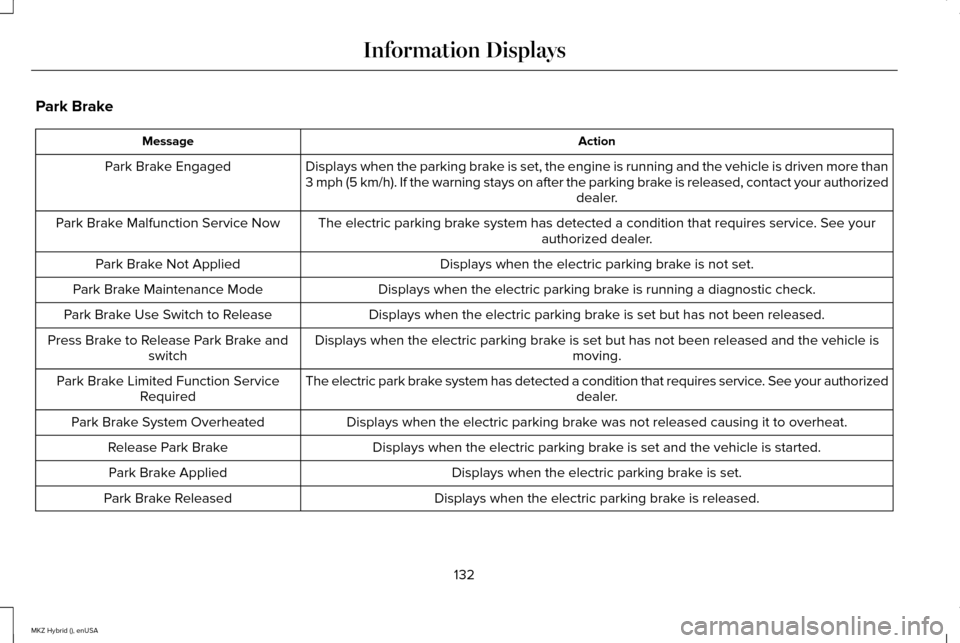
Park Brake
Action
Message
Displays when the parking brake is set, the engine is running and the vehicle is driven more than
3 mph (5 km/h). If the warning stays on after the parking brake is released, contact your authorized dealer.
Park Brake Engaged
The electric parking brake system has detected a condition that requires service. See your authorized dealer.
Park Brake Malfunction Service Now
Displays when the electric parking brake is not set.
Park Brake Not Applied
Displays when the electric parking brake is running a diagnostic check.
Park Brake Maintenance Mode
Displays when the electric parking brake is set but has not been released.
Park Brake Use Switch to Release
Displays when the electric parking brake is set but has not been released and the vehicle is moving.
Press Brake to Release Park Brake and
switch
The electric park brake system has detected a condition that requires service. See your authorized dealer.
Park Brake Limited Function Service
Required
Displays when the electric parking brake was not released causing it to overheat.
Park Brake System Overheated
Displays when the electric parking brake is set and the vehicle is started.
Release Park Brake
Displays when the electric parking brake is set.
Park Brake Applied
Displays when the electric parking brake is released.
Park Brake Released
132
MKZ Hybrid (), enUSA Information Displays
Page 137 of 504
Remote Start
Action
Message
Displays as a reminder to turn the key on to drive the vehicle after a remote start.
To Drive: Turn Key to On
Displays as a reminder to apply the brake and the gear shift button to drive the vehicle after a remote start.
To Drive: Press Brake and Gear Shift
Button
Seats Action
Message
Displays as a reminder that memory seats are not available while driving\
.
Memory Recall Not Permitted While Driving
Displays to show where your memory setting has been saved.
Memory X Saved
Starting System Action
Message
Displays when starting the vehicle as a reminder to apply the brake.
Press Brake to Start
Displays when the starter has exceeded its cranking time in attempting to start the vehicle.
Cranking Time Exceeded
Displays when the starter is attempting to start the vehicle.
Engine Start Pending Please Wait
Displays when the pending start has been cancelled.
Pending Start Cancelled
134
MKZ Hybrid (), enUSA Information Displays


