2015 LINCOLN MKX lock
[x] Cancel search: lockPage 193 of 453
Blocked Sensor
WARNING:Do not use ACC when towing a trailer with brake
controls. Aftermarket trailer brakes will not function properly
when ACC is activated because the brakes are electronically controlled.
Failing to do so may result in loss of vehicle control, which could result
in serious injury.
WARNING:Do not use tires sizes other than those
recommended because this can affect the normal operation of
ACC. Failing to do so may result in a loss of vehicle control, which
could result in serious injury.
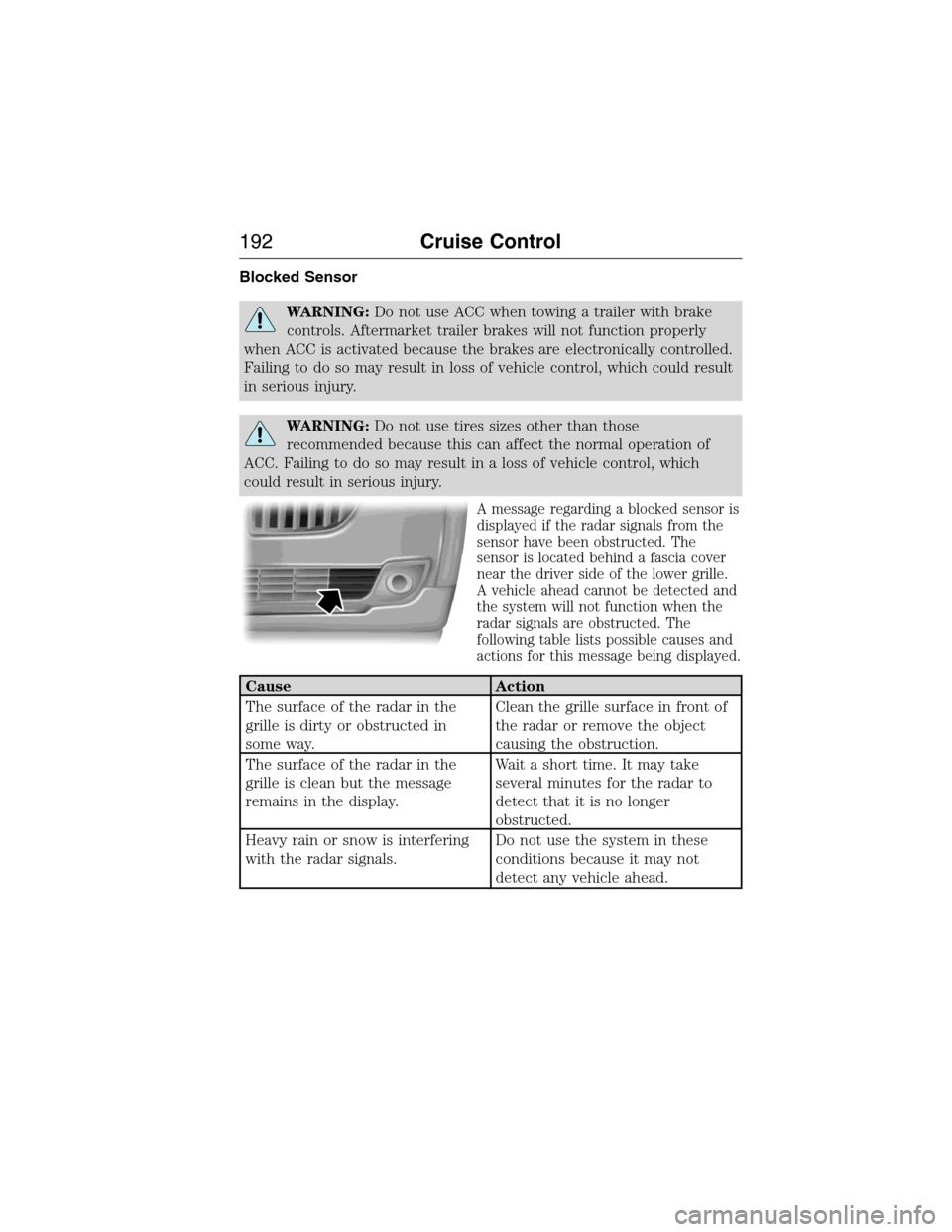
A message regarding a blocked sensor is
displayed if the radar signals from the
sensor have been obstructed. The
sensor is located behind a fascia cover
near the driver side of the lower grille.
A vehicle ahead cannot be detected and
the system will not function when the
radar signals are obstructed. The
following table lists possible causes and
actions for this message being displayed.
Cause Action
The surface of the radar in the
grille is dirty or obstructed in
some way.Clean the grille surface in front of
the radar or remove the object
causing the obstruction.
The surface of the radar in the
grille is clean but the message
remains in the display.Wait a short time. It may take
several minutes for the radar to
detect that it is no longer
obstructed.
Heavy rain or snow is interfering
with the radar signals.Do not use the system in these
conditions because it may not
detect any vehicle ahead.
192Cruise Control
2014 MKX(mkx)
Owners Guide gf, 1st Printing, June 2014
USA(fus)
Page 194 of 453

Cause Action
Swirling water, or snow or ice on
the surface of the road may
interfere with the radar signals.Do not use system in these
conditions because it may not
detect any vehicle ahead.
You are in a desert or remote area
with no other vehicles and no
roadside objects.Wait a short time or switch to
normal cruise control.
Due to the nature of radar technology, it is possible to get a blockage
warning and not be blocked. This can happen, for example, when driving
in sparse rural or desert environments. A false blocked condition will
either self-clear or clear after a key cycle.
Switching to Normal Cruise Control
WARNING:Normal cruise control will not brake due to slower
vehicles. Always be aware of which mode is selected and apply
the brakes when necessary.
You can manually change from adaptive cruise control to normal cruise
control through the information display.
The cruise control indicator light will replace the adaptive
cruise control indicator light if normal cruise control is selected.
The gap setting will not be displayed, the system will not
automatically respond to lead vehicles and automatic braking will not be
activated. The system will default to adaptive cruise control when the
engine is started.
Cruise Control193
2014 MKX(mkx)
Owners Guide gf, 1st Printing, June 2014
USA(fus)
Page 196 of 453

Using the Systems
BLIS® turns on when the engine is started and the vehicle is driven
forward above 3 mph (5 km/h); it remains on while the transmission is in
D (Drive) or N (Neutral). If shifted out of D (Drive) or N (Neutral), the
system enters CTA mode. Once shifted back into D (Drive), BLIS® turns
back on when the vehicle is driven above 3 mph (5 km/h).
Note:BLIS® does not function in R (Reverse) or P (Park) or provide
any additional warning when a turn signal is on.
CTA detects approaching vehicles from up to 45 feet (14 meters) away
though coverage decreases when the sensors are blocked. Reversing
slowly helps increase the coverage area and effectiveness.
WARNING:To help avoid personal injury, NEVER use the CTA
system as a replacement for using the interior and exterior
mirrors and looking over your shoulder before backing out of a parking
space. CTA is not a replacement for careful driving.
In this first example, the left sensor is only partially obstructed; zone
coverage is nearly maximized.
Driving Aids195
2014 MKX(mkx)
Owners Guide gf, 1st Printing, June 2014
USA(fus)
Page 198 of 453

System Sensors
WARNING:Just prior to the system recognizing a blocked condition
and alerting the driver, the number of missed objects will increase.
To help avoid injuries, NEVER use the BLIS® as a replacement for using
the side and rear view mirrors and looking over your shoulder before
changing lanes. BLIS® is not a replacement for careful driving.
Note:It is possible to get a blockage warning with no blockage present;
this is rare and known as a false blockage warning. A false blocked
condition either self-corrects or clears after a key cycle.
The system uses radar sensors
which are located behind the
bumper fascia on each side of the
vehicle. Do not allow these areas to
become obstructed by mud, snow or
bumper stickers, as this can cause
degraded system performance.
If the system detects a degraded
performance condition, a blocked
sensor warning or low visibility
warning will appear in the
information display and the alert indicator illuminates in the appropriate
mirror(s). The information display warning can be cleared but the alert
indicator remains illuminated.
When the blockage is removed, the system can be reset in two ways: 1)
when at least two objects are detected while driving, or 2) turn the ignition
key from on to off, then back on. If the blockage is still present after the
key cycle, the system senses again that it is blocked after driving in traffic.
Reasons for messages being displayed
The radar surface is
dirty or obstructedClean the fascia area in front of the radar or
remove the obstruction.
The radar surface is
not dirty or obstructedDrive normally in traffic for a few minutes to
allow the radar to detect passing vehicles so it
can clear the blocked state.
Heavy rainfall/snowfall
interferes with the
radar signalsNo action required. The system automatically
resets to an unblocked state once the
rainfall/snowfall rate decreases or stops. Do
not use BLIS® and/or CTA in these conditions.
Driving Aids197
2014 MKX(mkx)
Owners Guide gf, 1st Printing, June 2014
USA(fus)
Page 201 of 453

Using the Collision Warning System
WARNING:The collision warning system’s brake support can
only help reduce the speed at which a collision occurs if the
driver applies the vehicle’s brakes. The brake pedal must be pressed
just like any typical braking situation.
The warning system sensitivity can be adjusted to one of three possible
settings by using the information display control. Refer to the
Information Displayschapter.
Note:If collision warnings are perceived as being too frequent or
disturbing then the warning sensitivity can be reduced, though the
manufacturer recommends using the highest sensitivity setting where
possible. Setting lower sensitivity would lead to fewer and later system
warnings. Refer to theInformation Displayschapter for instructions on
reducing the sensitivity.
Blocked Sensors
If a message regarding a blocked sensor
appears in the information display, the
radar signals from the sensor have been
obstructed. The sensors are located
behind a fascia cover near the driver
side of the lower grille. When the
sensors are obstructed, a vehicle ahead
cannot be detected and the collision
warning system does not function. The
following table lists possible causes and
actions for this message being displayed.
Cause Action
The surface of the radar in the
grille is dirty or obstructed in
some wayClean the grille surface in front of
the radar or remove the object
causing the obstruction
The surface of the radar in the
grille is clean but the message
remains in the displayWait a short time. It may take
several minutes for the radar to
detect that it is no longer
obstructed
200Driving Aids
2014 MKX(mkx)
Owners Guide gf, 1st Printing, June 2014
USA(fus)
Page 202 of 453

Cause Action
Heavy rain, spray, snow, or fog is
interfering with the radar signalsThe collision warning system is
temporarily disabled. Collision
warning should automatically
reactivate a short time after the
weather conditions improve.
Swirling water, or snow or ice on
the surface of the road may
interfere with the radar signalsThe collision warning system is
temporarily disabled. Collision
warning should automatically
reactivate a short time after the
weather conditions improve.
System Limitations
WARNING:The collision warning system’s brake support can
only help reduce the speed at which a collision occurs if the
driver applies the vehicle’s brakes. The brake pedal must be pressed
just like any typical braking situation.
Due to the nature of radar technology, there may be certain instances
where vehicles do not provide a collision warning. These include:
•Stationary vehicles or vehicles moving below 6 mph (10 km/h).
•Pedestrians or objects in the roadway.
•Oncoming vehicles in the same lane.
•Severe weather conditions (see blocked sensor section).
•Debris build-up on the grille near the headlamps (see blocked sensor
section).
•Small distance to vehicle ahead.
•
Steering wheel and pedal movements are large (very active driving style).
•High interior temperatures, which may deactivate the illumination or
the warning lamps until the interior temperature reduces (audible
warning still sounds).
Certain conditions may reduce the visibility of the warning lamp;
therefore, it is recommended to keep the audible warning on.
If the front end of the vehicle is hit or damaged, the radar sensing zone
may be altered causing missed or false collision warnings. See your
authorized dealer to have your collision warning radar checked for
proper coverage and operation.
Driving Aids201
2014 MKX(mkx)
Owners Guide gf, 1st Printing, June 2014
USA(fus)
Page 227 of 453

WARNING:Always make sure that objects cannot fall into the
driver foot well while the vehicle is moving. Objects that are
loose can become trapped under the pedals causing a loss of vehicle
control.
WARNING:Failure to properly follow floor mat installation or
attachment instructions can potentially cause interference with
pedal operation causing a loss of vehicle control.
To install the floor mats, position the floor
mat eyelet over the retention post and
press down to lock in position.
To remove the floor mat, reverse the
installation procedure.
226Driving Hints
2014 MKX(mkx)
Owners Guide gf, 1st Printing, June 2014
USA(fus)
Page 228 of 453

ROADSIDE ASSISTANCE
Vehicles Sold in the United States: Getting Roadside Assistance
If you ever need help on the road, the Lincoln Motor Company is there
for you with nationwide, 24-hours-a-day, seven-days-a-week assistance.
The service is available:
•Throughout the life of the vehicle for original owners.
•For six years or 70000 miles (112655 kilometers) (whichever comes
first) within the extended powertrain warranty coverage period for
subsequent owners.
•For the coverage period listed on the Roadside Assistance Card
included in your Owner’s Manual portfolio.
This complimentary Roadside Assistance program is separate from the
New Vehicle Limited Warranty, and includes:
•A flat tire change with a good spare (except vehicles supplied with a
tire inflation kit).
•Battery jump start.
•Lock-out assistance (key replacement cost is the customer’s
responsibility).
•Fuel delivery – independent service contractors, if not prohibited by
state, local or municipal law, shall deliver up to 2.0 gallons (7.5 liters)
of gasoline or 5.0 gallons (18.9 liters) of diesel fuel to a disabled
vehicle. Roadside Assistance limits fuel delivery service to two
no-charge occurrences within a 12-month period.
•Winch out – available within 100 feet (30.5 meters) of a paved or
county maintained road, no recoveries.
•Towing – Lincoln eligible vehicles to the client’s selling or preferred
dealer within 100 miles (161 kilometers) of the disablement location
or to the nearest Lincoln dealer. If a client requests a tow to a selling
or preferred dealer that is more than 100 miles (161 kilometers) from
the disablement location, the client shall be responsible for any
mileage costs in excess of 100 miles (161 kilometers).
Roadside Assistance will include up to $200 coverage for a towed trailer
if the disabled eligible vehicle requires service at the nearest authorized
dealer. If the towing vehicle is operational but the trailer is not, then the
trailer does not qualify for any roadside services.
Roadside Emergencies227
2014 MKX(mkx)
Owners Guide gf, 1st Printing, June 2014
USA(fus)