2015 LINCOLN MKT warning
[x] Cancel search: warningPage 365 of 500

Items CapacityFord part name or
equivalentFord part number /
Ford specification
4See your authorized dealer for fluid level checking or filling.5Your engine has been designed to use Motorcraft engine oils or equivalent oils that meet Ford
specifications. It is also acceptable to use an engine oil of recommended viscosity grade that
meets API SN requirements and displays the API Certification Mark for gasoline engines.6Do not use supplemental engine oil additives in your engine. They are unnecessary and could
lead to engine damage that is not covered by your Ford warranty.7Do not use API S category labeled as SN, SM, SL or lower category unless the label also
displays the API certification mark. These oils do not meet the requirements of your engine and
emission systems.8Add the coolant type originally equipped in your vehicle.9See warning below:
WARNING:The air conditioning refrigerant system contains refrigerant R–134a under high
pressure. Opening the air conditioning refrigerant system can cause personal injury. Air
conditioning refrigerant system is to be serviced only by qualified personnel.
364Capacities and Specifications
2015 MKT(mkt)
Owners Guide gf, 1st Printing, October 2014
USA(fus)
Page 376 of 500
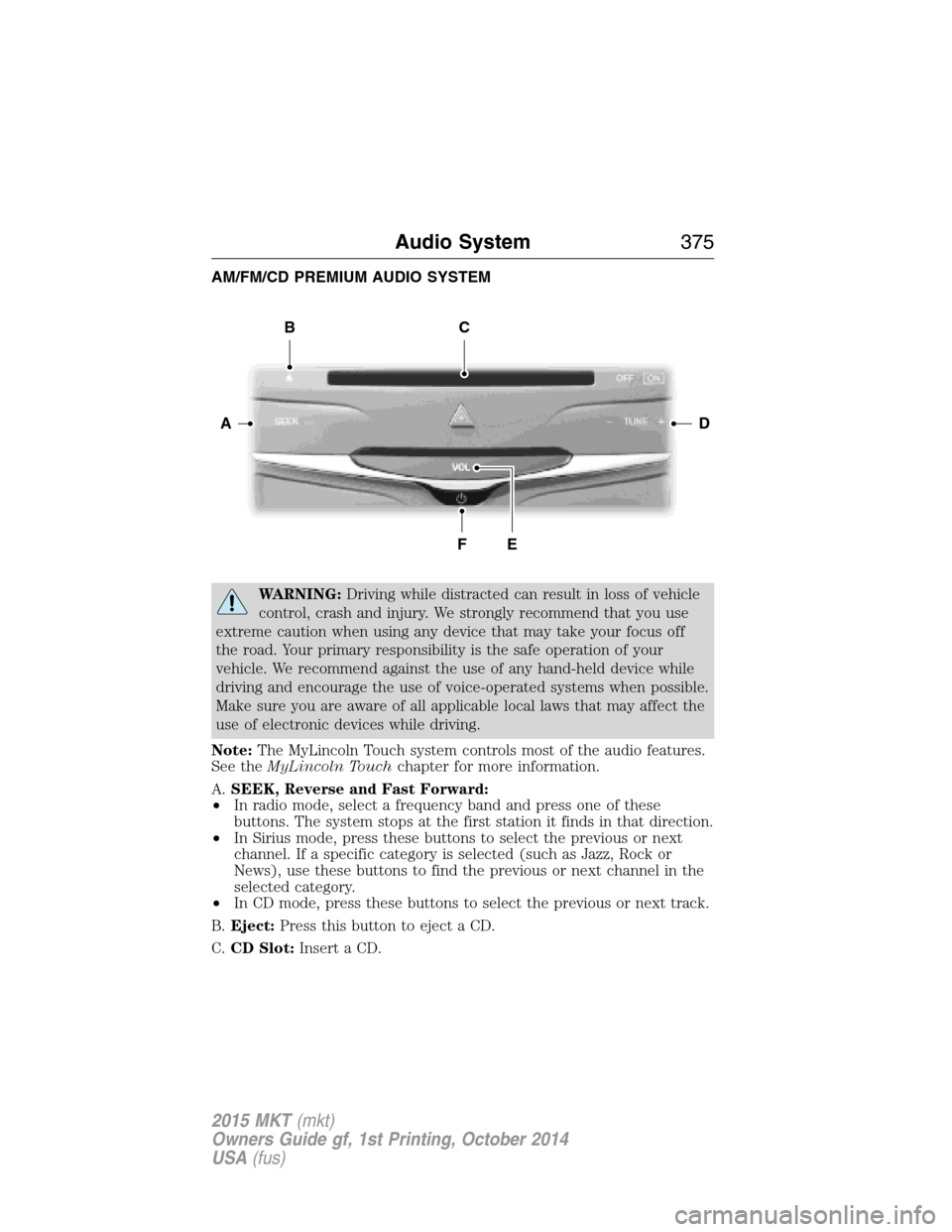
AM/FM/CD PREMIUM AUDIO SYSTEM
WARNING:Driving while distracted can result in loss of vehicle
control, crash and injury. We strongly recommend that you use
extreme caution when using any device that may take your focus off
the road. Your primary responsibility is the safe operation of your
vehicle. We recommend against the use of any hand-held device while
driving and encourage the use of voice-operated systems when possible.
Make sure you are aware of all applicable local laws that may affect the
use of electronic devices while driving.
Note:The MyLincoln Touch system controls most of the audio features.
See theMyLincoln Touchchapter for more information.
A.SEEK, Reverse and Fast Forward:
•In radio mode, select a frequency band and press one of these
buttons. The system stops at the first station it finds in that direction.
•In Sirius mode, press these buttons to select the previous or next
channel. If a specific category is selected (such as Jazz, Rock or
News), use these buttons to find the previous or next channel in the
selected category.
•In CD mode, press these buttons to select the previous or next track.
B.Eject:Press this button to eject a CD.
C.CD Slot:Insert a CD.
DA
BC
FE
Audio System375
2015 MKT(mkt)
Owners Guide gf, 1st Printing, October 2014
USA(fus)
Page 379 of 500

GENERAL INFORMATION
WARNING:Driving while distracted can result in loss of vehicle
control, crash and injury. We strongly recommend that you use
extreme caution when using any device that may take your focus off
the road. Your primary responsibility is the safe operation of your
vehicle. We recommend against the use of any hand-held device while
driving and encourage the use of voice-operated systems when possible.
Make sure you are aware of all applicable local laws that may affect the
use of electronic devices while driving.
You can also set up the certain convenience features using MyLincoln
Mobile over the internet or smartphone application. For more information
on MyLincoln Mobile, and to set up your MyLincoln Mobile account, visit
http://support.lincoln.com/owner-services/mylincoln-mobile-app.
A. Phone
B. Navigation (or Information if your vehicle is not equipped with
Navigation)
C. Climate
D. Settings
E. Home
F. Information
G. Entertainment
This system uses a four-corner strategy to provide quick access several
vehicle features and settings. The touchscreen provides easy interaction
AB
GCDFE
378MyLincoln Touch™
2015 MKT(mkt)
Owners Guide gf, 1st Printing, October 2014
USA(fus)
Page 383 of 500
Support
The SYNC support team is available to help you with any questions you
aren’t able to answer on your own.
Monday-Saturday, 8:30 am-8pm EST
In the United States, call: 1–888–270–1055
In Canada, call: 1–800–565–3673
Times are subject to change due to holidays.
SYNC Owner Account
Why do I need a SYNC owner account?
•Required to activate Vehicle Health Report and to view the reports
online.
•Required to activate the subscription-based SYNC Services and to
personalize your Saved Points and Favorites.
•Essential for keeping up with the latest software downloads available
for SYNC.
•Access to customer support for any questions you may have.
Safety information
WARNING:Driving while distracted can result in loss of vehicle
control, accident and injury. Ford strongly recommends that
drivers use extreme caution when using any device that may take their
focus off the road. Your primary responsibility is the safe operation of
the vehicle. We recommend against the use of any handheld device
while driving, encourage the use of voice-operated systems when
possible and that you become aware of applicable state and local laws
that may affect use of electronic devices while driving.
•Do not attempt to service or repair SYNC®. See your authorized
dealer.
•Do not operate playing devices if the power cords and/or cables are
broken, split or damaged. Carefully place cords and/or cables where
they will not be stepped on or interfere with the operation of pedals,
seats and/or compartments, or safe driving abilities.
•Do not leave playing devices in the vehicle in extreme conditions as it
could cause damage to your device. Refer to your device’s user guide
for further information.
382MyLincoln Touch™
2015 MKT(mkt)
Owners Guide gf, 1st Printing, October 2014
USA(fus)
Page 410 of 500

Bluetooth Audio
Your system allows you to stream audio over your vehicle’s speakers from
your connected, Bluetooth-enabled cellular phone.
To access, press the lower left corner on the touchscreen, then
select theBT Stereotab.
Bluetooth Audio Voice Commands
If you are listening to a Bluetooth audio device, press the voice
button on the steering wheel control. When prompted, say
“Next song”, “Pause”, “Play” or “Previous song”.
If you are not listening to a Bluetooth audio device, press the voice
button and, after the tone, say “Bluetooth Audio”, then “Next song”,
“Pause”, “Play” or “Previous song”.
A/V Inputs
WARNING:Driving while distracted can result in loss of vehicle
control, crash and injury. We strongly recommend that you use
extreme caution when using any device that may take your focus off
the road. Your primary responsibility is the safe operation of your
vehicle. We recommend against the use of any hand-held device while
driving and encourage the use of voice-operated systems when possible.
Make sure you are aware of all applicable local laws that may affect the
use of electronic devices while driving.
WARNING:For safety reasons, do not connect or adjust the
settings on your portable music player while your vehicle is
moving.
WARNING:Store the portable music player in a secure location,
such as the center console or the glove box, when your vehicle is
in motion. Hard objects may become projectiles in a crash or sudden
stop, which may increase the risk of serious injury. The audio extension
cable must be long enough to allow the portable music player to be
safely stored while your vehicle is moving.
MyLincoln Touch™409
2015 MKT(mkt)
Owners Guide gf, 1st Printing, October 2014
USA(fus)
Page 413 of 500

commands. While the system supports a variety of features, many are
dependent on your cellular phone’s functionality. At a minimum, most
cellular phones with Bluetooth wireless technology support the following
functions:
•Answering an incoming call
•Ending a call
•Using privacy mode
•Dialing a number
•Redialing
•Call waiting notification
•Caller ID.
Other features, such as text messaging using Bluetooth and automatic
phonebook download, are phone-dependent features. To check your
phone’s compatibility, see your phone’s user manual and visit
www.SYNCMyRide.com, www.SYNCMyRide.ca or www.syncmaroute.ca.
Pairing Your Phone for the First Time
WARNING:Driving while distracted can result in loss of vehicle
control, crash and injury. We strongly recommend that you use
extreme caution when using any device that may take your focus off
the road. Your primary responsibility is the safe operation of your
vehicle. We recommend against the use of any hand-held device while
driving and encourage the use of voice-operated systems when possible.
Make sure you are aware of all applicable local laws that may affect the
use of electronic devices while driving.
The first thing you must do to use the phone features of SYNC is to pair
your Bluetooth-enabled cellular phone with SYNC. This allows you to use
your phone in a hands-free manner.
Note:Put the transmission in positionP.Turn on your vehicle ignition
and the radio.
1. TouchAdd Phonein the upper left corner of the touchscreen.Find
SYNCappears on the screen and instructs you to begin the pairing
process from your device.
2. Make sure that Bluetooth is set toOnand that your cellular phone is
in the proper mode. See your phone’s manual if necessary.
•SelectSYNC,and a six-digit PIN appears on your device.
3. If you are prompted to enter a PIN on your device, it does not
support Secure Simple Pairing. To pair, enter the PIN displayed on
the touchscreen. Skip the next step.
412MyLincoln Touch™
2015 MKT(mkt)
Owners Guide gf, 1st Printing, October 2014
USA(fus)
Page 418 of 500
911 Assist
Turn on or turn off the 911 Assist feature. See911 Assistin theSYNC
Services and Applicationssection.
Phone Ringer
Select the ring tone you want to hear when you receive a call. Choose
from possible system ring tones, your currently paired phone’s ring tone,
a beep, text-to-speech or a silent notification.
Text Message Notification
Select a text message notification, if supported by your phone. Choose
from possible system alert tones, text-to-speech or silent.
Internet Data Connection
If your phone is compatible, use this screen to adjust your internet data
connection. Select to make your connection profile with the personal
area network or to turn off your connection. You can also choose to
adjust your settings or have the system always connect, never connect
when roaming or query on connect. Press?for more information.
Manage Phonebook
Touch this button to access features such as automatic phonebook
download, re-download your phonebook, add contacts from your phone
as well as delete or upload your phonebook.
Roaming Warning
Touch this button to have the system alert you when your phone is in
roaming mode.
Phone Voice Commands
Press the voice button on the steering wheel control. After the
tone, say any of the following commands:
“PHONE”
“Call” “Join calls”*
“Call
“Call
“Call
**
“Call
“Call
MyLincoln Touch™417
2015 MKT(mkt)
Owners Guide gf, 1st Printing, October 2014
USA(fus)
Page 424 of 500

SYNC Services Voice Commands
When a route has been downloaded (non-navigation systems),
press the voice button on the steering wheel control. When
prompted, say any of the following commands:
“SERVICES”
“Cancel route”
“Navigation voice off”
“Navigation voice on”
“Next turn”
“Route status”
“Route summary”
“Services”
“Update route”
“Help”
Sirius Travel Link (If Equipped and If Activated)
WARNING:Driving while distracted can result in loss of vehicle
control, crash and injury. We strongly recommend that you use
extreme caution when using any device that may take your focus off
the road. Your primary responsibility is the safe operation of your
vehicle. We recommend against the use of any hand-held device while
driving and encourage the use of voice-operated systems when possible.
Make sure you are aware of all applicable local laws that may affect the
use of electronic devices while driving.
Note:In order to use Sirius Travel Link, your vehicle must be equipped
with navigation and your navigation SD card must be in the SD card slot.
Note:A paid subscription is required to access and use these features.
Go to www.siriusxm.com/travellink for more information.
Note:Visit www.siriusxm.com/traffic# and click on Coverage map and
details for a complete listing of all traffic areas covered by Sirius Travel
Link.
Note:
Neither Sirius nor Ford is responsible for any errors or inaccuracies
in the Sirius Travel Link services or its use in vehicles.
MyLincoln Touch™423
2015 MKT(mkt)
Owners Guide gf, 1st Printing, October 2014
USA(fus)