2015 LINCOLN MKT air condition
[x] Cancel search: air conditionPage 111 of 500
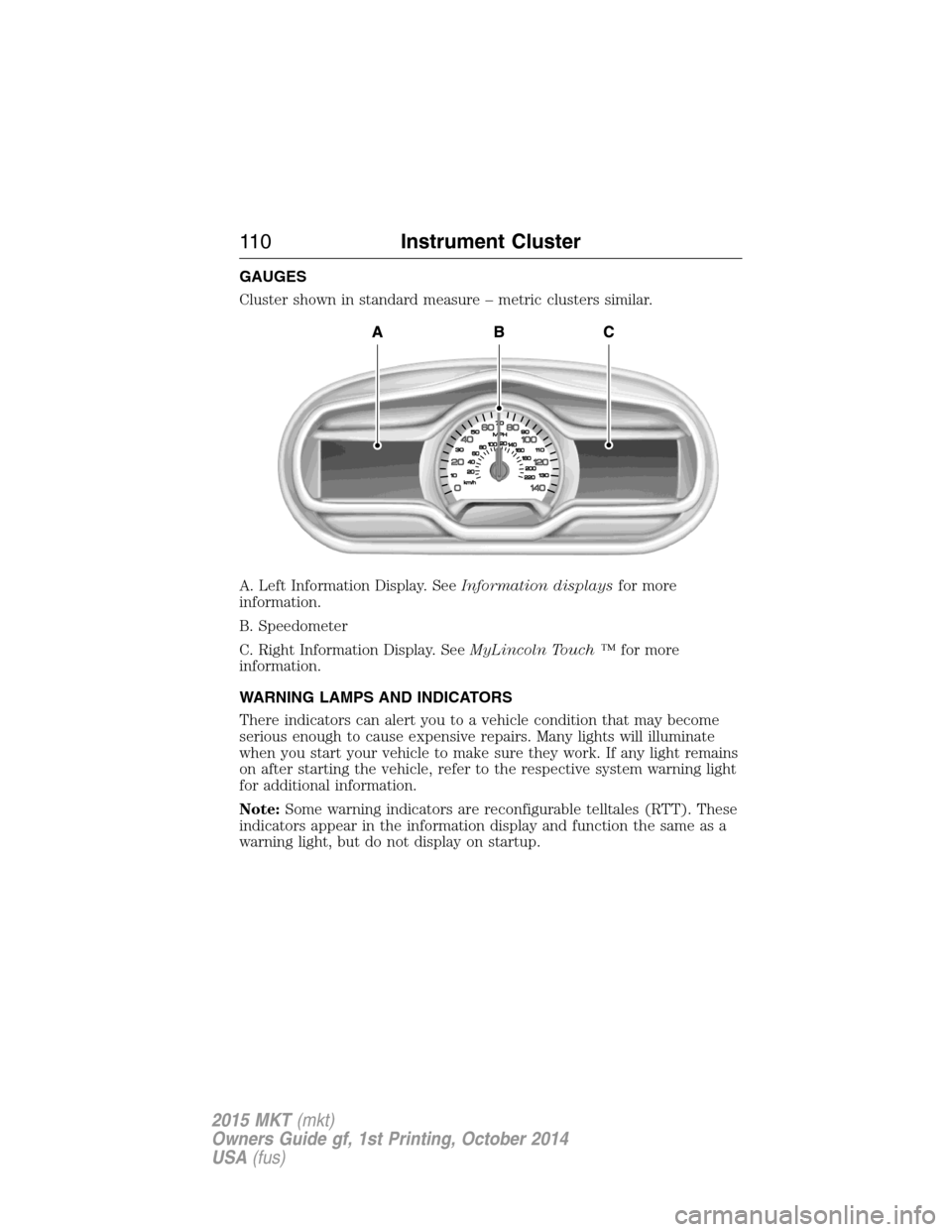
GAUGES
Cluster shown in standard measure – metric clusters similar.
A. Left Information Display. SeeInformation displaysfor more
information.
B. Speedometer
C. Right Information Display. SeeMyLincoln Touch ™for more
information.
WARNING LAMPS AND INDICATORS
There indicators can alert you to a vehicle condition that may become
serious enough to cause expensive repairs. Many lights will illuminate
when you start your vehicle to make sure they work. If any light remains
on after starting the vehicle, refer to the respective system warning light
for additional information.
Note:Some warning indicators are reconfigurable telltales (RTT). These
indicators appear in the information display and function the same as a
warning light, but do not display on startup.
11 0Instrument Cluster
2015 MKT(mkt)
Owners Guide gf, 1st Printing, October 2014
USA(fus)
Page 133 of 500
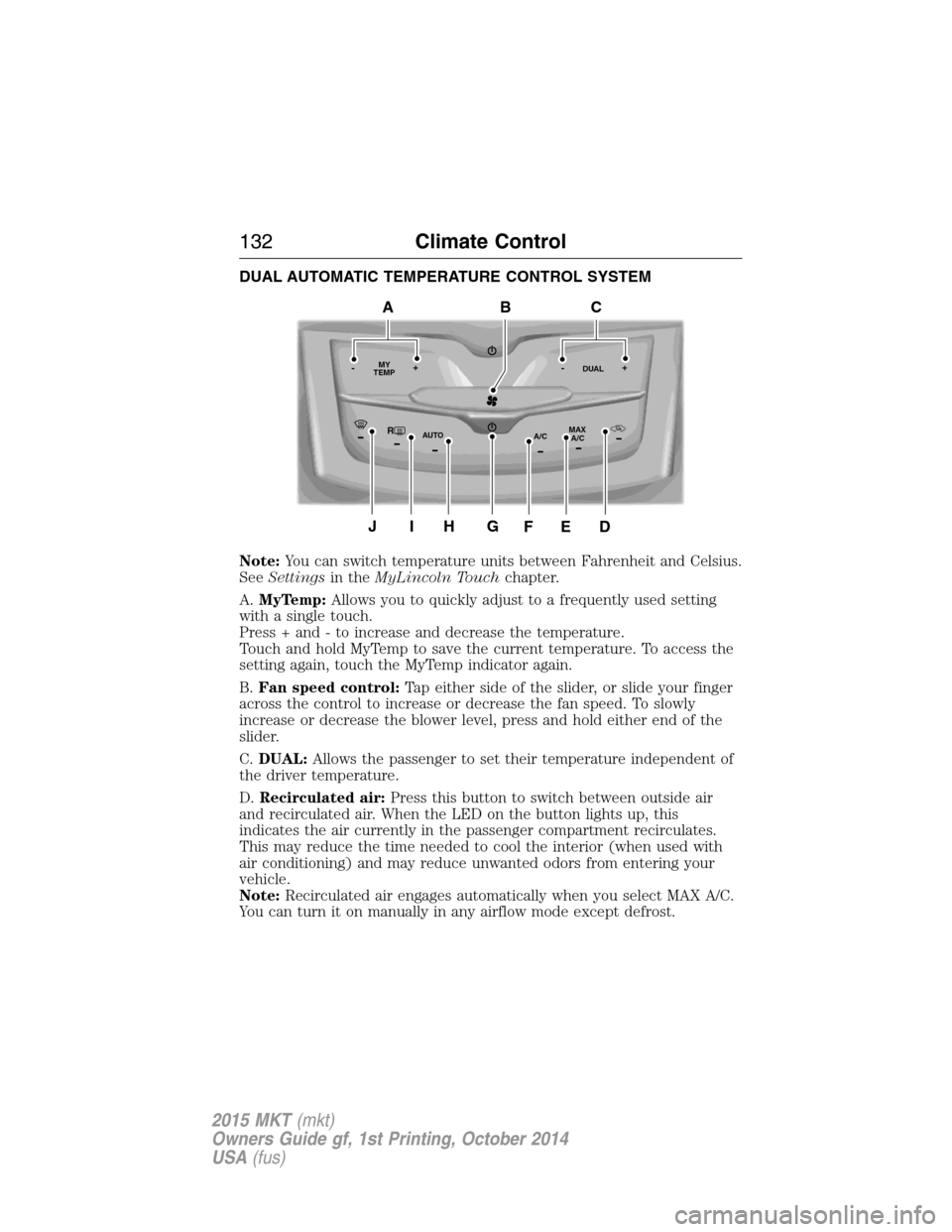
DUAL AUTOMATIC TEMPERATURE CONTROL SYSTEM
Note:You can switch temperature units between Fahrenheit and Celsius.
SeeSettingsin theMyLincoln Touchchapter.
A.MyTemp:Allows you to quickly adjust to a frequently used setting
with a single touch.
Press + and - to increase and decrease the temperature.
Touch and hold MyTemp to save the current temperature. To access the
setting again, touch the MyTemp indicator again.
B.Fan speed control:Tap either side of the slider, or slide your finger
across the control to increase or decrease the fan speed. To slowly
increase or decrease the blower level, press and hold either end of the
slider.
C.DUAL:Allows the passenger to set their temperature independent of
the driver temperature.
D.Recirculated air:Press this button to switch between outside air
and recirculated air. When the LED on the button lights up, this
indicates the air currently in the passenger compartment recirculates.
This may reduce the time needed to cool the interior (when used with
air conditioning) and may reduce unwanted odors from entering your
vehicle.
Note:Recirculated air engages automatically when you select MAX A/C.
You can turn it on manually in any airflow mode except defrost.
RMAX
A/C A/C
TEMP
AUTO MY-+DUAL-+
GJIH
BAC
DEF
132Climate Control
2015 MKT(mkt)
Owners Guide gf, 1st Printing, October 2014
USA(fus)
Page 134 of 500
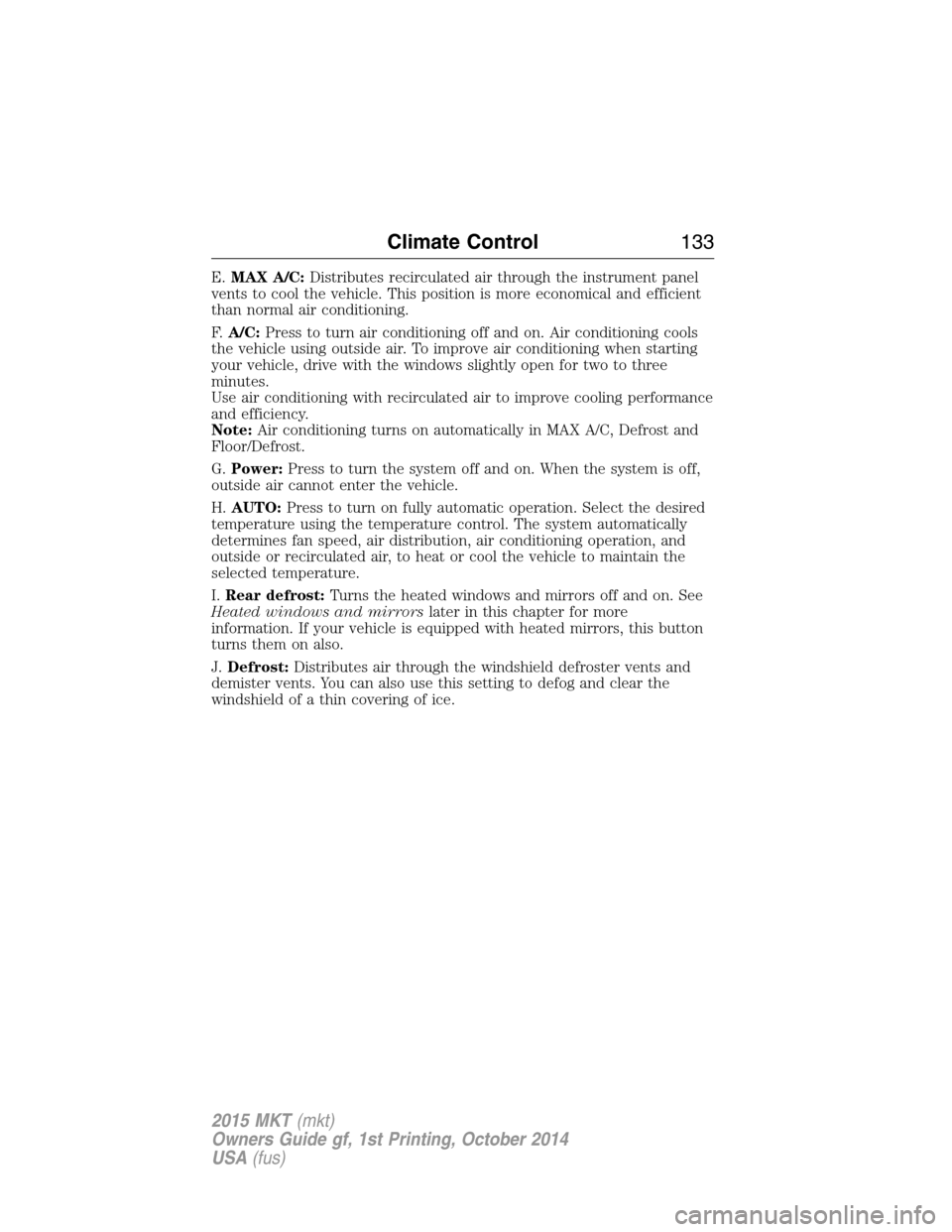
E.MAX A/C:Distributes recirculated air through the instrument panel
vents to cool the vehicle. This position is more economical and efficient
than normal air conditioning.
F.A/C:Press to turn air conditioning off and on. Air conditioning cools
the vehicle using outside air. To improve air conditioning when starting
your vehicle, drive with the windows slightly open for two to three
minutes.
Use air conditioning with recirculated air to improve cooling performance
and efficiency.
Note:Air conditioning turns on automatically in MAX A/C, Defrost and
Floor/Defrost.
G.Power:Press to turn the system off and on. When the system is off,
outside air cannot enter the vehicle.
H.AUTO:Press to turn on fully automatic operation. Select the desired
temperature using the temperature control. The system automatically
determines fan speed, air distribution, air conditioning operation, and
outside or recirculated air, to heat or cool the vehicle to maintain the
selected temperature.
I.Rear defrost:Turns the heated windows and mirrors off and on. See
Heated windows and mirrorslater in this chapter for more
information. If your vehicle is equipped with heated mirrors, this button
turns them on also.
J.Defrost:Distributes air through the windshield defroster vents and
demister vents. You can also use this setting to defog and clear the
windshield of a thin covering of ice.
Climate Control133
2015 MKT(mkt)
Owners Guide gf, 1st Printing, October 2014
USA(fus)
Page 136 of 500

F.AUTO:Press to activate automatic control of the airflow direction in
the rear of the vehicle. The system automatically determines the airflow
distribution in order to reach and maintain the desired temperature.
G.REAR LOCK:Illuminates when the rear climate system is being
controlled by the front controls. The rear climate controls do not work
when this is illuminated.
GENERAL OPERATING TIPS
•To reduce fog build-up on the windshield during humid weather,
select defrost. Temperature and fan speed can also be increased to
improve clearing.
•To reduce humidity build-up inside the vehicle, do not drive with the
system off or with recirculated air engaged.
•Do not put objects under the front seats that will interfere with the
airflow to the back seats.
•Remove any snow, ice or leaves from the air intake area at the base
of the windshield.
•To improve the air conditioning cool down, drive with the windows
slightly open for 2-3 minutes after start-up or until the vehicle has
been aired out.
•A small amount of air may be felt from the floor vent regardless of
the air distribution setting that is selected.
During extreme high ambient temperatures when idling stationary for
extended periods of time in gear, it is recommended to run the air
conditioning in the MAX A/C mode, adjust the blower fan speed to the
lowest setting and put the vehicle’s transmission into positionPto
continue to receive cool air from your air conditioning system.
For maximum cooling performance in AUTO, pressMAX A/C.
For maximum cooling performance in manual override control (using the
MyLincoln Touch climate controls):
1. Choose panel, A/C, and recirculation controls.
2. Set the temperature to LO.
3. Set the fan to the highest blower setting.
To aid in side window defogging and demisting in cold or humid weather:
1. Select defrost or floor/defrost (on the MyLincoln Touch climate
controls). To maximize performance select defrost.
2. SelectA/C.
3. Adjust the temperature control to maintain comfort.
4. Set the fan speed to the highest setting.
Climate Control135
2015 MKT(mkt)
Owners Guide gf, 1st Printing, October 2014
USA(fus)
Page 138 of 500

For more information regarding the interval at which you should replace
the cabin air filter, see theScheduled Maintenancechapter.
For additional cabin air filter information, or to replace the filter, see an
authorized dealer.
REMOTE START (IF EQUIPPED)
The remote start feature allows you to pre-condition the interior of your
vehicle. The climate control system works to achieve comfort according
to your previous settings.
Note:You cannot adjust the system during remote start operation.
Turn the ignition on to return the system to its previous settings. You
can now make adjustments normally, but you need to turn certain
vehicle-dependent features back on, such as:
•Heated seats.
•Cooled seats.
•Heated steering wheel.
•Heated mirrors.
•Heated rear window.
You can adjust the default remote start settings using the information
display controls. See theInformation Displayschapter.
Automatic Settings
In hot weather, the system is set to 72°F (22°C). The cooled seats are
set to high (if available, and selected to AUTO in the information
display).
In moderate weather, the system either heats or cools (based on
previous settings). The rear defroster, heated mirrors and heated seats
do not automatically turn on.
In cold weather, the system is set to 72°F (22°C). The heated seats are
set to high (if available, and selected to AUTO in the information
display). The rear defroster and heated mirrors automatically turn on.
Climate Control137
2015 MKT(mkt)
Owners Guide gf, 1st Printing, October 2014
USA(fus)
Page 147 of 500

HEATED SEATS (IF EQUIPPED)
WARNING:Persons who are unable to feel pain to the skin
because of advanced age, chronic illness, diabetes, spinal cord
injury, medication, alcohol use, exhaustion, or other physical conditions,
must exercise care when using the seat heater. The seat heater may
cause burns even at low temperatures, especially if used for long
periods of time. Do not place anything on the seat that insulates against
heat, such as a blanket or cushion, because this may cause the seat
heater to overheat. Do not puncture the seat with pins, needles, or
other pointed objects because this may damage the heating element
which may cause the seat heater to overheat. An overheated seat may
cause serious personal injury.
The heated seats will only function when the ignition is in the on
position.
Note:Do not do the following:
•Place heavy objects on the seat
•Operate the seat heater if water or any other liquid is spilled on the
seat. Allow the seat to dry thoroughly.
To operate the heated seats:
Press the heated seat symbol to cycle through the various
heat settings and off. Warmer settings are indicated by
more indicator lights.
Second-Row Climate Controlled Seats (If Equipped)
The second-row climate controlled seat controls are located on the rear
of the floor console. They function the same as the front-row climate
controlled seats.
Second-Row Climate Controlled Seats Air Filter Replacement
The climate controlled seat system includes air filters that must be
replaced periodically. See thescheduled maintenance information.
There is an air filter located under the rear of each second-row seat.
Tumble the seat forward to access the filter.
146Seats
2015 MKT(mkt)
Owners Guide gf, 1st Printing, October 2014
USA(fus)
Page 193 of 500

USING YOUR ALL-WHEEL DRIVE (AWD) SYSTEM (IF EQUIPPED)
AWD uses all four wheels to power the vehicle. This increases traction,
enabling you to drive over terrain and road conditions that a
conventional two-wheel drive vehicles cannot. The AWD system is active
all the time and requires no input from the operator.
Note:Your AWD vehicle is not intended for off-road use. The AWD
feature gives your vehicle some limited off-road capabilities in which
driving surfaces are relatively level, obstruction-free and otherwise
similar to normal on-road driving conditions. Operating your vehicle
under other than those conditions could subject the vehicle to excessive
stress which might result in damage which is not covered under your
warranty.
Note:When an AWD system fault is present, the warning Check AWD
will display in the information display. The AWD system is not
functioning correctly and defaulted to front-wheel drive. When this
warning is displayed, have your vehicle serviced at an authorized dealer.
Note:The AWD Off message may also be displayed in the information
display if the AWD system has overheated and defaulted to front-wheel
drive. This condition may occur if the vehicle was operated in extreme
conditions with excessive wheel slip, such as deep sand. To resume
normal AWD function as soon as possible, stop the vehicle in a safe
location and stop the engine for at least 10 minutes. After the engine has
been restarted and the AWD system has adequately cooled, the AWD Off
message will turn off and normal AWD function will return. In the event
the engine is not stopped, the AWD Off message will turn off when the
system cools and normal AWD function returns.
Do not use a spare tire of a different size other than the tire provided. If
the mini-spare tire is installed, the AWD system may disable
automatically and enter front-wheel drive only mode to protect driveline
components. This condition may be indicated by an AWD Off message in
the information display. If there is an AWD Off message in the message
center from using the spare tire, this indicator should turn off after
reinstalling the repaired or replaced normal road tire and cycling the
ignition off and on. It is recommended to reinstall the repaired or
replaced road tire as soon as possible. Major dissimilar tire sizes between
the front and rear axles could cause the AWD system to stop functioning
and default to front-wheel drive or damage the AWD system.
192All-Wheel Drive (If Equipped)
2015 MKT(mkt)
Owners Guide gf, 1st Printing, October 2014
USA(fus)
Page 258 of 500

Trailer Lamps
WARNING:Never connect any trailer lamp wiring to the
vehicle’s tail lamp wiring; this may damage the electrical system
resulting in a fire. Contact an authorized dealer as soon as possible for
assistance in proper trailer tow wiring installation. Additional electrical
equipment may be required.
Trailer lamps are required on most towed vehicles. Make sure all running
lights, brake lights, turn signals and hazard lights are working.
Before Towing a Trailer
Practice turning, stopping and backing up to get the feel of your
vehicle-trailer combination before starting on a trip. When turning, make
wider turns so the trailer wheels clear curbs and other obstacles.
When Towing a Trailer
•Do not drive faster than 70 mph (113 km/h) during the first 500 miles
(800 kilometers).
•Do not make full-throttle starts.
•Check your hitch, electrical connections and trailer wheel lug nuts
thoroughly after you have traveled 50 miles (80 kilometers).
•When stopped in congested or heavy traffic during hot weather, place
the gearshift in positionPto aid engine and transmission cooling and
to help air conditioning performance.
•Turn off the speed control with heavy loads or in hilly terrain. The
speed control may turn off automatically when you are towing on
long, steep grades.
•Shift to a lower gear when driving down a long or steep hill. Do not
apply the brakes continuously, as they may overheat and become less
effective.
•If your transmission is equipped with a Grade Assist or Tow/Haul
feature, use this feature when towing. This provides engine braking
and helps eliminate excessive transmission shifting for optimum fuel
economy and transmission cooling.
•Allow more distance for stopping with a trailer attached. Anticipate
stops and brake gradually.
Towing257
2015 MKT(mkt)
Owners Guide gf, 1st Printing, October 2014
USA(fus)