Page 362 of 500

TECHNICAL SPECIFICATIONS
Items CapacityFord part name or
equivalentFord part number /
Ford specification
Brake fluid
1
Between MAX and
MIN on reservoirMotorcraft DOT 4 Low
Viscosity High
Performance Motor
Vehicle Brake FluidPM-20 / WSS-M6C65-A2
Door latch, hood latch,
auxiliary hood latch,
seat tracks, trunk and
liftgate latches—Multi-Purpose Grease
(Lithium grease)XL-5 / ESA-M1C93-B
Lock cylinders —Motorcraft Penetrating
and Lock LubricantXL-1 /
None
Automatic transmission
fluid
2,3
6F35 transmission
9.0 qt (8.5L)
Motorcraft MERCON LV
Automatic Transmission
FluidXT-10-QLVC (U.S.);
CXT-10-LV12 (Canada) /
WSS-M2C938-A
MERCON LV 6F50 transmission
10.9 qt (10.3L)
6F55 transmission
11.6 qt (11.0L)
Rear differential fluid
(All Wheel Drive)2.43 pt
(1.15L)Motorcraft SAE 80W-90
Premium Rear Axle
LubricantXY-80W90-QL /
WSP-M2C197-A
Power Transfer Unit
(PTU) fluid (All Wheel
Drive)
4
18 oz (0.53L)Motorcraft SAE 75W-140
Synthetic Rear Axle
LubricantXY-75W140-QL(U.S.)
/ WSL-M2C192-A
CXY-75W140–1L
(Canada)
/ WSL-M2C192-A
Capacities and Specifications361
2015 MKT(mkt)
Owners Guide gf, 1st Printing, October 2014
USA(fus)
Page 369 of 500

ACCESSORIES
For a complete listing of the accessories that are available for your
vehicle, please contact an authorized dealer or visit our online store at:
www.Accessories.Lincoln.com (United States only).
Lincoln Motor Company will repair or replace any properly authorized
dealer-installed Lincoln Genuine Accessory found to be defective in
factory-supplied materials or workmanship during the warranty period, as
well as any component damaged by the defective accessories.
Lincoln Motor Company will warrant your accessory through the
warranty that provides the greatest benefit:
•24 months, unlimited mileage.
•The remainder of your new vehicle limited warranty.
Contact an authorized dealer for details and a copy of the warranty.
Exterior style
•Side window deflectors
Interior style
•Floor mats•Rear seat entertainment*
Lifestyle
•Ash cup / smoker’s package•Cargo organization and
management
•Conversation mirror•Trailer towing accessories
•Hitch-mounted bike carrier
Peace of mind
•Remote start•Wheel locks
•Vehicle security•Locking fuel plug
*The accessory manufacturer designs, develops and therefore warrants
Lincoln Licensed Accessories, and does not design or test these
accessories to Lincoln Motor Company engineering requirements.
Contact an authorized Lincoln dealer for the manufacturer’s limited
warranty details, and request a copy of the Lincoln Licensed Accessories
product limited warranty from the accessory manufacturer.
368Accessories
2015 MKT(mkt)
Owners Guide gf, 1st Printing, October 2014
USA(fus)
Page 372 of 500

Rental Car Reimbursement
1st Day Rental Benefit
You take advantage of replacement transportation if your vehicle is at the
dealership for same day covered repairs.
Extended Rental Benefits
If your vehicle is kept overnight for covered repairs, you are eligible for
rental car coverage, including Bumper to Bumper warranty repairs, or
Field Service Actions.
Roadside Assistance
Exclusive 24/7 roadside assistance, including:
•Towing, flat-tire change and battery jump starts.
•Out of fuel and lock-out assistance.
•Travel expense reimbursement for lodging, meals and rental car.
•Destination assistance for taxi, shuttle, rental car coverage and
emergency transportation.
Transferable Coverage
If you sell your vehicle before your Ford Extended Service Plan coverage
expires, you can transfer any remaining coverage to the new owner.
Whenever you sell your vehicle, prospective buyers may have a higher
degree of confidence that vehicle was properly maintained with Ford
ESP, thereby improving resale value!
Avoid the Rising cost of vehicle maintenance
Ford Extended Service Plan also offers a Premium Maintenance Plan
that covers all scheduled maintenance, and selected wear items. The
coverage is prepaid, so you never have to worry about affording your
vehicle’s maintenance. It covers regular checkups, routine inspections,
preventative care and replacement of select items that require periodic
attention for normal wear:
•Windshield Wiper Blades.
•Spark Plugs (except in California).
•The Clutch Disc.
•Brake Pads and Linings.
•Shock Absorbers.
•Belts and Hoses.
•Diesel Exhaust Fluid Replenishment.
Extended Service Plan371
2015 MKT(mkt)
Owners Guide gf, 1st Printing, October 2014
USA(fus)
Page 377 of 500
D.TUNE + and TUNE - :
•In radio mode, press these buttons to manually search through the
radio frequency band.
•In Sirius mode, press these buttons to find the next or previous
available satellite radio station.
E.Volume:Tap either side of the slider, or slide your finger across the
control to increase or decrease the volume level on the system. To slowly
increase or decrease the volume level, press and hold either end of the
slider.
F.Power:Press this button to switch the system off and on.
REAR AUDIO CONTROLS (IF EQUIPPED)
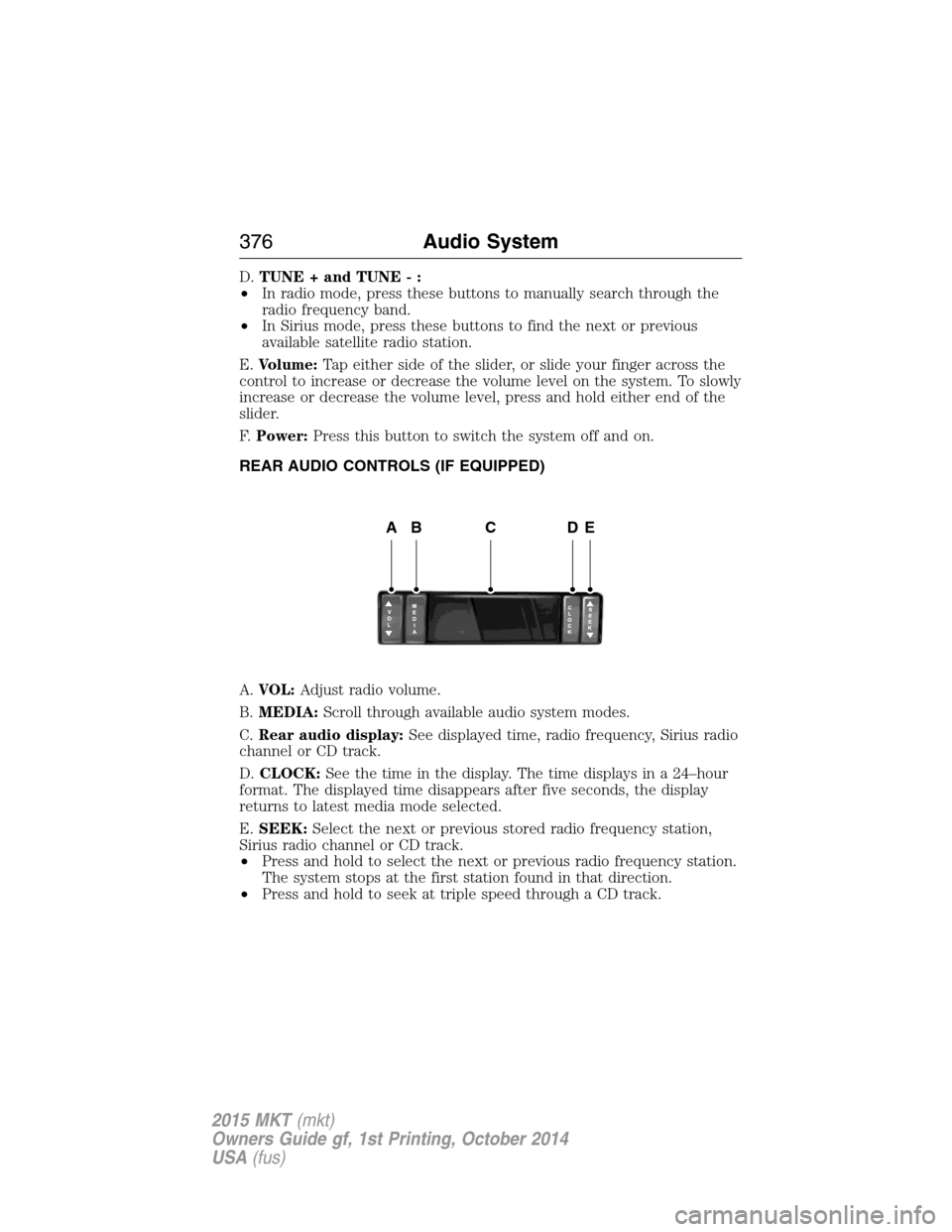
A.VOL:Adjust radio volume.
B.MEDIA:Scroll through available audio system modes.
C.Rear audio display:See displayed time, radio frequency, Sirius radio
channel or CD track.
D.CLOCK:See the time in the display. The time displays in a 24–hour
format. The displayed time disappears after five seconds, the display
returns to latest media mode selected.
E.SEEK:Select the next or previous stored radio frequency station,
Sirius radio channel or CD track.
•Press and hold to select the next or previous radio frequency station.
The system stops at the first station found in that direction.
•Press and hold to seek at triple speed through a CD track.
ABCDE
376Audio System
2015 MKT(mkt)
Owners Guide gf, 1st Printing, October 2014
USA(fus)
Page 381 of 500
SETTINGS
Press to select any of the following:
•Clock
•Display
•Sound
•Vehicle
•Settings
•Help
HOME
Press to access your home screen. Depending on your vehicle’s
option package and software, your screens may vary in
appearance from the descriptions in this section. Your features may also
be limited depending on your market. Check with your authorized dealer
for availability.
INFORMATION
Press to select any of the following:
•SYNC Services
•Sirius Travel Link
•Alerts
•Calendar
•SYNC Apps
If the icon is yellow, seeAlertsin theInformationsection of this
chapter.
The availability of these features is dependent on your vehicle’s option
package, software, and market.
ENTERTAINMENT
Press to select any of the following:
•AM
•FM
•SIRIUS
•CD
•USB
•BT Stereo
•SD Card
•A/V In
380MyLincoln Touch™
2015 MKT(mkt)
Owners Guide gf, 1st Printing, October 2014
USA(fus)
Page 400 of 500
Set Category for Seek/Scanallows you to select a category of music
you would like to search for. You can then choose to either seek or scan
for the stations playing that category.
Parental Lockoutallows you to lock and unlock channels, change or
reset your PIN or unlock all channels. To use this feature, you need your
initial PIN, which is 1234.
Artist/Title/Team Alertsallows you to select Artists, Titles and Teams
that you would like the system to alert you to when they are playing on
other channels. PressEdit Alertsto delete or turn off alerts. You can
also set all alerts to on or off. When an alert appears on the screen, you
can choose to Tune to the channel, to Cancel the alert or to Disable
Alerts. If you are listening to a sporting event, you can save your favorite
teams so that the system can alert you when they are playing on a
satellite radio channel.
Note:Sirius does not support the Alert feature on all channels. Ford
Motor Company shall not be responsible for Alert feature variation.
Electronic Serial Number (ESN)is required when you need to
activate, modify or track your satellite radio account. The ESN is on the
System Information Screen (SR ESN: XXXXXXXXXXXX). To access your
ESN, press the bottom left corner of the touchscreen, thenSIRIUS>
Options.
Direct Tune
Touch this button to manually enter the desired satellite channel
number. TouchEnterwhen you are done.
Browse
Touch this button to view a list of all available stations. Scroll to see
more categories. Touch the station you want to listen to.
TouchSkipif you want to skip this channel.
TouchLockif you do not want anyone to listen to this channel.
TouchTi t l eorArtistto see song and artists on other stations.
MyLincoln Touch™399
2015 MKT(mkt)
Owners Guide gf, 1st Printing, October 2014
USA(fus)
Page 403 of 500

Potential satellite radio reception issues
Station overloadWhen you pass a ground-based
broadcast-repeating tower, a stronger signal
may overtake a weaker one and the audio
system may mute.
Satellite radio signal
interferenceYour display may show ACQUIRING...to
indicate the interference and the audio
system may mute.
Sirius troubleshooting tips
Radio display Condition Possible action
Acquiring... Radio requires more
than two seconds to
produce audio for the
selected channel.No action required.
This message should
disappear shortly.
Sat Fault/SIRIUS
system failure.There is an internal
module or system
failure present.If this message does
not clear shortly, or
with an ignition key
cycle, your receiver
may have a fault. See
your authorized dealer
for service.
Invalid Channel. The channel is no
longer available.Tune to another
channel or choose
another preset.
Unsubscribed Channel. Your subscription does
not include this
channel.Contact Sirius at
1–888–539–7474 to
subscribe to the
channel, or tune to
another channel.
No Signal. The signal is lost from
the Sirius satellite or
Sirius tower to your
vehicle antenna.The signal is blocked.
When you move into
an open area, the
signal should return.
402MyLincoln Touch™
2015 MKT(mkt)
Owners Guide gf, 1st Printing, October 2014
USA(fus)
Page 404 of 500
Sirius troubleshooting tips
Radio display Condition Possible action
Updating. Update of channel
programming in
progress.No action required.
The process may take
up to three minutes.
Call SIRIUS
1–888–539–7474.Your satellite service is
no longer available.Contact Sirius at
1-888-539-7474 to
resolve subscription
issues.
None Found. Check
Channel Guide.All the channels in the
selected channels are
either skipped or
locked.Use the channel guide
to turn off theLock
orSkipfunction on
that station.
Subscription Updated. Sirius has updated the
channels available for
your vehicle.No action required.
CD
Press the lower left corner of the touchscreen, and then select
theCDtab.
You can also advance and reverse the current track or current folder, if
applicable.
Repeat
Touch this button to repeat the currently playing track, all tracks on the
disc or turn the feature off if already on.
Shuffle
Touch this button to play the tracks or entire albums in random order, or
turn the feature off if already on.
Scan
Touch this button to hear a brief sampling of all available tracks.
More Info
Touch this button to see disc information.
MyLincoln Touch™403
2015 MKT(mkt)
Owners Guide gf, 1st Printing, October 2014
USA(fus)
