2015 LINCOLN MKC Back
[x] Cancel search: BackPage 64 of 490

You may have to be closer to the vehicle
than when starting due to ground reflection
and the added noise of the running vehicle.
You can disable or enable the remote start
system through the information display. See
General Information (page 112).
Remote Control Feedback
An LED on the remote control provides status
feedback of remote start or stop commands. Status
LED
Remote start or
extension successful
Solid green
Remote stop
successful; engine off
Solid red
Remote start or stopfailed
Blinking red
Waiting for statusupdate
Blinking green REPLACING A LOST KEY OR
REMOTE CONTROL
Replacement keys or remote controls can
be purchased from an authorized dealer.
Authorized dealers can program remote
controls for your vehicle.
See Passive
Anti-Theft System (page 80).
To re-program the passive anti-theft system
see an authorized dealer.
61
MKC (TME), enUSA Keys and Remote Controls
Page 66 of 490

•
Audio system maximum volume of 45%.
A message will be shown in the display
when you attempt to exceed the limited
volume. Also, the speed-sensitive or
compensated automatic volume control
will be disabled.
• Always on setting. When this is selected,
you will not be able to turn off Advance
Trac (if your vehicle is equipped with this
feature).
CREATING A MYKEY
Use the information display to create a
MyKey:
1. Insert the key you want to program into the
ignition. If your vehicle is equipped with a
push-button start, place the intelligent access
key fob into the backup slot. The location of
your backup slot is in another chapter. See
Starting and Stopping the Engine (page 158).
2. Switch the ignition on. 3. Access the main menu on the information
display controls, and select
Settings then
MyKey by pressing OK or the > button.
4. Press OK or the > button to select Create
MyKey
.
5. When prompted, hold the
OK button until
you see a message informing you to label
this key as a MyKey. The key will be
restricted at the next start.
MyKey is successfully created. Make sure
you label it so you can distinguish it from the
admin keys.
You can also program configurable settings
for the key(s). See Programming/Changing
Configurable Settings
.
Programming/Changing Configurable
Settings
Use the information display to access your
configurable MyKey settings. 1.
Switch the ignition on using an admin key
or fob.
2. Access the main menu on the information
display controls, and select
Settings,
then MyKey by pressing OK or > button.
3. Use the arrow buttons to get to a feature.
4. Press
OK or > to make a selection.
Note: You can clear or change your MyKey
settings at any time during the same key
cycle as you created the MyKey. Once you
have switched the vehicle off, however, you
will need an admin key to change or clear
your MyKey settings.
CLEARING ALL MYKEYS
You can clear or change your MyKey settings
using the information display control on the
steering wheel.
See Information Displays
(page 112).
Switch the ignition on using an admin key or
fob.
63
MKC (TME), enUSA MyKey™
Page 73 of 490

Left-Hand Side
Turn clockwise to lock. Right-Hand Side
Turn counterclockwise to lock.
Opening a Rear Door from Inside
Pull the interior door handle twice to unlock
and open a rear door. The first pull unlocks
the door and the second pull will unlatch the
door.
Activating Intelligent Access
The intelligent access key must be within 3
feet (1 meter) of your vehicle.
At the Front Doors
Pull a front exterior door handle to unlock
and open the door. The unlock sensor is on
the back of the handle. Make sure not to
touch the lock sensor area on the front of
the handle.
Press and hold the lock sensor area for about
a second to lock your vehicle. To avoid
unlocking the door inadvertently, make sure
you only touch the lock sensor and not other
areas of the door handle.
After locking the doors with the lock sensor,
there is a brief delay before you can unlock
your vehicle. This delay lets you pull the
handle to make sure it locked.
Note:
Keep the door handle surface clean
to avoid issues with operation.
At the Liftgate
Press the exterior liftgate release button
inside the top of the liftgate pull-cup handle.
70
MKC (TME), enUSA LocksE180643 E146044
Page 82 of 490

Displaying the Factory-Set Code
Note:
You will need to have two
programmed intelligent access keys for this
procedure.
To display the factory-set code in the
information display: 1. Open the center console lid.
2. Place the first programmed key in the
backup slot.
3. Press the AUTO-START-STOP button
once and wait a few seconds.
4. Press the AUTO-
START-STOP button
again and remove the key. 5. Within ten seconds, insert the second
programmed key into the backup slot,
and then press the AUTO-
START-STOP
button.
The factory-set code will appear in the
information display for a few seconds.
Note: The code may not display until after
any other warning messages first display.
79
MKC (TME), enUSA LocksE170454
Page 90 of 490

AUTOWIPERS (If Equipped)
Note: Fully defrost the windshield before
switching on the windshield wipers.
Note: Make sure you switch off the
windshield wipers before entering a car
wash.
Note: Clean the windshield and wiper blades
if they begin to leave streaks or smears. If
that does not resolve the issue, install new
wiper blades.
Note: If you switch autolamps on in
conjunction with autowipers, your low beam
headlamps will illuminate automatically when
the rain sensor activates the windshield
wipers continuously.
Note: Wet or winter driving conditions with
ice, snow or salty road mist can cause
inconsistent and unexpected wiping or
smearing. In these conditions, you can do the following
to help keep your windshield clear:
•
Lower the sensitivity of the autowipers
to reduce the amount of smearing.
• Switch to normal or high-speed wipe.
• Switch the autowipers off. Highest sensitivity
A
OnB
Lowest sensitivity
C The autowipers feature uses a rain sensor.
You will find it in the area around the interior
mirror. The rain sensor monitors the amount
of moisture on the windshield and
automatically turns on the wipers. It will
adjust the wiper speed by the amount of
moisture that the sensor detects on the
windshield.
Note:
This autowiper feature is automatically
set to on and remains on until you switch it
off in the information display. You can also
switch the feature back on at any time.
See
General Information (page 87).
Use the rotary control to adjust the sensitivity
of the rain sensor. Set the control to low
sensitivity, and the wipers will turn on when
the rain sensor detects a large amount of
moisture on the windshield. Set the control
to high sensitivity, and the wipers will turn
on when the rain sensor detects a small
amount of moisture on the windshield.
87
MKC (TME), enUSA Wipers and WashersA
C
B
E169315
Page 98 of 490

Note:
Tap the lever up or down to make the
direction indicators flash three times to
indicate a lane change.
WELCOME LIGHTING
The Lincoln welcome mat projection lights
are on the bottom of the exterior mirror
housings. They will project an image onto
the ground a short distance from your vehicle
when welcome lighting or lighted entry turns
on.
For auto-fold mirrors, the Lincoln welcome
mat will turn on when welcome lighting or
lighted entry turns on and the mirrors have
been automatically folded in upon locking
or using the switch on the door.
Note: Moisture, frost and ice build-up or
other types of contamination on the surface
of the light lens can cause non-permanent
distortion or reduced brightness of the
image. Do not use abrasive materials to
clean the lens. Note:
If you enable auto-fold and then you
fold the mirrors in manually to the door
window glass, then the welcome mats will
not turn on.
INTERIOR LAMPS
The interior lamps turn on when:
• You open any door.
• You press a remote control button.
• You press switch A on the front interior
lamp.
Front Interior Lamp
Note: Touch switch C to switch the door
function off when you open any door. The
indicator lamp will illuminate amber when
the door function is off. When the door
function is off and you open a door, the
courtesy and door lamps will stay off. Touch
switch C again to switch the door function
back on. The indicator lamp will illuminate
blue when the door function is on. When the
door function is on and you open a door, the
courtesy and door lamps will switch on. A. Left-hand side map lamp switch.
B. All lamps on switch.
C.
Door function switch.
D. Right-hand side map lamp switch.
95
MKC (TME), enUSA LightingE176210
Page 100 of 490

POWER WINDOWS
WARNINGS
Do not leave children unattended in
your vehicle and do not let them play
with the power windows. They may seriously
injure themselves. When closing the power windows, you
should verify they are free of
obstructions and make sure that children and
pets are not in the proximity of the window
openings. Note:
You may hear a pulsing noise when
just one of the windows is open. Lower the
opposite window slightly to reduce this
noise.
Press the switch to open the window.
Lift the switch to close the window.
One-Touch Down
Press the switch fully and release it. Press
again or lift it to stop the window.
One-Touch Up
Lift the switch fully and release it. Press or
lift it again to stop the window.
Bounce-Back
The window will stop automatically while
closing. It will reverse some distance if there
is an obstacle in the way. Overriding the Bounce-Back Feature WARNING
When you override the bounce-back
feature the window will not reverse if
it detects an obstacle. Take care when
closing the windows to avoid personal injury
or damage to your vehicle. Pull up the window switch and hold within
two seconds of the window reaching the
bounce-back position. The window will travel
up with no bounce-back protection. The
window will stop if you release the switch
before the window closes fully.
97
MKC (TME), enUSA Windows and MirrorsE146043
Page 104 of 490
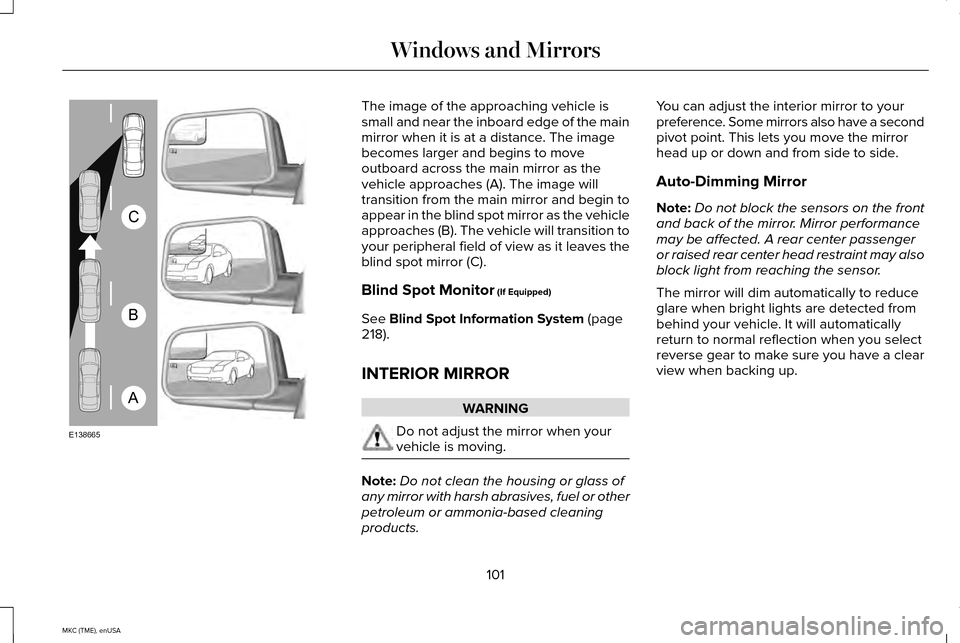
The image of the approaching vehicle is
small and near the inboard edge of the main
mirror when it is at a distance. The image
becomes larger and begins to move
outboard across the main mirror as the
vehicle approaches (A). The image will
transition from the main mirror and begin to
appear in the blind spot mirror as the vehicle
approaches (B). The vehicle will transition to
your peripheral field of view as it leaves the
blind spot mirror (C).
Blind Spot Monitor (If Equipped)
See
Blind Spot Information System (page
218).
INTERIOR MIRROR WARNING
Do not adjust the mirror when your
vehicle is moving.
Note:
Do not clean the housing or glass of
any mirror with harsh abrasives, fuel or other
petroleum or ammonia-based cleaning
products. You can adjust the interior mirror to your
preference. Some mirrors also have a second
pivot point. This lets you move the mirror
head up or down and from side to side.
Auto-Dimming Mirror
Note:
Do not block the sensors on the front
and back of the mirror. Mirror performance
may be affected. A rear center passenger
or raised rear center head restraint may also
block light from reaching the sensor.
The mirror will dim automatically to reduce
glare when bright lights are detected from
behind your vehicle. It will automatically
return to normal reflection when you select
reverse gear to make sure you have a clear
view when backing up.
101
MKC (TME), enUSA Windows and MirrorsA
B
C
E138665