2015 LINCOLN MKC Drive
[x] Cancel search: DrivePage 344 of 490

TECHNICAL SPECIFICATIONS
Ford part number / Ford specification
Ford part name or equivalent
Capacity
Item
PM-20 / WSS-M6C65-A2
Motorcraft High Performance DOT
4 LV Motor Vehicle Brake Fluid
Between MIN and MAX
on reservoir
Brake fluid 1
XL-5
Multi-Purpose Grease spray
(lithium grease)
–
Door latch, hood latch, auxiliary
hood latch, trunk latch, seat tracks
XL-1 (U.S.) / None
Motorcraft Penetrating and Lock
Lubricant (U.S.)
–
Lock cylinder
CXC-51-A (Canada) / None
Motorcraft Penetrating fluid
(Canada)
XT-10-QLVC
Motorcraft MERCON LV
9.0 qt (8.5 L)
Automatic transmission fluid 2, 3
WSS-M2C938-A
XY-80W90-QL /
Motorcraft SAE 80W-90 Premium
Rear Axle Lubricant
2.4 pt (1.15L)
Rear differential fluid (All Wheel
Drive) WSP-M2C197-A
XY-75W140-QL / WSL-M2C192-A
Motorcraft SAE 75W-140 Synthetic
Rear Axle Lubricant
18 fl oz (0.53 L)
Power transfer unit fluid (All Wheel
Drive) 4
XO-5W30-QSP or XO-5W30-QFS (U.S.) /WSS-M2C946-A
Motorcraft SAE 5W-30 Premium
Synthetic Blend Motor Oil orMotorcraft SAE 5W-30 Full Synthetic Motor Oil
5.7 qt (5.4 L)
Engine oil 5,6,7
2.0L EcoBoost CXO-5W30-LSP12 or CXO-5W30-LFS12(Canada) / WSS-M2C946-A
341
MKC (TME), enUSA Capacities and Specifications
Page 355 of 490
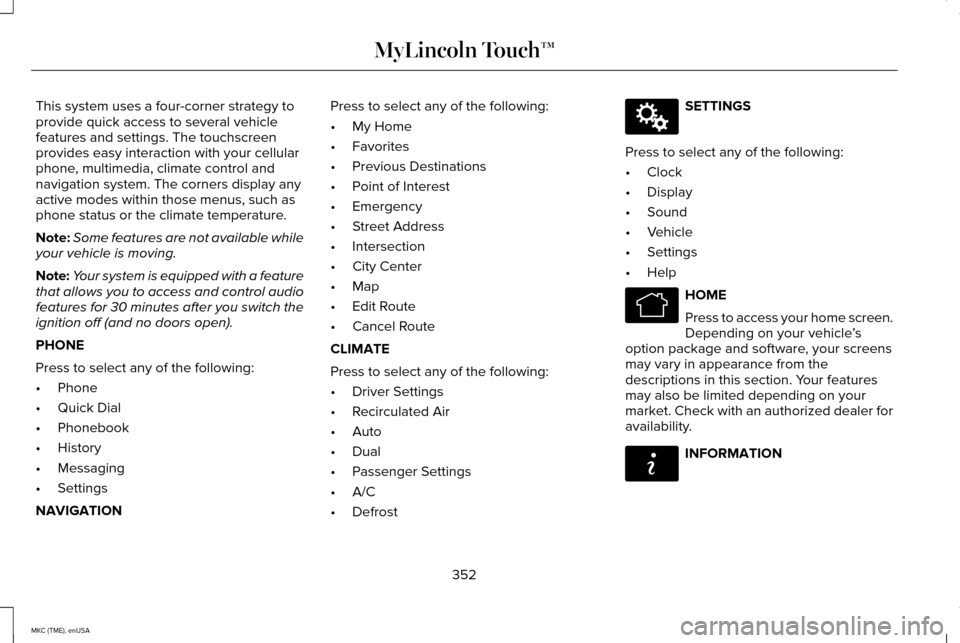
This system uses a four-corner strategy to
provide quick access to several vehicle
features and settings. The touchscreen
provides easy interaction with your cellular
phone, multimedia, climate control and
navigation system. The corners display any
active modes within those menus, such as
phone status or the climate temperature.
Note:
Some features are not available while
your vehicle is moving.
Note: Your system is equipped with a feature
that allows you to access and control audio
features for 30 minutes after you switch the
ignition off (and no doors open).
PHONE
Press to select any of the following:
• Phone
• Quick Dial
• Phonebook
• History
• Messaging
• Settings
NAVIGATION Press to select any of the following:
•
My Home
• Favorites
• Previous Destinations
• Point of Interest
• Emergency
• Street Address
• Intersection
• City Center
• Map
• Edit Route
• Cancel Route
CLIMATE
Press to select any of the following:
• Driver Settings
• Recirculated Air
• Auto
• Dual
• Passenger Settings
• A/C
• Defrost SETTINGS
Press to select any of the following:
• Clock
• Display
• Sound
• Vehicle
• Settings
• Help HOME
Press to access your home screen.
Depending on your vehicle
’s
option package and software, your screens
may vary in appearance from the
descriptions in this section. Your features
may also be limited depending on your
market. Check with an authorized dealer for
availability. INFORMATION
352
MKC (TME), enUSA MyLincoln Touch™E142607 E142613 E142608
Page 385 of 490

In order to provide the best possible
experience, use the contact form to report
any station issues found while listening to a
station broadcasting with HD Radio
technology. Independent entities own and
operate each station. These stations are
responsible for ensuring all audio streams
and data fields are accurate. Potential station issues
Action
Cause
Issues
No action required. This is a broadcast issue.
This is poor time alignment by the radio
broadcaster.
Echo, stutter, skip or repeat in audio.
Increase or decrease in audio volume.
No action required. The reception issue may
clear up as you continue to drive.
The radio is shifting between analog and
digital audio.
Sound fading or blending in and out.
No action required. This is normal behavior.
Wait until the audio is available.
The digital multicast is not available until the
HD Radio broadcast is decoded. Once
decoded, the audio is available.
There is an audio mute delay when selecting
HD2 or HD3, multicast preset or Direct Tune.
No action required. The station is not available
in your current location.
The previously stored multicast preset or
direct tune is not available in your current
reception area.
Cannot access HD2 or HD3 multicast channel
when recalling a preset or from a direct tune.
Fill out the station issue form at website listed
below.*
Data service issue by the radio broadcaster.
Text information does not match currently
playing audio.
382
MKC (TME), enUSA MyLincoln Touch™
Page 394 of 490

"CD"
"Shuffle off " "Help"
* This applies to WMA or MP3 files only.
SD Card Slot and USB Port
SD Card
Note: Your SD card slot is spring-loaded. To
remove the SD card, press the card in and
the system ejects it. Do not attempt to pull
the card to remove it as this could cause
damage.
Note: The navigation system also uses this
card slot. See Navigation (page 418). The SD card slot is under a small access door
at the front of the floor console. To access
and play music from your device, press the
lower left corner of the touchscreen, and
then select
SD Card from the list on the left
side of the screen. SD
logo is a trademark of SD-3C, LLC. USB Port
The USB ports are under a small access door
at the front of the floor console. To access
and play music from your device, press the
lower left corner of the touchscreen, and
then select
USB from the list on the left side
of the screen.
This feature allows you to plug in media
playing devices, memory sticks, flash drives
or thumb drives, and charge devices if they
support this feature.
Playing Music from Your Device
Note: The system is capable of indexing up
to 30,000 songs.
391
MKC (TME), enUSA MyLincoln Touch™E175710 E142620 E175711
Page 397 of 490

"BROWSE"
"Folder
"Playlist
"Podcast
Supported Media Players, Formats and
Metadata Information
SYNC is capable of hosting nearly any digital
media player, including iPod, Zune, plays
from device players, and most USB drives.
Supported audio formats include MP3, WMA,
WAV and AAC.
It is also able to organize your indexed media
from your playing device by metadata tags.
Metadata tags, which are descriptive
software identifiers embedded in the media
files, provide information about the file. If your indexed media files contain no
information embedded in these metadata
tags, SYNC may classify the empty metadata
tags as Unknown.
Bluetooth Audio
Your system allows you to stream audio over
your vehicle's speakers from your connected,
Bluetooth-enabled cellular phone. To access, press the lower left
corner on the touchscreen, then
select the
BT Stereo tab.
Bluetooth Audio Voice Commands If you are listening to a Bluetooth
audio device, press the voice
button on the steering wheel
control. When prompted, say "Next song",
"Pause", "Play" or "Previous song".
If you are not listening to a Bluetooth audio
device, press the voice button and, after the
tone, say "Next song", "Pause", "Play" or
"Previous song". Line In (Auxiliary Input Jack) WARNINGS
Driving while distracted can result in
loss of vehicle control, crash and injury.
We strongly recommend that you use
extreme caution when using any device that
may take your focus off the road. Your
primary responsibility is the safe operation
of your vehicle. We recommend against the
use of any handheld device while driving and
encourage the use of voice-operated
systems when possible. Make sure you are
aware of all applicable local laws that may
affect the use of electronic devices while
driving. For safety reasons, do not connect or
adjust the settings on your portable
music player while your vehicle is moving.
394
MKC (TME), enUSA MyLincoln Touch™E142611 E142599
Page 407 of 490

Under the Information menu, you can access
features such as:
•
SYNC Services
• Sirius Travel Link
• Alerts
• Calendar
• SYNC Applications If your vehicle is equipped with
Navigation, press the Information
button to access these features. If
your vehicle is not equipped with Navigation,
press the corner of the touchscreen with the
green tab.
SYNC Services (If Equipped, United
States Only)
Note: SYNC Services varies by trim level and
model year and may require a subscription.
Traffic alerts and turn-by-turn directions
available in select markets. Message and
data rates may apply. Ford Motor Company
reserves the right to change or discontinue
this product service at any time without prior
notification or incurring any future obligation. Note:
SYNC Services requires activation
before use. Visit www.SYNCMyRide.com to
register and check your eligibility for
complimentary services. Standard phone
and message rates may apply. Subscription
may be required. You must also have the
active SYNC Services Bluetooth-enabled
cellular phone paired and connected to the
system in order to connect to, and use, SYNC
Services. See Phone (page 396).
Note: This feature does not function properly
if you have enabled caller ID blocking on
your cellular phone. Make sure your cellular
phone is not blocking caller ID before using
SYNC Services. Note:
The driver is ultimately responsible for
the safe operation of the vehicle, and
therefore, must evaluate whether it is safe
to follow the suggested directions. Any
navigation features provided are only an aid.
Make your driving decisions based on your
observations of local conditions and existing
traffic regulations. Do not follow the route
suggestions if doing so would result in an
unsafe or illegal maneuver, if you would be
placed in an unsafe situation, or if you would
be directed into an area that you consider
unsafe. Maps used by this system may be
inaccurate because of errors, changes in
roads, traffic conditions or driving conditions.
404
MKC (TME), enUSA MyLincoln Touch™E142608
Page 418 of 490

Power: Touch to switch the system off and on. When the system is off, outside air cannot enter your vehicle.
A
Passenger settings: Depending on your vehicle and option package, you may have the following features: Touch DUAL to switch
on or off the ability to control the passenger side temperature separate\
ly. When switched off, the passenger side temperature will
always agree with the driver’ s temperature setting. Touch the
+ and - to adjust the temperature. Touch the heated seat icon to
control the heated seat (if equipped). Touch the cooled seat icon to control the cooled seat (if equipped). See Seats (page 141).
B
Fan speed: Touch + or - to increase or decrease the volume of air circulated in your vehicle. All fan indicators will turn off whenever
the fan speed is automatically controlled.
C
415
MKC (TME), enUSA MyLincoln Touch™E171848
K
Page 419 of 490

Recirculated air: Touch the button to switch between outside air and recirculated air. When you select recirculated air, the button
illuminates and the air currently in the passenger compartment recircula\
tes. This may reduce the time needed to cool the interior
(when used with A/C) and may reduce unwanted odors from entering your \
vehicle. Recirculated air may turn off automatically (or
be prevented from turning on) in all airflow modes except MAX A/C to reduce the possibility of fogging.
D
MAX A/C:
Touch to switch on. The system distributes recirculated air through the i\
nstrument panel air vents, the air conditioning
automatically turns on, the driver and passenger temperatures are set to\
LO and the fan speed adjusts to the highest speed. This
re-cooling of the interior is more economical and efficient than normal \
A/C.
E
A/C:
Touch to turn air conditioning on or off. To improve air conditioning when starting your vehicle, drive with the windows slightly
open for two to three minutes. Use A/C with recirculated air to improve \
cooling performance and efficiency. In certain conditions,
the air conditioning compressor may still operate even though the A/C bu\
tton is off.
F
AUTO:
Touch to turn on fully automatic operation. Select the desired temperatur\
e using the temperature control. The system
automatically adjusts fan speed, air distribution, A/C operation, and ou\
tside or recirculated air, to heat or cool the vehicle to maintain
the selected temperature.
G
Rear defrost:
Touch to switch the rear window defroster and heated mirrors (if equippe\
d) on or off.
H
MAX defrost:
Touch to clear the windshield of fog and thin ice. The driver and passenger temperatures set to HI, outside air
distributes through the windshield vents, the air conditioning automatic\
ally turns on and the fan automatically adjusts to the highest
speed. The heated rear window automatically turns on when you switch on \
MAX defrost and you will be unable to select recirculated
air (to prevent fogging).
I
416
MKC (TME), enUSA MyLincoln Touch™