Page 529 of 878
5293-4. Using the audio system
3
Interior features
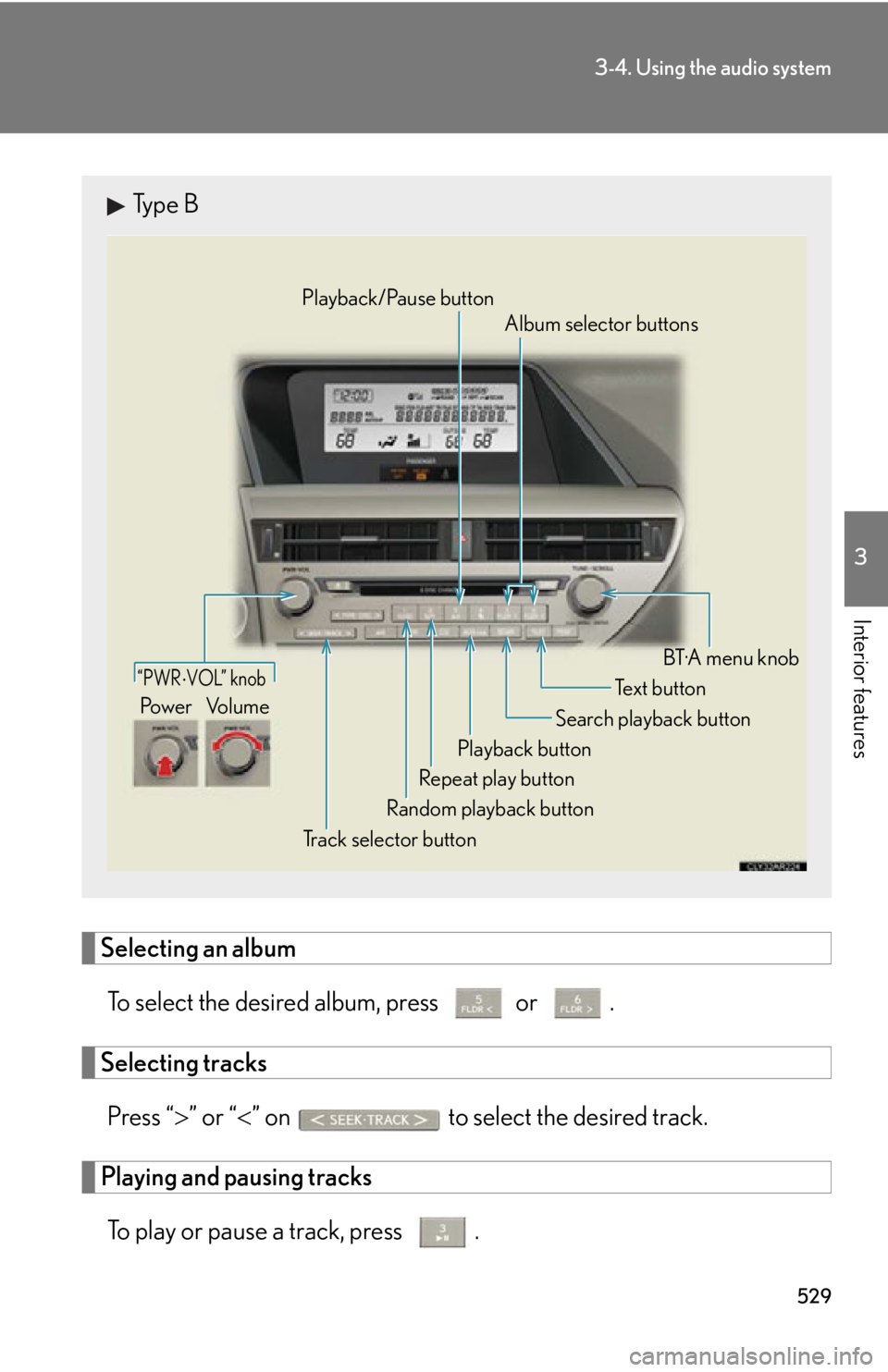
Selecting an album
To select the desired album, press or .
Selecting tracks
Press “ ” or “ ” on to select the desired track.
Playing and pausing tracks
To play or pause a track, press . Type B
“PWR VOL” knob
Track selector button Playback button Search playback button
Random playback button Repeat play button Te x t b u t t o n
Pow e r Vo l u m e Playback/Pause button
Album selector buttons
BT·A menu knob
Page 597 of 878
5973-7. Other interior features
3
Interior features Clock
■
The clock is displayed when
The clock is displayed when the “POWER” switch is in ACCESSORY or ON
mode.
■
When the 12-volt battery is disconnected
The time display will automatically be set to 1:00.The clock can be adjusted by pressing the buttons.
With a navigation system
Refer to the “Navigation System Owner’s Manual”.
With the Lexus Display Audio system
Adjusts the hours
Adjusts the minutes
Without a navigation system or the Lexus Display Audio system
Adjusts the hours
Adjusts the minutes
Page 613 of 878
6133-7. Other interior features
3
Interior features
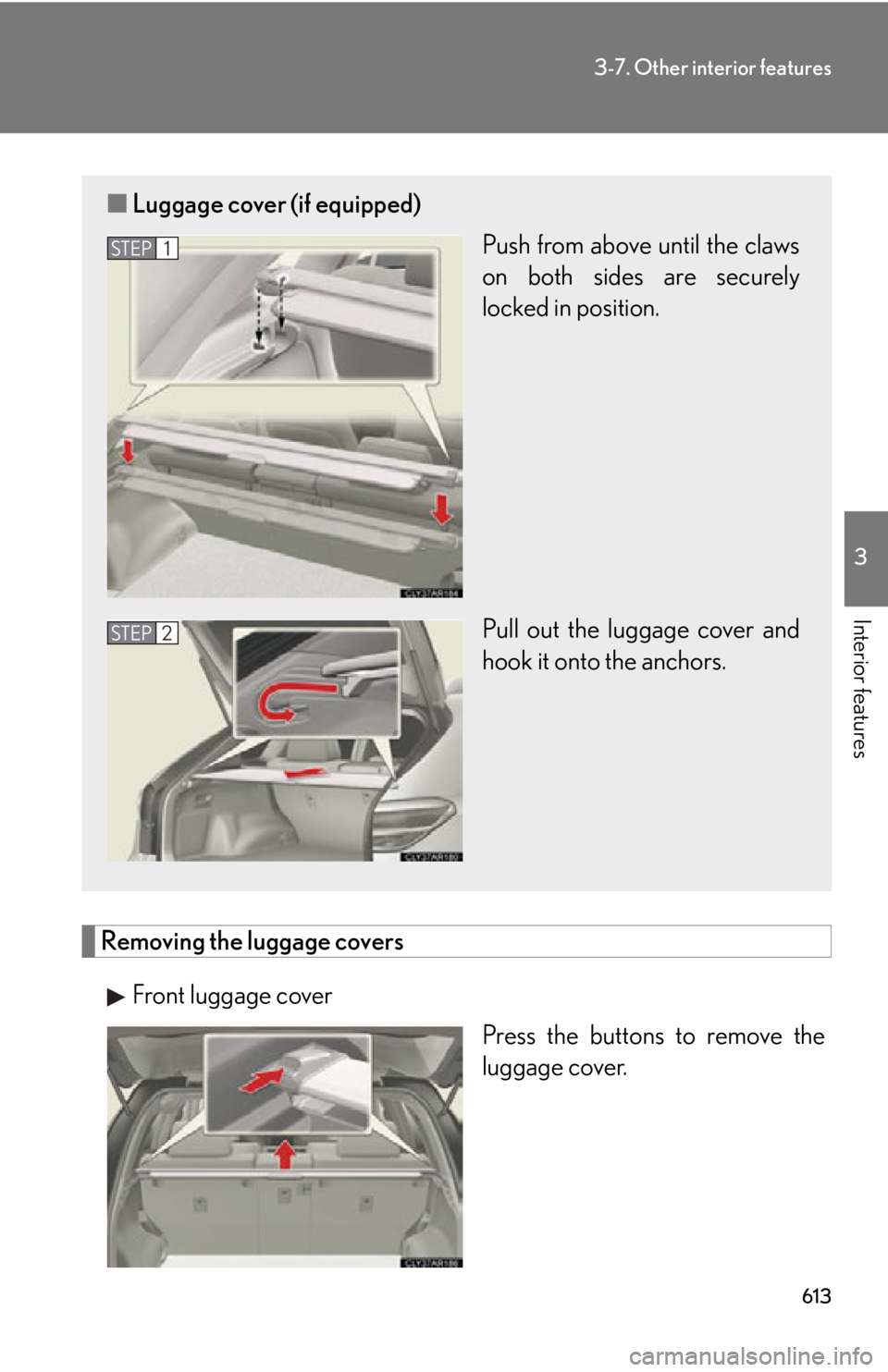
Removing the luggage covers
Front luggage cover
Press the buttons to remove the
luggage cover.■ Luggage cover (if equipped)
Push from above until the claws
on both sides are securely
locked in position.
Pull out the luggage cover and
hook it onto the anchors. STEP 1
STEP 2
Page 616 of 878
6163-7. Other interior features
Garage door opener The garage door opener (HomeLink
Universal Transceiver) is manufactured
under license from HomeLink
.
Programming the HomeLink
(for U.S.A. owners)
The HomeLink
compatible transceiver in your vehicle has 3 buttons
which can be programmed to operate 3 different devices. Refer to the
programming method below appropriate for the device.
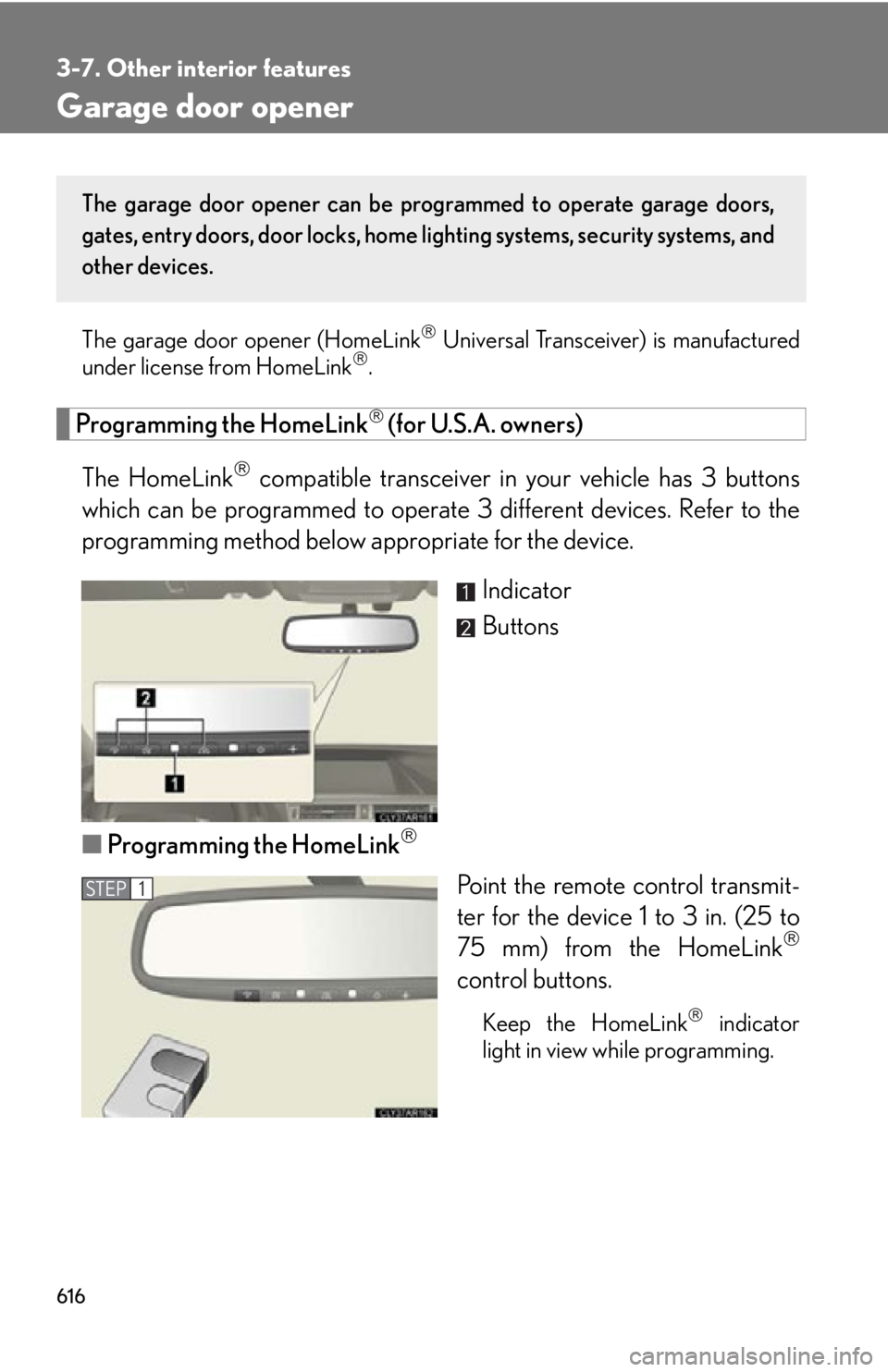
Indicator
Buttons
■ Programming the HomeLink
Point the remote control transmit-
ter for the device 1 to 3 in. (25 to
75 mm) from the HomeLink
control buttons.
Keep the HomeLink
indicator
light in view while programming.The garage door opener can be pr ogrammed to operate garage doors,
gates, entry doors, door locks, home lighting systems, security systems, and
other devices.
STEP 1
Page 617 of 878
6173-7. Other interior features
3
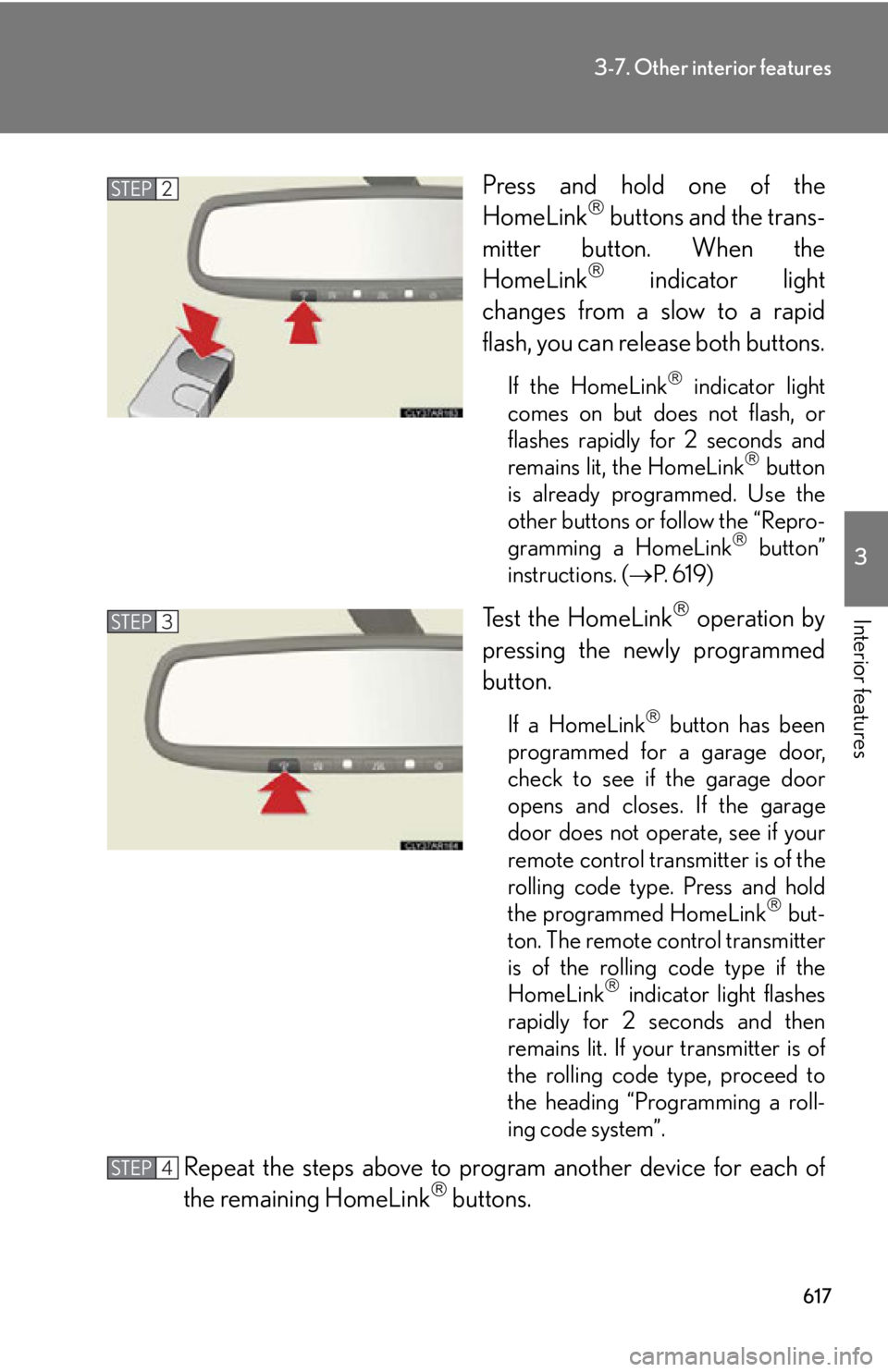
Interior features Press and hold one of the
HomeLink
buttons and the trans-
mitter button. When the
HomeLink
indicator light
changes from a slow to a rapid
flash, you can release both buttons. If the HomeLink
indicator light
comes on but does not flash, or
flashes rapidly for 2 seconds and
remains lit, the HomeLink
button
is already programmed. Use the
other buttons or follow the “Repro-
gramming a HomeLink
button”
instructions. ( P. 6 1 9 )
Test the HomeLink
operation by
pressing the newly programmed
button. If a HomeLink
button has been
programmed for a garage door,
check to see if the garage door
opens and closes. If the garage
door does not operate, see if your
remote control transmitter is of the
rolling code type. Press and hold
the programmed HomeLink
but-
ton. The remote control transmitter
is of the rolling code type if the
HomeLink
indicator light flashes
rapidly for 2 seconds and then
remains lit. If your transmitter is of
the rolling code type, proceed to
the heading “Programming a roll-
ing code system”.
Repeat the steps above to program another device for each of
the remaining HomeLink
buttons.STEP 2
STEP 3
STEP 4
Page 618 of 878

6183-7. Other interior features
■ Programming a Rolling Code system (for U.S.A. owners)
If your device is Rolling Code eq uipped, follow the steps under the
heading “Programming the HomeLink
” before proceeding with the
steps listed below.
Locate the learn button on th e ceiling mounted garage door
opener motor. The exact location and color of the button may
vary by brand of garage door opener motor. Refer to the operation manual supplied with the garage door opener
for the location of the learn button.
Press the learn button. Following this step, you have 30 se conds in which to initiate step 3
below.
Press and hold the vehi cle’s programmed HomeLink
button for
2 seconds and release it. Repeat this step once again. The garage
door may open. If the garage door opens, the programming process is complete. If the
door does not open, press and release the button a third time. This third
press and release will complete the programming process by opening
the garage door.
The ceiling mounted garage door op ener motor should now recognize
the HomeLink
signal and operate the garage door.
Repeat the steps above to prog ram another rolling code system
for any of the remaining HomeLink
buttons.
■ Programming an entry gate (for U .S.A. owners)/Programming all
devices in the Canadian market
Place your transmitter 1 to 3 in. (25 to 75 mm) away from the sur-
face of the HomeLink
.
Keep the HomeLink
indicator light in view while programming.
Press and hold the selected HomeLink
button.
Repeatedly press and release (cyc le) the device’s remote control
button for two seconds each until step 4 is completed.
When the indicator light on the HomeLink
compatible trans-
ceiver starts to flash rapidly, release the buttons.STEP 1
STEP 2
STEP 3
STEP 4
STEP 1
STEP 2
STEP 3
STEP 4
Page 619 of 878
6193-7. Other interior features
3
Interior features Test the operation of the HomeLink
by pressing the newly pro-
grammed button. Check to see if the gate/device operates cor-
rectly.
Repeat the steps above to program another device for each of
the remaining HomeLink
buttons.
■ Programming other devices
To program other devices such as home security systems, home door
locks or lighting, contact your auth orized Lexus dealer for assistance.
■ Reprogramming a button
The individual HomeLink
buttons cannot be erased but can be
reprogrammed. To reprogram a button, follow the “Reprogramming a
HomeLink
button” instructions.
Operating HomeLink
Press the appropriate HomeLink
button. The HomeLink
indicator
light should turn on. The HomeLink
compatible transceiver in your vehicle continues to send a
signal for up to 20 seconds as long as the button is pressed.
Reprogramming a HomeLink
button
Press and hold the desired HomeLink
button. After 20 seconds, the
HomeLink
indicator light will st art flashing slowly. Next, while still press-
ing and holding the HomeLink
button, press and hold the button on the
transmitter until the HomeLink
indicator light chan ges from a slow to a
rapid flash. STEP 5
STEP 6
Page 868 of 878

866Alphabetical index
I/M test ...................................................... 647
Identification
Electric motor ..................................... 800
Engine .................................................... 800
Vehicle .................................................... 799
Ignition switch........................................... 177
Illuminated entry system ....................582
Immobilizer system ............................... 124
Indicator lights......................................... 201
Initialization
Items to initialize ................................. 837
Inside rear view mirror ........................ 107
Instrument panel light control
buttons .................................................... 198
Interior lights
Interior lights.........................................582
Switch ......................................................583
Wattage................................................. 809
iPod* ................................................. 391, 501
Jack
Positioning a floor jack.................... 652
Vehicle-equipped jack ................... 764
Jack handle .............................................. 764 Keyless entry ............................................. 69
Keys
Electronic key .......................................... 51
If the electronic key does not
operate properly.............................. 781
If you lose your keys ........................ 780
Key number............................................... 51
Keyless entry............................................69
Keys............................................................... 51
Mechanical key ......................................52
“POWER” switch .................................177
Wireless remote control key...........69
Lexus Display Audio controller...... 328
Lexus Display Audio system............ 328
Lexus Enform with
Safety Connect*
Light bulbs
Replacing .............................................. 708
Wattage .................................................809
Lights
Door courtesy lights ........................ 582
Emergency flasher switch.............. 724
Fog light switch .....................................221
Hazard light switch ........................... 724
Headlight switch ...................................217
Interior light switch ........................... 583
Luggage compartment light ........... 77
Outer foot lights................................. 582
Overhead courtesy light ............... 582
Personal light switch ........................ 583
Replacing light bulbs ....................... 708
Scuff lights ............................................. 582I
J K
L
Page:
< prev 1-8 9-16 17-24