Page 773 of 878
7725-2. Steps to take in an emergency
Lower the vehicle.
Firmly tighten each wheel nut two
or three times in the order shown
in the illustration. Tightening torque:
76 ft•lbf (103 N•m, 10.5 kgf•m)
Stow the flat tire, tire jack and all tools.STEP 3
STEP 4
■
The compact spare tire ●
The compact spare tire is identified by the label “TEMPORARY USE ONLY”
on the tire sidewall.
Use the compact spare tire temporarily, and only in an emergency.●
Make sure to check the tire inflatio n pressure of the compact spare tire.
( P. 8 0 7 )■
When using the compact spare tire
As the compact spare tire is not equipped with a tire pressure warning valve and
transmitter, low inflation pressure of the spare tire will not be indicated by the tire
pressure warning system. Also, if you repl ace the compact spare tire after the tire
pressure warning light comes on, the light remains on. STEP 5
Page 774 of 878

5
When trouble arises
7735-2. Steps to take in an emergency
■
If you have a flat front tire on a road covered with snow or ice (vehicles with a
compact spare tire)
Install the compact spare tire on one of the rear wheels of the vehicle. Perform the
following steps and fit tire chains to the front tires:
Replace a rear tire with the compact spare tire.
Replace the flat front tire with the tire removed from the rear of the vehi-
cle.
Fit tire chains to the front tires.■
After completing the tire change
The tire pressure warning system must be reset. ( P. 6 7 1 )
CAUTION■
Using the tire jack
Improper use of the tire jack may cause the vehicle to suddenly fall off the jack,
leading to death or serious injury. ●
Do not use the tire jack for any purpose other than replacing tires or installing and
removing tire chains.●
Only use the tire jack that comes with this vehicle for replacing a flat tire.
Do not use it on other vehicles, and do no t use other tire jacks for replacing tires
on this vehicle.●
Always check that the tire jack is securely set to the jack point.●
Do not put any part of your body under the vehicle while it is supported by the
jack.●
Do not start or run the hybrid system while your vehicle is supported by the jack.●
Do not raise the vehicle while someone is inside.●
When raising the vehicle, do not put an object on or under the jack.
●
Do not raise the vehicle to a height greate r than that required to replace the tire.
●
Use a jack stand if it is necessary to get under the vehicle.
Take particular care when lowering the vehicle to ensure that no one working on or
near the vehicle may be injured. STEP 1
STEP 2
STEP 3
Page 777 of 878

7765-2. Steps to take in an emergency
NOTICE■
Do not drive the vehicle with a flat tire
Do not continue driving with a flat tire.
Driving even a short distance with a flat tire can damage the tire and the wheel
beyond repair.■
Be careful when driving over bumps with the compact spare tire installed on the
vehicle.
The vehicle becomes lower when driving with the compact spare tire compared to
when driving with standard tires. Be careful when driving over uneven road sur-
faces.■
Driving with tire chains and the compact spare tire
Do not fit tire chains to the compact spare tire.
Tire chains may damage the vehicle body and adversely affect driving performance.■
When replacing the tires
When removing or fitting the wheels, tire s or the tire pressure warning valve and
transmitter, contact your Lexus dealer as the tire pressure warning valve and trans-
mitter may be damaged if not handled correctly.■
To avoid damage to the tire pressure warning valves and transmitters
When a tire is repaired with liquid seal ants, the tire pressure warning valve and
transmitter may not operate properly. If a liquid sealant is used, contact your Lexus
dealer or other qualified service shop as so on as possible. Make sure to replace the
tire pressure warning valve and transmitter when replacing the tire. ( P. 6 7 1 )
Page 819 of 878

8186-1. Specifications
■ Traction AA, A, B, C
The traction grades, from highest to lowest, are AA, A, B and C, and
they represent the tire's ability to stop on wet pavement as measured
under controlled condit ions on specif ied government test surfaces of
asphalt and concrete. A tire marked C may have poor traction performance.
Warning: The traction grade assigned to this tire is based on braking
(straight ahead) traction tests and does not include cornering (turning) trac-
tion.
■ Temperature A, B, C
The temperature grades are A (the highest), B, and C, representing
the tire's resistance to the generation of heat and its ability to dissipate
heat when tested under controlled conditions on a specified indoor
laboratory test wheel. Sustained high temperature can cause the material of the tire to degenerate
and reduce tire life, and excessive temperature can lead to sudden tire fail-
ure.
The grade C corresponds to a level of performance which all passenger car
tires must meet under the Federal Mo tor Vehicle Safety Standard No. 109.
Grades B and A represent higher levels of performance on the laboratory
test wheel than the minimum required by law.
Warning: The temperature grades for this tire are established for a tire that
is properly inflated and not overloaded.
Excessive speed, underinflation, or excess ive loading, either separately or in
combination, can cause heat buildup and possible tire failure.
Page 829 of 878
8286-2. Customization
Smart access system with push-button start and wireless remote control
(
P. 56, 69) Function Default
setting Custom-
ized
setting
Operation buzzer
volume Level 7 Off to level
6 O —
O —
O O
Operation signal
(buzzer) On Off O —
O —
O O
Operation signal
(emergency flash-
ers) On Off O —
O —
O O
Open door warning
buzzer On Off — — — — —
O
Time elapsed before
the automatic door
lock function is acti-
vated if a door is not
opened after being
unlocked 60 sec-
onds Off
O —
O —
O O30 sec-
onds
120 sec-
onds
Smart door unlock-
ing Driver’s
door All the
doors O —
O —
O O
Smart access sys-
tem with push-but-
ton start On Off O —
O —
O O
Page 837 of 878
8366-2. Customization
Multi-information display ( P. 206)
Settings that can be changed usin g the multi-information switchesAvailable languages English, French and Spanish
Available units miles (MPG), km (km/L), km (L/100 km)■
In the following situations, customize mo de will automatically be turned off.●
A warning message appears after the customize mode screen is displayed.●
The “POWER” switch is turned off.●
The vehicle begins to move while the customize mode screen is displayed.
CAUTION■
Cautions during customization
As the hybrid system needs to be operatin g during customization, ensure that the
vehicle is parked in a place with adequate ventilation. In a closed area such as a
garage, exhaust gases including harmful carbon monoxide (CO) may collect and
enter the vehicle. This may lead to death or a serious health hazard.
NOTICE■
During customization
To prevent 12-volt battery discharge, ensure that the hybrid system is operating
while customizing features.
Page 839 of 878
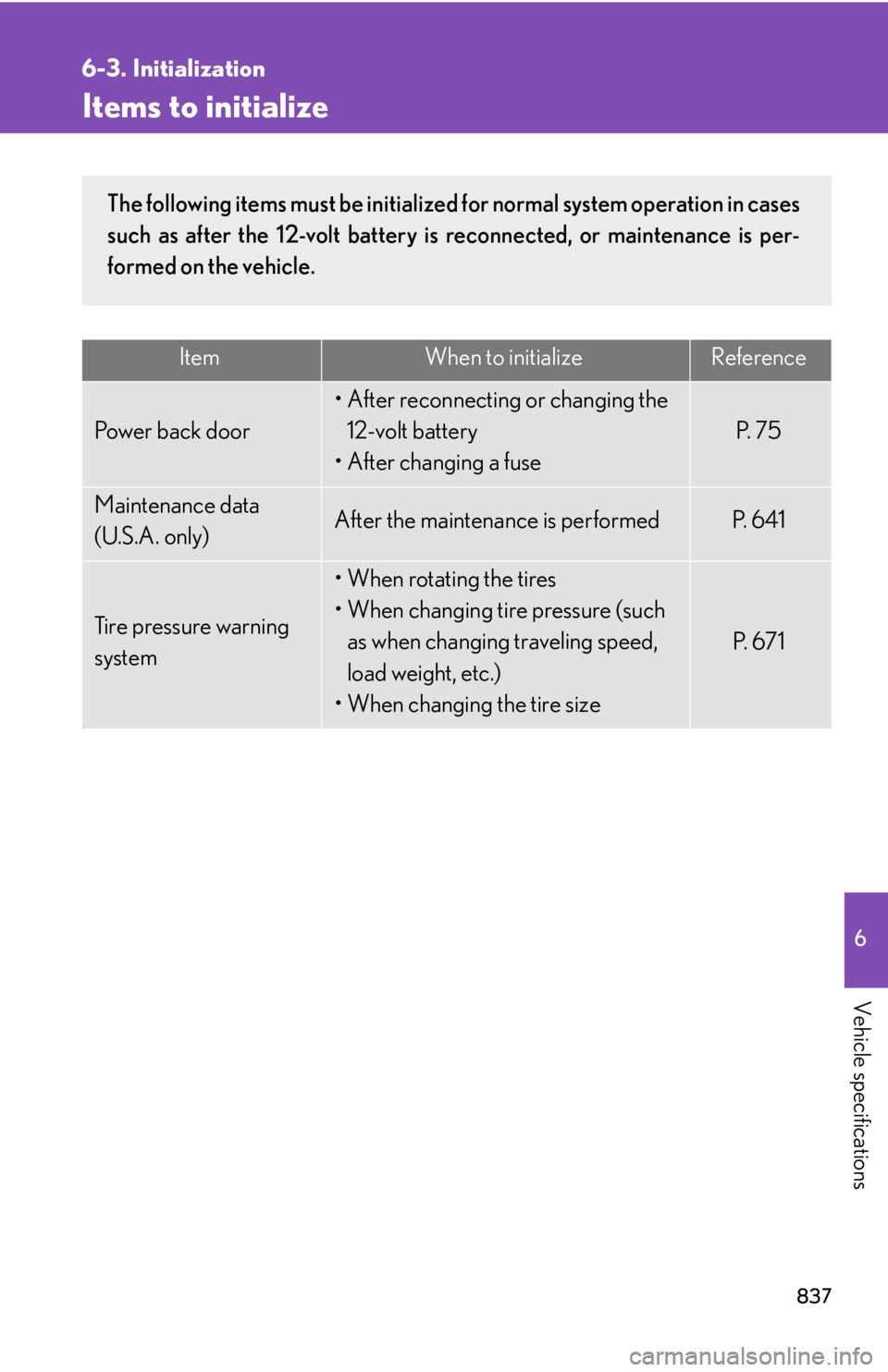
8376
Vehicle specifications 6-3. Initialization
Items to initialize Item When to initialize Reference
Power back door • After reconnecting or changing the
12-volt battery
• After changing a fuse P. 7 5
Maintenance data
(U.S.A. only) After the maintenance is performed P. 6 4 1
Tire pressure warning
system • When rotating the tires
• When changing tire pressure (such
as when changing traveling speed,
load weight, etc.)
• When changing the tire size P. 6 7 1The following items must be initialized for normal system operation in cases
such as after the 12-volt battery is reconnected, or maintenance is per-
formed on the vehicle.
Page 861 of 878
859Abbreviation list
PCS Pre-Collision System
PWR Po w e r
RF Radio Frequency
SRS Supplemental Restraint System
TIN Tire Identification Number
TPMS Tire Pressure Warning System
TRAC Traction Control
TWR Trailer Weight Rating
VDIM Vehicle Dynamics Integrated Management
VIN Vehicle Identification Number
VSC Vehicle Stability ControlABBREVIATIONS MEANING