Page 423 of 886

4233-3. Using the Lexus Display Audio system
3
Interior features Repeat play
Each time is selected, the mode changes in the following order:
■
When using the Bluetooth ®
audio system●
In the following conditions, the system may not function.
• If the portable audio player is turned off
• If the portable audio player is not connected
• If the portable audio player’s battery is low
• If the portable player is behind the se at or in the glove box or console box
• If metal is covering or touching the portable player●
There may be a delay if phone connecti on is carried out during Bluetooth ®
audio play.●
Depending on the type of portable audio player that is connected to the system,
operation may differ slightly and ce rtain functions may not be available.■
Bluetooth ®
antenna
The antenna is built into the display. If the portable audio player is behind the seat or
in the glove box or console box, or is touching or covered by metal objects, connec-
tion status may deteriorate.■
Battery charge/signal status
This display may not correspond exactly with the portable audio player, and this sys-
tem does not have a charging function. : Track repeat
: Album repeat
: Off
Page 424 of 886
4243-3. Using the Lexus Display Audio system
■
About Bluetooth ®
■
Compatible models
Portable audio players must correspond to the specifications. ●
Bluetooth ®
specifications:
Ver. 1.1, or higher (Recommended: Ver. 2.1 + EDR or higher)●
Profiles:
• A2DP (Advanced Audio Distribution Profile) Ver. 1.0, or higher
(Recommended: Ver. 1.2 or higher)
This is a profile to transmit stereo audio or high quality sounds to the head-
phone.
• AVRCP (Audio/Video Remote Control Profile) Ver. 1.0 or higher
(Recommended: Ver. 1.4 or higher)
This is a profile to remote control the A/V equipment.
However, please note that some function s may be limited depending on the type of
portable audio player. Bluetooth is a registered trademark of
Bluetooth SIG. Inc.
Page 433 of 886
4333-3. Using the Lexus Display Audio system
3
Interior features Hands-free system (for mobile phone) The hands-free system is a function that allows you to use your mobile
phone without touching it.
This system supports Bluetooth ®
. Bluetooth ®
is a wireless data system that
allows the mobile phone to wirelessly connect to the hands-free system and
make/receive calls.
■ Telephone switch
Volume switch
During an incoming call:
Adjusts the ring tone volume
During an ongoing call:
Adjusts the receiver volume The voice guidance volume can-
not be adjusted using this but-
ton.
Off hook switch
• Sending
• Receiving
• “Phone” screen display
On hook switch
• End call
• Refuse call
Talk switch
Press: Turns the voice com-
mand system on
Press and hold: Turns the
voice command system off
Page 434 of 886
4343-3. Using the Lexus Display Audio system
■ Microphone
You can use the microphone
when talking on the phone.
The person you are speaking to
can be heard from the front
speakers.
To use the hands-free system, you must register your Bluetooth ®
phone in the system. ( P. 4 4 2 )
Page 435 of 886
4353-3. Using the Lexus Display Audio system
3
Interior features Status display
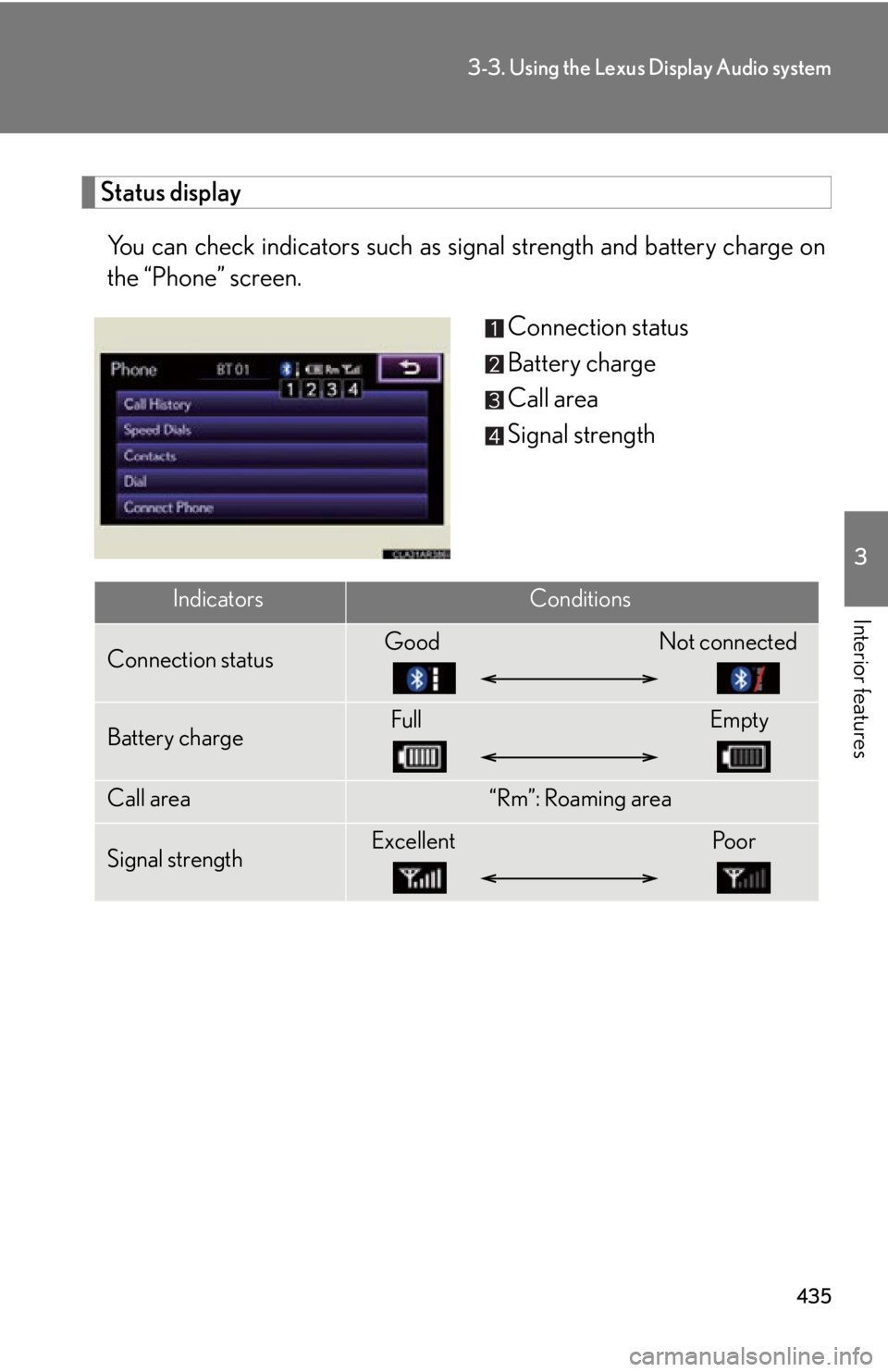
You can check indicators such as signal strength an d battery charge on
the “Phone” screen.
Connection status
Battery charge
Call area
Signal strength
Indicators Conditions
Connection status Good Not connected
Battery charge Full Empty
Call area “Rm”: Roaming area
Signal strength Excellent Poor
Page 436 of 886

4363-3. Using the Lexus Display Audio system
■
When using the hands-free system ●
The audio system is muted when making a call.●
If both parties speak at the same time, it may be difficult to hear.●
If the received call volume is overly loud, an echo may be heard.
If the Bluetooth ®
phone is too close to the system, quality of the sound may
deteriorate and connecting condition may go down.●
In the following circumstances, it may be difficult to hear the other party:
• When driving on unpaved roads
• When driving at high speeds
• If a window is open
• If the air conditioning is blowing directly on the microphone
• There is an effect from the network of the mobile phone■
Conditions under which the system will not operate ●
If using a mobile phone that does not support Bluetooth ®
●
If the mobile phone is turned off●
If you are outside service range●
If the mobile phon e is not connected●
If the mobile phone’s battery is low●
When outgoing is controlled, due to heavy traffic on telephone lines, etc.●
When the mobile phone itself cannot be used●
When transferring the phonebook data from the mobile phone■
Bluetooth ®
antenna
The antenna is built into the display. If the mobile phone is behind the seat or in the
console box, or touching or covered by metal objects, connection status may dete-
riorate.
Page 437 of 886

4373-3. Using the Lexus Display Audio system
3
Interior features ■
Battery charge/Signal status ●
This display may not correspond exactly with the mobile phone itself.●
This system does not have a charging function.●
The Bluetooth ®
phone battery will burn quickly when it is connected to
Bluetooth ®
.●
When the mobile phone is not connected, “No Connect” is displayed.●
When you are out of service area or in a place inaccessible by radio waves, “No
service” is displayed.■
When using Bluetooth ®
audio and hands-free system at the same time
The following problems may occur. ●
The Bluetooth ®
connection may be cut.●
Noise may be heard on the Bluetooth ®
audio playback.■
About the phonebook in this system
The following data is stored for every registered phone. When another phone is
connecting, you cannot read the registered data. ●
Phonebook data●
Call history date●
Speed dial
When you delete the phone, the above-mentioned data is also deleted.■
When you release your car
Be sure to initialize your data. ( P. 3 3 6 )■
About Bluetooth ®
Bluetooth is a registered trademark of
Bluetooth SIG. Inc.
Page 438 of 886

4383-3. Using the Lexus Display Audio system
■
Compatible models
This system supports the following service. ●
Bluetooth ®
Specification:
Ver. 1.1 or higher (Recommended: Ver. 2.1+EDR or higher)●
Profiles:
• HFP (Hands Free Profile) Ver. 1.0 or higher (Recommended: Ver. 1.5 or
higher)
This is a profile to allow hands-free phone calls using the mobile phone or
head sets. It has an outgoing and incoming call function.
• OPP (Object Push Profile) Ver. 1.1 or higher
This is a profile to exchange ph onebook data. When the Bluetooth ®
phone
has PBAP and OPP, OPP cannot be used.
• PBAP (Phone Book Access Profile) Ver. 1.0 or higher
This is a profile to transfer phonebook data.
If your mobile phone does not support HFP, you cannot enter the Bluetooth ®
phone. You need to take OPP or PBAP service individually.■
Certification for the hands-free system
FCC ID: AJDK046
IC ID: 775E-K046
This device complies with Part 15 of FCC Rules and Industry Canada licence-
exempt RSS standard(s). Operation is subject to the following two conditions: (1)
this device may not cause interference, and (2) this device must accept any inter-
ference, including interference that may cause undesired operation of this device.
Le présent appareil est conforme aux la partie 15 des règles de la FCC et CNR
d’Industrie Canada applicables aux appareils radio exempts de licence. L’exploita-
tion est autorisée aux deux conditions suivantes : (1) l’appareil ne doit pas produire
de brouillage, et (2) l’utilisateur de l’appareil doit accepter tout brouillage
radioélectrique subi, même si le brouilla ge est susceptible d’en compromettre le
fonctionnement.