Page 234 of 886
2342-4. Using other driving systems
When the set speed is shown in “km/h” Fine adjustment: By approximately 0.6 mph (1 km/h) each time the lever is
operated
Large adjustment: By approximately 3.1 mph (5 km/h) for each 0.75 sec-
onds the lever is held
In the constant speed control mode ( P. 238), the set speed will be
increased or decreased as follows:
Fine adjustment: By approximately 1 mph (1.6 km/h) each time the lever is
operated
Large adjustment: The set speed can be increased or decreased continu-
ally until the lever is released.
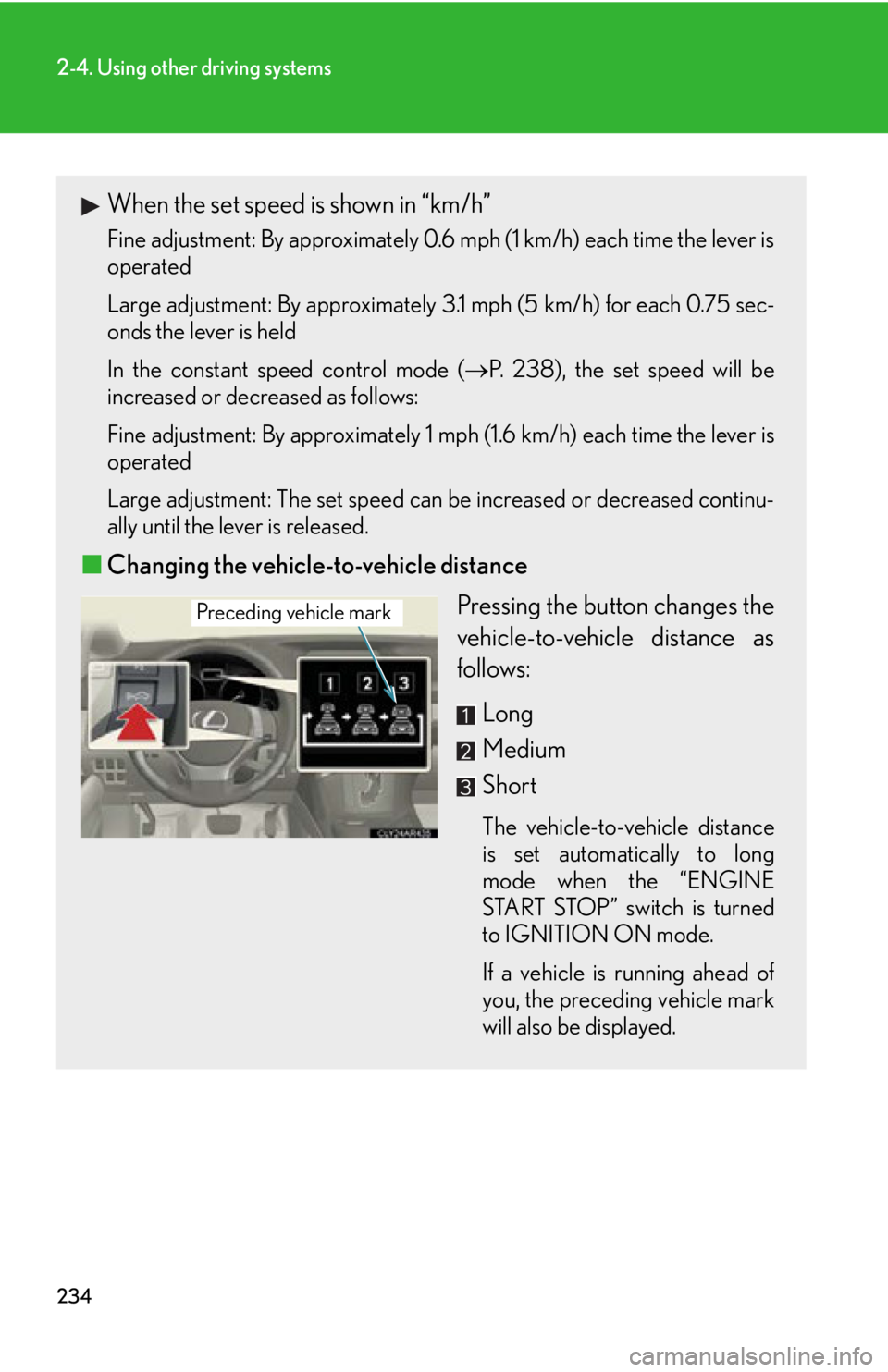
■ Changing the vehicle-to-vehicle distance
Pressing the button changes the
vehicle-to-vehicle distance as
follows:
Long
Medium
Short The vehicle-to-vehicle distance
is set automatically to long
mode when the “ENGINE
START STOP” switch is turned
to IGNITION ON mode.
If a vehicle is running ahead of
you, the preceding vehicle mark
will also be displayed.Preceding vehicle mark
Page 252 of 886

2522-4. Using other driving systems
Customization of the intuitive parkin g assist (vehicle with the Lexus
Display Audio system)
The buzzer volume, display and buzzer timing and display of the graphic
on the screen can be customized.
Press the “MENU” button on the Lexus Display Audio controller.
Select “Setup” on the “Menu” screen.
Select “Vehicle” on the “Setup” screen.
Select “LEXUS Park Assist” on the “Vehicle Settings” screen.
Alert volume setting
Display on/off
Alert distance setting
When you complete settings, select “Save”.STEP 1
STEP 2
STEP 3
STEP 4
■
The intuitive parking assist can be operated when ●
Front corner sensors:
• The “ENGINE START STOP” switch is in IGNITION ON mode.
• The shift lever is in a position other than P.
• The vehicle speed is less than about 6 mph (10 km/h).●
Front center sensors:
• The “ENGINE START STOP” switch is in IGNITION ON mode.
• The shift lever is in a position other than P or R.
• The vehicle speed is less than about 6 mph (10 km/h).
●
Rear corner and center sensors:
• The “ENGINE START STOP” switch is in IGNITION ON mode.
• The shift lever is in R. STEP 5
Page 256 of 886
2562-4. Using other driving systems
■
The rear view monitor system can be operated when
The shift lever is in R, the “ENGINE START STOP” switch is in IGNITION ON
mode.■
Changing display modes
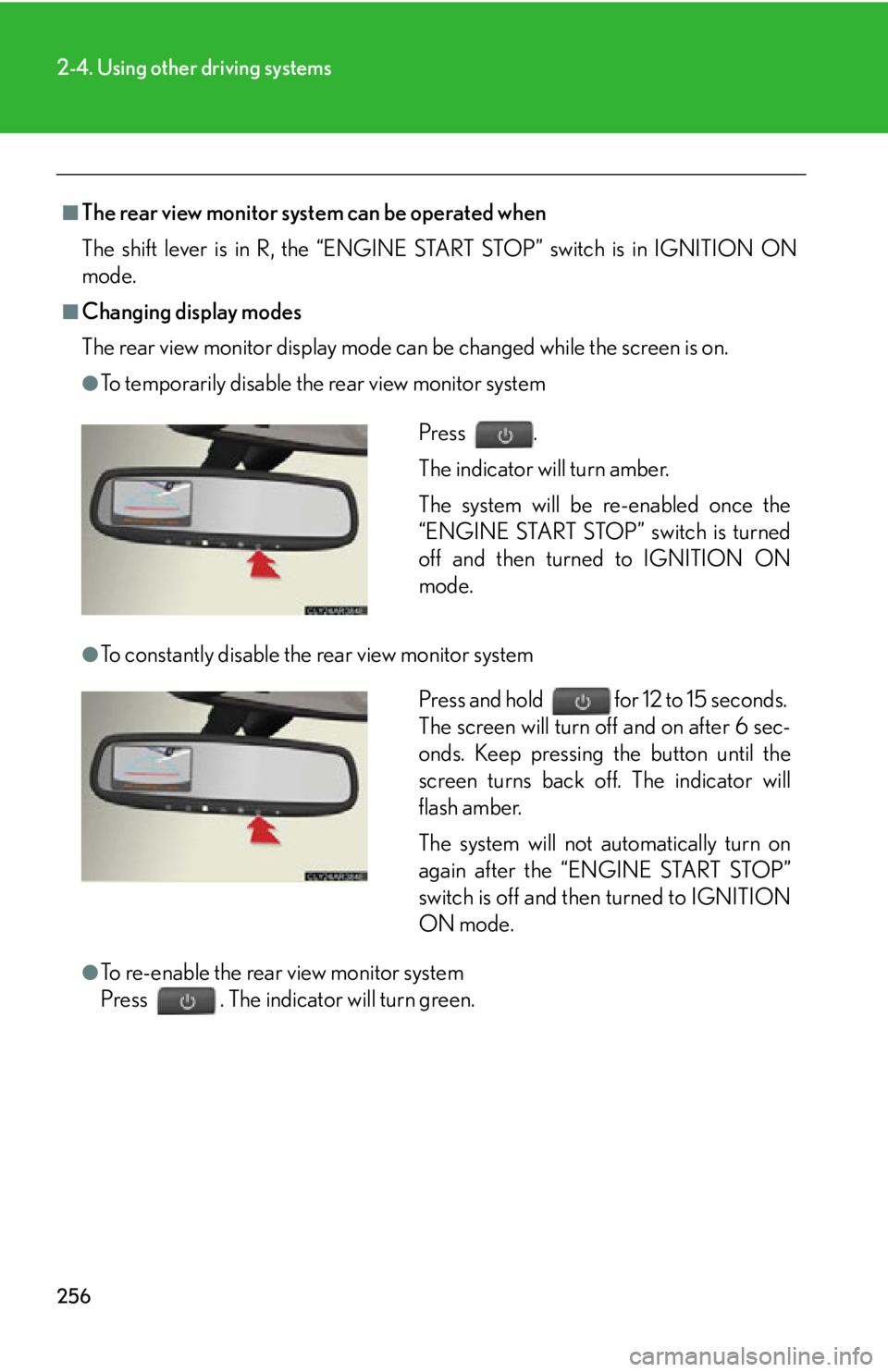
The rear view monitor display mode ca n be changed while the screen is on.●
To temporarily disable the rear view monitor system
●
To constantly disable the rear view monitor system
●
To re-enable the rear view monitor system
Press . The indicator will turn green. Press .
The indicator will turn amber.
The system will be re-enabled once the
“ENGINE START STOP” switch is turned
off and then turned to IGNITION ON
mode.
Press and hold for 12 to 15 seconds.
The screen will turn off and on after 6 sec-
onds. Keep pressing the button until the
screen turns back off. The indicator will
flash amber.
The system will not automatically turn on
again after the “ENGINE START STOP”
switch is off and then turned to IGNITION
ON mode.
Page 332 of 886
3323-1. Lexus Display Audio system
Display settings
Changing between day mode and night mode
When the headlights are turned on, the screen dims.
However, the screen can be switch ed to day mode by selecting “Day
Mode”.
If the screen is set in day mode with th e headlight switch turned on, this condi-
tion is memorized even with the “ENGINE START STOP” switch is turned
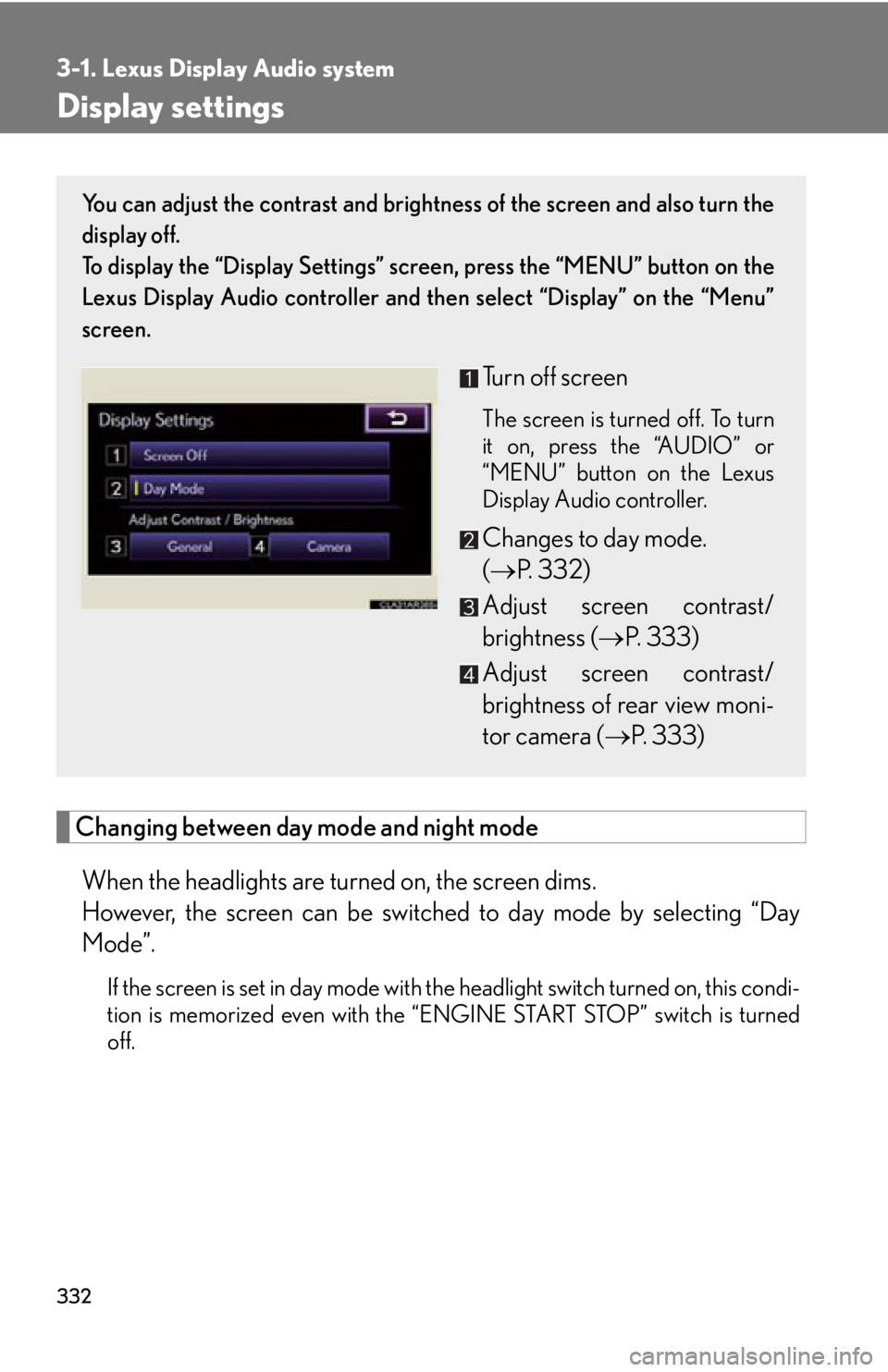
off. You can adjust the contrast and brightness of the screen and also turn the
display off.
To display the “Display Settings” sc reen, press the “MENU” button on the
Lexus Display Audio controller and then select “Display” on the “Menu”
screen.
Turn off screen The screen is turned off. To turn
it on, press the “AUDIO” or
“MENU” button on the Lexus
Display Audio controller.
Changes to day mode.
( P. 3 3 2 )
Adjust screen contrast/
brightness ( P. 333)
Adjust screen contrast/
brightness of rear view moni-
tor camera ( P. 333)
Page 351 of 886

3513-2. Using the air conditio ning system and defogger
3
Interior features ■
Air conditioning system settings ●
When the “ENGINE START STOP” switch is turned on, the air conditioning
system settings will be set to those that were in use the last time the “ENGINE
START STOP” switch was turned off.●
Air conditioning system settings are memorized individually on each electronic
key, so the settings repr oduced will be specific to the key that is used.●
This feature is customizable at your Lexus dealer.■
Using automatic mode
Fan speed is adjusted automatically accord ing to the temperature setting and ambi-
ent conditions. As a result, the following may occur:
Immediately after the button is pressed, the fan may stop for a while until warm or
cool air is ready to flow.■
Using the system in recirculated air mode
The windows will fog up more easily if recirculated air mode is used for an extended
period.■
Switching between outside air and recirculated air modes
Recirculated air mode or outside air mode may be automatically switched in accor-
dance with the temperature setting and the inside temperature.■
When the outside temperature exceeds 75°F (24°C) and the air conditioning
system is on ●
In order to reduce the air conditioning power consumption, the air conditioning
system may switch to recirculated air mode automatically. This may also reduce
fuel consumption.●
Recirculated air mode is selected as a default mode when the “ENGINE START
STOP” switch is turned to IGNITION ON mode.●
It is possible to switch to outside air mode at any time by pressing .
■
Window defogger feature
Recirculated air mode may automatically switch to outside air mode in situations
where the windows need to be defogged.
Page 358 of 886

3583-2. Using the air conditio ning system and defogger
Rear outlets
Direct air flow to the left or right,
up or down.
Turn the knob to open or close
the vent.■
Air conditioning system settings ●
When the “ENGINE START STOP” switch is turned on, the air conditioning
system settings will be set to those that were in use the last time the “ENGINE
START STOP” switch was turned off.●
Air conditioning system settings are memorized individually on each electronic
key, so the settings repr oduced will be specific to the key that is used.●
This feature is customizable at your Lexus dealer.■
Using automatic mode
Fan speed is adjusted automatically accord ing to the temperature setting and ambi-
ent conditions. As a result, the following may occur:
Immediately after the button is pressed, the fan may stop for a while until warm or
cool air is ready to flow.■
Using the system in recirculated air mode
The windows will fog up more easily if recirculated air mode is used for an extended
period.■
Switching between outside air and recirculated air modes
Recirculated air mode or outside air mode may be automatically switched in accor-
dance with the temperature setting and the inside temperature.
Page 359 of 886

3593-2. Using the air conditio ning system and defogger
3
Interior features ■
When the outside temperature exceeds 75°F (24°C) and the air conditioning
system is on ●
In order to reduce the air conditioning power consumption, the air conditioning
system may switch to recirculated air mode automatically. This may also reduce
fuel consumption.●
Recirculated air mode is selected as a default mode when the “ENGINE START
STOP” switch is turned to IGNITION ON mode.●
It is possible to switch to outside air mode at any time by pressing .■
Window defogger feature
Recirculated air mode may automatically switch to outside air mode in situations
where the windows need to be defogged.■
When outside air temperature is below 32 F (0 C)
The cooling and dehumidification fu nction may not operate even when
is
pressed.■
When the indicator light on goes off
Press to turn on the cooling and dehumi dification function again. There may
be a problem in the air conditioning system if the indicator light goes off again
shortly after the button is pressed. Have it inspected by your Lexus dealer.■
Ventilation and air conditioning odors ●
To let fresh air in, set the air conditioning system to the outside air mode.●
During use, various odors from inside and outside the vehicle may enter into
and accumulate in the air conditioning sy stem. This may then cause odor to be
emitted from the vents.●
To reduce potential odors from occurring:
• It is recommended that the air conditioning system be set to outside air mode
prior to turning the vehicle off.
• The start timing of the blower may be delayed for a short period of time
immediately after the air conditioning system is started in automatic mode.
Page 657 of 886
6574-2. Maintenance
4
Maintenance and care ■
Reset the maintenance data (U.S.A. only)
After the required maintenance is performed according to the maintenance sched-
ule, please reset the maintenance data.
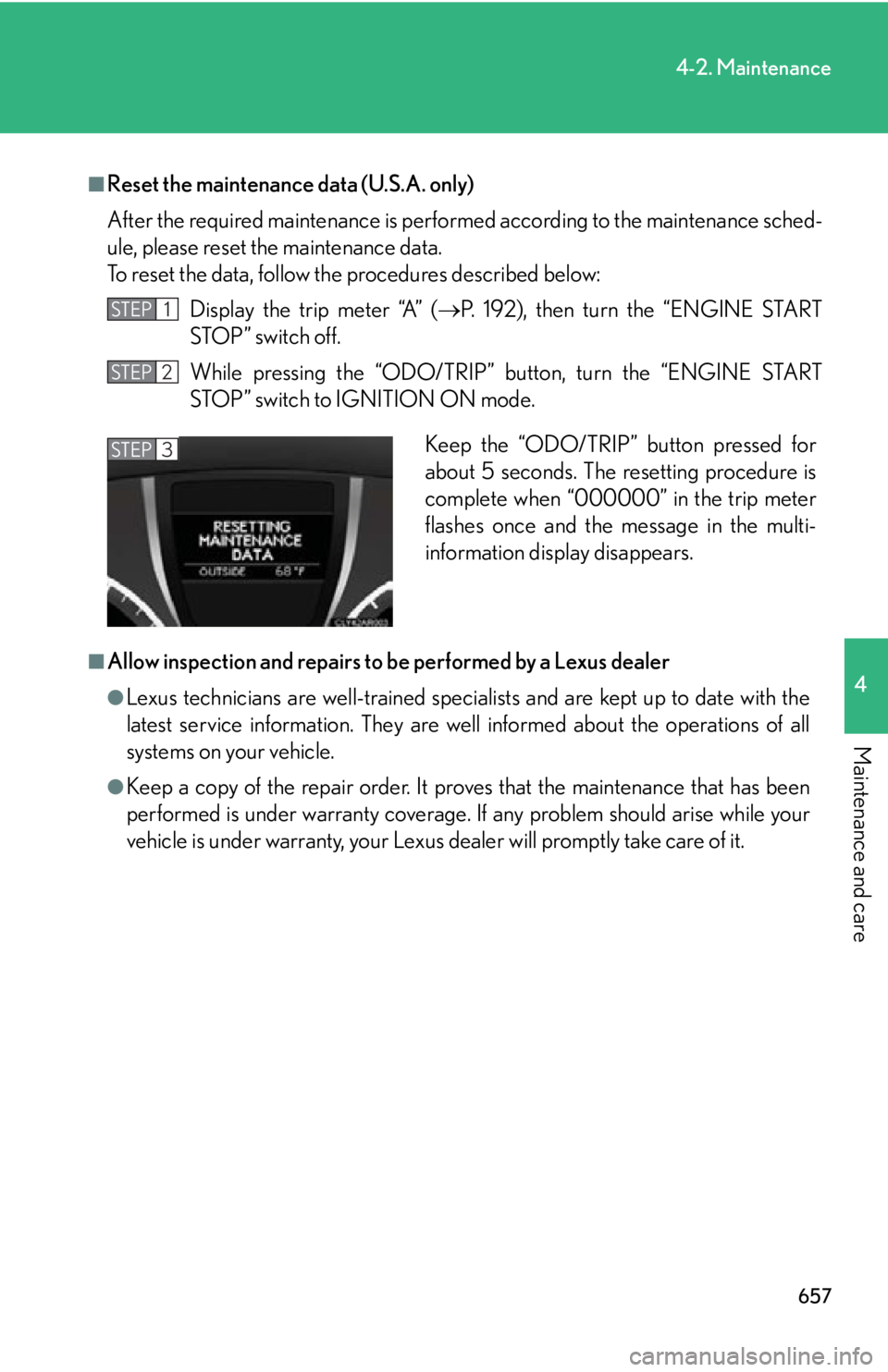
To reset the data, follow th e procedures described below:
Display the trip meter “A” ( P. 192), then turn the “ENGINE START
STOP” switch off.
While pressing the “ODO/TRIP” button, turn the “ENGINE START
STOP” switch to IGNITION ON mode.
■
Allow inspection and repairs to be performed by a Lexus dealer●
Lexus technicians are well-trained specialists and are kept up to date with the
latest service information. They are well informed about the operations of all
systems on your vehicle.●
Keep a copy of the repair order. It proves that the maintenance that has been
performed is under warranty coverage. If any problem should arise while your
vehicle is under warranty, your Lexus de aler will promptly take care of it.STEP 1
STEP 2
Keep the “ODO/TRIP” button pressed for
about 5 seconds. The resetting procedure is
complete when “000000” in the trip meter
flashes once and the message in the multi-
information display disappears.STEP 3