2015 LEXUS RC350 change time
[x] Cancel search: change timePage 204 of 684

2044-2. Driving procedures
RC350/RCF_U (OM24636U)
The lever will return to its original position immediately after operation.
Right turn
Lane change to the right (move the
lever partway and release it)
The right hand signals will flash 3 times.
Lane change to the left (move the
lever partway and release it)
The left hand signals will flash 3 times.
Left turn
■If the turn signals do not stop flashing af ter turning left or right, or if you want
to stop them flashing
Operate the lever in the opposite direction to either position or . If you
move the lever to either position or , the selected turn signals will flash.
■Turn signals can be operated when
The engine switch is in IGNITION ON mode.
■If the indicator flashes faster than usual
Check that a light bulb in the front or rear turn signal lights has not burned out.
■If the turn signals stop flashing befo re a lane change has been performed
Operate the lever again.
■Customization
The number of times the turn signals flash during a lane change can be changed.
(Customizable feature P. 6 3 5 )
Turn signal lever
Operating instructions
1
2
3
4
23
14
Page 230 of 684
2304-5. Using the driving support systems
RC350/RCF_U (OM24636U)
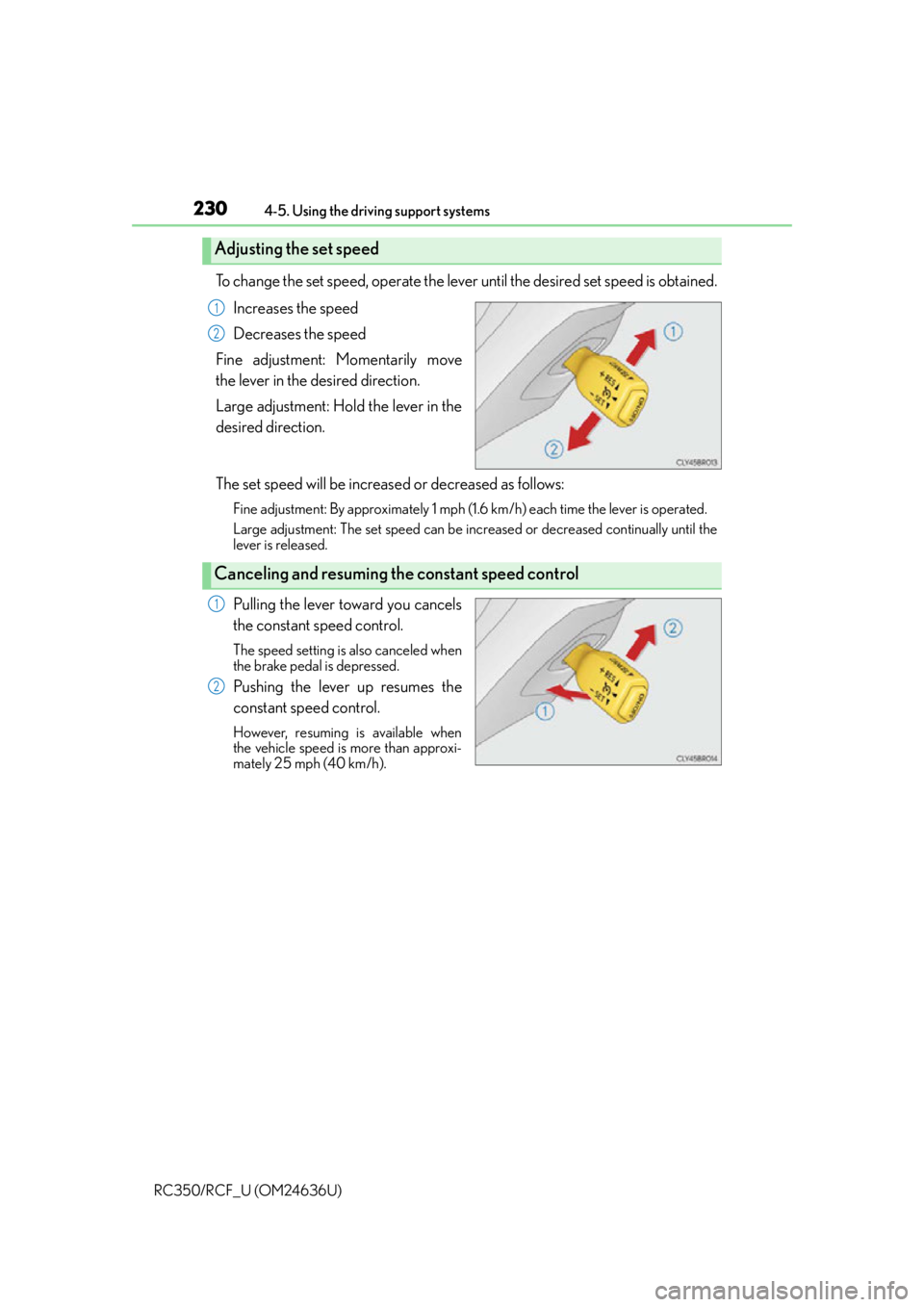
To change the set speed, operate the lever until the desired set speed is obtained. Increases the speed
Decreases the speed
Fine adjustment: Momentarily move
the lever in the desired direction.
Large adjustment: Hold the lever in the
desired direction.
The set speed will be increase d or decreased as follows:
Fine adjustment: By approximately 1 mph (1.6 km/h) each time the lever is operated.
Large adjustment: The set speed can be incr eased or decreased continually until the
lever is released.
Pulling the lever toward you cancels
the constant speed control.
The speed setting is also canceled when
the brake pedal is depressed.
Pushing the lever up resumes the
constant speed control.
However, resuming is available when
the vehicle speed is more than approxi-
mately 25 mph (40 km/h).
Adjusting the set speed
1
2
Canceling and resuming the constant speed control
1
2
Page 234 of 684

2344-5. Using the driving support systems
RC350/RCF_U (OM24636U)
This mode employs a radar sensor to detect the presence of vehicles up to
approximately 400 ft. (120 m) ahead, determines the current vehicle-to-vehicle
following distance, and operates to main tain a suitable following distance from
the vehicle ahead.
Note that vehicle-to-vehicle distance will close in when traveling on long downhill
slopes.
Example of constant speed cruising
When there are no vehicles ahead
The vehicle travels at the speed set by the driver. The desired vehicle-to-vehicle dis-
tance can also be set by operating the vehicle-to-vehicle distance control.
Example of deceleration cruising
When a preceding vehicle driving slower than the set speed appears
When a vehicle is detected running ahead of you, the system automatically deceler-
ates your vehicle. When a greater reduction in vehicle speed is necessary, the system
applies the brakes (the stop lights will come on at this time). A warning tone warns you
when the system cannot decelera te sufficiently to prevent your vehicle from closing in
on the vehicle ahead.
Example of follow-up cruising
When following a preceding vehicle driving slower than the set speed
The system continues follow-up cruising wh ile adjusting for changes in the speed of
the vehicle ahead in order to maintain the vehicle-to-vehicle distance set by the driver.
Example of acceleration
When there are no longer any preceding vehicles driving slower than the set
speed
The system accelerates until the set speed is reached. The system then returns to con-
stant speed cruising.
Driving in vehicle-to-vehicle distance control mode
1
2
3
4
Page 236 of 684

2364-5. Using the driving support systems
RC350/RCF_U (OM24636U)
To change the set speed, operate the lever until the desired set speed is dis-
played. Increases the speed
Decreases the speed
Fine adjustment: Momentarily move
the lever in the desired direction.
Large adjustment: Hold the lever in the
desired direction.
In the vehicle-to-vehicle distance control mode, the set speed will be increased
or decreased as follows:
• When the set speed is shown in “MPH” Fine adjustment: By approximately 1 mph (1.6 km/h) each time the lever is operated
Large adjustment: By approximately 5 mph (8 km/h) for each 0.75 seconds the lever
is held
• When the set speed is shown in “km/h” Fine adjustment: By approximately 0.6 mph (1 km/h) each time the lever is operated
Large adjustment: By approximately 3.1 mph (5 km/h) for each 0.75 seconds the
lever is held
In the constant speed control mode ( P. 239), the set speed will be increased
or decreased as follows:
Fine adjustment: By approximately 1 mph (1.6 km/h) each time the lever is operated
Large adjustment: The set speed can be incr eased or decreased continually until the
lever is released.
Adjusting the set speed
1
2
Page 253 of 684

2534-5. Using the driving support systems
4
Driving
RC350/RCF_U (OM24636U)
NOTICE
■To prevent damage to or incorrect operation of the LDA system
●Do not modify the headlights or attach stickers to the surface of the lights.
●Do not modify the suspension.
If any suspension parts need to be replaced, contact your Lexus dealer.
●Do not install or place anything on the hood or the grille. Also, do not install a grille
guard (bull bars, kangaroo bar etc.).
●If your windshield needs repairs, contact your Lexus dealer.
■Camera sensor
Observe the following to ensure that the LDA system functions correctly.
●Keep the windshield clean at all times.
Performance could be affected if the windshie ld is dirty, or if raindrops, condensation
or ice are adhering to the windshield.
●Do not spill liquid onto the camera sensor.
●Do not attach window tinting to the windshield.
●Do not install an antenna in front of the camera lens.
●If the area of the windshield in front of the camera sensor is fogged up, use the wind-
shield defogger to remove the fog.
When it is cold, setting the heater to blow air to the feet only may cause the area of
the windshield in front of the camera sensor to fog up. This will have a negative effect
on the images.
●Do not scratch the camera lens, or let it get dirty.
When cleaning the inside of the windshield , be careful not to get any glass cleaner
etc. on the lens. Also, do not touch the lens.
For lens repair, contact your Lexus dealer.
●Do not change the installation position or di rection of the camera sensor or remove it.
The direction of the camera se nsor is precisely adjusted.
●Do not subject the camera sensor to strong impact or force, and do not disassemble
the camera sensor.
●If the windshield needs to be re placed, contact your Lexus dealer.
●Do not attach a sticker or other items to the
windshield near the camera sensor.
Page 286 of 684

2864-5. Using the driving support systems
RC350/RCF_U (OM24636U)
■Expert mode (RC F)
When expert mode is selected, it is possible to drive in a more sporty manner than other
drive modes. Expert mode disables the TRAC and VSC systems but the engine and
brakes may be controlled depending on the vehicle behavior.
■When the message is displayed on the mu lti-information display showing that TRAC
has been disabled even if has not been pressed (RC350)
TRAC and hill-start assist control cannot be operated. Contact your Lexus dealer.
■When the “TRAC OFF” indicator light comes on even if () has not been
pressed (RC F)
TRAC and hill-start assist control cannot be operated. Contact your Lexus dealer.
■VGRS is disabled when
VGRS may stop operating in the following situations.
In this event, the steering wheel may move fr om its straight forward position, but it will
return when the system restarts.
●When the steering wheel is operated for an extended period of time while the vehicle is
stopped or is moving very slowly
(on vehicles with LDH, DRS is disabled together with VGRS)
●When the steering wheel has been held fully to the left or right
The center position of the steering wheel may change when VGRS is disabled. However,
the position will return to normal after VGRS is reactivated.
■When the battery is disconnected (vehicles with VGRS)
The steering wheel may move fr om its straight forward position, but this will be corrected
automatically when driving. To select expert mode, press
()
when in SPORT S+ mode.
The “EXPERT” indicator will come on together
with the TRAC OFF and VSC OFF indicators.
To cancel expert mode, press
()
or use the driving mode se lect switch to select a
driving mode other than SPORT S+ mode.
Page 295 of 684

2954-5. Using the driving support systems
4
Driving
RC350/RCF_U (OM24636U)
WA R N I N G
■Limitations of the pre-collision system
●The driver is solely responsible for safe driving. Always drive safely, taking care to
observe your surroundings.
Never use the pre-collision safety system instead of normal braking operations. This
system is not designed to avoid or reduce collisions in every situation. Overly relying
on the system or entrusting it with safety may lead to an accident resulting in death or
serious injury.
Although this system is designed to suppor t in avoiding a collision or reducing the
damage of a collision, its effectiveness may change according to various conditions
( P. 292, 293). Therefore, the system may not always provide the same perfor-
mance. Also, pre-collision braking function may not operate depending on the oper-
ations of the driver. If the driver is stepping on the brake pedal or is operating the
steering wheel, the system may determine th at the driver is taking evasive action and
pre-collision braking func tion may not operate.
●As the pre-collision system is designed to assi st the driver in safe driving, it may oper-
ate under sporty driving conditions, whic h may cause an accident. For this reason
under sporty driving conditions, it is reco mmended that this system be disabled by
using the PCS OFF switch.
■Handling the radar sensor
Observe the following to ensure the pre-collision system can function effectively.
Otherwise, the system may not function correctly and could result in an accident.
●Keep the sensor and grille cover clean at all times.
Clean the sensor and grille cover with a soft cloth so you do not mark or damage
them.
●Do not subject the sensor or surr ounding area to a strong impact.
If the sensor moves even slightly off posi tion, the system may become inaccurate or
malfunction. If the sensor or surrounding area is subject to a strong impact, always
have the area inspected and adjusted by your Lexus dealer.
●Do not disassemble the sensor.
●Do not attach accessories or stickers to the sensor, grille cover or surrounding area.
●Do not modify or paint the sensor and grille cover.
●If the radar sensor needs to be replaced, contact your Lexus dealer.
Page 338 of 684
338
RC350/RCF_U (OM24636U)5-3. Using the audio system
Press the button to display the “Source” screen.
If the “Source” screen is not displayed, press the button again.
Select the desired audio source.
The audio source can be selected by pressing the “RADIO” or “MEDIA” button.
Press the “MODE” switch when the audio
system is turned on. The audio source
changes each time the “MODE” switch is pressed.
■Rearranging the list
The listing order of the sour ce list can be rearranged.
Move the controller to the left while on the “Source” screen.
Select “Audio Source Select”.
Select an item you wish to move and th en select where to move the item to.
Selecting the audio source
Switching between audio sources such as radio and CD are explained in this
section.
Changing audio source
Using the steering wheel switches to change audio sources
1
2
1
2
3