Page 324 of 681

324 4-6. Driving tips
NX300h_U_OM78007UHybrid vehicle driving tips ◆ Using Eco drive mode
When using Eco drive mode, the torq ue corresponding to the accelerator
pedal depression amount can be generate d more smoothly than it is in normal
conditions. In addition, the operation of the air conditioning system (heat-
ing/cooling) will be minimized, improving the fuel economy. ( P. 3 0 3 )
◆ Use of Hybrid System Indicator
The Eco-friendly driving is possible by keeping the indicator needle of Hybrid
System Indicator within Eco area. ( P. 100)
◆ Shift lever operation
Shift the shift lever to D when stopped at a traffic light, or driving in heavy traf-
fic, etc. Shift the shift lever to P when parking. When using the N, there is no
positive effect on fuel consumption. In the N, the gasoline engine operates but
electricity cannot be generated. Also, wh en using the air conditioning system,
etc., the hybrid battery (traction battery) power is consumed.
◆ Accelerator pedal/brake pedal operation ●
Drive your vehicle smoothly. Avoid ab rupt acceleration and deceleration.
Gradual acceleration and deceleration will make more effective use of the
electric motor (traction motor) wi thout having to use gasoline engine
power. ●
Avoid repeated acceleration. Repeated acceleration consumes hybrid bat-
tery (traction battery) power, resulting in poor fuel consumption. Battery
power can be restored by driving with the accelerator pedal slightly
released.
◆ When braking
Make sure to operate the brakes gently and in a timely manner. A greater
amount of electrical energy can be regenerated when slowing down.For economical and ecological driving, pay attention to the following points:
Page 325 of 681

3254-6. Driving tips
4
Driving
NX300h_U_OM78007U ◆ Delays
Repeated acceleration and deceleration, as well as long waits at traffic lights,
will lead to bad fuel economy. Check traffic reports before leaving and avoid
delays as much as possible. When drivin g in a traffic jam, gently release the
brake pedal to allow the vehicle to move forward slightly while avoiding over-
use of the accelerator pedal. Doing so can help control excessive gasoline
consumption.
◆ Highway driving
Control and maintain the vehicle at a co nstant speed. Before stopping at a toll
booth or similar, allow plenty of time to release the accelerator and gently
apply the brakes. A greater amount of electrical energy can be regenerated
when slowing down.
◆ Air conditioning
Use the air conditioning only when necessary. Doing so can help reduce
excessive gasoline consumption.
In summer: When the ambient temperature is high, use the recirculated air
mode. Doing so will help to reduce th e burden on the air conditioning system
and reduce fuel consumption as well.
In winter: Because the gasoline engine will not automatically cut out until it
and the interior of the vehicle are warm, it will consume fuel. Also, fuel con-
sumption can be improved by avoiding overuse of the heater.
◆ Checking tire inflation pressure
Make sure to check the tire inflation pressure frequently. Improper tire infla-
tion pressure can cause poor fuel economy.
Also, as snow tires can cause large amou nts of friction, their use on dry roads
can lead to poor fuel economy. Use ti res that are appropriate for the season.
◆ Luggage
Carrying heavy luggage will lead to poor fuel economy. Avoid carrying
unnecessary luggage. Installing a large roof rack will also cause poor fuel
economy.
◆ Warming up before driving
Since the gasoline engine starts up and cuts out automatically when cold,
warming up the engine is unnecessary. Moreover, frequently driving short dis-
tances will cause the engine to repeated ly warm up, which can lead to excess
fuel consumption.
Page 418 of 681
418 5-12. Other function
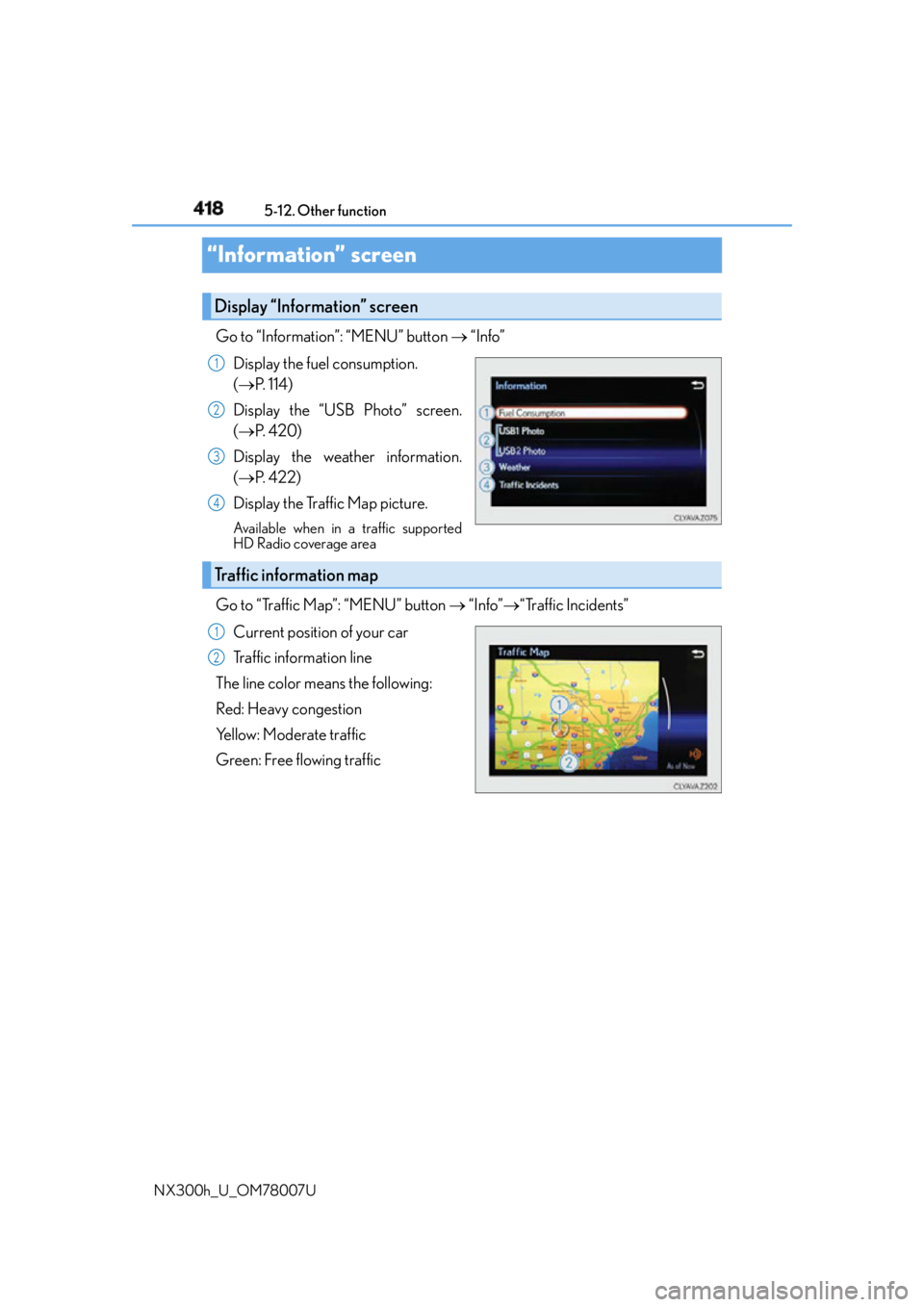
NX300h_U_OM78007U“Information” screen Go to “Information”: “MENU” button “Info”
Display the fuel consumption.
( P. 1 1 4 )
Display the “USB Photo” screen.
( P. 4 2 0 )
Display the weather information.
( P. 422)
Display the Traffic Map picture. Available when in a traffic supported
HD Radio coverage area
Go to “Traffic Map”: “MENU” button “Info” “Traffic Incidents”
Current position of your car
Traffic information line
The line color means the following:
Red: Heavy congestion
Yellow: Moderate traffic
Green: Free flowing trafficDisplay “Information” screen 1
2
3
4
Traffic information map 1
2
Page 437 of 681

4376-1. Using the air conditio ning system and defogger
6
Interior features
NX300h_U_OM78007U ■
Adjusting the position of and opening and closing the air outlets
Direct air flow to the left or right, up or down
Turn the knob to open or close the vent ■
Registering air conditioning settings to elec tronic keys (vehicles with driving position
memory) ●
Unlocking the vehicle using an electronic key and turning the power switch to ON
mode will recall that key’s registered air conditioning settings. ●
When the power switch is turned off, the curr ent air conditioning settings will automati-
cally be registered to the electronic key that was used to unlock the vehicle. ●
The system may not operate correctly if more th an one electronic key is in the vicinity or
if the smart access system with push-button start is used to unlock a passenger door. ●
The doors that can recall the air conditioni ng setting when unlocked using the smart
access system with push-b utton start can be changed.
* For details, contact your Lexus
dealer.
* : The doors that can recall the driving positi on memory are changed at the same time.■
Using automatic mode
Fan speed is adjusted automatically accordin g to the temperature setting and the ambi-
ent conditions.
Therefore, the fan may stop for a while until warm or cool air is ready to flow immediately
after the “AUTO” button is pr essed or “AUTO” is selected.■
When the outside temperature exceeds 75 F (24 C) and the air conditioning system
is on ●
In order to reduce the air conditioning po wer consumption, the ai r conditioning system
may switch to recirculated air mode automatically.
This may also reduce fuel consumption. ●
Recirculated air mode is selected as a default mode when the power switch is turned to
ON mode. ●
It is possible to switch to outside air mode at any time by pressing .
Front
Rear
1
2
Page 638 of 681

638 9-2. Customization
NX300h_U_OM78007U ■
Multi-information display ( P. 9 7 , 1 0 2 )
* 1
: The default setting varies according to countries.
* 2
: Some status screens cannot be registered (indicated on the multi-information display)
* 3
: 2 of the following items: current fuel consumption, average fuel economy (after reset),
average fuel economy (after refuel), average fuel economy (after start), average vehi-
cle speed (after reset), average vehicle speed (after start), distance (driving range),
distance (after start), elapsed time (after reset), elapsed time (after start), blank
* 4
: Intersection guidance, Incoming calls, Adjust brightness Function Default
setting Customized
setting
Changeover to tachometer
when sport mode is selected Auto Hybrid system
indicator
(always)
–O– –
Tachometer
(always)
EV indicator On Off – O – –
Language
* 1
English French
– O – –
Spanish
Units
* 1
miles (MPG US) miles
(MPG Imperial )
– O – –
km (L/100km)
km (km/ L)
switch settings Drive
information 1 Desired status
screen
* 2
– O – –
Drive information screen dis-
played on the first screen of
(Drive information 1) Current fuel
consumption
* 3
– O – –
Average fuel
consumption
(after reset)
Drive information screen dis-
played on the second screen
of
(Drive information 2) Distance (range)
* 3
– O – –
Average speed
(after reset)
Po p - u p d i s p l a y
* 4
On Off – O – –
Accent color Color 1 Color 2
O O – – 1 2 3 4