2015 LEXUS NX300h brake
[x] Cancel search: brakePage 93 of 681

932. Instrument cluster
2
Instrument cluster
NX300h_U_OM78007U Warning lights inform the driver of malfun ctions in any of the vehicle’s systems.
Warning lights * 1
(U.S.A.)
Brake system warning light
( P. 5 6 5 )
* 1
(Canada)
ABS warning light
( P. 5 6 6 )
* 1
(Canada)
Brake system warning light
( P. 5 6 5 )
* 1
Electric power steering
system warning light
( P. 5 6 6 )
* 2
Charging system warning
light ( P. 5 6 5 )
* 1
Electric power steering
system warning light
( P. 5 6 6 )
* 2
Low engine oil pressure
warning light ( P. 565) * 1, 3
(if equipped)
PCS warning light
( P. 5 6 6 )
* 2
High coolant temperature
warning light ( P. 565) * 1
Slip indicator light
( P. 5 6 6 )
* 1
Brake system warning light
( P. 5 6 5 )
* 1, 3
Brake hold operated
indicator ( P. 5 6 6 )
* 1
(U.S.A.)
Malfunction indicator lamp
( P. 5 6 5 ) * 3
(U.S.A.)
Parking brake indicator
( P. 5 6 6 )
* 1
(Canada)
Malfunction indicator lamp
( P. 5 6 5 ) * 3
(Canada)
Parking brake indicator
( P. 5 6 6 )
* 1
SRS warning light
( P. 5 6 6 ) Low fuel level warning light
( P. 5 6 7 )
* 1
(U.S.A.) ABS warning light
( P. 5 6 6 ) Driver’s and front
passenger’s seat belt
reminder light ( P. 5 6 7 )
Page 94 of 681

94 2. Instrument cluster
NX300h_U_OM78007U * 1
: These lights turn on when the power switch is turned to ON mode to indicate that a
system check is being performed. They will turn off after the hybrid system is on, or
after a few seconds. There may be a malfunctio n in a system if the lights do not turn on,
or turn off. Have the vehicle inspected by your Lexus dealer.
* 2
: This light illuminates on the multi-information display.
* 3
: The light flashes to indicate a malfunction.
* 4
: This light illuminates on the center panel.
The indicators inform the driver of the op erating state of the vehicle’s various sys-
tems. * 1
Master warning light
( P. 5 6 7 )
* 2
Brake Override System/
Drive-Start Control warning
light ( P. 5 6 7 )
* 1
Tire pressure warning light
( P. 5 6 7 )
Indicators Turn signal indicator
( P. 212) “READY” indicator
( P. 2 0 1 )
(U.S.A.)
Headlight indicator
( P. 2 1 9 ) EV indicator ( P. 7 9 )
(Canada)
Tail light indicator
( P. 220) * 8
EV drive mode indicator
( P. 2 0 6 )
Headlight high beam
indicator ( P. 220) * 8
“ECO” indicator
( P. 303)
(if equipped)
Automatic High Beam
indicator ( P. 223) * 8
“SPORT” indicator
( P. 303)
Fog light indicator
( P. 2 2 7 ) * 8
(if equipped)Radar cruise control
indicator ( P. 2 4 0 , 2 5 3 )
Page 95 of 681

952. Instrument cluster
2
Instrument cluster
NX300h_U_OM78007U * 1
: These lights turn on when the power switch is turned to the ON mode to indicate that
a system check is being performed. They will turn off after the hybrid system is on, or
after a few seconds. There may be a malfunctio n in a system if the lights do not turn on,
or turn off. Have the vehicle inspected by your Lexus dealer.
* 2
: The light flashes to indicate that the system is operating.
* 3
: The light comes on when the system is turned off.
* 4
: When the outside temperature is approximately 37 F (3 C) or lower, the indicator
will flash for approximately 10 seconds, then stay on.* 8
Cruise control “SET”
indicator
( P. 240, 253, 267) (U.S.A.)
Parking brake indicator
( P. 213, 214)
* 8
Cruise control indicator
( P. 240, 253, 267) (Canada)
Parking brake indicator
( P. 213, 214)
* 8
(if equipped)
LDA indicator ( P. 2 7 0 )
* 1
Brake hold standby
indicator ( P. 2 1 6 )
* 8
(if equipped)
Steering control indicator
( P. 2 7 0 )
* 1
Brake hold operated
indicator ( P. 2 1 6 )
(if equipped)
Intuitive parking assist
indicator ( P. 2 7 9 )
* 4, 8
Low outside temperature
indicator ( P. 9 7 )
* 1, 2
Slip indicator light
( P. 3 0 6 ) * 5, 6
(if equipped)
BSM outside rear view
mirror indicators ( P. 3 1 6 )
* 1
VSC OFF indicator
( P. 3 0 7 )
* 7
Security indicator
( P. 86, 88)
* 1, 3
(if equipped)
PCS warning light
( P. 311) * 7
“A I R B A G O N / O F F ”
indicator ( P. 5 3 )
Page 100 of 681

100 2. Instrument cluster
NX300h_U_OM78007U ■
Hybrid System Indicator
●
Hybrid System Indicator is displayed when th e driving mode is in other than the sport
mode. ●
By keeping the indicator needle within Ec o area, more Eco-friendly driving can be
achieved. ●
Charge area indicates regeneration
* status. Regenerated energy will be used to
charge the hybrid battery (traction battery).
* : When used in this manual, “regeneration” re fers to the conversion of energy created
by the movement of the vehicle into electrical energy. ■
Tachometer
Hybrid System Indicator switches to the tachometer when driving mode is in sport mode.
The settings of the tachometer display can be changed on the multi-information display.
( P. 6 3 8 ) ■
Engine speed
On hybrid vehicles, engine speed is precisely controlled in order to help improve fuel
efficiency and reduce exhaust emissions, etc.
There are times when the engine speed that is displayed may differ even when vehicle
operation and driving conditions are the same. Po w e r a r e a
Shows that an Eco-friendly driving range is
being exceeded (during full power driving
etc.)
Eco area
Shows that the vehicle is being driven in an
Eco-friendly manner.
Hybrid Eco area
Shows that gasoline engine power is not
being used very often.
The gasoline engine will automatically stop
and restart under various conditions.
Charge area
Shows that energy is being recovered via the
regenerative brake. 1
2
3
4
Page 109 of 681

1092. Instrument cluster
2
Instrument cluster
NX300h_U_OM78007U When the vehicle approaches an inter-
section, the direction the vehicle should
go is guided by the arrow. When the
vehicle approaches an intersection, the
route guidance will start and the dis-
tance
* to the intersection will also be
displayed.
* : The distance indication will disappear
when the vehicle passes through the
intersection.
Displays the speed limit for the current
road.
The audio display and speed limit display can be shown or hidden. When customizing vehicle features, ensure that the vehicle is parked in a safe
place with the shift lever in P and the parking brake set.
Until the screen changes, continue
pressing the “DISP” button, and it
will repeat until the item desired to
be changed is displayed. Customization can be performed when
the head-up display is on.
Press the “DISP” button to switch
between on and off. On and off will be switched between each time the button is pressed.
If the button is left alone without being operated for a short time, setting will be fin-
ished automatically.Route guidance display (v ehicles with navigation system)
Speed limit display (vehicles with navigation system)
Display customization 1
2
Page 133 of 681

1333-2. Opening, closing and locking the doors
3
Operation of each component
NX300h_U_OM78007U ■
Power back door operating conditions (vehicles with a power back door)
With the power back door operations set to ON, it can automatically open and close for
the following conditions: ●
When the electronic key is being carried and the power back door switch is pushed
*●
When the wireless remote control is used
*●
When the power switch is in ON mode, in addition to the above for the opening opera-
tions, the back door operates for any of the following conditions:
• Parking brake is engaged
• The brake pedal is depressed
• The shift lever is in P
* : When configured with the cu stomization function so that it can be operated after
being unlocked, operate the back door after it has been unlocked. ■
Luggage compartment light
The luggage compartment light turns on when the back door is opened with the luggage
compartment light switch on.
■
If the back door opener is inoperative
The back door can be unlocked from the inside.
Move the lever.Off
On
When the power switch is turned off, the light
will go off automatically after 20 minutes.
Remove the cover.
To protect the cover, place a rag between the
flathead screwdriver and the cover as shown
in the illustration. 1
2
1
2
Vehicles without a power back
door
Vehicles with a power back
door
Page 151 of 681
1513-3. Adjusting the seats
3
Operation of each component
NX300h_U_OM78007U ■
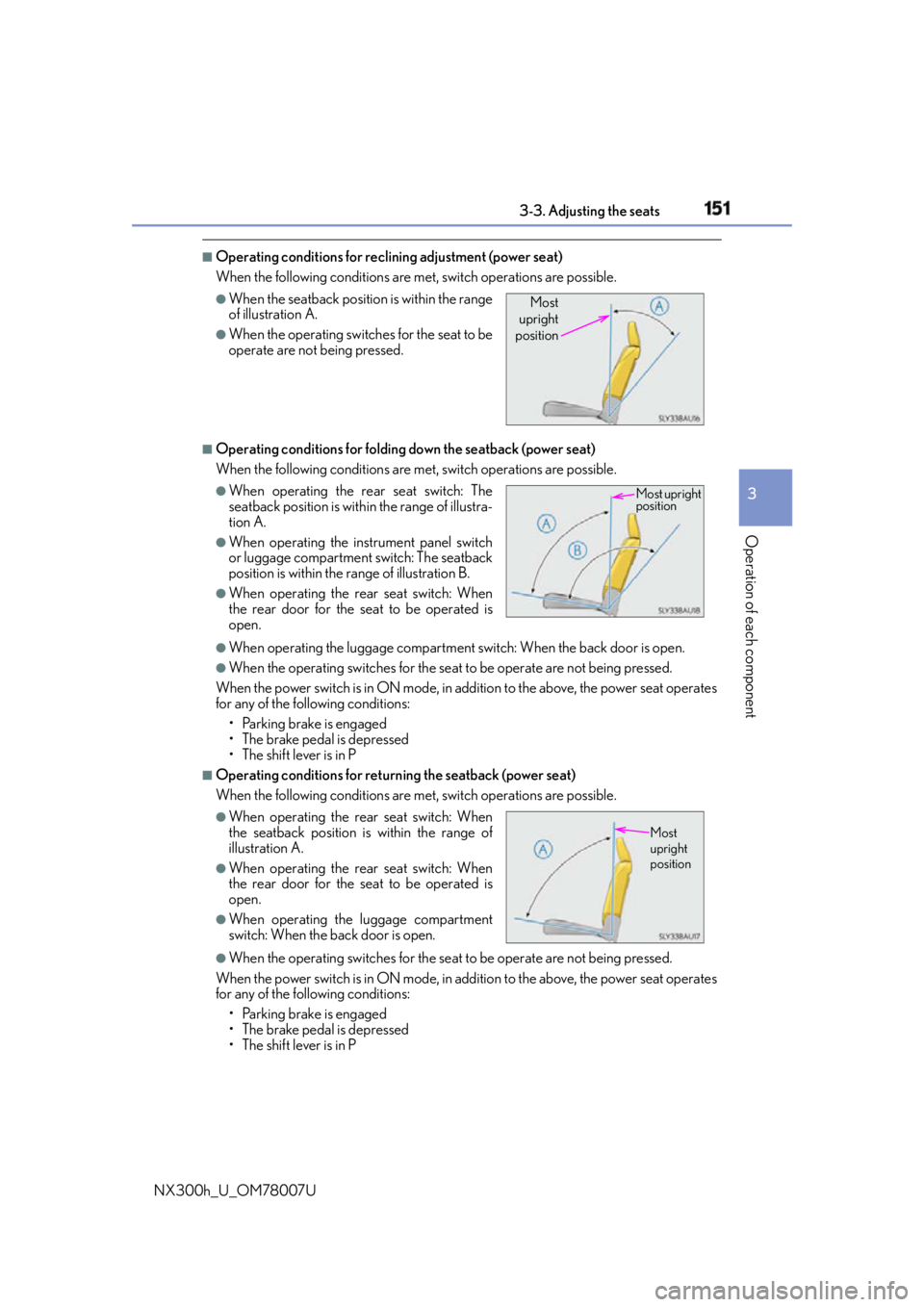
Operating conditions for reclining adjustment (power seat)
When the following conditions are me t, switch operations are possible.
■
Operating conditions for folding down the seatback (power seat)
When the following conditions are me t, switch operations are possible.
●
When operating the luggage compartment switch: When the back door is open. ●
When the operating switches for the seat to be operate are not being pressed.
When the power switch is in ON mode, in addition to the above, the power seat operates
for any of the following conditions:
• Parking brake is engaged
• The brake pedal is depressed
• The shift lever is in P ■
Operating conditions for return ing the seatback (power seat)
When the following conditions are me t, switch operations are possible.
●
When the operating switches for the seat to be operate are not being pressed.
When the power switch is in ON mode, in addition to the above, the power seat operates
for any of the following conditions:
• Parking brake is engaged
• The brake pedal is depressed
• The shift lever is in P ●
When the seatback position is within the range
of illustration A. ●
When the operating switches for the seat to be
operate are not being pressed. ●
When operating the rear seat switch: The
seatback position is with in the range of illustra-
tion A. ●
When operating the in strument panel switch
or luggage compartment switch: The seatback
position is within the range of illustration B. ●
When operating the rear seat switch: When
the rear door for the seat to be operated is
open.
●
When operating the rear seat switch: When
the seatback position is within the range of
illustration A. ●
When operating the rear seat switch: When
the rear door for the seat to be operated is
open. ●
When operating the luggage compartment
switch: When the back door is open. Most
upright
position
Most upright
position
Most
upright
position
Page 152 of 681

152 3-3. Adjusting the seats
NX300h_U_OM78007U ■
Reclining adjustment (power seat)
■
Power seat operations (if equipped)
If the seat has a cover or seat cushion, it may not operate properly. Also, when folding
down the seat, check that there is nothing on the rear seat that would interfere with the
operation. ■
Seatback jam protection function (power seat)
When folding down the seatback, if a foreig n object is perceived between the seatback
and seat cushion, the seatback will revers e operations and then stops operations.
The buzzer sounds intermitte ntly during reverse operatio ns and sounds continuously
when operations are stopped.Stop the seatback partwa y. To set the seatback
to the rearmost position, press the button again.
WA R N I N G ■
When folding the rear seatbacks down and after folded
Observe the following precautions.
Failure to do so may result in death or serious injury.●
Do not fold the seatbacks down while driving. ●
Stop the vehicle on level ground, set the parking brake and shift the shift lever to P. ●
Do not allow anyone to sit on a folded se atback or in the luggage compartment while
driving. ●
Do not allow children to enter the luggage compartment. ■
When operating the seatback
Observe the following precautions.
Failure to do so may cause death or serious injury. ●
Keep other passengers from being hit with the seatback. ●
Do not bring your hands close to the moving parts or between the seats, as well as do
not let any part of your body get caught. ●
Vehicles with a power seat: Do not let children operate the seatback as other passen-
gers may get caught in seat. ●
Vehicles with a power seat: Check that there are no passengers sitting in the seat
before folding that seat forward. Also, do le t other passengers sit in the seat while the
seat is forward folding.