Page 459 of 960
4593-2. Using the air conditio ning system and defogger
3
Interior features
LX570_OM_OM60L96U_(U) Adjusting the position and opening and closing the air outlets
Direct air flow to the left or right,
up or down.
Turn the knob fully to the back
of the vehicle to close the vent.
NOTICE■
To prevent battery discharge
Do not leave the air conditioning system on longer than necessary when the engine
is stopped.
Page 465 of 960
4653-3. Using the audio system
3
Interior features
LX570_OM_OM60L96U_(U) CAUTION■
For vehicles sold in U.S.A. and Canada ●
Part 15 of the FCC Rules
FCC Warning:
Changes or modifications not expressly approved by the party responsible for
compliance could void the user’s authority to operate the equipment. ●
Laser products
• USE OF CONTROL OR ADJUSTMENT OR PERFORMANCE OF PRO-
CEDURES OTHER THAN THOSE SPECIFIED HEREIN MAY RESULT IN
HAZARDOUS RADIATION EXPOSURE.
• THE USE OF OPTICAL INSTRUMENTS WITH THIS PRODUCT WILL
INCREASE EYE HAZARD.
NOTICE■
To prevent battery discharge
Do not leave the audio system on longer than necessary when the engine is off. ■
To avoid damaging the audio system
Take care not to spill drinks or other fluids on the audio system.
Page 501 of 960
5013-3. Using the audio system
3
Interior features
LX570_OM_OM60L96U_(U) Silencing the sound
Press .
Press the button again to turn the system back on. ■
If you touch
The display returns to the previous screen. ■
When the battery is disconnected
All preset stations are erased. ■
Reception sensitivity ●
Cargo loaded on the roof luggage ca rrier, especially metal objects, may
adversely affect the reception of XM ®
Satellite Radio.●
Maintaining perfect radio reception at all times is difficult due to the continually
changing position of the antenna, differ ences in signal stre ngth and surrounding
objects, such as trains, transmitters, etc. ●
The radio antenna is mounted inside the rear quarter window. To maintain clear
radio reception, do not attach metallic window tinting or other metallic objects
to the antenna wire mounted inside the rear quarter window.
Page 542 of 960
5423-3. Using the audio system
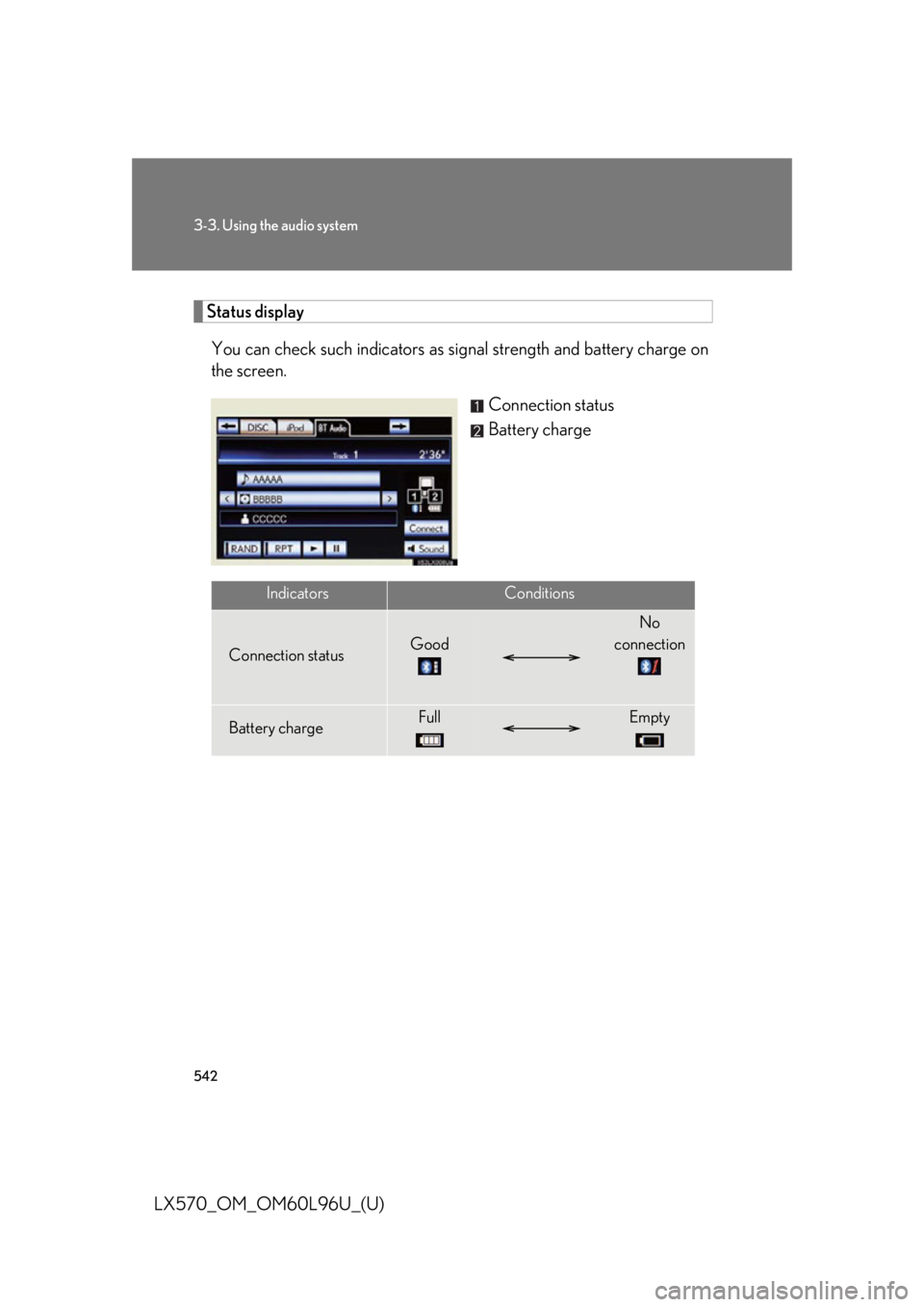
LX570_OM_OM60L96U_(U) Status display
You can check such indicators as si gnal strength and battery charge on
the screen.
Connection status
Battery charge
Indicators Conditions
Connection status Good No
connection
Battery charge Full Empty
Page 549 of 960

5493-3. Using the audio system
3
Interior features
LX570_OM_OM60L96U_(U) ■
If you touch
The display returns to the previous screen. ■
Connecting Bluetooth ®
audio player●
Touching “Connect Portable Player” on the “Bluetooth*” screen also connects
a Bluetooth ®
audio player. ( P. 681)●
When none of the selectable portable players have been registered, a screen
confirming registration is displayed. The registrati on method is the same as
phone registration. ( P. 674)●
When the currently connected portable pl ayer is selected, a screen confirming
the selected player’s disconnection is displayed. ( P. 676)●
If connection fails once, a changing conn ection method confirmation screen is
displayed. If connection fails 2 or more times, a message will be displayed.
When this message is displayed, try again.
*: Bluetooth is a re gistered trademark of Bluetooth SIG, Inc.■
When using the Bluetooth ®
audio system●
In the following conditions, the system may not function.
• The portable player is turned off
• The portable player is not connected
• The portable player battery is low ●
There may be a delay if phone connection is carried out during Bluetooth ®
audio play. ●
Depending on the type of portable player that is connected to the system, oper-
ation may differ slightly and certain functions may not be available.■
Bluetooth ®
antenna
The antenna is built into the audio unit. If th e portable player is behind the seat or in
the glove box or console box, or is touching or covered by metal objects, connec-
tion status may deteriorate. ■
Battery charge/signal status
This display may not correspond exactly wi th the portable play er, and this system
does not have a charging function.
Page 569 of 960

5693-3. Using the audio system
3
Interior features
LX570_OM_OM60L96U_(U) ■
iPod functions ●
When the iPod connected to the system includes iPod video, the system can
only output the sound by touching “Video” on the “iPod” screen.●
Depending on the iPod, the video so und may not be able to be heard.●
When an iPod is connected and the audi o source is changed to iPod mode, the
iPod will resume play from the same point in which it was last used. ●
Depending on the iPod that is connected to the system, certain functions may
not be available. If a function is unavailable due to a malfunction (as opposed to
a system specification), disconnecting the device and reconnecting it once
again may resolve the problem.■
When using an iPod
You maybe unable to use the instrument panel power outlet if the iPod is con-
nected to the USB port at the same time. ■
Battery charge
When an iPod is connected using a genuine iPod cable, the iPod starts charging its
battery. ■
Error messages for iPod
“iPod Error”: This indicates a proble m in the iPod or its connection.
“No music files found.”: This indicates that there is no music data in the iPod.
“Please check the iPod firmware version.”:
This indicates that the software version is not compati-
ble. Perform the iPod fir mware updates and try again.
“iPod authorization failed.”: This indicates th at it failed to authorize the iPod. Please
check your iPod.
Page 585 of 960

5853-4. Using the rear se at entertainment system
3
Interior features
LX570_OM_OM60L96U_(U) ■
Headphones
With some headphones generall y available in the market, it may be difficult to catch
signals properly. Lexus recommends the use of Lexus genuine wireless head-
phones.
Contact your Lexus dealer for further details. ■
Volume ●
Adjust the volume when you connect th e headphones to the jack. Loud sounds
may have a significant im pact on the human body.●
Conversational speech on some DVDs is recorded at a low volume to empha-
size the impact of sound e ffects. If you adjust the volume assuming that the con-
versations represent the maximum volume level that the DVD will play, you may
be startled by louder sound effects or when you change to a different audio
source. Be sure to adjust th e volume with this in mind.
CAUTION■
To prevent accidents and electric shock
Do not disassemble or modify the controller. ■
When the controller is not used
Stow the controller.
Injuries may result in the event of sudden braking, sudden swerving or an accident.■
For vehicles sold in the U.S.A. and Canada
Laser products ( P. 465)■
Removed battery and other parts
These parts are small and if swallowed by a child, they can cause choking. Keep
away from children. Failure to do so co uld result in death or serious injury.
Page 586 of 960
5863-4. Using the rear seat entertainment system
LX570_OM_OM60L96U_(U) NOTICE■
Cleaning the display
Wipe the display with a dry soft cloth.
If the screen is wiped with a rough cloth, the surface of the screen may be
scratched. ■
To prevent damage to the controller ●
Keep the remote control away from dire ct sunlight, high temperature and high
humidity. ●
Do not drop or knock the cont roller against hard objects.●
Do not sit on or place heavy objects on the controller.■
DVD player
Never try to disassemble or oil any part of the DVD player. Do not insert anything
other than a disc into the slot. ■
For normal operation after replacing the battery
Observe the following precau tions to prevent accidents.●
Always work with dry hands.
Moisture may cause the battery to rust. ●
Do not touch or move any other components inside the controller. ●
Do not bend either of the battery terminals.