2015 LEXUS LS600H belt
[x] Cancel search: beltPage 175 of 620
1733-3. Adjusting the seats
3
Operation of each component
LS600hL_U(OM50E41U)
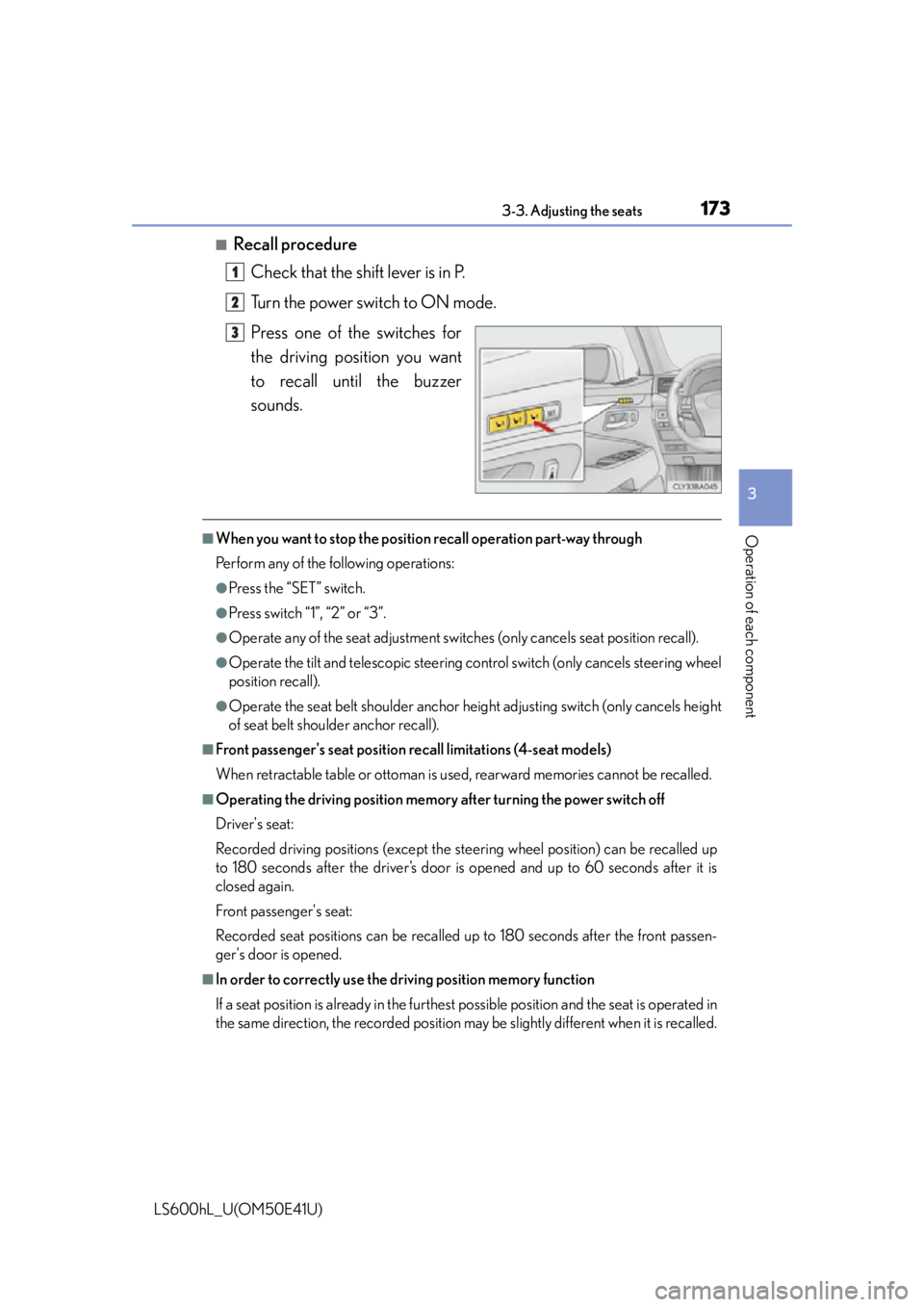
■Recall procedureCheck that the shift lever is in P.
Turn the power switch to ON mode.
Press one of the switches for
the driving position you want
to recall until the buzzer
sounds.
■When you want to stop the position recall operation part-way through
Perform any of the following operations:
●Press the “SET” switch.
●Press switch “1”, “2” or “3”.
●Operate any of the seat adju stment switches (only cancels seat position recall).
●Operate the tilt and telescopic steering co ntrol switch (only cancels steering wheel
position recall).
●Operate the seat belt shoulder anchor he ight adjusting switch (only cancels height
of seat belt shoulder anchor recall).
■Front passenger's seat position recall limitations (4-seat models)
When retractable table or ottoman is used, rearward memories cannot be recalled.
■Operating the driving position memory after turning the power switch off
Driver's seat:
Recorded driving positions (except the steering wheel position) can be recalled up
to 180 seconds after the driver’s door is opened and up to 60 seconds after it is
closed again.
Front passenger's seat:
Recorded seat positions can be recalled up to 180 seconds after the front passen-
ger's door is opened.
■In order to correctly use the dr iving position memory function
If a seat position is already in the furthest possible position and the seat is operated in
the same direction, the recorded position ma y be slightly different when it is recalled.
1
2
3
Page 177 of 620

1753-3. Adjusting the seats
3
Operation of each component
LS600hL_U(OM50E41U)
Using the door lock switch
Carry only one of the keys (including the card key) to which you want to
link the driving position. If 2 or mo re keys are in the vehicle, the driving
position cannot be linked properly.
Turn the power switch off and close the driver's door.
While pressing the recalled
switch, press and hold the door
lock switch (either lock or
unlock) unt il the buzzer
sounds.
■Recall procedure
Carry the electronic key that has b een registered to the driving posi-
tion, and then unlock and open the driver's door using the smart
access system with pu sh-button start or wireless remote control.
The driving position will move to the recorded position (not including the
steering wheel). However, the seat will move to a position slightly behind the
recorded position in order to make entering the vehicle easier.
If the driving position is in a position that has already been recorded, the seat
and outside rear view mirrors will not move.
Turn the power switch to ACCESSORY mode or fasten your seat-
belt.
The seat and steering wheel will move to the recorded position.
1
2
1
2
Page 182 of 620
1803-3. Adjusting the seats
LS600hL_U(OM50E41U)
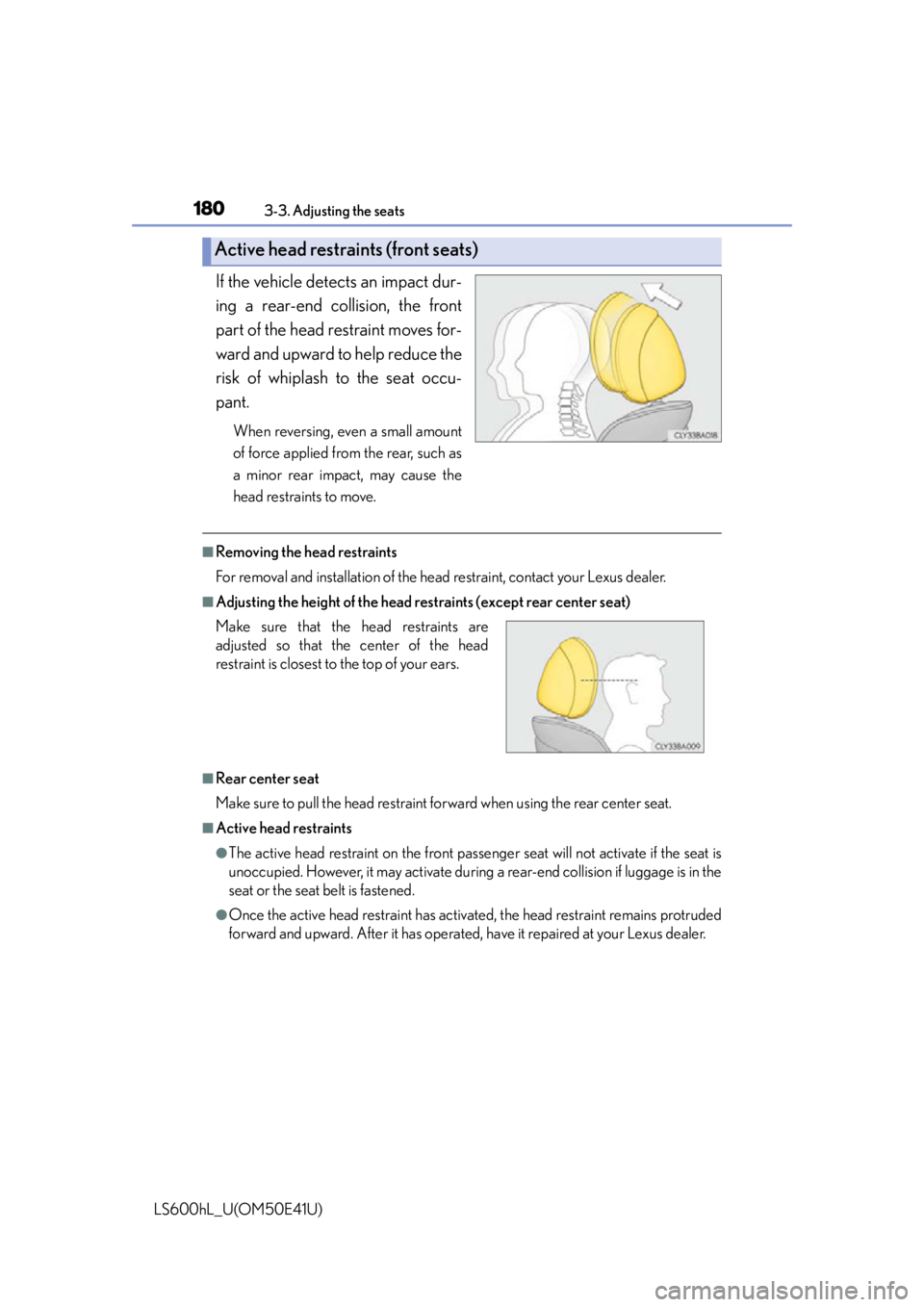
If the vehicle detects an impact dur-
ing a rear-end collision, the front
part of the head restraint moves for-
ward and upward to help reduce the
risk of whiplash to the seat occu-
pant.
When reversing, even a small amount
of force applied from the rear, such as
a minor rear impact, may cause the
head restraints to move.
■Removing the head restraints
For removal and installation of the head restraint, contact your Lexus dealer.
■Adjusting the height of the head restraints (except rear center seat)
■Rear center seat
Make sure to pull the head restraint forward when using the rear center seat.
■Active head restraints
●The active head restraint on the front pass enger seat will not activate if the seat is
unoccupied. However, it may activate during a rear-end collision if luggage is in the
seat or the seat belt is fastened.
●Once the active head restraint has activate d, the head restraint remains protruded
forward and upward. After it has operated, have it repaired at your Lexus dealer.
Active head restraints (front seats)
Make sure that the head restraints are
adjusted so that the center of the head
restraint is closest to the top of your ears.
Page 184 of 620
182
LS600hL_U(OM50E41U)
3-4. Adjusting the steering wheel and mirrors
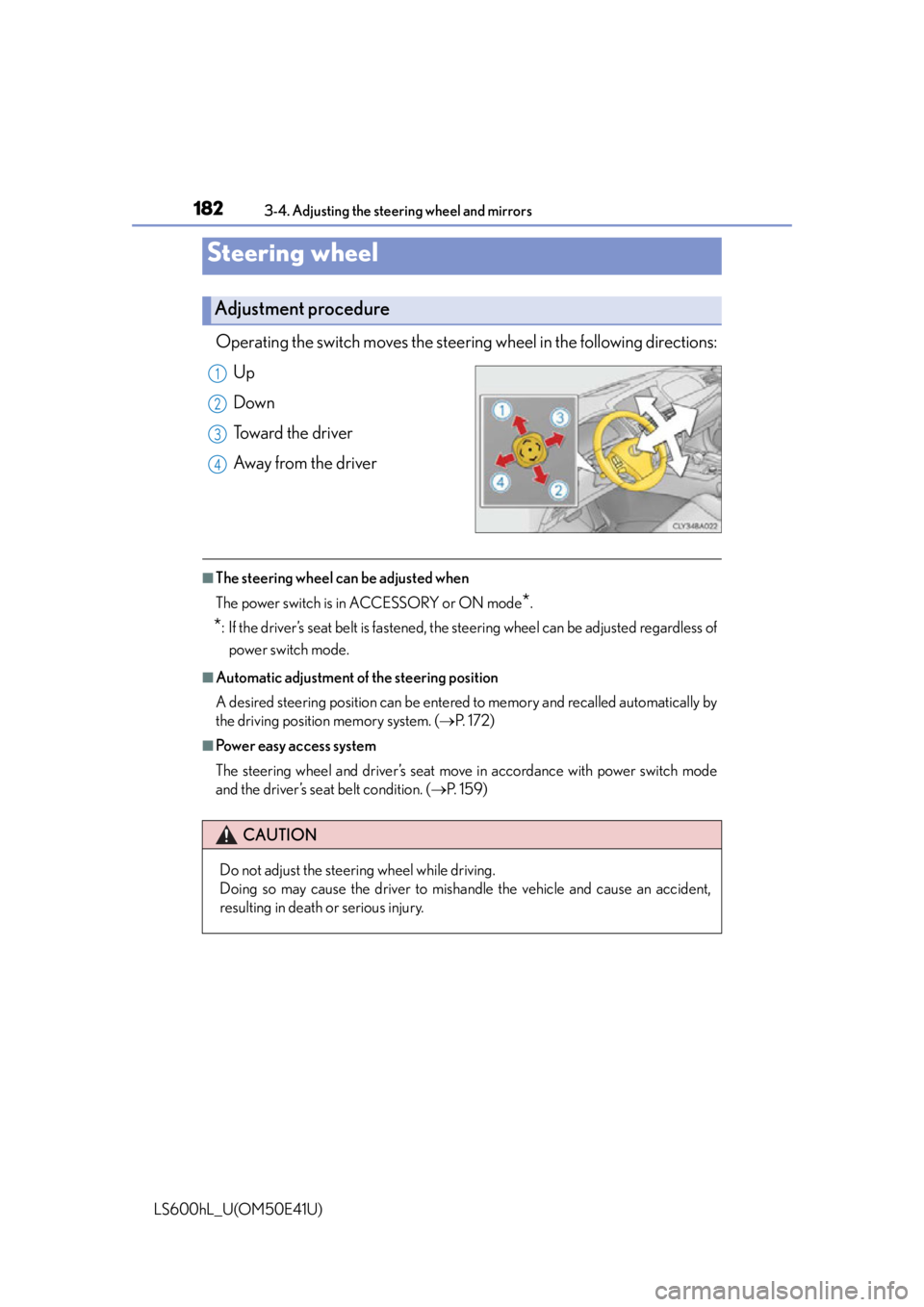
Operating the switch moves the steering wheel in the following directions:
Up
Down
Toward the driver
Away from the driver
■The steering wheel can be adjusted when
The power switch is in ACCESSORY or ON mode
*.
*: If the driver’s seat belt is fastened, the steering wheel can be adjusted regardless of power switch mode.
■Automatic adjustment of the steering position
A desired steering position can be entered to memory and recalled automatically by
the driving position memory system. ( P. 1 7 2 )
■Power easy access system
The steering wheel and driver’s seat move in accordance with power switch mode
and the driver’s seat belt condition. ( P. 1 5 9 )
Steering wheel
Adjustment procedure
1
2
3
4
CAUTION
Do not adjust the steering wheel while driving.
Doing so may cause the driver to mishandle the vehicle and cause an accident,
resulting in death or serious injury.
Page 233 of 620

2314-2. Driving procedures
4
Driving
LS600hL_U(OM50E41U)
Turns the brake hold system on
The brake hold standby indicator
(green) comes on. While the system is
holding the brake, the brake hold
operated indicator (yellow) comes on.
■Brake hold system operating conditions
The brake hold system cannot be turn ed on in the following conditions:
●The trunk or hood is not closed.
●The driver’s door is not closed.
●The driver is not wearing the seat belt.
If any of the conditions above are detected when the brake hold system is enabled,
the system will turn off and the brake hold standby indicator light will go off. In addi-
tion, if any of the conditions are detected while the system is holding the brake, a
warning buzzer will sound and a message wi ll be shown on the multi-information dis-
play. The parking brake will then be set automatically.
■Brake hold function
●If the brake pedal is left released for a period of about 3 minutes after the system
has started holding the brake, the parking brake will be set automatically. In this
case, a warning buzzer sounds and a message is shown on the multi-information
display.
●To turn the system off while the system is holding the brake, firmly depress the
brake pedal and press the switch again.
●The brake hold function may not hold the vehicle when the vehicle is on a steep
incline. In this situation, it may be nece ssary for the driver to apply the brakes. The
multi-information display will info rm the driver of this situation.
Brake Hold
The brake hold system keeps the brake applied when the shift lever is in
D, S or N with the system on and the brake pedal has been depressed to
stop the vehicle. The system releases the brake when the accelerator
pedal is depressed with the shift lever in D or S to allow smooth start off.
Page 268 of 620

2664-5. Using the driving support systems
LS600hL_U(OM50E41U)Adjusting the speed setting:
P. 2 5 9
Canceling and resuming the speed
setting: P. 2 6 2
■Dynamic radar cruise control with full-speed range can be set when
●The shift lever is in D or range 4 or higher of S has been selected.
●Vehicle speed is above approximately 30 mph (50 km/h).
■Accelerating after setting the vehicle speed
The vehicle can accelerate normally. After acceleration, the set speed resumes.
However, during vehicle-to-vehicle distance control mode, the vehicle speed may
decrease below the set speed in order to maintain the distance to the vehicle ahead.
■Automatic cancelation of vehicle-to-vehicle distance control
Vehicle-to-vehicle distance control driving is automatically canceled in the following
situations:
●Actual vehicle speed falls below approximately 25 mph (40 km/h) when there are
no vehicle ahead.
●The preceding vehicle leaves the lane when your vehicle is following at a speed
below 25 mph (40 km/h).
●VSC is activated.
●TRAC is activated for a period of time.
●When the VSC or TRAC system is turn ed off by pressing the VSC OFF switch.
●The sensor cannot operate correctly because it is covered in some way.
●The windshield wipers are operating at hi gh speed (when the wiper switch is set to
the “AUTO” mode or the high speed wiper operation position).
●When snow mode is set.
●The parking brake is operated.
●The vehicle is stopped by system control on a steep incline.
●Pre-collision brake assist is activated.
●The following are detected when the vehi cle has been stopped by system control:
• The driver is not wearing a seat belt.
• The driver’s door is opened.
• The trunk or hood is opened.
• The vehicle has been stopped for about 3 minutes.
If vehicle-to-vehicle distance control driv ing is automatically canceled for any other
reason, there may be a malfunction in the system. Contact your Lexus dealer.
Page 298 of 620

2964-5. Using the driving support systems
LS600hL_U(OM50E41U)
◆Pre-collision warning
When a high possibility of a fron-
tal collision is detected, the pre-
collision system warning light
flashes, a buzzer sounds and a
message is shown on the multi-
information display to urge the
driver to take evasive action.
Pre-collision warning can be dis-
abled using the pre-collision brak-
ing off switch.
◆Pre-collision seat belts (front seat only)
If the pre-collision sensor detects that a collision is unavoidable, the
pre-collision system will retract the seat belt before the collision occurs.
The same will happen if the dr iver makes an emergency braking or
loses control of the vehicle. ( P. 38)
◆Pre-collision brake assist
When there is a high possibility of a frontal collision, the system applies
greater braking force in relation to how strongly the brake pedal is
depressed.
PCS (Pre-Collision System)
: If equipped
When the sensor detects that a fron tal collision is highly likely or even
unavoidable, safety systems such as the brakes and seat belts are auto-
matically engaged to help avoid a co llision or to lessen impact as well as
vehicle damage.
Page 302 of 620

3004-5. Using the driving support systems
LS600hL_U(OM50E41U)
■The pre-collision system is operational when
●Pre-collision warning:
Vehicles without camera sensors
• The pre-collision braking off switch is not pressed.
• Vehicle speed is greater than about 10 mph (15 km/h).
• The speed at which your vehicle is approaching the obstacle or the vehicle run- ning ahead of you is greater than about 10 mph (15 km/h).
Vehicles with camera sensors
• The pre-collision braking off switch is not pressed.
• Vehicle speed is greater than about 4 mph (5 km/h).
• The speed at which your vehicle is approaching the obstacle or the vehicle run- ning ahead of you is greater than about 4 mph (5 km/h).
●Pre-collision seat belts (operating conditions A):
• Vehicle speed is greater than about 19 mph (30 km/h).
• The system detects sudd en braking or skidding.
• The front occupants are wearing a seat belt.
●Pre-collision seat belts (operating conditions B):
• Vehicle speed is greater than about 4 mph (5 km/h).
• The speed at which your vehicle is approaching the obstacle or the vehicle run- ning ahead of you is greater than about 19 mph (30 km/h).
• The front occupants are wearing a seat belt.
●Pre-collision brake assist:
• The VSC OFF switch is not pressed.
• Vehicle speed is greater than about 19 mph (30 km/h).
• The speed at which your vehicle is approaching the obstacle or the vehicle run- ning ahead of you is greater than about 19 mph (30 km/h).
• The brake pedal is depressed.
●Pre-collision braking:
Vehicles without camera sensors
• The pre-collision braking off switch is not pressed.
• The VSC OFF switch is not pressed.
• Vehicle speed is greater than about 10 mph (15 km/h).
• The speed at which your vehicle is approaching the obstacle or the vehicle run- ning ahead of you is greater than about 10 mph (15 km/h).
Vehicles with camera sensors
• The pre-collision braking off switch is not pressed.
• The VSC OFF switch is not pressed.
• Vehicle speed is greater than about 4 mph (5 km/h).
• The speed at which your vehicle is approaching the obstacle or the vehicle run- ning ahead of you is greater than about 4 mph (5 km/h).