Page 220 of 628
2204-2. Driving procedures
IS300h_EE(OM53D56E)
*1: To improve fuel efficiency and reduce noise, shift the shift lever to D for normal driv-ing.
*2: By selecting shift ranges using S mode, you can control accelerating force and enginebraking force.
■Sport mode/Eco drive mode
→ P. 2 9 3
■Snow mode
Snow mode can be selected to suit the conditions when driving on slippery
road surfaces, such as snow.
Press the switch.
Press the switch again to return to
normal mode.
Shift position purpose
Shift positionObjective or function
PParking the vehicle/starting the hybrid system
RReversing
NNeutral
(Condition in which the power is not transmitted)
DNormal driving*1
SS mode driving*2 ( → P. 222)
Selecting the driving mode
Page 222 of 628
2224-2. Driving procedures
IS300h_EE(OM53D56E)
To enter S mode, shift the shift lever to S. Shift ranges can be selected by operat-
ing the shift lever or paddle shift switches, allowing you to drive in the shift range
of your choice. The shift range can be selected by operating the shift lever or the
“-” and “+” paddle shift switches. Upshifting
Downshifting
The selected shift range, from S1 to S6,
will be displayed in the meter.
The initial shift range in S mode is auto-
matically set to S2, S3, S4 or S5
according to the vehicle speed.
■Shift ranges and their functions
●You can choose from 6 levels of accelerating force and engine braking
force.
●A lower shift range will provide greater accelerating force and engine
braking force than a higher shift range, and the engine revolutions will also
increase.
●If you accelerate while in ranges 1 to 4, the shift range may automatically
increase in accordance with the vehicle speed.
Selecting shift ranges in the S position
1
2
Page 223 of 628

2234-2. Driving procedures
4
Driving
IS300h_EE(OM53D56E)
■When the “-” paddle shift switch is operated with the shift lever in the D position
The shift range is downshifted to a range that enables engine braking force that is suit-
able to driving conditions.
■Automatic deactivation of shift range selection in the D position
Shift range selection in the D position will be deactivated in the following situations:
●When the vehicle comes to a stop
●If the accelerator pedal is depressed for more than a certain period of time
●When the shift lever is shifted to a position other than D
■Downshifting restriction warning buzzer
To help ensure safety and driving performa nce, downshifting operation may sometimes
be restricted. In some circumstances, downsh ifting may not be possible even when the
shift lever or paddle shift switch is operated. (A buzzer will sound twice.)
■Snow mode automatic deactivation
Snow mode is automatically deactivated if the power switch is turned off after driving in
snow mode.
■When driving with cruise control or dynamic radar cruise control activated
Even when performing the following actions with the intent of enabling engine braking,
engine braking will not activate because cruise control or dynamic radar cruise control
will not be canceled.
●While driving in D or S mode, downshifting to 5 or 4. ( →P. 250, 254)
●When switching the driving mode to sport mode while driving in D position. ( →P. 2 9 3 )
■If the shift lever cannot be shifted from P
→P. 5 6 2
Page 226 of 628
2264-2. Driving procedures
IS300h_EE(OM53D56E)
■Turn signals can be operated when
The power switch is in ON mode.
■If the indicator flashes faster than usual
Check that a light bulb in the front or rear turn signal lights has not burned out.
■If the turn signals stop flashing before a lane change has been performed
Operate the lever again.
■Customization
The number of times the turn signals flash during a lane change can be changed.
(Customizable feature →P. 5 9 1 )
Page 228 of 628
2284-2. Driving procedures
IS300h_EE(OM53D56E)
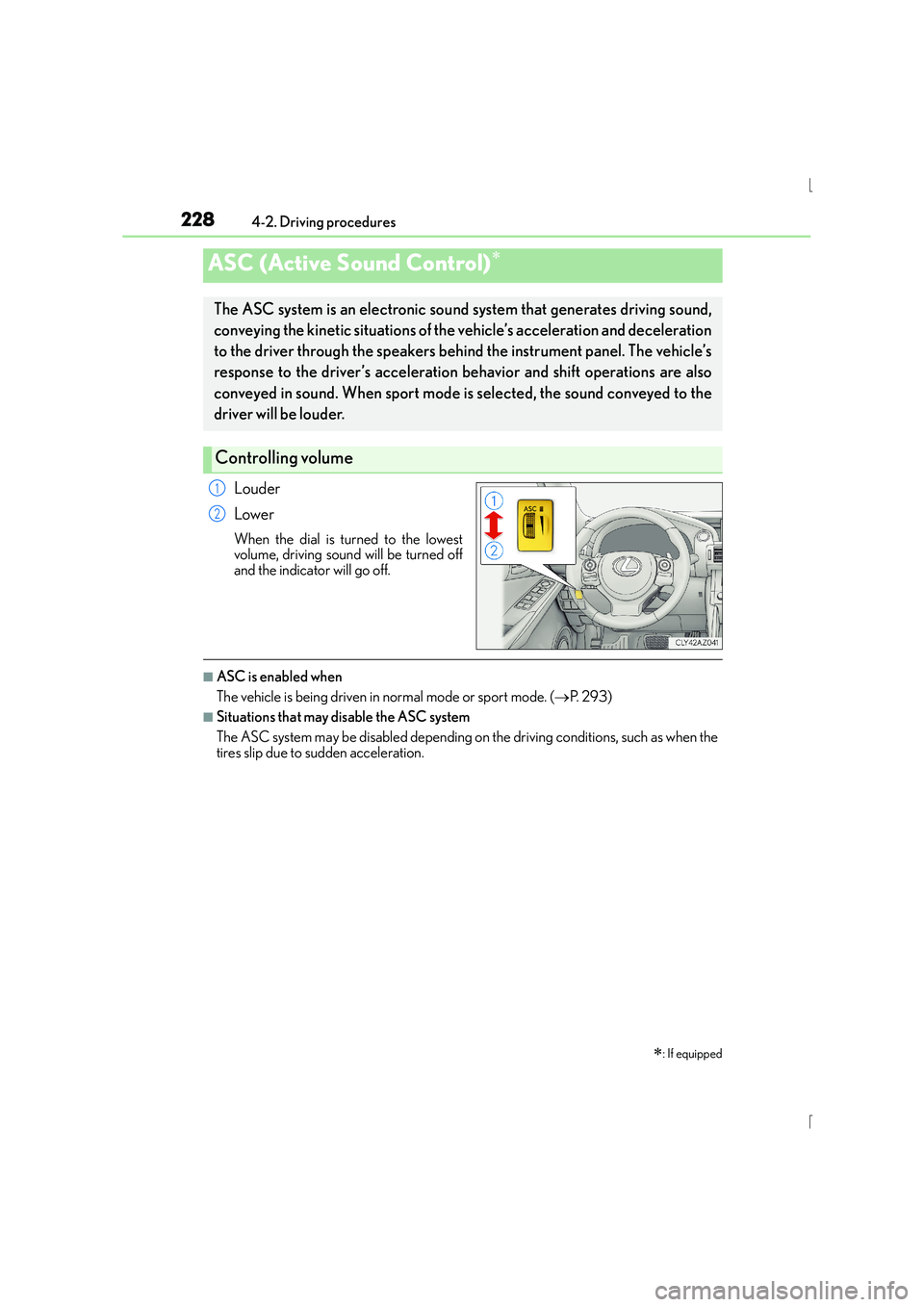
Louder
Lower
When the dial is turned to the lowest
volume, driving sound will be turned off
and the indicator will go off.
■ASC is enabled when
The vehicle is being driven in normal mode or sport mode. (→P. 2 9 3 )
■Situations that may disable the ASC system
The ASC system may be disabled depending on the driving conditions, such as when the
tires slip due to sudden acceleration.
ASC (Active Sound Control)∗
∗
: If equipped
The ASC system is an electronic soun d system that generates driving sound,
conveying the kinetic situations of the vehicle’s acceleration and deceleration
to the driver through the speakers behind the instrument panel. The vehicle’s
response to the driver’s acceleration behavior and shift operations are also
conveyed in sound. When sport mode is selected, the sound conveyed to the
driver will be louder.
Controlling volume
1
2
Page 229 of 628
229
4
Driving
IS300h_EE(OM53D56E)4-3. Operating the lights and wipers
Turning the end of the lever turns on the lights as follows:
The front position, tail, license
plate and instrument panel
lights turn on.
The headlights and all lights
listed above turn on.
The headlights, daytime run-
ning lights ( →P. 2 3 0 ) a n d a l l
the lights listed above turn on
and off automatically.
(When the power switch is in
ON mode.)
The daytime running lights turn
on. ( →P. 2 3 0 )
With the headlights on, push the
lever away from you to turn on the
high beams.
Pull the lever toward you to the center
position to turn the high beams off.
Pull the lever toward you and release
it to flash the high beams once.
You can flash the high beams with the
headlights on or off.
Headlight switch
The headlights can be operated manually or automatically.
Operating instructions
1
2
3
4
Turning on the high beam headlights
1
2
Page 230 of 628

2304-3. Operating the lights and wipers
IS300h_EE(OM53D56E)
This system allows the headlights and front position lights to be turned on for 30
seconds when the power switch is off.
Pull the lever toward you and release it
with the light switch is in or
after turning the power switch off.
Pull the lever toward you and release it
again to turn off the lights.
■Daytime running light system
To make your vehicle more visible to other drivers during daytime driving, the daytime
running lights turn on automatically whenever the hybrid system is started with the head-
light switch off or in the “AUTO” position and the parking brake is released. (Illuminate
brighter than the front position lights.) Dayt ime running lights are not designed for use at
night.
■Headlight control sensor
■Automatic light off system
●When the light switch is in or : The he adlights and front fog lights turn off auto-
matically if the power switch is turned to ACCESSORY mode or turned off.
●When the light switch is in : The headlights and all lights turn off automatically if the
power switch is turned to ACCESSORY mode or turned off.
To turn the lights on again, turn the power swit ch to ON mode, or turn the light switch off
once and then back to or .
Follow me home system
The sensor may not function properly if an
object is placed on the sensor, or anything that
blocks the sensor is affixed to the windshield.
Doing so interferes with the sensor detecting
the level of ambient light and may cause the
automatic headlight system to malfunction.
Page 231 of 628
2314-3. Operating the lights and wipers
4
Driving
IS300h_EE(OM53D56E)
■Light reminder buzzer
A buzzer sounds when the power switch is turned off or turned to ACCESSORY mode
and the driver’s door is opened while the lights are turned on.
■Automatic headlight leveling system
The level of the headlights is automatically adjusted according to the number of passen-
gers and the loading condition of the vehicle to ensure that the headlights do not inter-
fere with other road users.
■Customization
Settings (e.g. light sensor se nsitivity) can be changed.
(Customizable features: →P. 5 9 7 )
NOTICE
■To prevent 12-volt battery discharge
Do not leave the lights on longer than necessary when the hybrid system is off.