2015 Lexus IS300h Can
[x] Cancel search: CanPage 143 of 628
1433-2. Opening, closing and locking the doors and trunk
3
Operation of each component
IS300h_EE(OM53D56E)
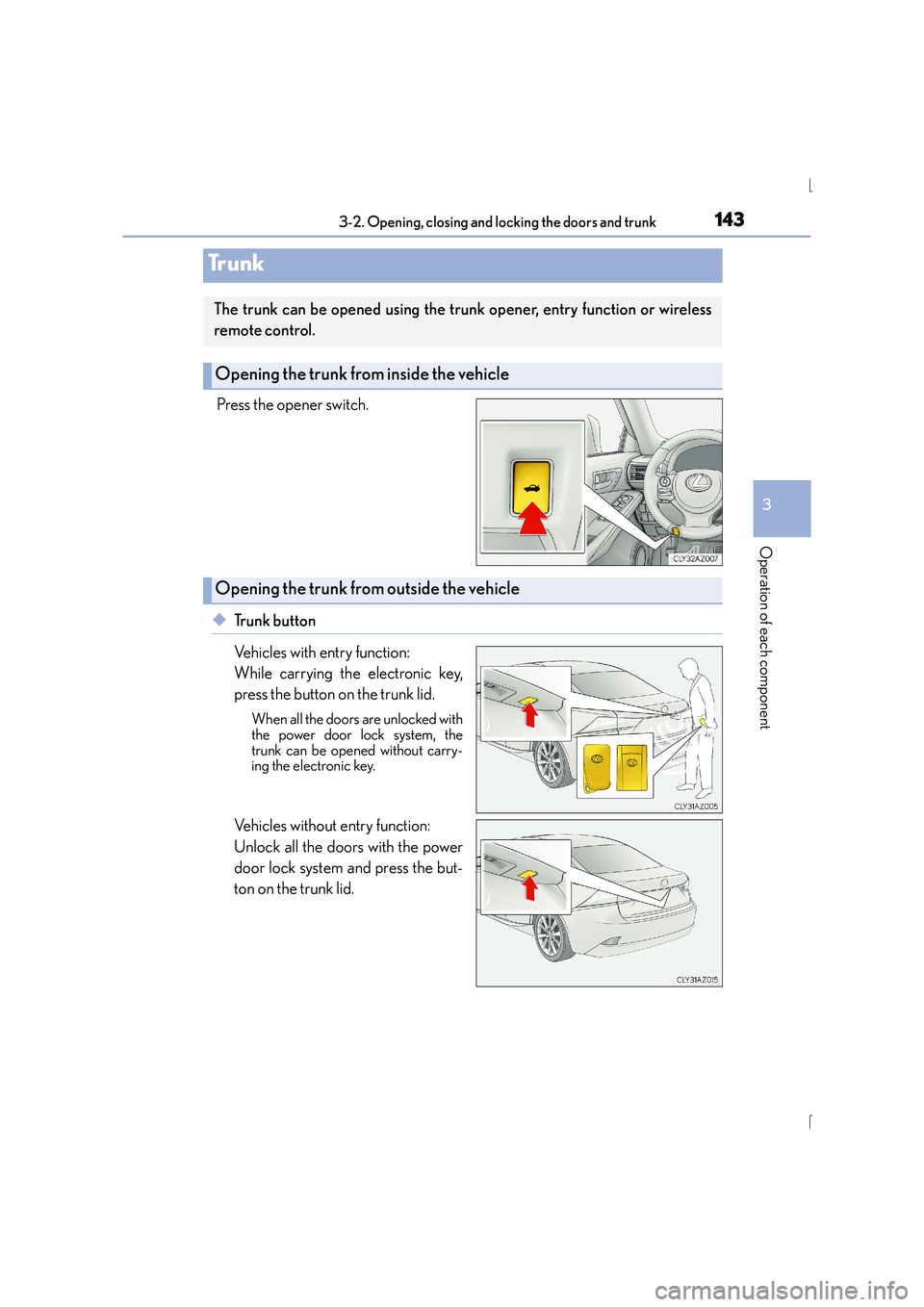
Press the opener switch.
◆Trunk button
Vehicles with entry function:
While carrying the electronic key,
press the button on the trunk lid.
When all the doors are unlocked with
the power door lock system, the
trunk can be opened without carry-
ing the electronic key.
Vehicles without entry function:
Unlock all the doors with the power
door lock system and press the but-
ton on the trunk lid.
Tr u n k
The trunk can be opened using the trunk opener, entry function or wireless
remote control.
Opening the trunk from inside the vehicle
Opening the trunk from outside the vehicle
Page 145 of 628

1453-2. Opening, closing and locking the doors and trunk
3
Operation of each component
IS300h_EE(OM53D56E)
To protect luggage stored in the trunk against theft, the luggage security system
can be set to on.Folding type rear seats only: Move
the luggage security system levers to
the lock position.
To disable the trunk opener, turn the
main switch in the glove box off On
Off
When the main switch is off, the trunk
lid cannot be opened even with the
wireless remote control or entry
function.
Luggage security system
1
2
1
2
Page 146 of 628

1463-2. Opening, closing and locking the doors and trunk
IS300h_EE(OM53D56E)
■Trunk light (if equipped)
The trunk light turns on when the trunk is opened.
■Function to prevent the trunk being locked with the electronic key inside
●When all doors are locked, closing the trunk lid with the electronic key left inside the
trunk will sound an alarm.
In this case, the trunk lid can be opened pressing the trunk release button on the trunk
lid.
●If the spare electronic key is put in the trunk with all the doors locked, the key confine-
ment prevention function is activated so the trunk can be opened. In order to prevent
theft, take all electronic keys with you when leaving the vehicle.
●If the electronic key is put in the trunk with all the doors locked, the key may not be
detected depending on the location of the key and the surrounding radio wave condi-
tions. In this case, the key confinement prevention function cannot be activated, causing
the doors to lock when the trunk is closed. Make sure to check where the key is before
closing the trunk.
●The key confinement prevention function canno t be activated if any one of the doors is
unlocked. In this case, open the trunk using the trunk opener.
■Using the mechanical key
The trunk can be also opened using the mechanical key. ( →P. 5 6 3 )
■If the smart entry & start system or the wireless remote control does not operate prop-
erly
Use the mechanical key to unlock the trunk. ( →P. 5 6 3 )
Replace the key battery with a new one if it is depleted. ( →P. 4 8 8 )
■When leaving a key to the vehicle with a parking attendant
→P. 1 3 2
■Customization
The trunk unlocking operation can be changed. (Customizable features: →P. 5 9 1 )
Page 149 of 628

1493-2. Opening, closing and locking the doors and trunk
3
Operation of each component
IS300h_EE(OM53D56E)
●Locks and unlocks the doors (vehicles with entry function) (→P. 136)
●Opens the trunk (vehicles with entry function) ( →P. 1 4 3 )
●Starts the hybrid system ( →P. 212)
■Antenna location
■Effective range (areas within which the electronic key is detected)
Smart entry & start system
The following operations can be perfor med simply by carrying the electronic
key (including the card key) on your person, for example in your pocket. The
driver should always carry the electronic key.
Antennas outside the cabin (vehicles with
entry function)
Antennas inside the cabin
Antenna inside the trunk
Antenna outside the trunk (vehicles with
entry function)
When locking or unlocking the doors
(vehicles with entry function)
The system can be operated when the elec-
tronic key is within about 0.7 m (2.3 ft.) of
an outside door handle. (Only the doors
detecting the key can be operated.)
When opening the trunk (vehicles with
entry function)
The system can be operated when the electronic key is within about 0.7 m (2.3
ft.) of the trunk release button.
When starting the hybrid system or changing power switch modes The system can be operated when the electronic key is inside the vehicle.1
2
3
4
Page 150 of 628

1503-2. Opening, closing and locking the doors and trunk
IS300h_EE(OM53D56E)
■Battery-saving function (vehicles with entry function)
The battery-saving function will be activated in order to prevent the electronic key bat-
tery and the 12-volt battery from being discharged while the vehicle is not in operation
for a long time.
●In the following situations, the smart entry & start system may take some time to unlock
the doors.
• The electronic key has been left within approximately 2 m (6 ft.) of the outside of the vehicle for 10 minutes or longer.
• The smart entry & start system has not been used for 5 days or longer.
●If the smart entry & start system has not been used for 14 days or longer, the doors can-
not be unlocked at any door except the driver ’s door. In this case, hold the driver’s door
handle, or use the wireless remote control or mechanical key, to unlock the doors.
■Electronic Key battery-Saving Function
When battery-saving mode is set, battery depletion is minimized by stopping the elec-
tronic key from receiving radio waves.
Press twice while pressing and holding
. Confirm that the electronic key indica-
tor flashes 4 times.
While the battery-saving mode is set, the smart
entry & start system cannot be used. To cancel
the function, press any of the electronic key but-
tons.
Page 152 of 628

1523-2. Opening, closing and locking the doors and trunk
IS300h_EE(OM53D56E)
■Note for the entry function (if equipped)
●Even when the electronic key is within the effective range (detection areas), the system
may not operate properly in the following cases:
• The electronic key is too close to the window or outside door handle, near theground, or in a high place when the doors are locked or unlocked.
• The electronic key is near the ground or in a high place, or too close to the rear
bumper center when the trunk is opened.
●Do not leave the electronic key on top of th e instrument panel or near the door pockets
when exiting the vehicle. Depending on the radio wave reception conditions, it may be
detected by the antenna outside the cabin and the doors will become lockable from the
outside, possibly trapping the electronic key inside the vehicle.
●As long as the electronic key is within the effective range, the doors may be locked or
unlocked by anyone. However, only the doors detecting the electronic key can be used
to unlock the vehicle.
●The doors may unlock or lock if a large amou nt of water splashes on the door handle,
such as in the rain or in a car wash, when the electronic key is within the effective range.
(The doors will automatically be locked af ter approximately 30 seconds if the doors
are not opened and closed.)
●If the wireless remote control is used to lock the doors when the electronic key is near
the vehicle, there is a possibility that the d oor may not be unlocked by the entry func-
tion. (Use the wireless remote control to unlock the doors.)
●Touching the door lock or unlock sensor while wearing gloves may prevent lock or
unlock operation.
●If the door handle becomes wet while the electronic key is within the effective range,
the door may lock and unlock repeatedly. In this case, follow the following correction
procedures to wash the vehicle:
• Place the electronic key in a location 2 m (6 ft.) or more away from the vehicle. (Take care to ensure that the key is not stolen.)
• Set the electronic key to battery-saving mode to disable the smart entry & start sys- tem. ( →P. 1 5 0 )
●If the electronic key is inside the vehicle and a door handle becomes wet during a car
wash, a message may be shown on the multi-information display and a buzzer will
sound outside the vehicle. To turn off the alarm, lock all the doors.
●The lock sensor may not work properly if it comes into contact with ice, snow, mud, etc.
Clean the lock sensor and attempt to operate it again, or use the lock sensor on the
lower part of the door handle.
●A sudden handle operation or a handle operation immediately after entering the effec-
tive range may prevent the doors from being unlocked. Touch the door unlock sensor
and check that the doors are unlocked before pulling the door handle again.
●Unlocking the vehicle may take more time if another electronic key is within the effec-
tive range.
Page 153 of 628

1533-2. Opening, closing and locking the doors and trunk
3
Operation of each component
IS300h_EE(OM53D56E)
■Note for the push-start function
●Even when the electronic key is within the effective range (detection areas), the system
may not operate properly when the electronic key is on the instrument panel, rear
package tray or floor, or in the door pockets or glove box when the hybrid system is
started or power switch modes are changed.
●Even if the electronic key is not inside the vehicle, it may be possible to start the hybrid
system if the electronic key is near the window.
■When the vehicle is not driven for extended periods
●Vehicles with entry function: To prevent theft of the vehicle, do not leave the electronic
key within 2 m (6 ft.) of the vehicle.
●The smart entry & start system can be deactivated in advance. ( →P. 5 9 1 )
■To operate the system properly
●Make sure to carry the electronic key when operating the system. Do not get the elec-
tronic key too close to the vehicle when operating the system from the outside of the
vehicle.
Depending on the position and holding condition of the electronic key, the key may not
be detected correctly and the system may not operate properly. (The alarm may go off
accidentally, or the door lock prev ention function may not operate.)
●Do not leave the electronic key inside the luggage compartment.
The key confinement prevention function may not operate, depending on the location
of the key (close to a spare tire [if equipped], the inside edge of the luggage compart-
ment), conditions (inside a metal bag, close to metallic objects) and the radio waves in
the surrounding area. ( →P. 1 4 6 )
■If the smart entry & start system does not operate properly
●Locking and unlocking the doors and opening the trunk: Use the mechanical key.
(→ P. 5 6 3 )
●Starting the hybrid system: →P. 5 6 4
■Customization
Settings (e. g. smart entry & start system) can be changed.
(Customizable features: →P. 5 9 1 )
■If the smart entry & start system has been deactivated in a customized setting
●Locking and unlocking the doors and opening the trunk:
Use the wireless remote control or mechanical key. ( →P. 136, 144, 563)
●Starting the hybrid system and changing power switch modes: →P. 5 6 4
●Stopping the hybrid system: →P. 2 1 3
Page 164 of 628

1643-2. Opening, closing and locking the doors and trunk
IS300h_EE(OM53D56E)
CAUTION
■Caution regarding interference with electronic devices
●People with implantable cardiac pacemakers, cardiac resynchronization therapy-
pacemakers or implantable cardioverter defibrillators should maintain a reasonable
distance between themselves and the smart entry & start system antennas.
( → P. 1 4 9 )
The radio waves may affect the operation of such devices. If necessary, the entry
function can be disabled. Ask any authoriz ed Lexus dealer or repairer, or another
duly qualified and equipped professional fo r details, such as the frequency of radio
waves and timing of the emitted radio waves. Then, consult your doctor to see if you
should disable the entry function.
●Users of any electrical medical device other than implantable cardiac pacemakers,
cardiac resynchronization therapy-pacemakers or implantable cardioverter defibril-
lators should consult the manufacturer of the device for information about its opera-
tion under the influence of radio waves.
Radio waves could have unexpected effects on the operation of such medical
devices.
Ask any authorized Lexus dealer or repair er, or another duly qualified and equipped
professional for details on disabling the entry function.