Page 427 of 628

4276-2. Using the interior lights
6
Interior features
IS300h_EE(OM53D56E)
■The interior lights and personal lights can be operated when
The interior lights and personal lights can be used regardless of the power switch mode.
However, when the power switch is turned off, they can be used only when the 12-volt
battery protection function is not operating.
■12-volt battery protection function
To prevent the 12-volt battery from being discharged, approximately 20 minutes after
the power switch is turned off, the power supplied to the interior lights, personal lights,
and other lights will be cut off automatically. (If th e interior lights, etc. are left on when the
power switch is turned off, they will be turned off automatically.)
To turn the interior lights, etc. back on, turn the power switch to ACCESSORY or ON
mode or operate the interior light switch until the interior lights turn on.
If any of the lights are illuminated automatically due to the illuminated entry system, the
12-volt battery protection function will be canceled.
■Illuminated entry system
The lights automatically turn on/off according to power switch mode, the presence of the
electronic key, whether the doors are locked/unlocked, and whether the doors are
opened/closed.
■Customization
Setting (e.g. the time elapsed before lights turn off) can be changed.
(Customizable features: →P. 5 9 1 )
NOTICE
To prevent 12-volt battery discharge, do not leave the lights on longer than necessary
when the hybrid system is off.
Page 428 of 628
428
IS300h_EE(OM53D56E)6-3. Using the storage features
List of storage features
Glove box (
→P. 4 2 9 )
Bottle holders ( →P. 4 3 0 ) Cup holders (if equipped)
(→ P. 4 3 0 )
Console box ( →P. 4 2 9 )
CAUTION
●Do not leave glasses, lighters or spray cans in the storage spaces, as this may cause
the following when cabin temperature becomes high:
• Glasses may be deformed by heat or cracked if they come into contact with other
stored items.
• Lighters or spray cans may explode. If th ey come into contact with other stored
items, the lighter may catch fire or the spray can may release gas, causing a fire
hazard.
●When driving or when the storage compartments are not in use, keep the lids closed.
In the event of sudden braking or sudden swerving, an accident may occur due to an
occupant being struck by an open lid or the items stored inside.
1
2
3
4
Page 429 of 628
4296-3. Using the storage features
6
Interior features
IS300h_EE(OM53D56E)
Open (press the button)
Unlock with the mechanical key
Lock with the mechanical key
●The glove box light turns on when the power switch is in ACCESSORY or ON mode.
●The trunk opener main switch is located in the glove box. (→P. 1 4 5 )
Push the knob.
Lift by hand to fully open the console
box.
Glove box
1
2
3
●The insert inside the glove box can be
removed.
Console box
Page 430 of 628
4306-3. Using the storage features
IS300h_EE(OM53D56E)
■Cup holders
■Bottle holders
●When storing a bottle, close the cap.
●The bottle may not be stored depending on its size or shape.
●The rubber mats at the bottom of the front cup holders can be removed.
Cup holders/Bottle holders
XFrontXRear (if equipped)
To open, pull down the armrest and
press the button and release the
rear cup holder on the armrest.
Page 431 of 628
4316-3. Using the storage features
6
Interior features
IS300h_EE(OM53D56E)
CAUTION
●Do not place anything other than cups or aluminum cans in the cup holders and bot-
tle in the bottle holders. Other items may be thrown out of the holders in the event of
an accident or sudden braking, causing injury.
●To prevent burns, cover hot drinks when placed in the cup holders.
NOTICE
To prevent damage to the rear cup holder, stow the cup holder before stowing the arm-
rest.
Page 435 of 628
435
IS300h_EE(OM53D56E)
6
Interior features
6-4. Using the other interior features
To set the visor in the forward posi-
tion, flip it down.
To set the visor in the side position,
flip down, unhook, and swing it to the
side.
Slide the cover to open.
The light turns on when the cover is
opened.
The clock can be adjusted. Pressing and holding will move the
clock hands backward.
Pressing and holding will move the
clock hands forward.
Other interior features
Sun visors
1
2
Vanity mirrors
Clock
1
2
Page 436 of 628
4366-4. Using the other interior features
IS300h_EE(OM53D56E)
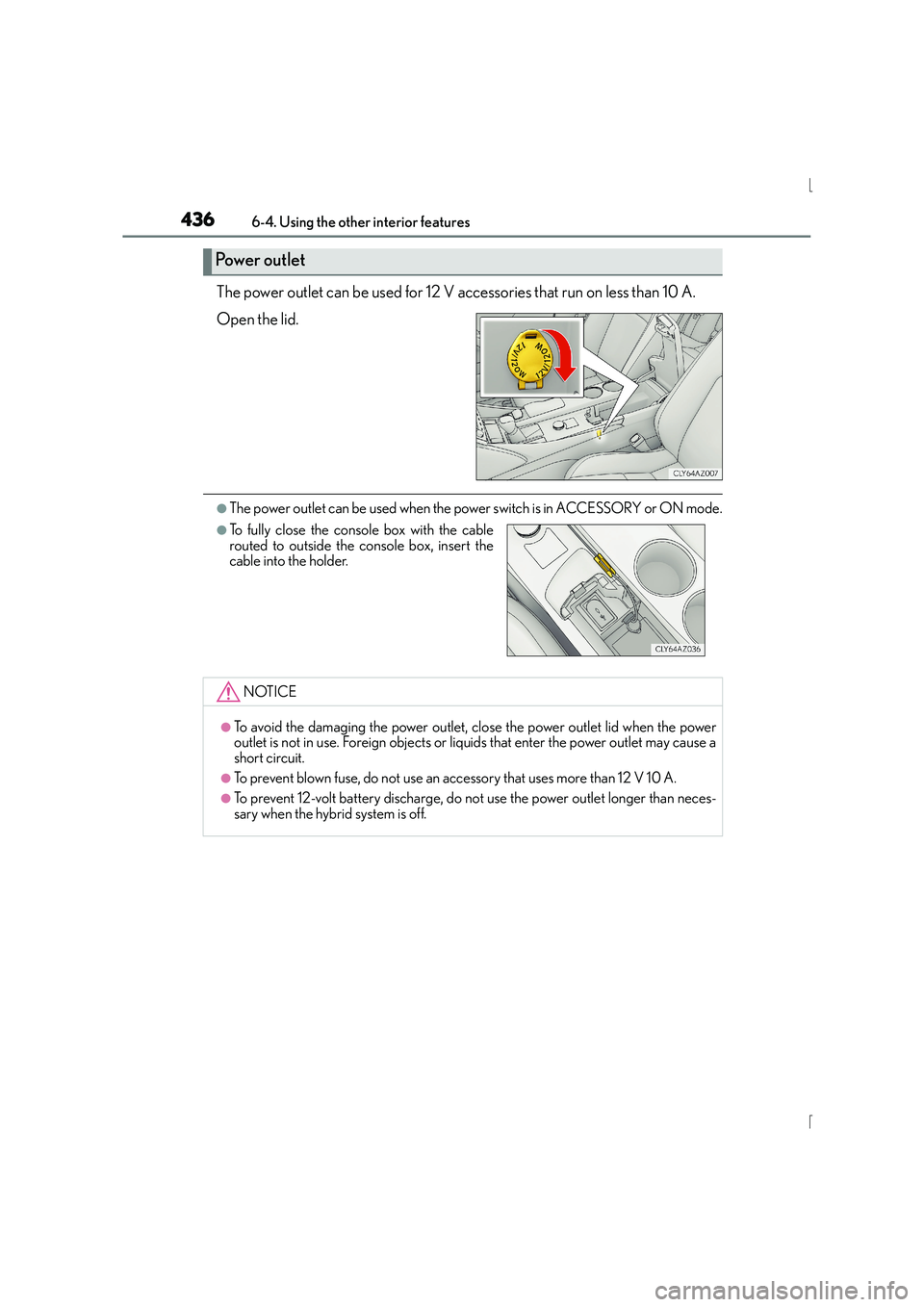
The power outlet can be used for 12 V accessories that run on less than 10 A.
Open the lid.
●The power outlet can be used when the power switch is in ACCESSORY or ON mode.
Power outlet
●To fully close the console box with the cable
routed to outside the console box, insert the
cable into the holder.
NOTICE
●To avoid the damaging the power outlet, close the power outlet lid when the power
outlet is not in use. Foreign objects or liquids that enter the power outlet may cause a
short circuit.
●To prevent blown fuse, do not use an accessory that uses more than 12 V 10 A.
●To prevent 12-volt battery discharge, do not use the power outlet longer than neces-
sary when the hybrid system is off.
Page 437 of 628
4376-4. Using the other interior features
6
Interior features
IS300h_EE(OM53D56E)
Fold down the armrest for use.
The rear sunshade can be raised and lowered.
Raise/lower
Armrest (if equipped)
NOTICE
To prevent damage to the armrest, do not apply too much load on the armrest.
Rear sunshade (if equipped)