Page 383 of 628

3835-9. Bluetooth® Phone
5
Lexus Display Audio system
IS300h_EE(OM53D56E)
You can transfer the phone numbers in a Bluetooth® phone to the system.
Operation methods differ between PBAP (Phone Book Access Profile) compat-
ible and PBAP incompatible Bluetooth
® phones. If the cellular phone does not
support either PBAP or OPP (Object Push Profile) service, you cannot transfer
contacts.
Press the switch on the steering wheel.
If the phonebook is empty, a message will be displayed.
XFor a PBAP compatible Bluetooth® phone and “Automatic transfer” is off
To transfer new contacts from a cel-
lular phone, select “Always” and then
enable “Automatic transfer”.
( → P. 3 9 4 )
Select “Once” if you want to transfer
new contacts from a cellular phone.
XFor a PBAP incompatible and OPP compatible Bluetooth® phone
Select “Transfer” and operate your
cellular phone to transfer new con-
tacts from a cellular phone.
Select “Add” if you want to add a new
contact manually.
When the phonebook is empty
1
2
2
Page 385 of 628
3855-9. Bluetooth® Phone
5
Lexus Display Audio system
IS300h_EE(OM53D56E)
Press the switch on the steering
wheel or select .
Press the switch on the steering wheel or select .
■International calls
Depending on the cellular phone in use, received international calls may not be dis-
played correctly.
Receiving a call
When a call is received, the following screen is displayed together with a
sound.
To answer the phone
To refuse a call
Page 387 of 628

3875-9. Bluetooth® Phone
5
Lexus Display Audio system
IS300h_EE(OM53D56E)
XPhone number containing a “w” symbol
When the “w” symbol is dialed in an outgoing call, you need to go to the
“Release tones” screen to dial the following digits. Move the controller to the
left and then select “Release tones”.
Select “Handset mode” to change from a hands-free call to a cellular phone call
or vice versa.
Press the switch on the steering wheel or select .
When a call is interrupted by a third party while talking, an incoming call mes-
sage will be displayed.
To talk with the other party:
Press the switch on the steering
wheel or select .
To refuse the call:
Press the switch on the steering
wheel or select .
Every time you press the switch on the steering wheel or select during call
waiting, you will be switched to the other party.
■Tr a n s f e r r i n g c a l l s
●It is not possible to transfer from hand s-free to the cellular phone while driving.
●If you transfer from the cellular phone to ha nds-free, the hands-free screen will be dis-
played, and you can operate the system using the screen.
●Transfer method and operation may vary according to the cellular phone used.
●For operation of the cellular phone in use, see the phone's manual.
■Call waiting operation
Call waiting operation may differ depending on your phone company and cellular
phone.
To transfer a call
To h a n g u p
Call waiting
Page 389 of 628
3895-9. Bluetooth® Phone
5
Lexus Display Audio system
IS300h_EE(OM53D56E)
Move the controller to the left while on the message screen.
Select “Quick message” to display the “Quick message” screen.
Select the desired message and then select “Send”.
■Editing a quick messageMove the controller to the left while on the message screen.
Select “Quick message” and then the desired message. Move the control-
ler to the left while the desired message is displayed.
Select “Edit”.
To return to the default message after editing, select “Default”.
Replying to a message
1
2
3
1
2
3
Page 391 of 628
3915-9. Bluetooth® Phone
5
Lexus Display Audio system
IS300h_EE(OM53D56E)
Volume switch
During an incoming call: Adjusts the
ring tone volume
During speaking on the phone:
Adjusts in call volume.
The voice guidance volume cannot be
adjusted using this button.
Off hook switch•Start call
• Receiving
• Phone top screen display
On hook switch •End call
• Refuse call
Talk switch
Press: Turns the speech command system on
Press and hold: Turns the speech command system off
Using the steering wheel switches
The steering wheel switches can be used to operate a connected cellular
phone.
Operating a telephone using the steering wheel switches
1
2
3
4
Page 393 of 628
3935-9. Bluetooth® Phone
5
Lexus Display Audio system
IS300h_EE(OM53D56E)
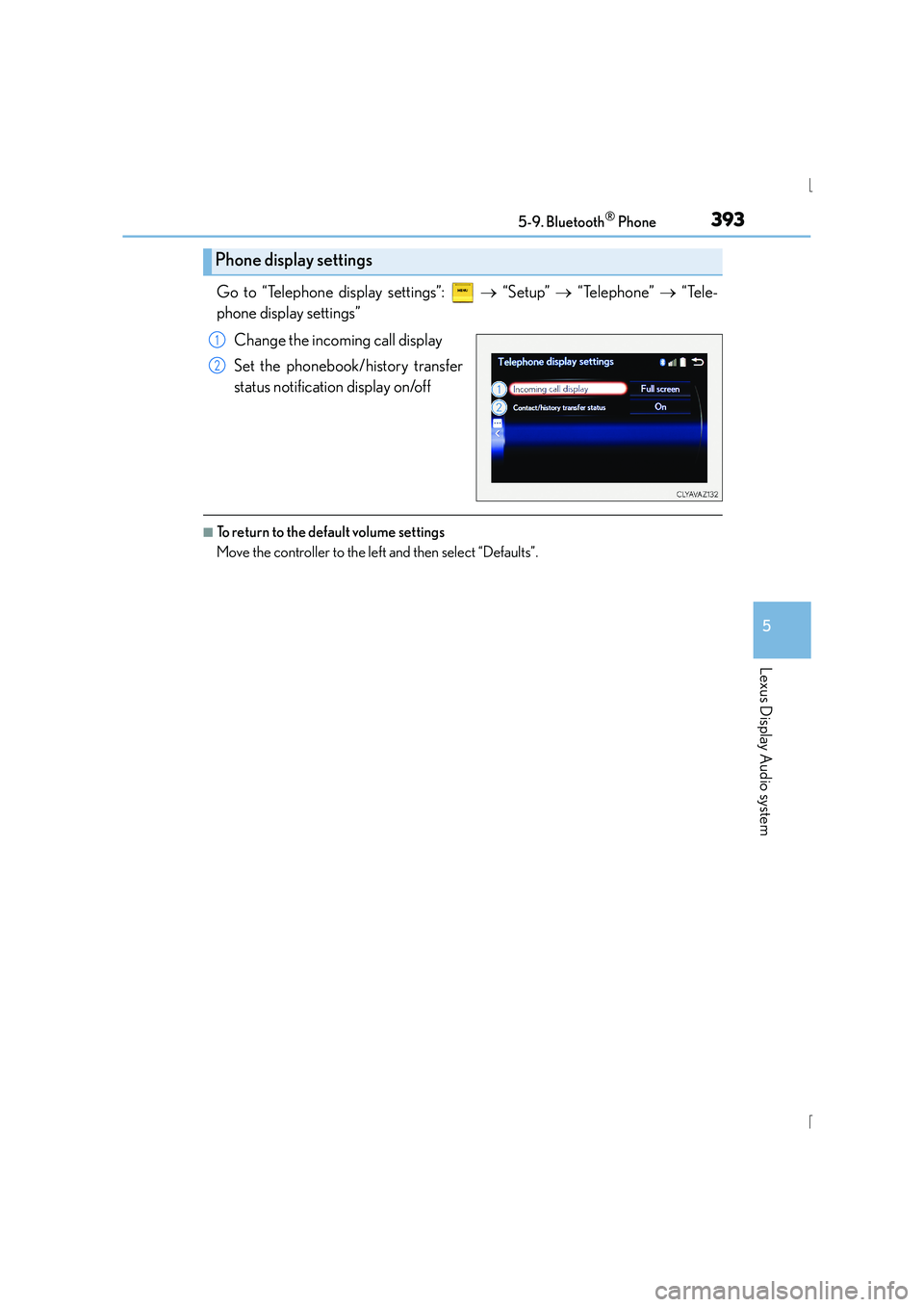
Go to “Telephone display settings”: → “Setup” → “Telephone” → “Tele-
phone display settings”
Change the incoming call display
Set the phonebook/history transfer
status notification display on/off
■To return to the default volume settings
Move the controller to the left and then select “Defaults”.
Phone display settings
1
2
Page 395 of 628

3955-10. Phonebook
5
Lexus Display Audio system
IS300h_EE(OM53D56E)
■Return to the default settings
Move the controller to the left and select “Defaults”.
You can transfer the phone numbers in your Bluetooth® phone to display audio
system. Operation methods differ between PBAP compatible and PBAP incom-
patible Bluetooth
® phones. If your cellular phon e does not support either PBAP
or OPP services, you cannot transfer contacts.
Go to “Transfer contacts”: → “Setup” → “Telephone” → “Contact/call his-
tory settings” → “Update contacts from telephone”
XFor PBAP compatible Bluetooth® phones when “Automatic transfer” is set to
on
Start the update automatically.
XFor PBAP compatible Bluetooth® phones when “Automatic transfer” is set to
off and PBAP incompatible Bluetooth® phones
Select to transfer the contact from
the connected cellular phone and
replace the current one.
Select to transfer the desired con-
tact data from the connected cellu-
lar phone to add to the current one.
You can register the desired contact from the phonebook. Up to 15 contacts per
phone can be registered.
Go to “Add favourite”: → “Setup” → “Telephone” → “Contact/call his-
tory settings” → “A d d f a v o u r i t e ”
Choose the contact to register.
Transferring a phone number
1
2
Registering favorites
1
2
Page 396 of 628

3965-10. Phonebook
IS300h_EE(OM53D56E)
Go to “Remove favourite”: → “Setup” → “Telephone” → “Contact/call
history settings” → “Remove favourite”
Select the desired contacts.
You can select all contacts by selecting “Select all”
Move the controller to the left and select “Remove”.
Go to “Delete contact”: → “Setup” → “Telephone” → “Contact/call his-
tory settings” → “Delete contacts”
Select the desired contacts.
You can select all contacts by selecting “Select all”.
Move the controller to the left and select “Delete”.
■Phonebook data
Phonebook data is managed separately fo r every registered phone. When another
phone is connected, you cannot read the registered data.
■When transferring contacts
Transfer contacts while the hybrid system is running.
If the cellular phone is OPP or PBAP compat ible, you may need to input “1234” on the
cellular phone for OBEX certification.
■When you have selected “Replace contacts” or “Add contact” to transfer contacts
If the cellular phone does not support OPP service, you cannot use these functions. You
can transfer the phonebook data only by operating your phone.
■Transferring contacts while Bluetooth® audio is playing
Bluetooth® audio will disconnect. It will reconnect automatically when data transfer fin-
ishes. It may not reconnect depending on the phone which is connected.
Removing favorites
Deleting the contacts data
1
2
3
1
2
3