Page 88 of 586
872. Instrument cluster
2
Instrument cluster
IS350/250_U (OM53C50U)
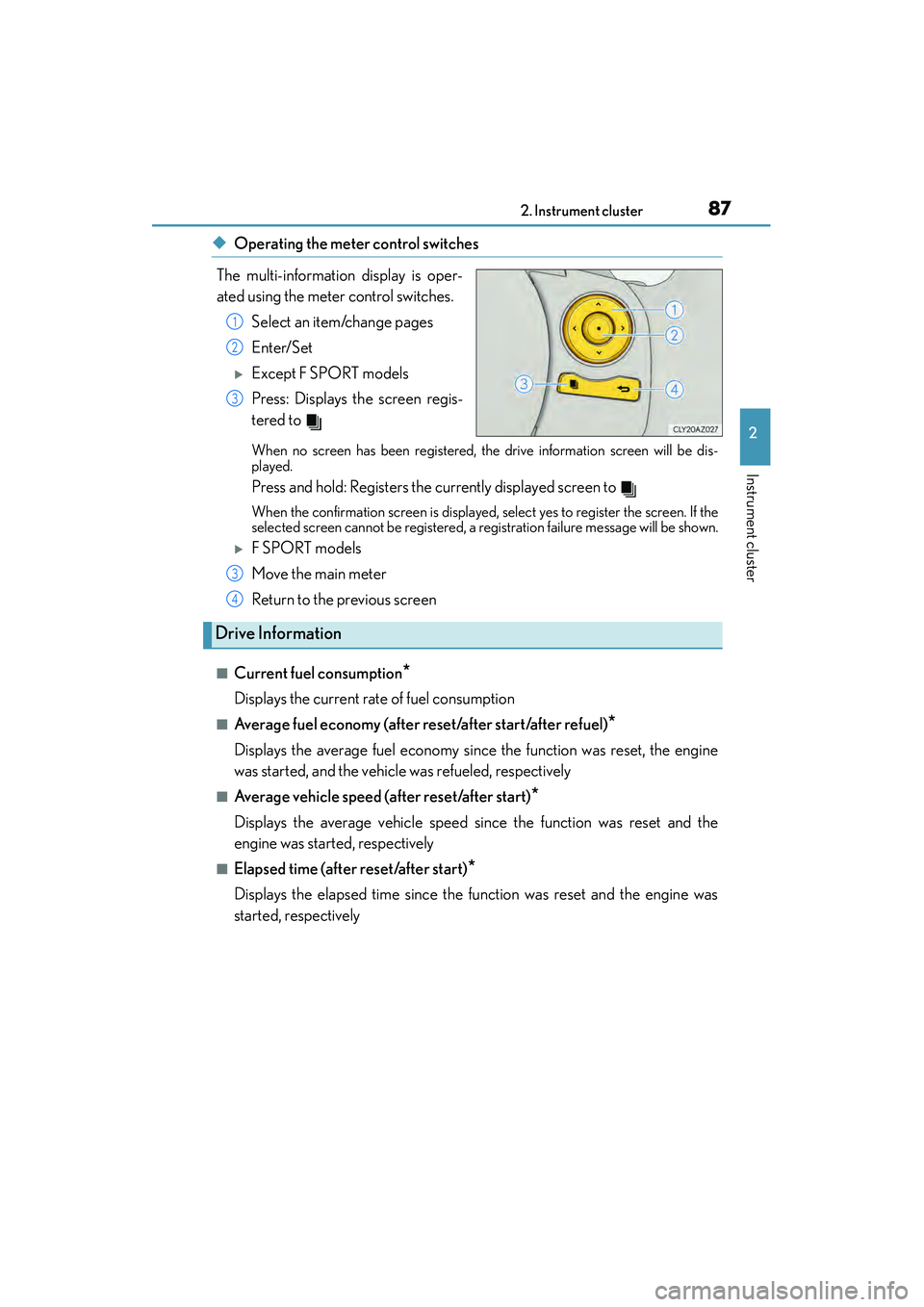
◆Operating the meter control switches
The multi-information display is oper-
ated using the meter control switches. Select an item/change pages
Enter/Set
XExcept F SPORT models
Press: Displays the screen regis-
tered to
When no screen has been registered, the drive information screen will be dis-
played.
Press and hold: Registers the currently displayed screen to
When the confirmation screen is displayed, select yes to register the screen. If the
selected screen cannot be registered, a registration failure message will be shown.
XF SPORT models
Move the main meter
Return to the previous screen
■Current fuel consumption*
Displays the current rate of fuel consumption
■Average fuel economy (after reset/after start/after refuel)*
Displays the average fuel economy since the function was reset, the engine
was started, and the vehicle was refueled, respectively
■Average vehicle speed (after reset/after start)*
Displays the average vehicle speed since the function was reset and the
engine was started, respectively
■Elapsed time (after reset/after start)*
Displays the elapsed time since the function was reset and the engine was
started, respectively
1
2
3
3
Drive Information
4
Page 89 of 586

882. Instrument cluster
IS350/250_U (OM53C50U)
■Distance (driving range/after start)*
Displays the estimated maximum distance that can be driven with the quantity
of fuel remaining and the distance driven after the engine was started respec-
tively.
• This distance is computed based on your average fuel consumption. As a result, the actual distance that can be driven may differ from that displayed.
• When only a small amount of fuel is added to the tank, the display may not be
updated.
When refueling, turn the engine switch off. If the vehicle is refueled without turning
the engine switch off, the display may not be updated.
■Eco Driving Indicator
→ P. 9 0
■Tire inflation pressure
→P. 4 2 4
■Gear positions
→P. 1 6 8
*: Displayed when the item is set in “Drive Info 1” or “Drive Info 2”. Use these values as a
reference.
■Language
Select to change the language on the display.
■Units
Select to change the unit of measure for fuel consumption.
■Maintenance system
Select to reset the maintenance data after the required maintenance is per-
formed. (
→ P. 4 0 3)
■Eco Driving Indicator Light
Select to activate/deactivate the Eco Driving Indicator Light.
■ switch settings (except F SPORT models)
Displays a procedure to register a desired screen to .
You can register 1 screen as a shortcut, which can be displayed by pressing . (
→P. 8 7 )
■Drive information 1 /Drive information 2
Select to select up to 2 items that will be displayed on the “Drive Info 1” screen
and “Drive Info 2” screen respectively. (
→ P. 8 7 )
Settings display
Page 93 of 586
922. Instrument cluster
IS350/250_U (OM53C50U)
Fuel consumption information
Fuel consumption information can be displayed on the navigation system
screen or the Lexus Display Audio screen.
XNavigation systemXLexus Display Audio system
Navigation system screen
“MENU” button
Remote Touch knob Lexus Display Audio screen
“MENU” button
Lexus Display Audio controller
1
2
3
1
2
3
Page 94 of 586
932. Instrument cluster
2
Instrument cluster
IS350/250_U (OM53C50U)
XNavigation system
Press the “MENU” button on the
Remote Touch, then select “Info” on
the “Menu” screen, and then select
“Fuel Consumption”.
If the “Past Record” screen is dis-
played, select “Trip Information”.
Resetting the consumption data
Fuel consumption in the past 15
minutes
Displays the average vehicle
speed since the engine was
started.
Displays the elapsed time since
the engine was started.
Cruising range (→P. 9 6 )
Trip information
1
2
3
4
5
Page 95 of 586
942. Instrument cluster
IS350/250_U (OM53C50U)
XLexus Display Audio system
Press the “MENU” button on the
Lexus Display Audio controller, then
select “Info” on the “Menu” screen,
and then select “Fuel Consumption”.
If the “Trip Information” screen does
not appear, move the controller to
the right and select “Trip Informa-
tion”.
Fuel consumption in the past 15
minutes
Displays the average vehicle
speed since the engine was
started.
Displays the elapsed time since
the engine was started.
Cruising range ( →P. 9 6 )
Average fuel consumption for the past 15 minutes is divided by color into past
averages and averages attained since the engine switch was last turned to
IGNITION ON mode. Use the displayed average fuel consumption as a ref-
erence.
The image is an example only.1
2
3
4
Page 96 of 586

952. Instrument cluster
2
Instrument cluster
IS350/250_U (OM53C50U)
XNavigation system
Press the “MENU” button on the Remote Touch, then select “Info” on the
“Menu” screen, and then select “Fuel Consumption”.
If the “Trip Information” screen is displayed, select “Past Record”.
Resetting the past record data
Best recorded fuel consumption
Average fuel consumption
Previous fuel consumption record
Updating the average fuel con-
sumption data
XLexus Display Audio system
Press the “MENU” button on the Lexus Display Audio controller, then select
“Info” on the “Menu” screen, and then select “Fuel Consumption”.
If the “Past Record” screen does not appear, move the controller to the right and
select “Past Record”.
Previous fuel consumption record
Average fuel consumption
Best recorded fuel consumption
The average fuel consumption history is divided by color into past averages
and the average fuel consumption since the last updated. Use the displayed
average fuel consumption as a reference.
The image is an example only.
Past record
1
2
3
4
5
1
2
3
Page 97 of 586
962. Instrument cluster
IS350/250_U (OM53C50U)
■Updating the past record data
XNavigation system
Update the average fuel consumption by selecting “Update” to measure the current fuel
consumption again.
XLexus Display Audio system
Update the average fuel consumption by moving the controller to the left and select
“Update” to measure the current fuel consumption again.
■Resetting the data
XNavigation system
The fuel consumption data can be deleted by selecting “Clear”.
XLexus Display Audio system
The fuel consumption data can be deleted by moving the controller to the left and select
“Clear ”.
■Cruising range
Displays the estimated maximum distance that can be driven with the quantity of fuel
remaining.
This distance is computed based on your average fuel consumption.
As a result, the actual distance that can be driven may differ from that displayed.
Page 146 of 586

145
Driving4
IS350/250_U (OM53C50U)
4-1. Before drivingDriving the vehicle ...................... 146
Cargo and luggage .................... 153
Vehicle load limits ....................... 156
Trailer towing ................................. 157
Dinghy towing...............................158
4-2. Driving procedures Engine (ignition) switch ............ 159
Automatic transmission ............ 164
Turn signal lever ........................... 170
Parking brake .................................172
4-3. Operating the lights and wipers
Headlight switch ...........................173
Automatic High Beam ............... 176
Fog light switch.............................. 181
Windshield wipers and washer........................................... 182
4-4. Refueling Opening the fuel tank cap.......188 4-5. Using the driving support
systems
Cruise control .............................. 192
Dynamic radar cruise control .......................................... 196
LDA (Lane Departure Alert) ........208
Intuitive parking assist ................214
Lexus parking assist monitor ..........................................221
Driving mode select switch ........................................... 237
Driving assist systems............... 240
PCS (Pre-Collision System).......... 246
BSM (Blind Spot Monitor) ..... 252
• The Blind Spot Monitor function .................................... 255
• The Rear Cross Traffic Alert function......................... 257
4-6. Driving tips Winter driving tips ..................... 260


