Page 67 of 586

661-1. For safe use
IS350/250_U (OM53C50U)
CAUTION
■When installing a booster seat
To prevent the belt from going into ALR lock mode, do not fully extend the shoulder
belt. ALR mode causes the belt to tighten only . This could cause injury or discomfort to
the child. ( →P. 3 2 )
■When installing a child restraint system
Follow the directions given in the child restraint system installation manual and fix the
child restraint system securely in place.
If the child restraint system is not correctly fixed in place, the child or other passengers
may be seriously injured or even killed in the event of a sudden braking or an accident.
●If the driver’s seat interferes with the child
restraint system and prevents it from being
attached correctly, attach the child restraint
system to the right-hand rear seat.
●Adjust the front passenge r seat so that it does
not interfere with the child restraint system.
●Only put a forward-facing child restraint sys-
tem on the front seat when unavoidable.
When installing a forward-facing child
restraint system on the front passenger seat,
move the seat as far back as possible even if
the “AIR BAG OFF” indicator light is illumi-
nated. Failure to do so may result in death or
serious injury if the airbags deploy (inflate).
Page 70 of 586

69
1
For safety and security
IS350/250_U (OM53C50U)1-2. Theft deterrent system
The indicator light flashes after the
engine switch has been turned off to
indicate that the system is operating.
The indicator light stops flashing after
the engine switch has been turned to
ACCESSORY or IGNITION ON
mode to indicate that the system has
been canceled.
■System maintenance
The vehicle has a maintenance-free type engine immobilizer system.
■Conditions that may cause
the system to malfunction
●If the grip portion of the key is in contact with a metallic object
●If the key is in close proximity to or touching a key registered to the security system (key
with a built-in transponder chip) of another vehicle
Engine immobilizer system
The vehicle’s keys have built-in transponder chips that prevent the engine
from starting if a key has not been previously registered in the vehicle’s on-
board computer.
Never leave the keys inside the vehicle when you leave the vehicle.
This system is designed to help prev ent vehicle theft but does not guarantee
absolute security against all vehicle thefts.
Page 73 of 586

721-2. Theft deterrent system
IS350/250_U (OM53C50U)
■System maintenance
The vehicle has a maintenance-free type alarm system.
■Items to check before locking the vehicle
To prevent unexpected triggering of the alarm and vehicle theft, make sure of the follow-
ing:
●Nobody is in the vehicle.
●The windows and moon roof are closed before the alarm is set.
●No valuables or other personal items are left in the vehicle.
■Triggering of the alarm
The alarm may be triggered in the following situations:
(Stopping the alarm deactivates the alarm system.)
■Alarm-operated door lock
In the following situations, the doors are locked automatically to prevent intruders:
●The doors are unlocked manually without the mechanical key and the alarm is trig-
gered.
●While the alarm is operating, the doors are unlocked manually without the mechanical
key.
●A person inside the vehicle opens a door, the
trunk or hood, or unlocks the vehicle using a
inside lock button.
●The battery is recharged or replaced when the
vehicle is locked. (→P. 5 0 4 )
NOTICE
■To ensure the system operates correctly
Do not modify or remove the system. If modified or removed, the proper operation of
the system cannot be guaranteed.
Page 74 of 586
731-2. Theft deterrent system
1
For safety and security
IS350/250_U (OM53C50U)
These labels are attached to the vehicle
to reduce vehicle theft by facilitating
the tracing and recovery of parts from
stolen vehicles. Do not remove under
penalty of law.
Theft prevention labels (U.S.A.)
Page 83 of 586
822. Instrument cluster
IS350/250_U (OM53C50U)
Engine coolant temperature gauge
Displays the engine coolant temperature
Ta c h o m e t e r
Displays the engine speed in revolutions per minute
Outside temperature
Displays the outside temperature within the range of -40°F (-40°C) to 122°F
(50°C). Low outside temperature indicator comes on when the ambient temperature
is 37°F (3°C) or lower.
Shift position and gear position ( → P. 1 6 4 )
Speedometer
Fuel gauge
Multi-information display
Presents the driver with a variety of vehicle data ( →P. 8 6 )
Displays warning messages in case of a malfunction ( →P. 4 7 2 )
Odometer and trip meter display
Odometer:
Displays the total distance the vehicle has been driven
Tr i p m e t e r :
Displays the distance the vehicle has been driven since the meter was last reset. Trip
meters “A” and “B” can be used to record and display different distances indepen-
dently.
1
2
3
4
5
6
7
8
Page 86 of 586
852. Instrument cluster
2
Instrument cluster
IS350/250_U (OM53C50U)
NOTICE
■To prevent damage to the engine and its components
●Do not let the indicator needle of the tachometer enter the red zone, which indicates
the maximum engine speed.
●The engine may be overheating if the engine coolant temperature gauge is in the red
zone (H). In this case, immediately stop the vehicle in a safe place, and check the
engine after it has cooled completely. (→P. 5 0 6 )
Page 88 of 586
872. Instrument cluster
2
Instrument cluster
IS350/250_U (OM53C50U)
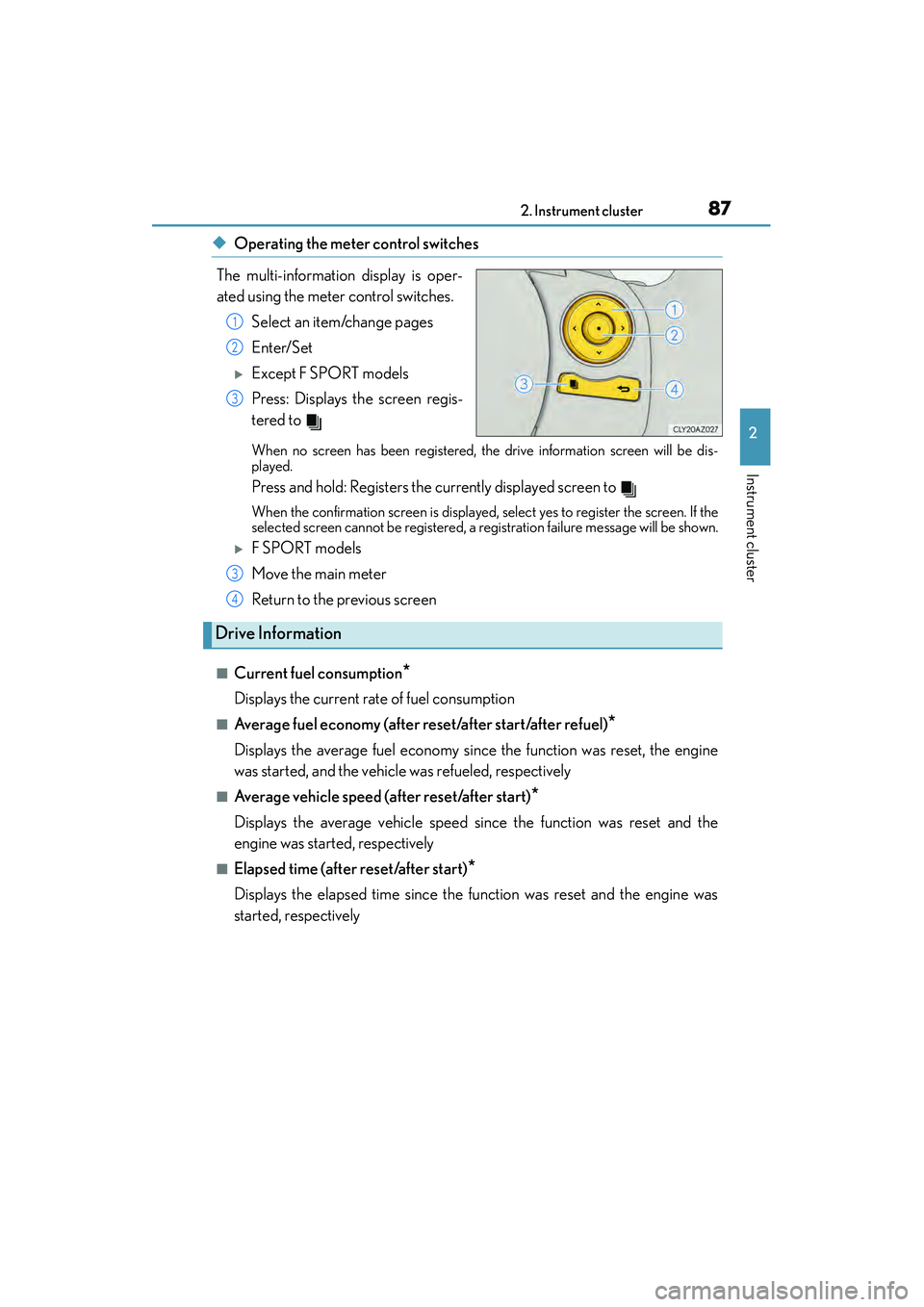
◆Operating the meter control switches
The multi-information display is oper-
ated using the meter control switches. Select an item/change pages
Enter/Set
XExcept F SPORT models
Press: Displays the screen regis-
tered to
When no screen has been registered, the drive information screen will be dis-
played.
Press and hold: Registers the currently displayed screen to
When the confirmation screen is displayed, select yes to register the screen. If the
selected screen cannot be registered, a registration failure message will be shown.
XF SPORT models
Move the main meter
Return to the previous screen
■Current fuel consumption*
Displays the current rate of fuel consumption
■Average fuel economy (after reset/after start/after refuel)*
Displays the average fuel economy since the function was reset, the engine
was started, and the vehicle was refueled, respectively
■Average vehicle speed (after reset/after start)*
Displays the average vehicle speed since the function was reset and the
engine was started, respectively
■Elapsed time (after reset/after start)*
Displays the elapsed time since the function was reset and the engine was
started, respectively
1
2
3
3
Drive Information
4
Page 90 of 586

892. Instrument cluster
2
Instrument cluster
IS350/250_U (OM53C50U)
■Pop-up display
Select to set the following pop-up displays, which may appear in some situa-
tions, on/off.
• Route guidance display of the navigation system-linked system (if equipped)
• Incoming call display of the hands-free phone system
• Windshield wiper switch operation display (if equipped)
• Headlight switch operation display (if equipped)
• Dynamic radar cruise control operation display (if equipped)
• Instrument panel brightness adjustment display
• Main meter switch operation display (F SPORT models)
■Accent color (except F SPORT models)
Select to change the accent colors on the screen, such as the cursor color.
■Needle (F SPORT models)
Select to change the needle color for the tachometer.
■Speed indicator (F SPORT models)
Select to set the speed indicator on/
off.
When set to on, both sides of the dis-
played speed unit will turn yellow
when the vehicle reaches a set
speed.
Selectable speed range:
30 mph to 100 mph (50 km/h to
160 km/h)
*
The indicator will illuminate in yellow at an optionally set speed and red at the fixed
high speed.
*: Always observe the legal speed limit when driving on public roads.
■Rev indicator (F SPORT models)
Select to set the rev indicator on/off.
When set to on, the tachometer will
show a ring-shaped indicator in red
when the engine reaches a set speed.
Selectable engine speed range:
2000 rpm to 6600 rpm.


