2015 Lexus IS250 instrument
[x] Cancel search: instrumentPage 173 of 584
173
4
Driving
IS350/250_U (OM53C50U)4-3. Operating the lights and wipers
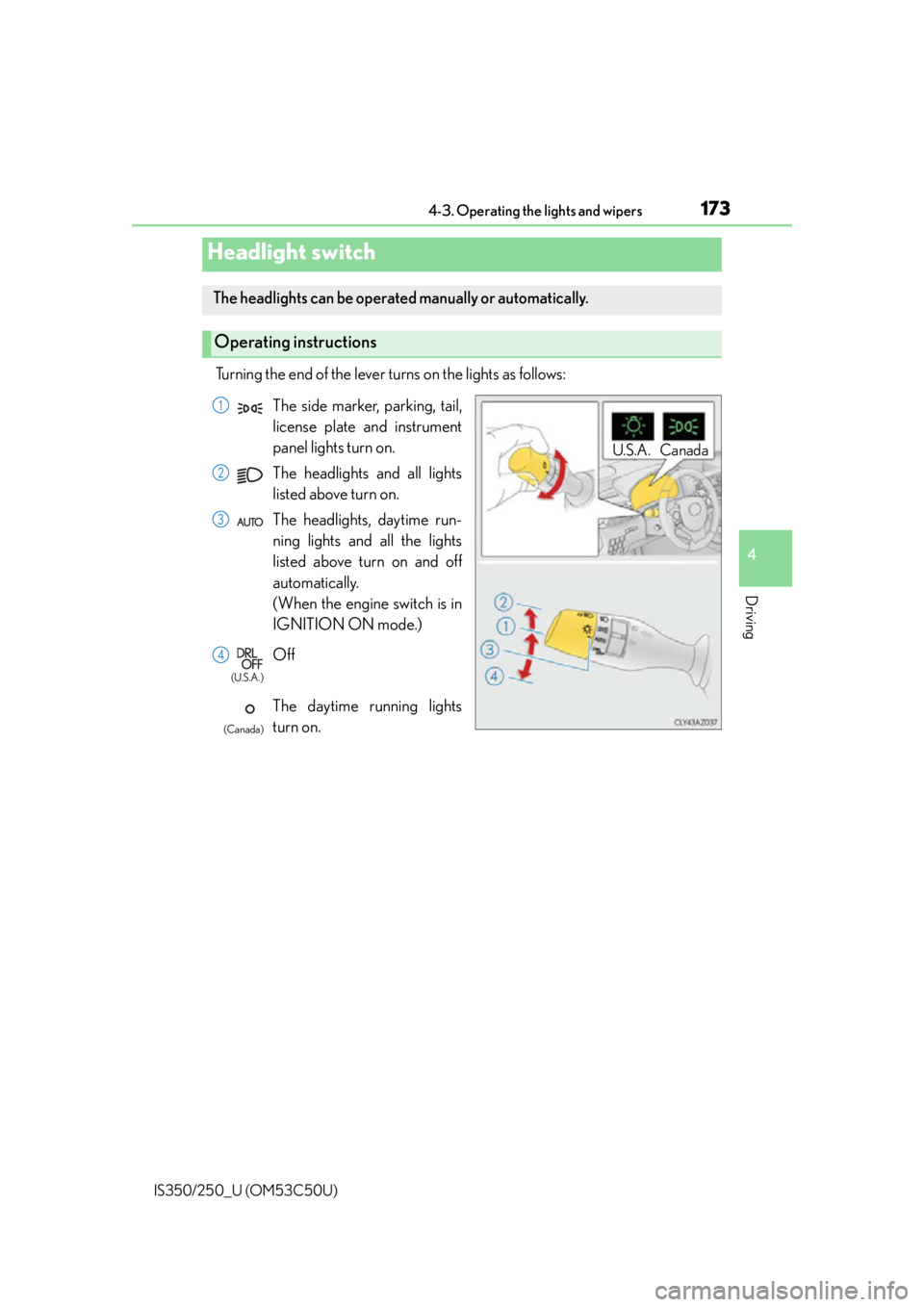
Turning the end of the lever turns on the lights as follows:
Headlight switch
The headlights can be operated manually or automatically.
Operating instructions
U.S.A. Canada
The side marker, parking, tail,
license plate and instrument
panel lights turn on.
The headlights and all lights
listed above turn on.
The headlights, daytime run-
ning lights and all the lights
listed above turn on and off
automatically.
(When the engine switch is in
IGNITION ON mode.)
Off
The daytime running lights
turn on.1
2
3
4
(U.S.A.)
(Canada)
Page 270 of 584

2705-1. Basic Operations
IS350/250_U (OM53C50U)
■When using the screen
●Under extremely cold conditions, the Lexus Display Audio controller may react slowly.
●If the screen is cold, the display may be dark, or the system may seem to be operating
slightly slower than normal.
●The screen may seem dark and hard to see when viewed through sunglasses. Change
your angle of viewing, adjust the display on the “Display” screen ( P. 280) or remove
your sunglasses.
■Using cellular phones
Interference may be heard through the audio system's speakers if a cellular phone is
being used inside or close to the vehi cle while the audio system is operating.
CAUTION
■Using the Lexus Display Audio controller
Be careful when touching the Lexus Display Audio controller in extreme temperatures
as it may become very hot or cold due to the temperature inside the vehicle.
■Laser product
●USE OF CONTROL OR ADJUSTMENT OR PERFORMANCE OF PROCE-
DURES OTHER THAN THOSE SPECIFIED HEREIN MAY RESULT IN HAZARD-
OUS RADIATION EXPOSURE.
●THE USE OF OPTICAL INSTRUMENTS WITH THIS PRODUCT WILL
INCREASE EYE HAZARD.
NOTICE
■To prevent Lexus Display Audio controller malfunction
●Do not allow the Lexus Display Audio controller to come into contact with food, liq-
uid, stickers or lit cigarettes as doing so may cause it to change color, emit a strange
odor or stop functioning.
●Do not subject the Lexus Display Audio controller to excessive pressure or strong
impact as the controller may bend or break off.
■To prevent battery discharge
Do not leave the audio system on longer than necessary when the engine is off.
■To avoid damaging the audio system
Take care not to spill drinks or other fluids on the audio system.
Page 365 of 584
3656-1. Using the air conditioning system
6
Interior features
IS350/250_U (OM53C50U)
■When the outside temperature falls to nearly 32F (0 C)
The dehumidification function may not operate even when is pressed or “A/C” is
selected.
■Ventilation and air conditioning odors
●To let fresh air in, set the air conditio ning system to the outside air mode.
●During use, various odors from inside and outside the vehicle may enter into and accu-
mulate in the air conditioning system. This may then cause odor to be emitted from the
vents.
●To reduce potential odors from occurring:
• It is recommended that the air conditioning system be set to outside air mode prior to turning the vehicle off.
• The start timing of the blower may be dela yed for a short period of time immediately
after the air conditioning system is started in automatic mode.
■Air conditioning filter
P. 4 3 7
■Customization
Settings (e.g. A/C Auto switch operation) can be changed.
(Customizable features P. 5 4 3 )
CAUTION
■To prevent the windshield from fogging up
●Do not use during cool air operation in extremely humid weather. The differ-
ence between the temperature of the outside air and that of the windshield can cause
the outer surface of the windshield to fog up, blocking your vision.
■To prevent burns
●Do not touch the rear view mirror surfaces when the outside rear view mirror defog-
gers are on.
●Do not touch the glass at lower part of the wi ndshield or to the side of the front pillars
when the windshield wiper de-icer is on.
NOTICE
■To prevent battery discharge
Do not leave the air conditioning system on longer than necessary when the engine is
stopped.
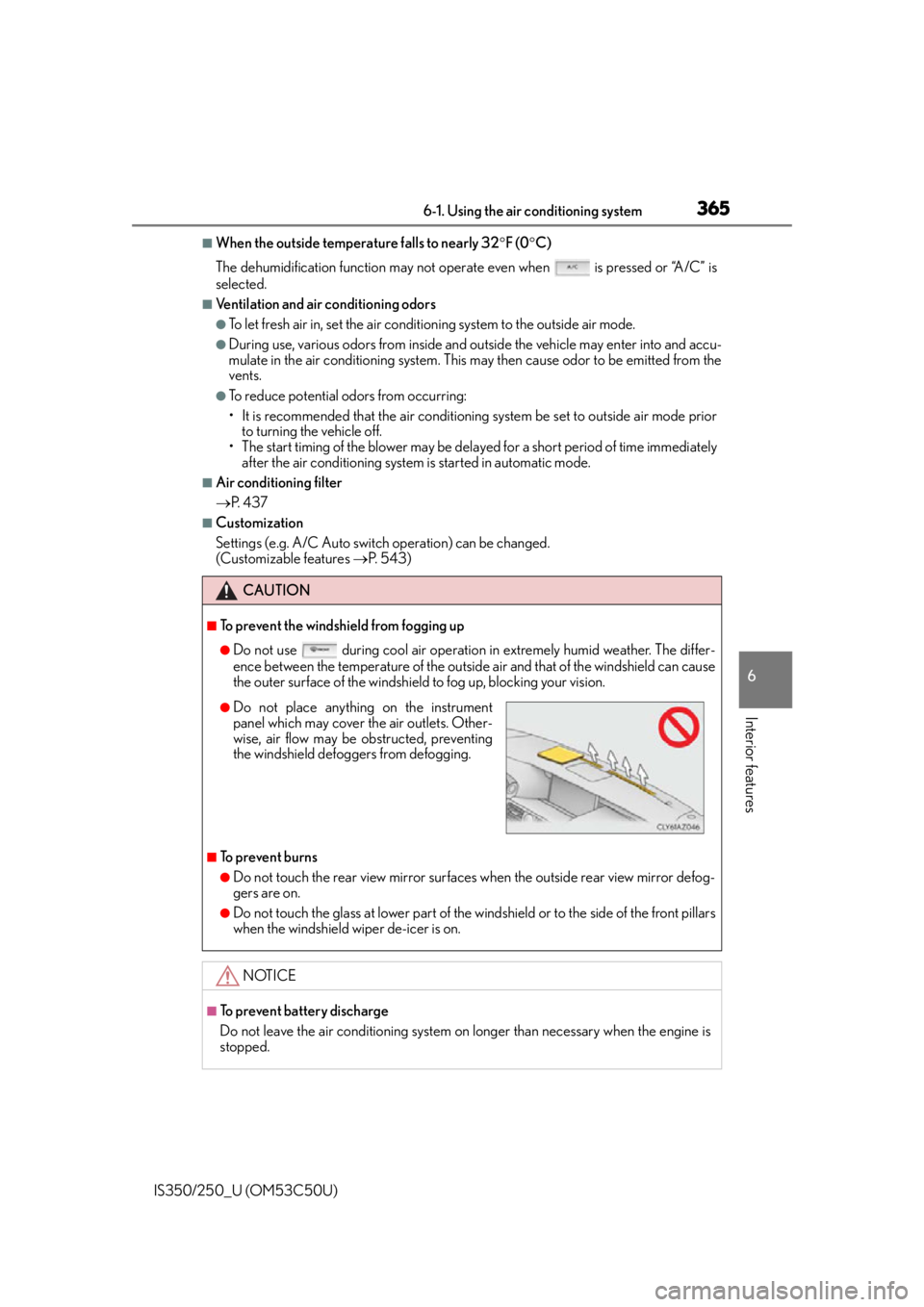
●Do not place anything on the instrument
panel which may cover th e air outlets. Other-
wise, air flow may be obstructed, preventing
the windshield defoggers from defogging.
Page 400 of 584

4007-1. Maintenance and care
IS350/250_U (OM53C50U)
■Caring for leather areas
Lexus recommends cleaning the interior of th e vehicle at least twice a year to maintain
the quality of the vehicle’s interior.
■Shampooing the carpets
There are several commercial foaming-type cleaners available. Use a sponge or brush to
apply the foam. Rub in overlapping circles. Do not use water. Wipe dirty surfaces and let
them dry. Excellent results are obtained by keeping the carpet as dry as possible.
■Seat belts
Clean with mild soap and lukewarm water using a cloth or sponge. Also check the belts
periodically for excessive wear, fraying or cuts.
■When cleaning the carpeted portions of the glove box, console box, etc.
If a strong adhesive tape is used, there is a possibility that the surface of the carpet could
be damaged.
CAUTION
■Wa t e r i n t h e v e h i c l e
●Do not splash or spill liquid in the vehicle.
Doing so may cause electrical components etc. to malfunction or catch fire.
●Do not get any of the SRS components or wiring in the vehicle interior wet.
( P. 3 8 )
An electrical malfunction may cause the airbags to deploy or not function properly,
resulting in death or serious injury.
■Cleaning the interior (especially instrument panel)
Do not use polish wax or polish cleaner. The instrument panel may reflect off the wind-
shield, obstructing the driver’s view and leading to an accident, resulting in death or
serious injury.
Page 401 of 584

4017-1. Maintenance and care
7
Maintenance and care
IS350/250_U (OM53C50U)
NOTICE
■Cleaning detergents
●Do not use the following types of detergent, as they may discolor the vehicle interior
or cause streaks or damage to painted surfaces:
• Non-seat portions: Organic substances such as benzene or gasoline, alkaline oracidic solutions, dye, and bleach
• Seats: Alkaline or acidic solutions, su ch as thinner, benzene, and alcohol
●Do not use polish wax or polish cleaner. The instrument panel’s or other interior part’s
painted surface may be damaged.
■Preventing damage to leather surfaces
Observe the following precautions to avoid damage to and deterioration of leather
surfaces:
●Remove any dust or dirt from leather surfaces immediately.
●Do not expose the vehicle to direct sunlight for extended periods of time. Park the
vehicle in the shade, especially during summer.
●Do not place items made of vinyl, plastic, or containing wax on the upholstery, as they
may stick to the leather su rface if the vehicle interior heats up significantly.
■Water on the floor
Do not wash the vehicle floor with water.
Vehicle systems such as the audio system may be damaged if water comes into contact
with electrical components such as the au dio system above or under the floor of the
vehicle. Water may also cause the body to rust.
■When cleaning the inside of the windshield (vehicles with LDA [Lane Departure
Alert])
Be careful not to touch the camera sensor ( P. 2 0 8 ) .
If the camera is accidentally scratched or hit, LDA may not operate properly or may
cause a malfunction.
■Cleaning the inside of the rear window
●Do not use glass cleaner to clean the rear window, as this may cause damage to the
rear window defogger heater wires or antenna. Use a cloth dampened with luke-
warm water to gently wipe the window cl ean. Wipe the window in strokes running
parallel to the heater wires or antenna.
●Be careful not to scratch or damage the heater wires or antenna.
Page 441 of 584
4417-3. Do-it-yourself maintenance
7
Maintenance and care
IS350/250_U (OM53C50U)
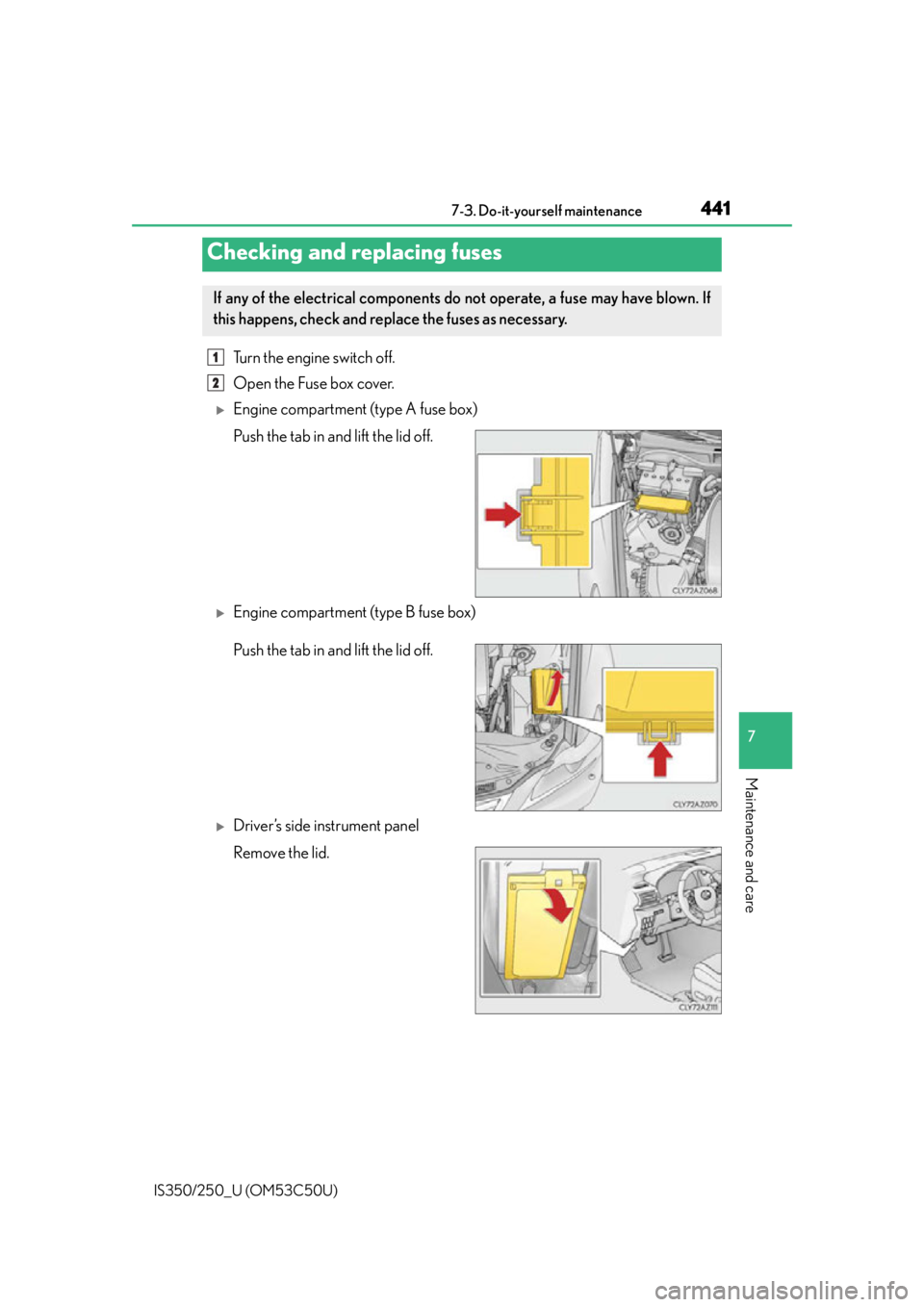
Turn the engine switch off.
Open the Fuse box cover.
Engine compartment (type A fuse box)
Push the tab in and lift the lid off.
Engine compartment (type B fuse box)
Push the tab in and lift the lid off.
Driver’s side instrument panel
Remove the lid.
Checking and replacing fuses
If any of the electrical components do not operate, a fuse may have blown. If
this happens, check and replace the fuses as necessary.
1
2
Page 513 of 584
5139-1. Specifications
9
Vehicle specifications
IS350/250_U (OM53C50U)
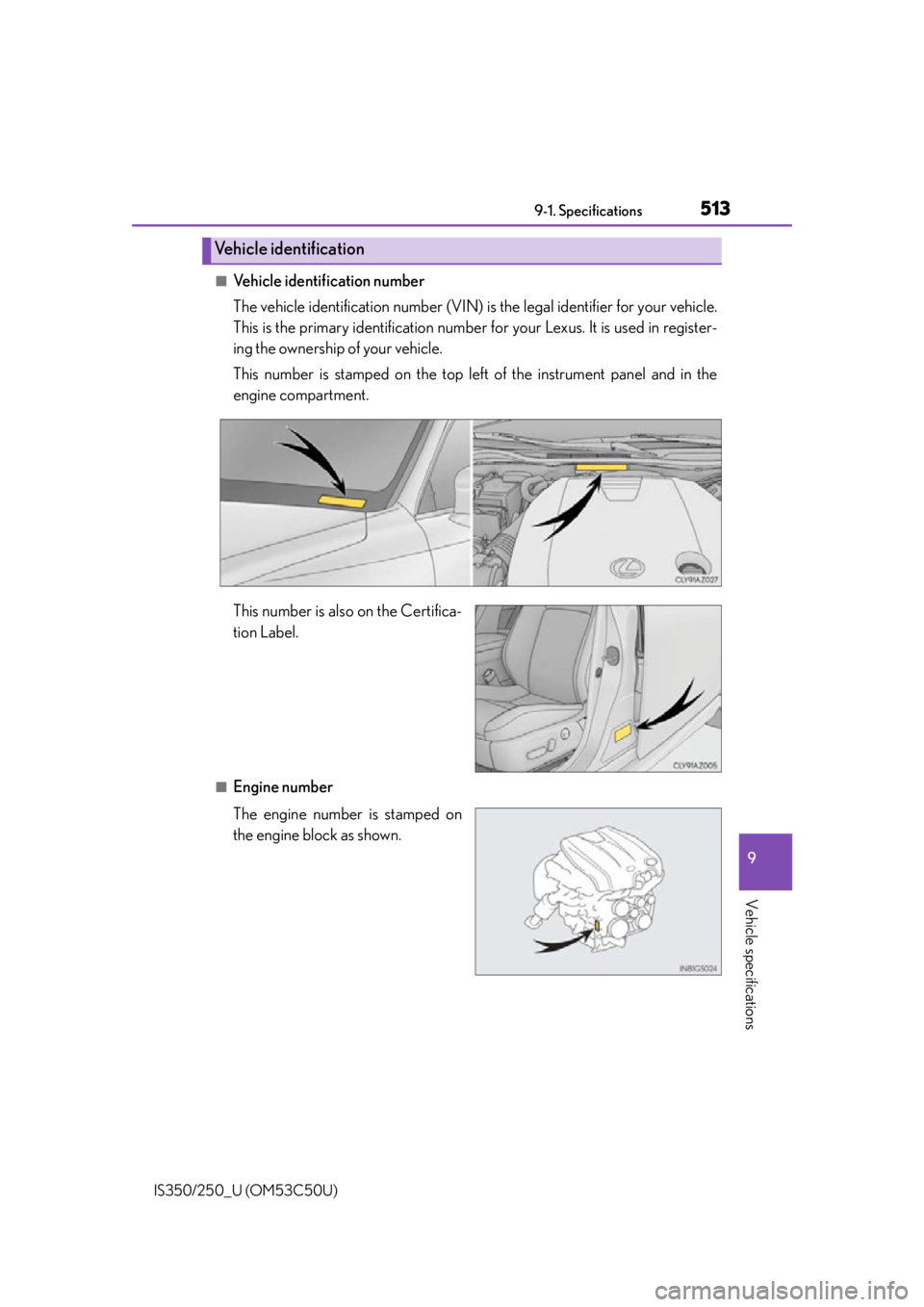
■Vehicle identification number
The vehicle identification number (VIN) is the legal identifier for your vehicle.
This is the primary identification number fo r your Lexus. It is used in register-
ing the ownership of your vehicle.
This number is stamped on the top left of the instrument panel and in the
engine compartment.
This number is also on the Certifica-
tion Label.
■Engine number
The engine number is stamped on
the engine block as shown.
Vehicle identification
Page 566 of 584

566Alphabetical index
IS350/250_U (OM53C50U)
Back-up lightsReplacing light bulbs ......................... 451
Wattage ................................................... 521
Battery....................................................... 420 Battery checking ................................420
If the vehicle battery is discharged.................................... 502
Preparing and checking before winter ................................................... 260
Warning light ...................................... 466
Bluetooth
®
Audio system .........................................317
Hands-free system (for cellular phone) ......................... 319
Bottle holders ......................................... 372
Brake Fluid............................................................ 419
Parking brake......................................... 172
Warning light ...................................... 466
Brake assist ............................................. 240
Break-in tips.............................................. 147
Brightness control Instrument panel light control .........84
BSM (Blind Spot Monitor)................ 252 Care................................................ 396, 399
Aluminum wheels .............................. 397
Exterior ................................................... 396
Interior ..................................................... 399
Seat belts............................................... 400
Cargo capacity ....................................... 156
Cargo hooks ...........................................374
CD player................................................ 295
Chains ......................................................... 261
Child restraint system ............................54 Booster seats, definition .................... 55
Booster seats, installation ................. 64
Convertible seats, definition ........... 55
Convertible seats, installation........... 61
Front passenger occupant classification system..........................47
Infant seats, definition.......................... 55
Infant seats, installation......................... 61
Installing CRS with LATCH anchors ..................... 59
Installing CRS with seat belts ........... 61
Installing CRS with top tether strap......................... 65
BC