Page 579 of 612
579
9
9-2. Customization
Vehicle specifications
IS200t_EE(OM53D19E)
■Door lock (
→P. 122, 129, 550)
■Smart entry & start system and wireless remote control ( →P. 1 2 2 , 1 2 9 )
FunctionDefault settingCustomized setting
Unlocking using a mechanical
keyAll doors
unlocked in
one stepDriver’s door
unlocked in one step, all doors
unlocked in two steps
——O
Speed-detecting automatic door
lock functionOnOffO—O
Shifting gears to position other
than P locks all doorsOffOnO—O
Shifting gears to P unlocks all
doorsOffOnO—O
Opening driver's door unlocks
all doorsOnOffO—O
Locking/unlocking of the trunk
when all doors are locked/
unlocked
OnOff——O
123
FunctionDefault settingCustomized setting
Operation signal
(Emergency flashers)OnOffO—O
Time elapsed before automatic
door lock function is activated if
door is not opened after being
unlocked
30 seconds
60 seconds
——O120 seconds
Open door warning buzzerOnOff——O
Welcome light illumination con-
trolOnOff——O
123
Page 580 of 612
5809-2. Customization
IS200t_EE(OM53D19E)
■Smart entry & start system ( →P. 122, 129, 134)
*: If equipped
■Wireless remote control ( →P. 122, 129)
■Driving position memory* (→ P. 1 5 3 )
*: If equipped
FunctionDefault settingCustomized setting
Smart entry & start systemOnOffO—O
Smart door unlocking*All the doorsDriver's doorO—O
Number of consecutive door
lock operations*As many as
desired2 times——O
123
FunctionDefault settingCustomized setting
Wireless remote controlOnOff——O
Unlocking operation
All doors
unlocked in one stepDriver's door
unlocked in one
step, all doors
unlocked in two steps
O—O
Trunk unlocking operationPress and hold
(short)
One short press
——O
Push twice
Press and hold
(long)
Off
123
FunctionDefault settingCustomized setting
Driver's seat movement when
exiting the vehicleStandardOffO—OPa r t i a l
Doors linked to the driving posi-
tion memory recall functionDriver's doorAll doors——O
123
Page 581 of 612
581
9
9-2. Customization
Vehicle specifications
IS200t_EE(OM53D19E)
■Outside rear view mirrors (
→P. 1 6 5 )
*: If equipped
■Powe r w i n d ows ( →P. 1 6 9 )
■Moon roof* (→ P. 1 7 3 )
*: If equipped
FunctionDefault settingCustomized setting
Automatic mirror folding and
extending operation*
Linked to the
locking/
unlocking of
the doorsOff
——OLinked to operation
of the engine switch
123
FunctionDefault settingCustomized setting
Mechanical key linked operationOffOn——O
Wireless remote control linked
operationOffOn——O
Wireless remote control linked
operation signal (buzzer)OnOff——O
123
FunctionDefault settingCustomized setting
Mechanical key linked operationOffOn——O
Linked operation of components
when mechanical key is used
(open only)
Slide onlyTilt only——O
Wireless remote control linked
operationOffOn——O
Linked operation of components
when wireless remote control is
used (open only)
Slide onlyTilt only——O
Wireless remote control linked
operation signal (buzzer)OnOff——O
123
Page 584 of 612
5849-2. Customization
IS200t_EE(OM53D19E)
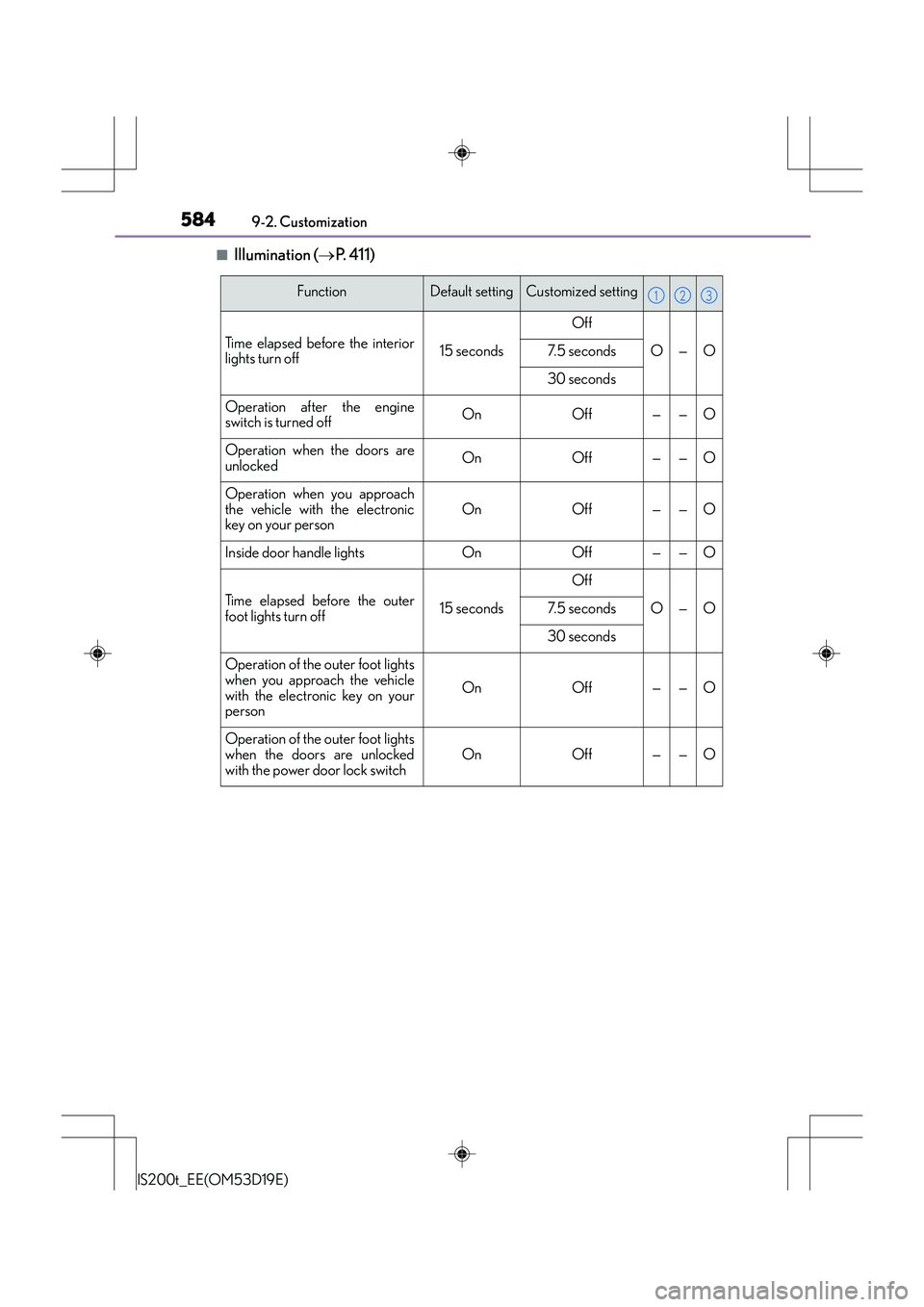
■Illumination ( →P. 4 1 1 )
FunctionDefault settingCustomized setting
Time elapsed before the interior
lights turn off15 seconds
Off
O—O7. 5 s e c o n d s
30 seconds
Operation after the engine
switch is turned offOnOff——O
Operation when the doors are
unlockedOnOff——O
Operation when you approach
the vehicle with the electronic
key on your person
OnOff——O
Inside door handle lightsOnOff——O
Time elapsed before the outer
foot lights turn off15 seconds
Off
O—O7. 5 s e c o n d s
30 seconds
Operation of the outer foot lights
when you approach the vehicle
with the electronic key on your
person
OnOff——O
Operation of the outer foot lights
when the doors are unlocked
with the power door lock switchOnOff——O
123
Page 585 of 612

585
9
9-2. Customization
Vehicle specifications
IS200t_EE(OM53D19E)
■Vehicle customization
●When the speed-detecting automatic door lock and shift-linked automatic door lock
are both on, the door lock operates as follows.
• When shifting the shift lever to any position
other than P, all the doors will be locked.
• If the vehicle is started with all doors locked, the speed-detecting automatic door lock will not operate.
• If the vehicle is started with any door unlocked, the speed-detecting automatic door
lock will operate.
●When the smart entry & start system is off, the entry unlock function cannot be custom-
ized.
●When the doors remain closed after unlocking the doors and the timer activated auto-
matic door lock function activates, signal s will be generated in accordance with the
operation buzzer volume and operational signal (Emergency flashers) function set-
tings.
●Some settings can be changed using a switch or the audio system screen. If a setting is
changed using a switch, the ch anged setting will not be reflected on the audio system
screen until the engine switch is turn ed off and then to IGNITION ON mode.
■When customizing using the Remote Touch or Lexus Display Audio controller (if
equipped)
Stop the vehicle in a safe place, apply the parking brake, and shift the shift lever to P. Also,
to prevent battery discharge, leave the engine running while customizing the features.
CAUTION
■During customization
As the engine needs to be running during customization, ensure that the vehicle is
parked in a place with adequate ventilation. In a closed area such as a garage, exhaust
gases including harmful carbon monoxide (CO) may collect and enter the vehicle. This
may lead to death or a serious health hazard.
NOTICE
■During customization
To prevent battery discharge, ensure that the engine is running while customizing fea-
tures.
Page 588 of 612

588
IS200t_EE(OM53D19E)What to do if... (Troubleshooting)
What to do if... (Troubleshooting)
●If you lose your mechanical keys, new genuine mechanical keys can be made
by any authorized Lexus dealer or repairer, or another duly qualified and
equipped professional. (
→P. 118)
●If you lose your electronic keys, the risk of vehicle theft increases significantly.
Contact any authorized Lexus dealer or repairer, or another duly qualified
and equipped professional immediately. ( →P. 1 2 1 )
●Is the electronic key battery weak or depleted? ( →P. 466)
●Is the engine switch in IGNITION ON mode?
When locking the doors, turn the engine switch off. ( →P. 1 9 7 )
●Is the electronic key left inside the vehicle?
When locking the doors, make sure that you have the electronic key on your
person.
●The function may not operate properly due to the condition of the radio wave.
(→ P. 136)
●Is the child-protector lock set?
The rear door cannot be opened from inside the vehicle when the lock is set.
Open the rear door from outside and then unlock the child-protector lock.
( → P. 1 2 6 )
If you have a problem, check the foll owing before contacting any authorized
Lexus dealer or repairer, or another duly qualified and equipped professional.
The doors cannot be locked, unlocked, opened or closed
You lose your keys
The doors cannot be locked or unlocked
The rear door cannot be opened
Page 589 of 612

589What to do if... (Troubleshooting)
IS200t_EE(OM53D19E)
●The function to prevent the electronic key from being left inside the trunk will
operate and you can open the trunk as usual. Take the key out from the trunk.
(→ P. 131)
●Did you press the engine switch while firmly depressing the brake pedal?
(→ P. 1 9 6 )
●Is the shift lever in P? ( →P. 1 9 8 )
●Is the electronic key anywhere detectable inside the vehicle? ( →P. 1 3 4 )
●Is the steering wheel unlocked? ( →P. 1 9 8 )
●Is the electronic key battery weak or depleted?
In this case, the engine can be started in a temporary way. ( →P. 5 5 1 )
●Is the battery discharged? ( →P. 5 5 3 )
●Is the engine switch in IGNITION ON mode?
If you cannot release the shift lever by depressing the brake pedal with the
engine switch in IGNITION ON mode. ( →P. 549)
●It is locked automatically to prevent theft of the vehicle. ( →P. 1 9 8 )
The trunk lid is closed with the electronic key left inside
If you think som
ething is wrong
The engine does not start
The shift lever cannot be shifted from P even if you depress the brake
pedal
The steering wheel cannot be turned after the engine is stopped
Page 590 of 612

590What to do if... (Troubleshooting)
IS200t_EE(OM53D19E)
●Is the window lock switch pressed?
The power window except for the one at the driver’s seat cannot be operated
if the window lock switch is pressed. ( →P. 1 6 9 )
●The auto power off function will be operated if the vehicle is left in ACCES-
SORY or IGNITION ON mode (the engine is not running) for a period of
time. ( →P. 1 9 8 )
●The seat belt reminder light is flashing
Are the driver and the front passenger wearing the seat belts? ( →P. 5 0 2 )
●The parking brake indicator is on
Is the parking brake released? ( →P. 2 0 9 )
Depending on the situation, other types of warning buzzer may also sound.
( → P. 500, 506)
●Did anyone inside the vehicle open a door or anything move inside the vehicle
during setting the alarm?
The sensor detects them and the alarm sounds. ( →P. 8 3 )
Do one of the following to deactivate or stop the alarm:
• Unlock the doors or open the trunk using th e entry function or wireless remote con-
trol.
• Start the engine.
The windows do not open or close by operating the power window
switches
The engine switch is turned off automatically
A warning buzzer sounds during driving
An alarm is activated and th e horn sounds (if equipped)