Page 112 of 652
112
GS450h_OM_OM30F70U_(U)
2. Instrument cluster
■Remote Touch screen
Press the “MENU” button on the Remote Touch, then select on
the “Menu” screen, and then select “Fuel Consumption”.
If the “Trip Information” or “Past Record” screen is displayed, select “Energy”.
■Multi-information display
Press the “DISP” button on the
steering wheel several times to
select the energy monitor display.
Energy monitor
Page 114 of 652
114
GS450h_OM_OM30F70U_(U)
2. Instrument cluster
Press the “MENU” button on the Remote Touch, then select on the
“Menu” screen, and then select “Fuel Consumption”.
■Trip information
If the “Energy Monitor” or “Past Re cord” screen is displayed, select
“Trip Information”.
Resetting the consumption
data
Fuel consumption in the past
15 minutes
Current fuel consumption
Regenerated energy in the
past 15 minutes
One symbol indicates 50 Wh. Up to 5 symbols are shown.
Average vehicle speed since the hybrid system was started.
Elapsed time since the hybrid system was started.
Cruising range ( P. 1 1 5 )
Average fuel consumption for the past 15 minutes is divided by color into past
averages and averages attained since the power switch was last turned to ON
mode. Use the displayed average fuel consumption as a reference.
The image is an example only, and may vary slightly from actual conditions.
Consumption
1
2
3
4
5
6
7
Page 115 of 652

GS450h_OM_OM30F70U_(U)
1152. Instrument cluster
2
Instrument cluster
■Past record
If the “Energy Monitor” or “Trip Information” screen is displayed, select
“Past Record”.
Resetting the past record data
Best recorded fuel consump-
tion
Average fuel consumption
Previous fuel consumption
record
Updating the average fuel
consumption data
The average fuel consumption history is divided by color into past averages
and the average fuel consumption since the last updated. Use the displayed
average fuel consumption as a reference.
The image is an example only, and may vary slightly from actual conditions.
■Updating the past record data
Update the average fuel cons umption by selecting “Update” to measure the current
fuel consumption again.
■Resetting the data
The fuel consumption data can be deleted by selecting “Clear”.
■Cruising range
Displays the estimated maximum distance that can be driven with the quantity of fuel
remaining.
This distance is computed based on your average fuel consumption.
As a result, the actual distance that can be driven may differ from that displayed.
1
2
3
4
5
Page 116 of 652
116
GS450h_OM_OM30F70U_(U)
2. Instrument cluster
Vehicle information can be displayed on the side display (P. 333), then
select or to select the desired screen.
Fuel consumption
Displays the average fuel consump-
tion and regenerated energy for the
past 10 minutes in 1 minute intervals,
as well as the cruising range.
Past record
Displays the average fuel consump-
tion and highest fuel consumption.
Trip information
Displays the cruising range, average
fuel consumption and the amount of
time elapsed since the hybrid sys-
tem was started.
Using the side display (if equipped)
Page 175 of 652

175
GS450h_OM_OM30F70U_(U)
4Driving
4-1. Before driving Driving the vehicle ....................... 176
Cargo and luggage .................... 187
Vehicle load limits .......................190
Trailer towing .................................. 191
Dinghy towing............................... 192
4-2. Driving procedures Power (ignition) switch.............. 193
EV drive mode ........................... 200
Hybrid transmission ..................203
Turn signal lever ......................... 209
Parking brake ..................................211
Brake Hold ..................................... 214
Horn.................................................. 216
4-3. Operating the lights and wipers
Headlight switch .......................... 217
Fog light switch............................ 222
Windshield wipers and washer .................................223
4-4. Refueling Opening the fuel tank cap..... 230 4-5. Using the driving support
systems
Cruise control ............................. 235
Dynamic radar cruise control ............................ 239
Dynamic radar cruise control with full-speed range ............. 254
LKA (Lane-Keeping Assist) .......... 270
Driving mode select switch ...280
Driving assist systems............... 283
PCS (Pre-Collision System).......... 290
BSM (Blind Spot Moni tor)............. 300
• The Blind Spot Monitor function ....................................304
• The Rear Cross Traffic Alert function......................... 307
Lexus night view .......................... 310
4-6. Driving tips Hybrid vehicle driving tips....... 316
Winter driving tips ...................... 318
Page 178 of 652

178
GS450h_OM_OM30F70U_(U)
4-1. Before driving
■Drum-in-disc type parking brake system
Your vehicle has a drum-in-disc type parking brake system. This type of brake system
needs bedding-down of the brake shoes peri odically or whenever the parking brake
shoes and/or drum are replaced. Have your Lexus dealer perform the bedding
down operation.
■Operating your vehicle in a foreign country
Comply with the relevant vehicle registration laws and confirm the availability of the
correct fuel. ( P. 5 76 )
■For efficient use
●Shift the shift lever to D when driving.
In the N position, the gasoline engine oper ates but electricity cannot be generated.
The hybrid battery (traction battery) will discharge, requiring unnecessary engine
power to recharge.
●Drive your vehicle smoothly.
Avoid abrupt acceleration and decelerati on. Gradual acceleration and decelera-
tion will make more effective use of the electric motor (traction motor) without hav-
ing to use gasoline engine power.
●Avoid repeated acceleration.
Repeated acceleration consumes hybrid ba ttery (traction battery) power, resulting
in poor acceleration. Battery power can be restored by driving with the accelerator
pedal slightly released.
●Shift the shift lever to P when parking.
In the N position, the hybrid battery (traction battery) does not recharge.
Leaving the shift lever in the N position for an extended period of time may dis-
charge the hybrid battery (traction batter y). The vehicle cannot run if the hybrid
battery (traction battery) is discharged.
Page 201 of 652

GS450h_OM_OM30F70U_(U)
2014-2. Driving procedures
4
Driving
■Switching to EV drive mode when the gasoline engine is cold
If the hybrid system is started while the gasoline engine is cold, the gasoline engine
will start automatically in order to warm up. In this case, you will become unable to
switch to EV drive mode.
■Automatic cancelation of EV drive mode
When driving in EV drive mode, the gasoline engine may automatically restart in the
following situations. When EV drive mode is canceled, a buzzer will sound and the
EV drive mode indicator will flash and go off.
●The hybrid battery (traction battery) becomes low.
The remaining battery level indicated in the “Energy Monitor” display is low.
( P. 112)
●Vehicle speed becomes more than about 25 mph (40 km/h).
●The accelerator pedal is depressed firmly or the vehicle is on a hill etc.
When it is possible to inform the driver of automatic cancelation in advance, a prior
notice screen will appear on the multi-information display.
■Possible driving distance when driving in EV drive mode
EV drive mode’s possible driving distan ce ranges from a few hundred meters to
approximately 0.6 mile (1 km). Driving is possible at speeds of less than approxi-
mately 25 mph (40 km/h). However, depend ing on vehicle conditions, there are sit-
uations when EV drive mode cannot be used.
(The distance that is possible depends on the hybrid battery [traction battery] level
and driving conditions.)
■Fuel economy
Your Lexus is designed to achieve the best possible fuel economy during normal
driving (using the gasoline en gine and electric motor [traction motor]). Driving in EV
drive mode more than necessary may lower fuel economy. To prevent gasoline engine warm up in order
to reduce noises, start the hybrid system with-
out starting the gasoline engine, pressing the
power switch with fully depressing the brake
pedal and pressing the EV drive mode switch.
Page 203 of 652
203
GS450h_OM_OM30F70U_(U)4-2. Driving procedures
4
Driving
Hybrid transmission
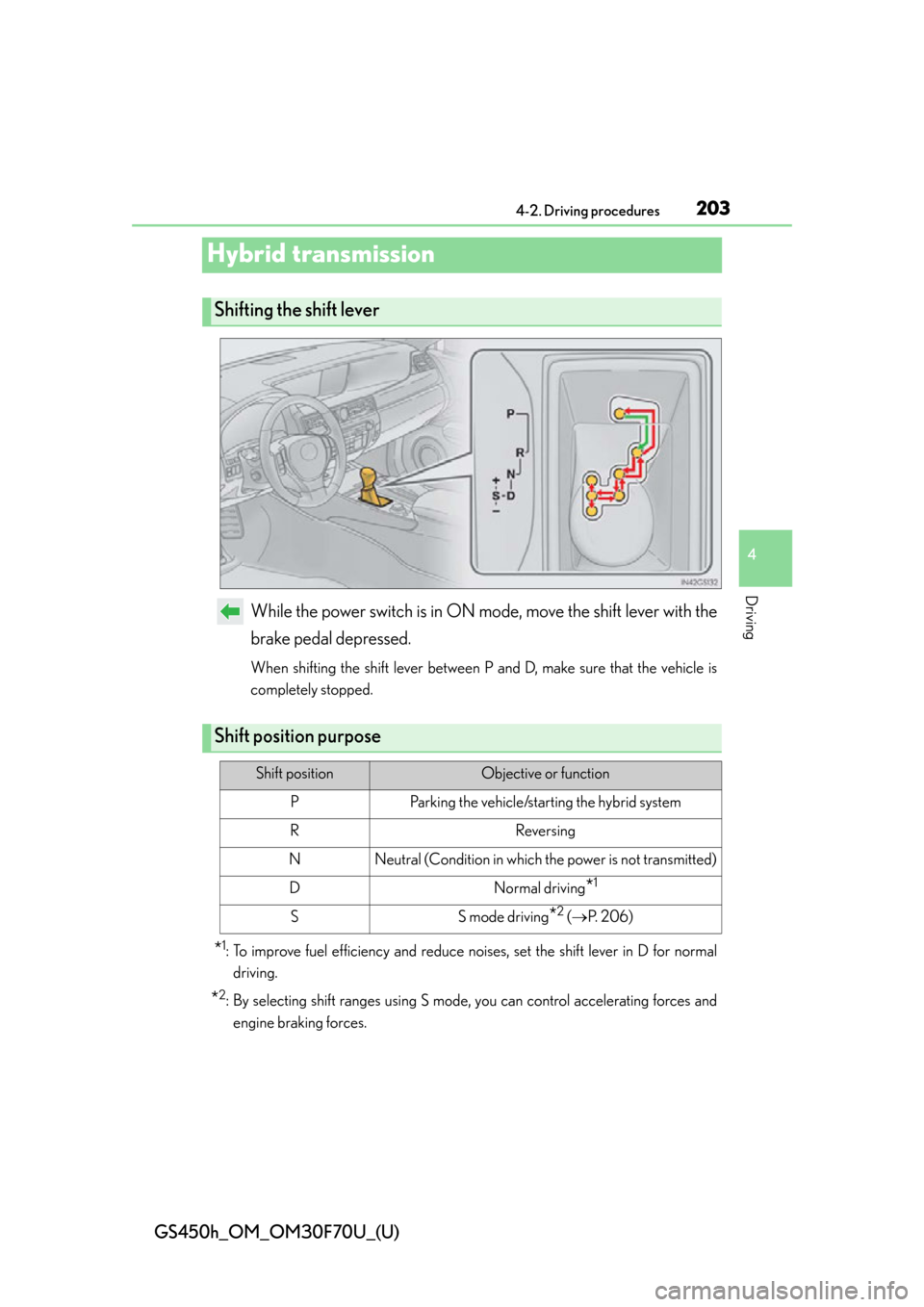
While the power switch is in ON mode, move the shift lever with the
brake pedal depressed.
When shifting the shift lever between P and D, make sure that the vehicle is
completely stopped.
*1: To improve fuel efficiency and reduce noises, set the shift lever in D for normal driving.
*2: By selecting shift ranges using S mode, you can control accelerating forces and
engine braking forces.
Shifting the shift lever
Shift position purpose
Shift positionObjective or function
PParking the vehicle/starting the hybrid system
RReversing
NNeutral (Condition in which the power is not transmitted)
DNormal driving*1
SS mode driving*2 ( P. 2 0 6 )