Page 209 of 615

GS350_OM_OM30F69U_(U)
2074-3. Operating the lights and wipers
4
Driving
■Raindrop sensor (vehicles with rain-sensing windshield wipers)
●If AUTO mode is selected while the engine switch is in IGNITION ON mode, the
wipers will operate once to show that AUTO mode is activated.
●If the temperature of the raindrop sensor is 185°F (85°C) or higher, or -22°F
(-30°C) or lower, automatic operation may not occur. In this case, operate the
wipers in any mode other than AUTO mode.
■When the windshield wipers are in temporary operation
AUTO mode cannot be activated even if is pressed.
■If no windshield washer fluid sprays
Check that the washer nozzles are not blocked if there is washer fluid in the wind-
shield washer fluid reservoir.
●The raindrop sensor judges the amount of
raindrops.
An optical sensor is adopted. It may not
operate properly when sunlight from the
rising or setting of the sun intermittently
strikes the windshield, or if bugs etc. are
present on the windshield.
CAUTION
■Caution regarding the use of windshield wipers in AUTO mode
The windshield wipers may operate unexpectedly if the sensor is touched or the
windshield is subject to vibration in AUTO mode. Take care that your fingers or
anything else do not become caught in the windshield wipers.
■Caution regarding the use of washer fluid
When it is cold, do not use the washer fluid until the windshield becomes warm.
The fluid may freeze on the windshield and cause low visibility. This may lead to an
accident, resulting in death or serious injury.
GS350_OM_OM30F69U_(U).book Page 207 Monday, January 19, 2015 2:53 PM
Page 212 of 615

210
GS350_OM_OM30F69U_(U)
4-4. Refueling
CAUTION
■When refueling the vehicle
Observe the following precautions while refueling the vehicle. Failure to do so may
result in death or serious injury.
●After exiting the vehicle and before opening the fuel door, touch an unpainted
metal surface to discharge any static electricity. It is important to discharge static
electricity before refueling because sparks resulting from static electricity can
cause fuel vapors to ignite while refueling.
●Always hold the grips on the fuel tank cap and turn it slowly to remove it.
A whooshing sound may be heard when the fuel tank cap is loosened. Wait until
the sound cannot be heard before fully removing the cap. In hot weather, pressur-
ized fuel may spray out the filler neck and cause injury.
●Do not allow anyone that has not discharged static electricity from their body to
come close to an open fuel tank.
●Do not inhale vaporized fuel.
Fuel contains substances that are harmful if inhaled.
●Do not smoke while refueling the vehicle.
Doing so may cause the fuel to ignite and cause a fire.
●Do not return to the vehicle or touch any person or object that is statically
charged.
This may cause static electricity to build up, resulting in a possible ignition hazard.
■When refueling
Observe the following precautions to prevent fuel overflowing from the fuel tank:
●Securely insert the fuel nozzle into the fuel filler neck.
●Stop filling the tank after the fuel nozzle automatically clicks off.
●Do not top off the fuel tank.
NOTICE
■Refueling
Do not spill fuel during refueling.
Doing so may damage the vehicle, such as causing the emission control system to
operate abnormally or damaging fuel system components or the vehicle’s painted
surface.
GS350_OM_OM30F69U_(U).book Page 210 Monday, January 19, 2015 2:53 PM
Page 223 of 615
GS350_OM_OM30F69U_(U)
2214-5. Using the driving support systems
4
Driving
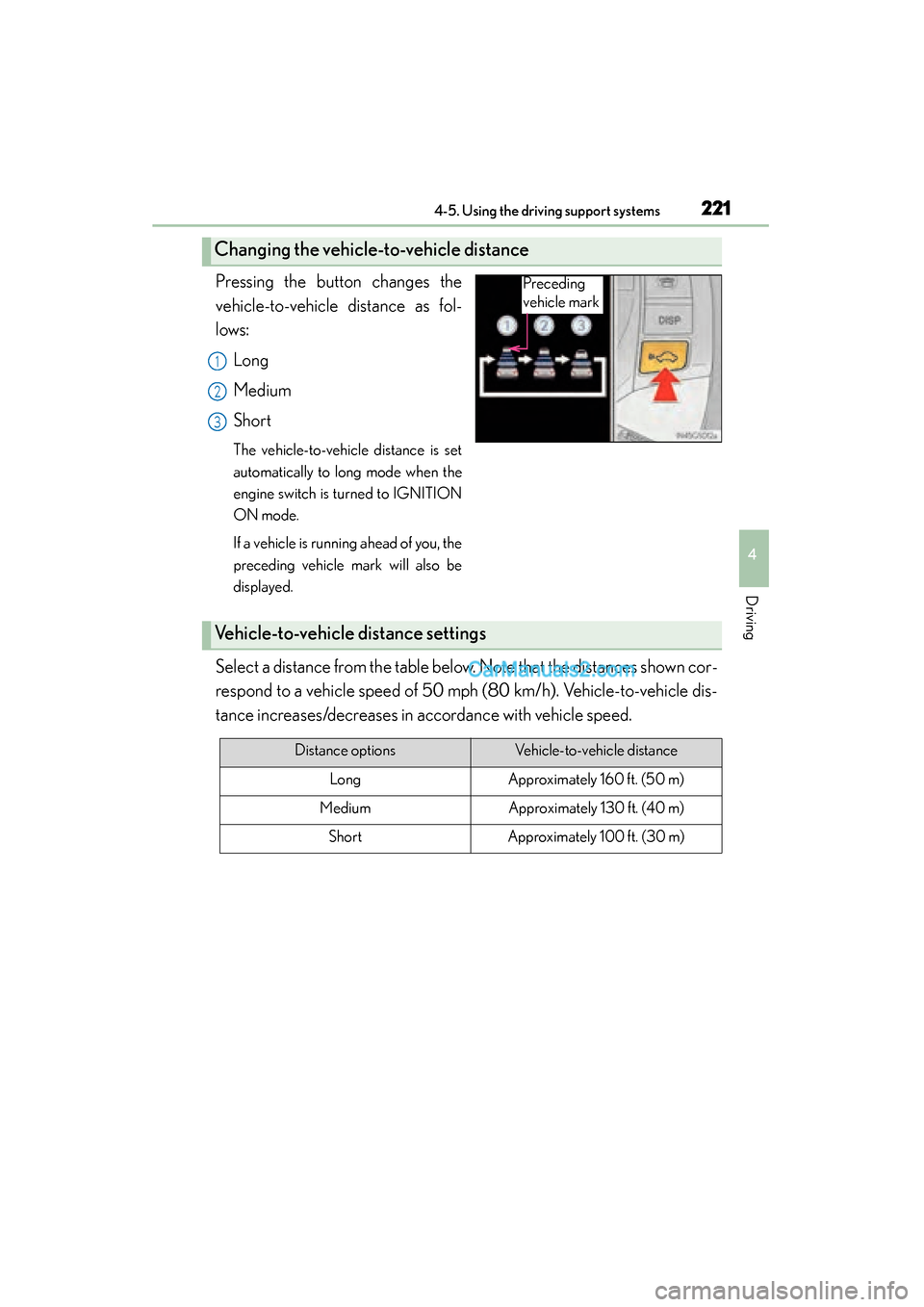
Pressing the button changes the
vehicle-to-vehicle distance as fol-
lows:Long
Medium
Short
The vehicle-to-vehicle distance is set
automatically to long mode when the
engine switch is turned to IGNITION
ON mode.
If a vehicle is running ahead of you, the
preceding vehicle mark will also be
displayed.
Select a distance from the table below. Note that the distances shown cor-
respond to a vehicle speed of 50 mph (80 km/h). Vehicle-to-vehicle dis-
tance increases/decreases in accordance with vehicle speed.
Changing the vehicle-to-vehicle distance
Preceding
vehicle mark
1
2
3
Vehicle-to-vehicle distance settings
Distance optionsVehicle-to-vehicle distance
LongApproximately 160 ft. (50 m)
MediumApproximately 130 ft. (40 m)
ShortApproximately 100 ft. (30 m)
GS350_OM_OM30F69U_(U).book Page 221 Monday, January 19, 2015 2:53 PM
Page 227 of 615

GS350_OM_OM30F69U_(U)
2254-5. Using the driving support systems
4
Driving
When constant speed control mode is selected, your vehicle will maintain
a set speed without controlling the vehicle-to-vehicle distance. Select this
mode only when vehicle-to-vehicle distance control mode does not func-
tion correctly due to dirt etc.
Press the “ON/OFF” button to
activate the cruise control.
Press the button again to deactivate
the cruise control.
Switch to constant speed control
mode.
(Push the lever forward and hold
for approximately one second.)
Cruise control indicator will come on.
When in constant speed control
mode, to return to vehicle-to-vehicle
distance control mode, push the lever
forward again and hold for approxi-
mately 1 second.
After the desired speed has been set,
it is not possible to return to vehicle-
to-vehicle distance control mode.
If the engine switch is turned off and
then turned to IGNITION ON mode
again, the vehicle will automatically
return to vehicle-to-vehicle distance
control mode.
Adjusting the speed setting:
→ P. 220
Canceling and resuming the speed
setting: →P. 222
Selecting conventional constant speed control mode
1
2
GS350_OM_OM30F69U_(U).book Page 225 Monday, January 19, 2015 2:53 PM
Page 237 of 615
GS350_OM_OM30F69U_(U)
2354-5. Using the driving support systems
4
Driving
Press the “LKA” switch to activate
the system.
“LKA” indicator will come on.
Press the switch again to turn the LKA
system off.
The LKA system will revert to off each
time the engine switch is turned to
IGNITION ON mode.
Turning the LKA system on
GS350_OM_OM30F69U_(U).book Page 235 Monday, January 19, 2015 2:53 PM
Page 279 of 615

277
GS350_OM_OM30F69U_(U)4-5. Using the driving support systems
4
Driving
Lexus night view∗
Turn the engine switch to IGNITION ON mode.
The headlights turn on
Press the Lexus night view switch
The Lexus night view is displayed on
the Remote Touch screen.
To return the screen to its previous
state, press the switch again.
When the light sensor ( →P. 199)
determines that it is currently night
time from the brightness of the sur-
rounding area, the Lexus night view
can be operated by pressing the
Lexus night view switch while the
headlights are on.
∗: If equipped
Lexus night view is a system which assists with nighttime driving.
Near-infrared rays are irradiated forward and an image converted
from the irradiated light is show n on the Remote Touch screen. The
image shows pedestrians, obstacles, and road conditions ahead of the
vehicle, which ar e difficult to see at nigh ttime with the naked eye.
Displaying the Lexus night view
1
2
3
GS350_OM_OM30F69U_(U).book Page 277 Monday, January 19, 2015 2:53 PM
Page 317 of 615

GS350_OM_OM30F69U_(U)
3155-2. Using the air conditioning system and defogger
5
Interior features
■Registering air conditioning settings to electronic keys
●Unlocking the vehicle using an electronic key and turning the engine switch to
IGNITION ON mode will recall that key’s registered air conditioning settings.
●When the engine switch is turned off, the current air conditioning settings will auto-
matically be registered to the electronic key that was used to unlock the vehicle.
The system may not operate correctly if more than one electronic key is in the vicinity
or if the smart access system with push-button start is used to unlock a passenger
door.
Settings for the electronic key and the corresponding door can be changed. Contact
your Lexus dealer.
■Using automatic mode
●Fan speed is adjusted automatically according to the temperature setting and the
ambient conditions.
Therefore, the fan may stop for a while until warm or cool air is ready to flow imme-
diately after is pressed.
●Cool air may blow around the upper body even when the heater is on due to sun-
light.
■Humidity sensor
A sensor, which detects humidity inside the
vehicle and the temperature of the wind-
shield, is provided to detect fog on the front
windscreen. Due to the sensor, when auto-
matic mode is set the air conditioning may
make the following controls:
●Changing the amount of air flow
●Changing the amount of air introduced from
outside when in outside air mode with the air
vents in the position
●Changing the settings of the air vents to
when the is set
GS350_OM_OM30F69U_(U).book Page 315 Monday, January 19, 2015 2:53 PM
Page 326 of 615
324
GS350_OM_OM30F69U_(U)
5-2. Using the air conditioning system and defogger
Rear window and outside rear view mirror
defoggers
On/off
The defoggers will automatically turn
off after 15 to 60 minutes. The opera-
tion time changes according to the
ambient temperature and vehicle
speed.
■Operating conditions
The engine switch must be in the IGNITION ON mode.
These features are used to defog the rear window, and to remove rain-
drops, dew and frost from the outside rear view mirrors.
CAUTION
■When the outside rear view mirror defoggers are on
Do not touch the rear view mirror surfaces, as they can become very hot and burn
you.
NOTICE
■To prevent battery discharge
Turn the defoggers off when the engine is off.
GS350_OM_OM30F69U_(U).book Page 324 Monday, January 19, 2015 2:53 PM