Page 352 of 620

3524-6. Driving tips
GS450h_300h_OM_OM30F00E_(EE)
◆Delays
Repeated acceleration and deceleration, as well as long waits at traffic lights,
will lead to bad fuel economy. Check traffic reports before leaving and avoid
delays as much as possible. When driving in a traffic jam, gently release the
brake pedal to allow the vehicle to move forward slightly while avoiding over-
use of the accelerator pedal. Doing so can help control excessive gasoline
consumption.
◆Highway driving
Control and maintain the vehicle at a constant speed. Before stopping at a toll
booth or similar, allow plenty of time to release the accelerator and gently
apply the brakes. A greater amount of electrical energy can be regenerated
when slowing down.
◆Air conditioning
Use the air conditioning only when necessary. Doing so can help reduce
excessive gasoline consumption.
In summer: When the ambient temperature is high, use the recirculated air
mode. Doing so will help to reduce the burden on the air conditioning system
and reduce fuel consumption as well.
In winter: Because the gasoline engine will not automatically cut out until it
and the interior of the vehicle are warm, it will consume fuel. Also, fuel con-
sumption can be improved by avoiding overuse of the heater.
◆Checking tire inflation pressure
Make sure to check the tire inflation pressure frequently. Improper tire infla-
tion pressure can cause poor fuel economy.
Also, as snow tires can cause large amounts of friction, their use on dry roads
can lead to poor fuel economy. Use tires that are appropriate for the season.
Page 354 of 620

3544-6. Driving tips
GS450h_300h_OM_OM30F00E_(EE)
Winter driving tips
●Use fluids that are appropriate to the prevailing outside temperatures. •Engine oil
• Engine/power control unit coolant
•Washer fluid
●Have a service technician inspect the condition of the 12-volt battery.
●Have the vehicle fitted with four snow tires or purchase a set of tire chains for
the rear tires.
*
Ensure that all tires are the specified size and brand, and that chains match the size
of the tires.
*: Tire chains cannot be mounted on vehicles with front and rear tires of differing sizes and vehicles with LDH and 19 inch tires
Perform the following according to the driving conditions:
●Do not try to forcibly open a window or move a wiper that is frozen. Pour
warm water over the frozen area to melt the ice. Wipe away the water imme-
diately to prevent it from freezing.
●To ensure proper operation of the climate control system fan, remove any
snow that has accumulated on the air inlet vents in front of the windshield.
●Check for and remove any excess ice or snow that may have accumulated on
the exterior lights, vehicle’s roof, chassis, around the tires or on the brakes.
●Remove any snow or mud from the bottom of your shoes before getting in the
vehicle.
Carry out the necessary preparations and inspections before driving the vehi-
cle in winter. Always drive the vehicle in a manner appropriate to the prevail-
ing weather conditions.
Preparation for winter
Before driving the vehicle
Page 359 of 620

359
5Interior features
GS450h_300h_OM_OM30F00E_(EE)
5-1. Remote Touch screenRemote Touch/12.3-inch display ......................................... 360
5-2. Using the air conditioning system and defogger
Front automatic air conditioning system .........366
Rear air conditioning system .......................................... 378
Heated steering wheel/ seat heaters/
seat ventilators .......................... 381 5-3. Using the interior lights
Interior lights list .........................386• Interior lights .......................... 387
• Personal lights ....................... 387
5-4. Using the storage features List of storage features ............389• Glove box ...............................390
• Console box...........................390
• Cup holders ............................ 391
• Auxiliary boxes ..................... 393
Trunk features .............................. 394
5-5. Using the other interior features Other interior features ............ 397• Sun visors ................................ 397
• Vanity mirrors ........................ 397
• Clock ........................................398
• Ashtrays ...................................398
• Power outlets ......................... 399
• Armrest....................................400
• Rear sunshade/
rear door sunshades...........400
• Coat hooks ............................. 402
• Assist grips.............................. 403
Page 382 of 620
3825-2. Using the air conditioning system and defogger
GS450h_300h_OM_OM30F00E_(EE)
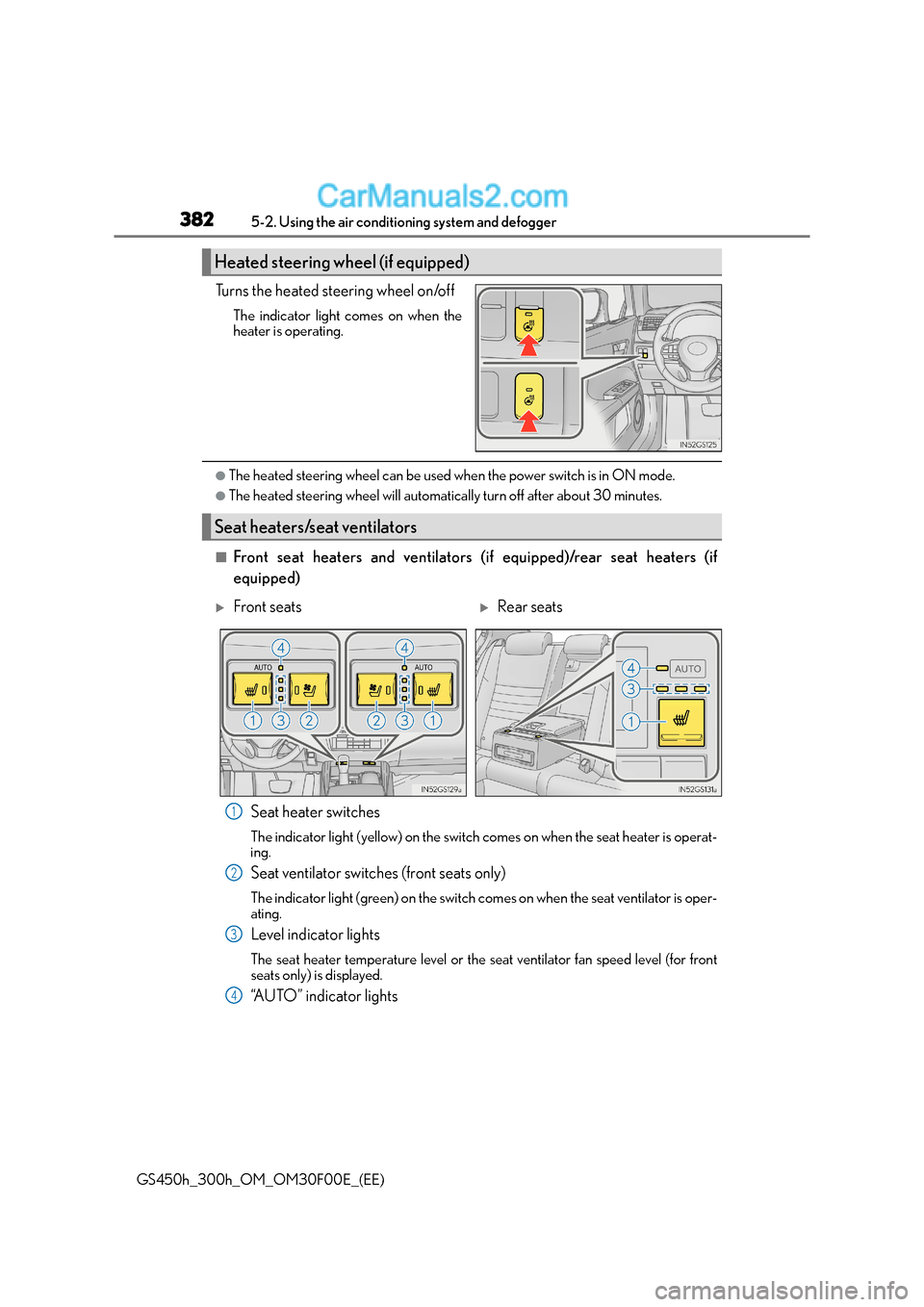
Turns the heated steering wheel on/off
The indicator light comes on when the
heater is operating.
●The heated steering wheel can be used when the power switch is in ON mode.
●The heated steering wheel will automatically turn off after about 30 minutes.
■Front seat heaters and ventilators (i f equipped)/rear seat heaters (if
equipped)
Seat heater switches
The indicator light (yellow) on the switch comes on when the seat heater is operat-
ing.
Seat ventilator switches (front seats only)
The indicator light (green) on the switch comes on when the seat ventilator is oper-
ating.
Level indicator lights
The seat heater temperature level or the seat ventilator fan speed level (for front
seats only) is displayed.
“AUTO” indicator lights
Heated steering wheel (if equipped)
Seat heaters/seat ventilators
XFront seatsXRear seats
1
2
3
4
Page 383 of 620
3835-2. Using the air conditioning system and defogger
5
Interior features
GS450h_300h_OM_OM30F00E_(EE)
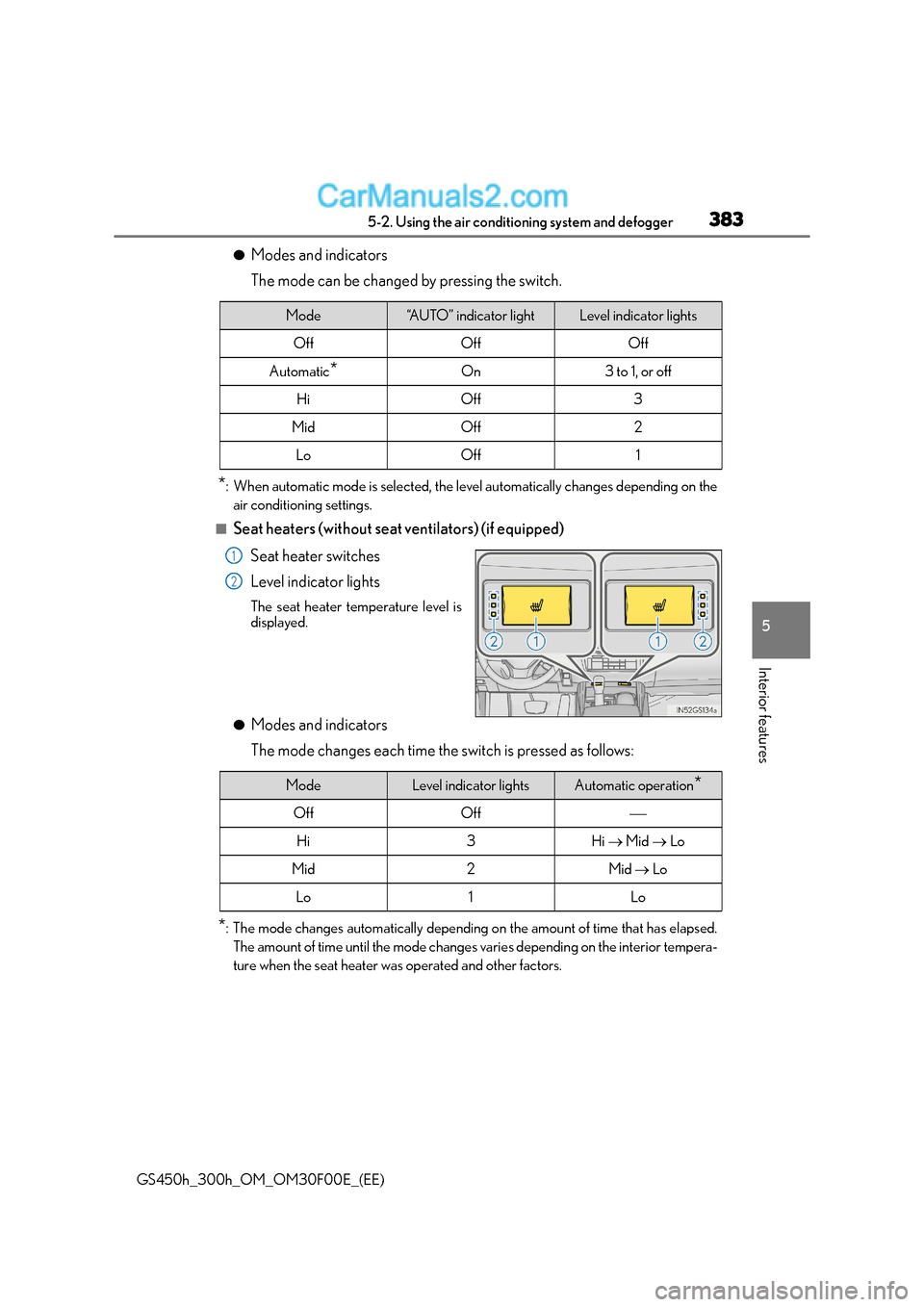
●Modes and indicators
The mode can be changed by pressing the switch.
*: When automatic mode is selected, the level automatically changes depending on the
air conditioning settings.
■Seat heaters (without seat ventilators) (if equipped)
Seat heater switches
Level indicator lights
The seat heater temperature level is
displayed.
●Modes and indicators
The mode changes each time the switch is pressed as follows:
*: The mode changes automatically depending on the amount of time that has elapsed. The amount of time until the mode changes varies depending on the interior tempera-
ture when the seat heater was operated and other factors.
Mode“AUTO” indicator lightLevel indicator lights
OffOffOff
Automatic*On3 to 1, or off
HiOff3
MidOff2
LoOff1
1
2
ModeLevel indicator lightsAutomatic operation*
OffOff
Hi3Hi → Mid → Lo
Mid2Mid → Lo
Lo1Lo
Page 384 of 620
3845-2. Using the air conditioning system and defogger
GS450h_300h_OM_OM30F00E_(EE)
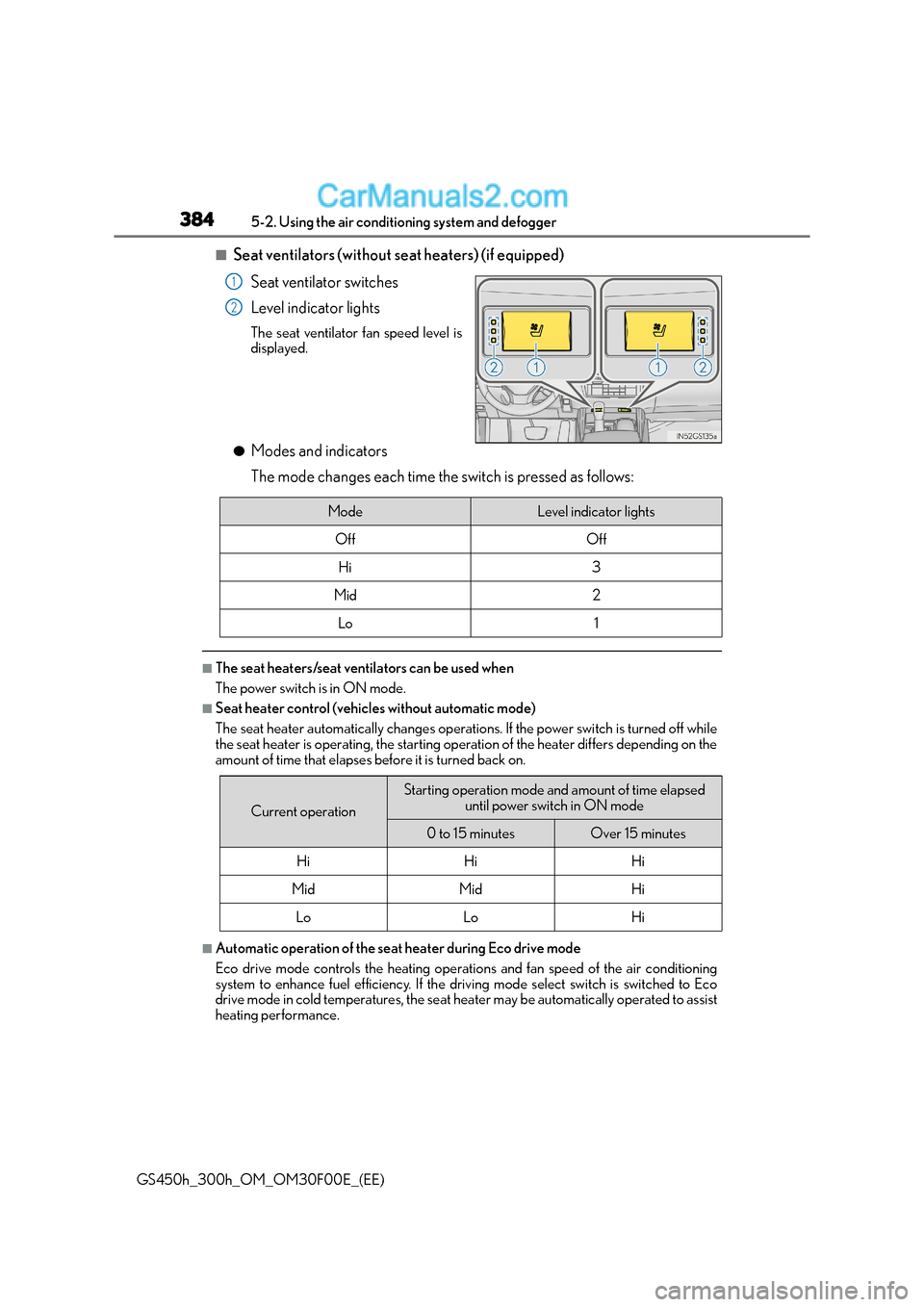
■Seat ventilators (without seat heaters) (if equipped)
Seat ventilator switches
Level indicator lights
The seat ventilator fan speed level is
displayed.
●Modes and indicators
The mode changes each time the switch is pressed as follows:
■The seat heaters/seat ventilators can be used when
The power switch is in ON mode.
■Seat heater control (vehicles without automatic mode)
The seat heater automatically changes operations. If the power switch is turned off while
the seat heater is operating, the starting operation of the heater differs depending on the
amount of time that elapses before it is turned back on.
■Automatic operation of the seat heater during Eco drive mode
Eco drive mode controls the heating operations and fan speed of the air conditioning
system to enhance fuel efficiency. If the driv ing mode select switch is switched to Eco
drive mode in cold temperatures, the seat heater may be automatically operated to assist
heating performance.
1
2
ModeLevel indicator lights
OffOff
Hi3
Mid2
Lo1
Current operation
Starting operation mode and amount of time elapsed
until power switch in ON mode
0 to 15 minutesOver 15 minutes
HiHiHi
MidMidHi
LoLoHi
Page 386 of 620
3865-3. Using the interior lights
GS450h_300h_OM_OM30F00E_(EE)
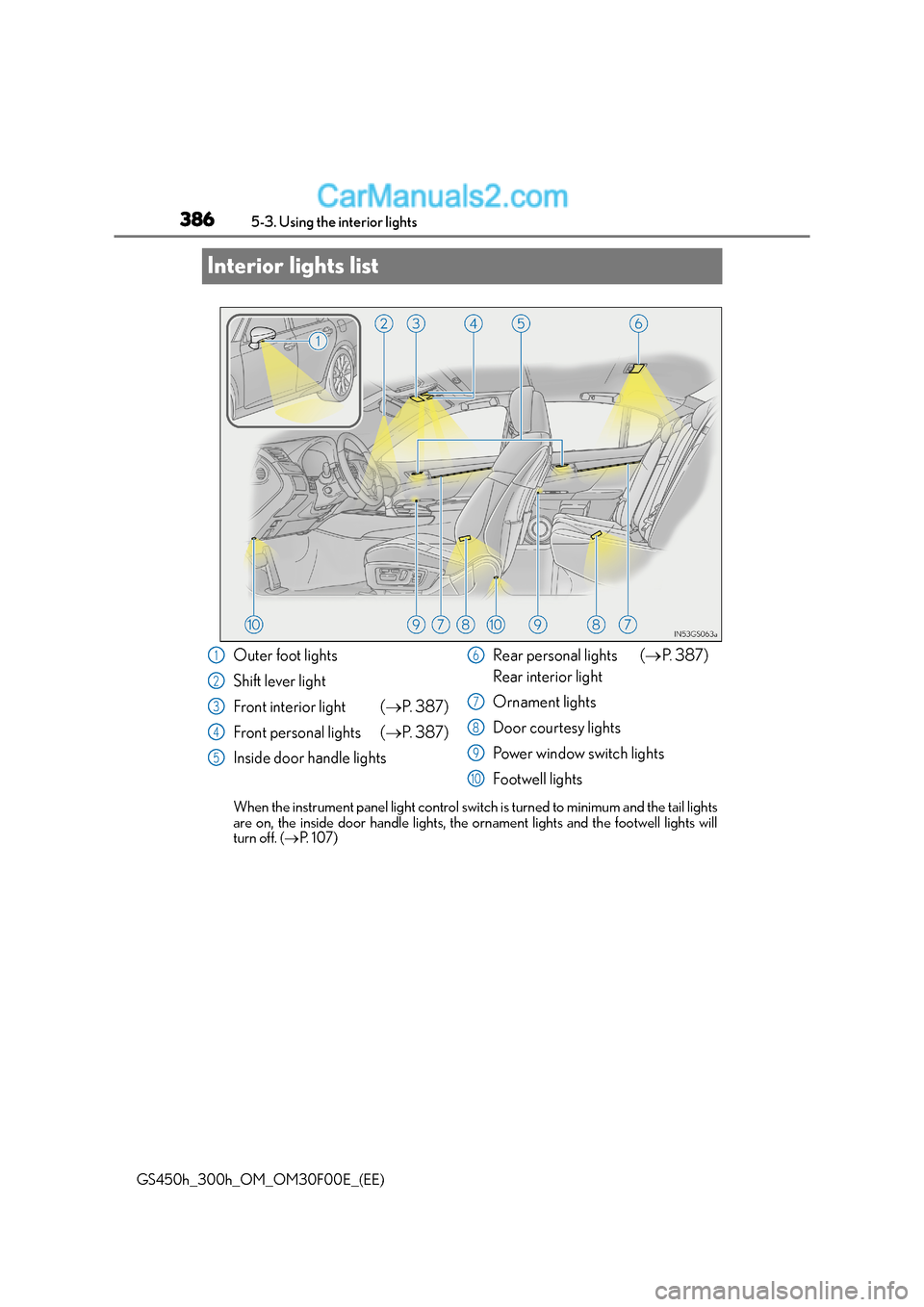
Interior lights list
When the instrument panel light control swit ch is turned to minimum and the tail lights
are on, the inside door handle lights, th e ornament lights and the footwell lights will
turn off. ( →P. 1 0 7 )
Outer foot lights
Shift lever light
Front interior light ( →P. 3 8 7 )
Front personal lights ( →P. 3 8 7 )
Inside door handle lights Rear personal lights (
→P. 3 8 7 )
Rear interior light
Ornament lights
Door courtesy lights
Power window switch lights
Footwell lights1
2
3
4
5
6
7
8
9
10
Page 387 of 620
3875-3. Using the interior lights
5
Interior features
GS450h_300h_OM_OM30F00E_(EE)
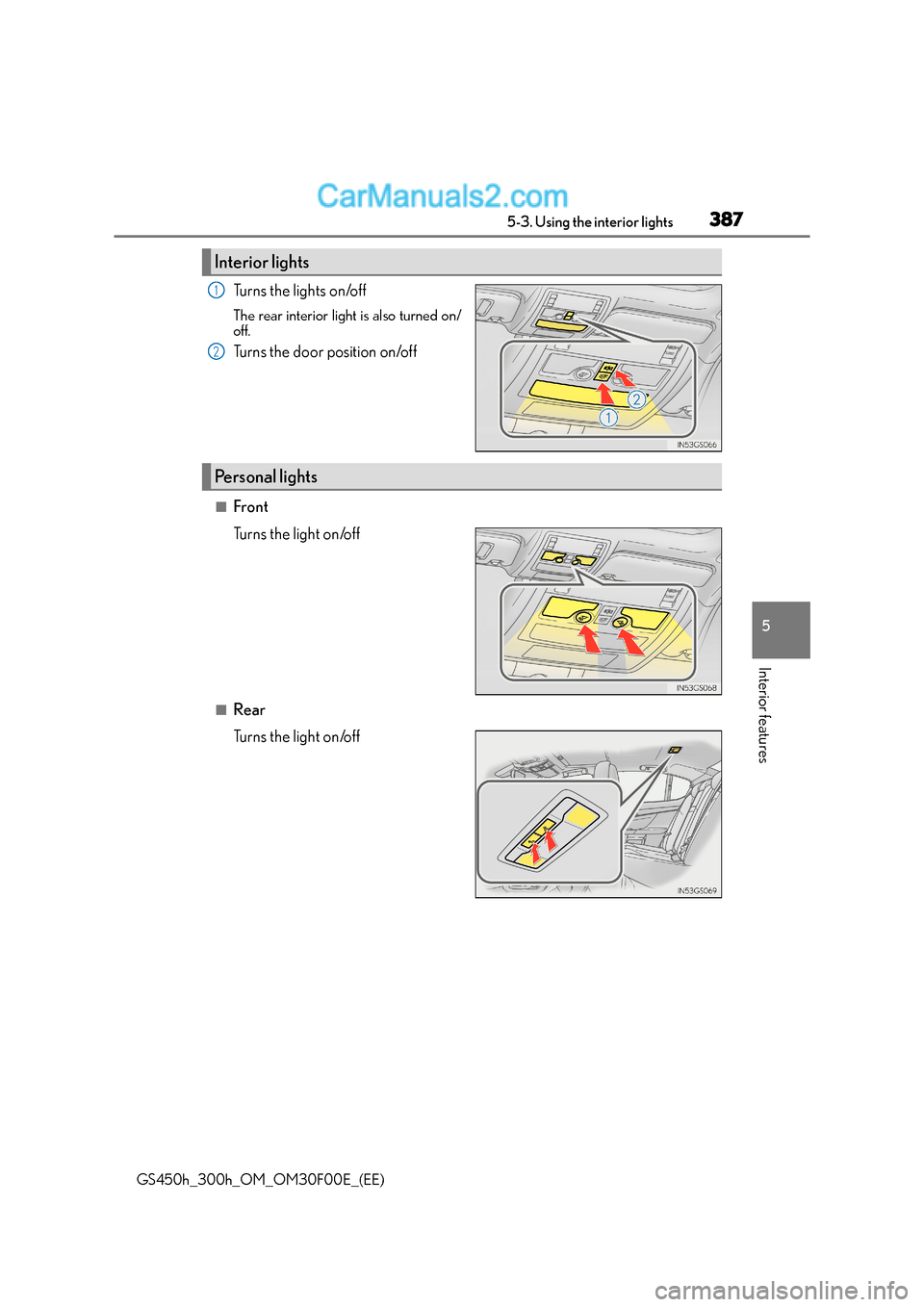
Turns the lights on/off
The rear interior light is also turned on/
off.
Turns the door position on/off
■Front
Turns the light on/off
■Rear
Turns the light on/off
Interior lights
1
2
Personal lights