2015 Lexus GS300h radio
[x] Cancel search: radioPage 156 of 620

1563-2. Opening, closing and locking the doors and trunk
GS450h_300h_OM_OM30F00E_(EE)
■Note for the entry function (if equipped)
●Even when the electronic key is within the effective range (detection areas), the system
may not operate properly in the following cases:
• The electronic key is too close to the window or outside door handle, near theground, or in a high place when the doors are locked or unlocked.
• The electronic key is near the ground or in a high place, or too close to the rear
bumper center when the trunk is opened.
• The electronic key is on the instrument pa nel, rear package tray or floor, or in the
door pockets or glove box when the hybrid system is started or power switch modes
are changed.
●Do not leave the electronic key on top of th e instrument panel or near the door pockets
when exiting the vehicle. Depending on the radio wave reception conditions, it may be
detected by the antenna outside the cabin and the door will become lockable from the
outside, possibly trapping the electronic key inside the vehicle.
●As long as the electronic key is within the effective range, the doors may be locked or
unlocked by anyone. However, only the doors detecting the electronic key can be used
to unlock the vehicle.
●The doors may unlock or lock if a large amou nt of water splashes on the door handle,
such as in the rain or in a car wash when the electronic key is within the effective range.
(The doors will automatically be locked af ter approximately 30 seconds if the doors
are not opened and closed.)
●If the wireless remote control is used to lock the doors when the electronic key is near
the vehicle, there is a possibility that the d oor may not be unlocked by the entry func-
tion. (Use the wireless remote control to unlock the doors.)
●Touching the door lock sensor while wearing gloves may delay or prevent lock opera-
tion.
●If the door handle becomes wet while the electronic key is within the effective range,
the door may lock and unlock repeatedly. In that case, follow the following correction
procedures to wash the vehicle:
• Place the electronic key in a location 2 m (6 ft.) or more away from the vehicle. (Take care to ensure that the key is not stolen.)
• Set the electronic key to battery-saving mode to disable the smart entry & start sys- tem. ( →P. 1 5 5 )
●If the electronic key is inside the vehicle and a door handle becomes wet during a car
wash, a message may be shown on the multi-information display and a buzzer will
sound outside the vehicle. To turn off the alarm, lock all the doors.
●The lock sensor may not work properly if it comes into contact with ice, snow, mud, etc.
Clean the lock sensor and attempt to operate it again, or use the lock sensor on the
lower part of the door handle.
●A sudden approach to the effective range or door handle may prevent the doors from
being unlocked. In this case, return the door handle to the original position and check
that the doors unlock before pulling the door handle again.
●Gripping the door handle when wearing a glove may not unlock the door.
●If there is another electronic key in the de tection area, it may take slightly longer to
unlock the doors after the door handle is gripped.
●Fingernails may scrape against the door duri ng operation of the door handle. Be care-
ful not to injure fingernails or damage the surface of the door.
Page 157 of 620

1573-2. Opening, closing and locking the doors and trunk
3
Operation of each component
GS450h_300h_OM_OM30F00E_(EE)
■Note for the push-start function
●Even when the electronic key is within the effective range (detection areas), the system
may not operate properly when the electronic key is on the instrument panel, rear
package tray or floor, or in the door pockets or glove box when the hybrid system is
started or power switch modes are changed.
●Even if the electronic key is not inside the vehicle, it may be possible to start the hybrid
system if the electronic key is near the window.
■When the vehicle is not driven for extended periods
●Vehicles with entry function: To prevent theft of the vehicle, do not leave the electronic
key within 2 m (6 ft.) of the vehicle.
●The smart entry & start system can be deactivated in advance. ( →P. 5 8 1 )
■To operate the system properly
●Make sure to carry the electronic key when operating the system. Do not get the elec-
tronic key too close to the vehicle when operating the system from the outside of the
vehicle.
Depending on the position and holding condition of the electronic key, the key may not
be detected correctly and the system may not operate properly. (The alarm may go off
accidentally, or the door lock prev ention function may not operate.)
●Do not leave the electronic key inside the trunk.
The key confinement prevention function may not operate, depending on the location
of the key (close to a spare tire [if equipped], the inside edge of the trunk), conditions
(inside a metal bag, close to metallic object s) and the radio waves in the surrounding
area. ( →P. 1 4 8 )
■If the smart entry & start system does not operate properly
●Locking and unlocking the doors and opening the trunk: Use the mechanical key.
(→ P. 5 4 8 )
●Starting the hybrid system: →P. 5 4 9
■Customization
Settings (e. g. smart entry & start system) can be changed.
(Customizable features: →P. 5 8 1 )
■If the smart entry & start system has been deactivated in a customized setting
●Locking and unlocking the doors and opening the trunk:
Use the wireless remote control or mechanical key. ( →P. 139, 147, 548)
●Starting the hybrid system and changing power switch modes: →P. 5 4 9
●Stopping the hybrid system: →P. 2 1 8
Page 174 of 620
1743-2. Opening, closing and locking the doors and trunk
GS450h_300h_OM_OM30F00E_(EE)
WA R N I N G
■Caution regarding interference with electronic devices
●People with implantable cardiac pacemakers, cardiac resynchronization therapy-
pacemakers or implantable cardioverter defibrillators should maintain a reasonable
distance between themselves and the smart entry & start system antennas. ( →P. 1 5 3 )
The radio waves may affect the operation of such devices. If necessary, the entry
function can be disabled. Ask any authoriz ed Lexus dealer or repairer, or another
duly qualified and equipped professional fo r details, such as the frequency of radio
waves and timing of the emitted radio waves. Then, consult your doctor to see if you
should disable the entry function.
●Users of any electrical medical device other than implantable cardiac pacemakers,
cardiac resynchronization therapy-pacemakers or implantable cardioverter defibril-
lators should consult the manufacturer of the device for information about its opera-
tion under the influence of radio waves.
Radio waves could have unexpected effects on the operation of such medical
devices.
Ask any authorized Lexus dealer or repair er, or another duly qualified and equipped
professional for details on disabling the entry function.
Page 277 of 620
2774-5. Using the driving support systems
4
Driving
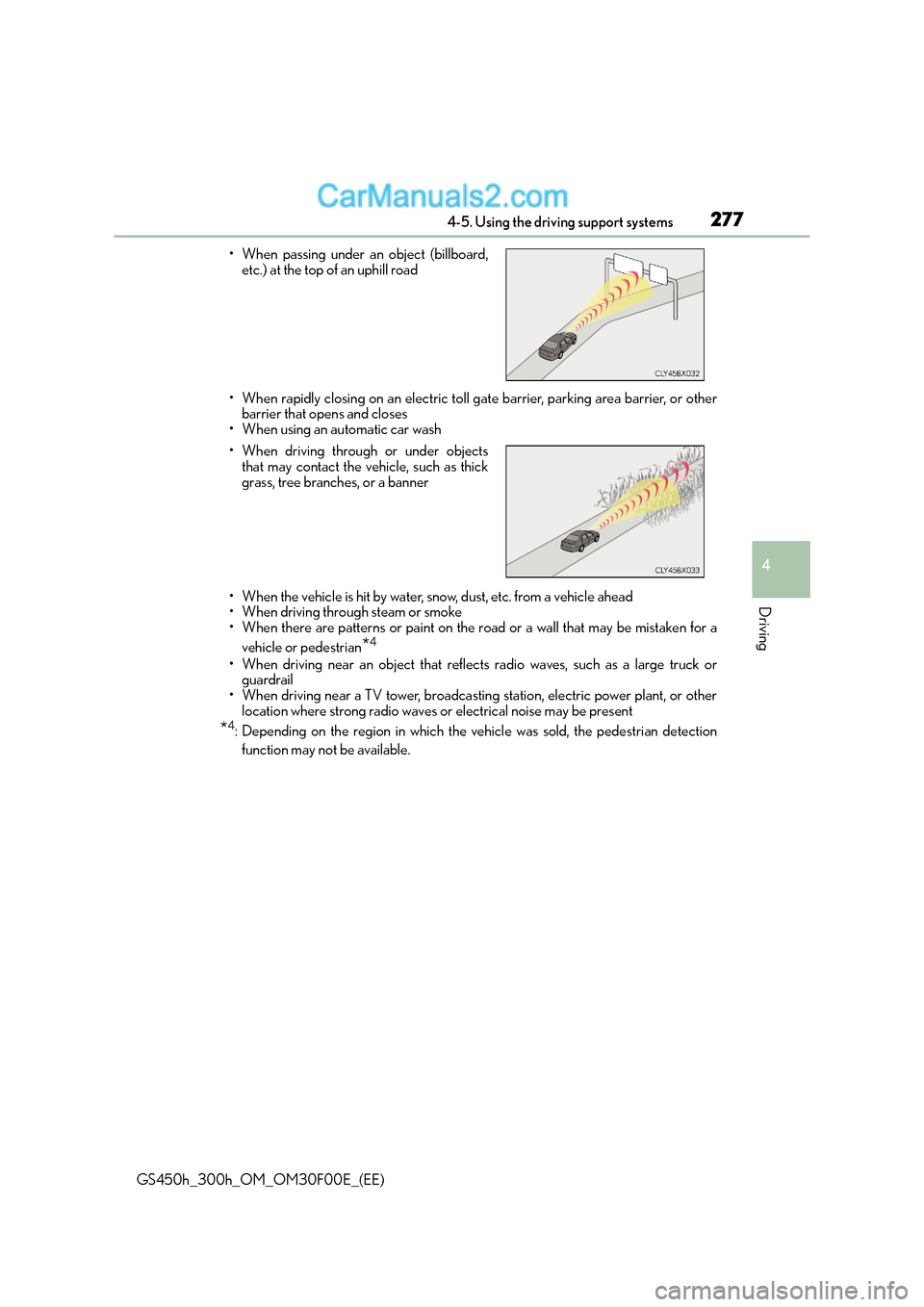
GS450h_300h_OM_OM30F00E_(EE)• When rapidly closing on an electric toll gate barrier, parking area barrier, or other
barrier that opens and closes
• When using an automatic car wash
• When the vehicle is hit by water, snow, dust, etc. from a vehicle ahead
• When driving through steam or smoke
• When there are patterns or paint on the road or a wall that may be mistaken for a
vehicle or pedestrian
*4
• When driving near an object that reflects radio waves, such as a large truck orguardrail
• When driving near a TV tower, broadcasting station, electric power plant, or other location where strong radio waves or electrical noise may be present
*4: Depending on the region in which the vehicle was sold, the pedestrian detection
function may not be available.
• When passing under an object (billboard,
etc.) at the top of an uphill road
• When driving through or under objects that may contact the vehicle, such as thick
grass, tree branches, or a banner
Page 363 of 620

3635-1. Remote Touch screen
5
Interior features
GS450h_300h_OM_OM30F00E_(EE)
Press the “MENU” button on the Remote Touch to display the “Menu” screen.
The display may differ depending on the type of the system.
12.3-inch display: When an interruption screen is being displayed on the side display,
the “Menu” screen will be shown on the main display.
“Menu” screen
XVehicles with 8-inch displayXVehicles with 12.3-inch display
SwitchFunction
Select to display the map screen or the navigation menu screen.*1, 2
Select to display the radio control screen.*1
Select to operate the media control screen.*1
Select to display the hands-free operation screen.*1
Select to display the fuel consumption screen. (→P. 126, 129)
Select to display the “Information” screen.*1
Select to display the air conditioning control screen. ( →P. 3 6 6 )
Select to display the “Setup” screen.*1
Page 436 of 620

4366-3. Do-it-yourself maintenance
GS450h_300h_OM_OM30F00E_(EE)
■When rotating the tires (vehicles with the tire pressure warning system featuring a tire
inflation pressure display function)
Make sure that the power switch is off. If the tires are rotated while the power switch is in
ON mode, the tire position information will not be updated.
If this accidentally occurs, either turn the power switch to off and then to ON mode, or
initialize the system after checking that the tire pressure is properly adjusted.
■Low profile tires (except 225/50R17 tires)
Generally, low profile tires will wear more rapidly and tire grip performance will be
reduced on snowy and/or icy roads when compared to standard tires. Be sure to use
snow tires or tire chains on snowy and/or icy roads and drive carefully at a speed appro-
priate for road and weather conditions. ( →P. 3 5 5 )
■If the tread on snow tires wears down below 4 mm (0.16 in.)
The effectiveness of the tire s as snow tires is lost.
■Situations in which the tire pressure warning system may not operate properly (vehi-
cles with the tire pressure warning system)
●In the following cases, the tire pressure warning system may not operate properly.
• If non-genuine Lexus wheels are used.
• A tire has been replaced with a tire that is not an OE (Original Equipment) tire.
• A tire has been replaced with a tire that is not of the specified size.
• Tire chains etc. are equipped.
• An auxiliary-supported run-flat tire is equipped.
• If a window tint that affects the radio wave signals is installed.
• If there is a lot of snow or ice on the vehicle, particularly around the wheels or wheel
housings.
• If the tire inflation pressure is extremely higher than the specified level.
• If wheel without the tire pressure warning valve and transmitter are used.
• If the ID code on the tire pressure warning valves and transmitters is not registered in the tire pressure warning computer.
●Performance may be affected in the following situations.
• Near a TV tower, electric power plant, gas station, radio station, large display, air-
port or other facility that generates strong radio waves or electrical noise
• When carrying a portable radio, cellular phone, cordless phone or other wireless communication device
Vehicles with the tire inflation pressure display function: If tire position information is
not correctly displayed due to the radio wave conditions, the display may be corrected
by driving and changing the radio wave conditions.
●When the vehicle is parked, the time taken for the warning to start or go off could be
extended.
●When tire inflation pressure declines rapidly for example when a tire has burst, the
warning may not function.
Page 443 of 620
443 6-3. Do-it-yourself maintenance
6
Maintenance and care
GS450h_300h_OM_OM30F00E_(EE)
WA R N I N G
■When inspecting or replacing tires
Observe the following precautions to prevent accidents.
Failure to do so may cause damage to parts of the drive train as well as dangerous han-
dling characteristics, which may lead to an accident resulting in death or serious injury.
●Do not mix tires of different makes, models or tread patterns.
Also, do not mix tires of remarkably different treadwear.
●Do not use tire sizes other than those recommended by Lexus.
●Do not mix differently constructed tires (radial, bias-belted or bias-ply tires).
●Do not mix summer, all season and snow tires.
●Do not use tires that have been used on another vehicle.
Do not use tires if you do not know how they were used previously.
●Vehicles with compact spare tire: Do not tow if your vehicle has a compact spare tire
installed.
●Vehicles with emergency tire puncture repair kit: Do not tow anything if a tire that has
been repaired using the emergency tire punc ture repair kit is installed. The load on
the tire may cause unexpected damage to the tire.
■When initializing the tire pressure warning system (vehicles with the tire pressure
warning system)
Do not initialize tire inflation pressure withou t first adjusting the tire inflation pressure to
the specified level. Otherwise, the tire pre ssure warning light may not come on even if
the tire inflation pressure is low, or it ma y come on when the tire inflation pressure is
actually normal.
■Caution regarding interference with electron ic devices (vehicles with the tire pres-
sure warning system featuring a tire inflation pressure display function)
●Users of any electrical medical device other than implantable cardiac pacemakers,
cardiac resynchronization therapy-pacemakers or implantable cardioverter defibril-
lators should consult the manufacturer of the device for information about its opera-
tion under the influence of radio waves.
Radio waves could have unexpected effects on the operation of such medical
devices.
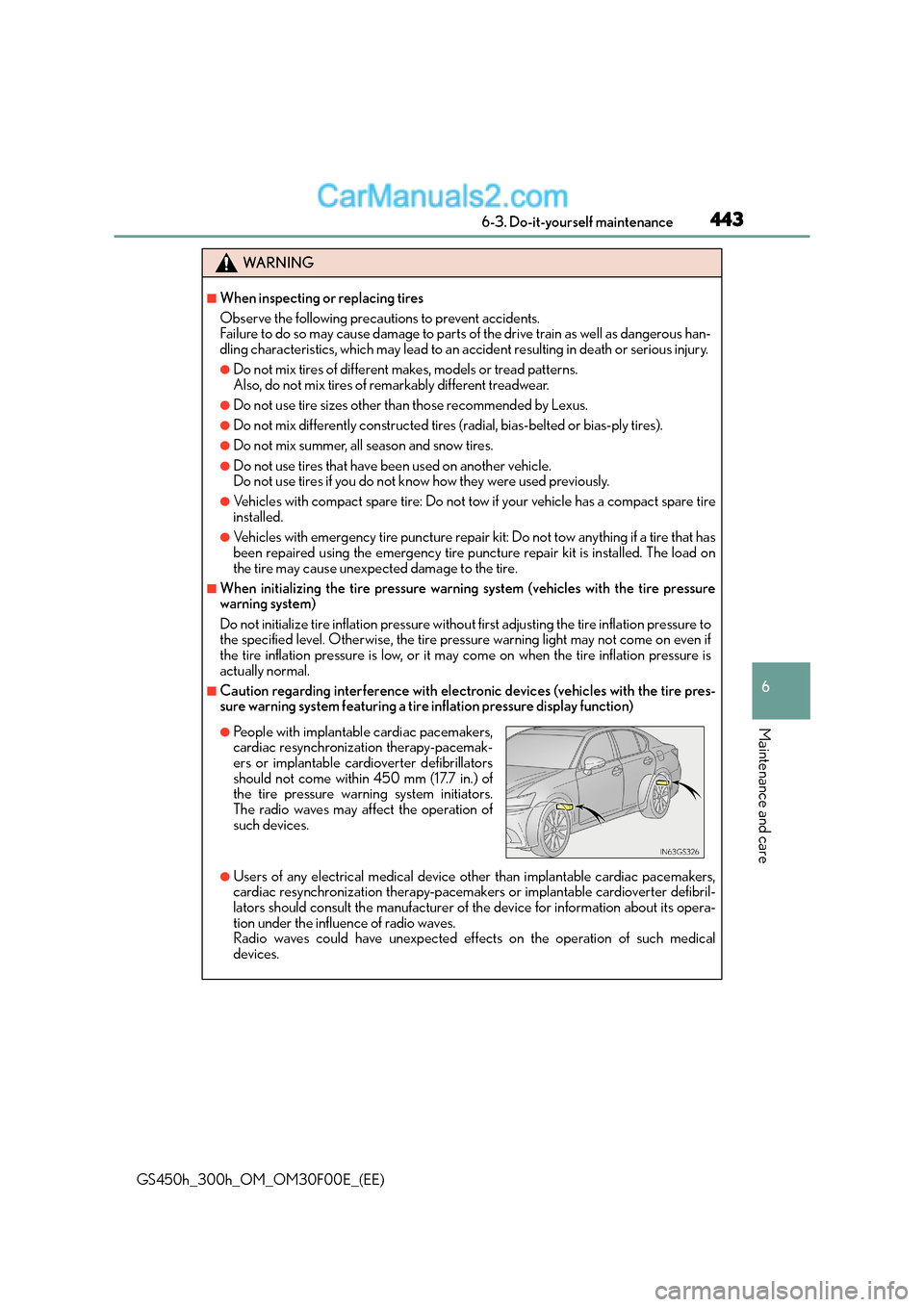
●People with implantable cardiac pacemakers,
cardiac resynchronization therapy-pacemak-
ers or implantable cardioverter defibrillators
should not come within 450 mm (17.7 in.) of
the tire pressure warning system initiators.
The radio waves may affect the operation of
such devices.
Page 504 of 620

5047-2. Steps to take in an emergency
GS450h_300h_OM_OM30F00E_(EE)
(If equipped)
Indicates that the tire inflation pressure is low
→Check the tire inflation pressure, and adjust to the
appropriate level.
(If equipped)
Indicates a malfunction in th e tire pressure warning sys-
tem
→ Stop the vehicle in a safe place and turn the power
switch off then on again. If the tire pressure warning
indicator flashes for 1 minute then illuminates, there
is a malfunction in the system. Have the vehicle
inspected by any authorized Lexus dealer or
repairer, or another duly qualified and equipped
professional.
(If equipped)
Indicates that the tire position information cannot be rec-
ognized
→Drive for a short while an d check if the display
updates.
If the radio wave conditions improve, the display
may return to normal. If the tire pressure is still not
displayed after driving for several minutes, stop the
vehicle in a safe place, turn the power switch off
then on again, and start driving. If the tire pressure is
still not displayed even after repeating this process
several times, have the vehicle inspected by any
authorized
Lexus dealer or repairer, or another duly qualified
and equipped professional.
Wa r n i n g m e s s a g eDetails/Actions