Page 352 of 620

3524-6. Driving tips
GS450h_300h_OM_OM30F00E_(EE)
◆Delays
Repeated acceleration and deceleration, as well as long waits at traffic lights,
will lead to bad fuel economy. Check traffic reports before leaving and avoid
delays as much as possible. When driving in a traffic jam, gently release the
brake pedal to allow the vehicle to move forward slightly while avoiding over-
use of the accelerator pedal. Doing so can help control excessive gasoline
consumption.
◆Highway driving
Control and maintain the vehicle at a constant speed. Before stopping at a toll
booth or similar, allow plenty of time to release the accelerator and gently
apply the brakes. A greater amount of electrical energy can be regenerated
when slowing down.
◆Air conditioning
Use the air conditioning only when necessary. Doing so can help reduce
excessive gasoline consumption.
In summer: When the ambient temperature is high, use the recirculated air
mode. Doing so will help to reduce the burden on the air conditioning system
and reduce fuel consumption as well.
In winter: Because the gasoline engine will not automatically cut out until it
and the interior of the vehicle are warm, it will consume fuel. Also, fuel con-
sumption can be improved by avoiding overuse of the heater.
◆Checking tire inflation pressure
Make sure to check the tire inflation pressure frequently. Improper tire infla-
tion pressure can cause poor fuel economy.
Also, as snow tires can cause large amounts of friction, their use on dry roads
can lead to poor fuel economy. Use tires that are appropriate for the season.
Page 353 of 620
3534-6. Driving tips
4
Driving
GS450h_300h_OM_OM30F00E_(EE)
◆Luggage
Carrying heavy luggage will lead to poor fuel economy. Avoid carrying
unnecessary luggage. Installing a large roof rack will also cause poor fuel
economy.
◆Warming up before driving
Since the gasoline engine starts up and cuts out automatically when cold,
warming up the engine is unnecessary. Moreover, frequently driving short dis-
tances will cause the engine to repeatedly warm up, which can lead to excess
fuel consumption.
Page 363 of 620
3635-1. Remote Touch screen
5
Interior features
GS450h_300h_OM_OM30F00E_(EE)
Press the “MENU” button on the Remote Touch to display the “Menu” screen.
The display may differ depending on the type of the system.
12.3-inch display: When an interruption screen is being displayed on the side display,
the “Menu” screen will be shown on the main display.
“Menu” screen
XVehicles with 8-inch displayXVehicles with 12.3-inch display
SwitchFunction
Select to display the map screen or the navigation menu screen.*1, 2
Select to display the radio control screen.*1
Select to operate the media control screen.*1
Select to display the hands-free operation screen.*1
Select to display the fuel consumption screen. (→P. 126, 129)
Select to display the “Information” screen.*1
Select to display the air conditioning control screen. ( →P. 3 6 6 )
Select to display the “Setup” screen.*1
Page 364 of 620
3645-1. Remote Touch screen
GS450h_300h_OM_OM30F00E_(EE)
*1: Refer to the “NAVIGATION AND MULTIMEDIA SYSTEM OWNER’S MANUAL”.
*2: If equipped
■Full screen display
The following functions can be displayed full screen:
*: Refer to the “NAVIGATION AND MULTIMEDIA SYSTEM OWNER’S MAN-UAL”.
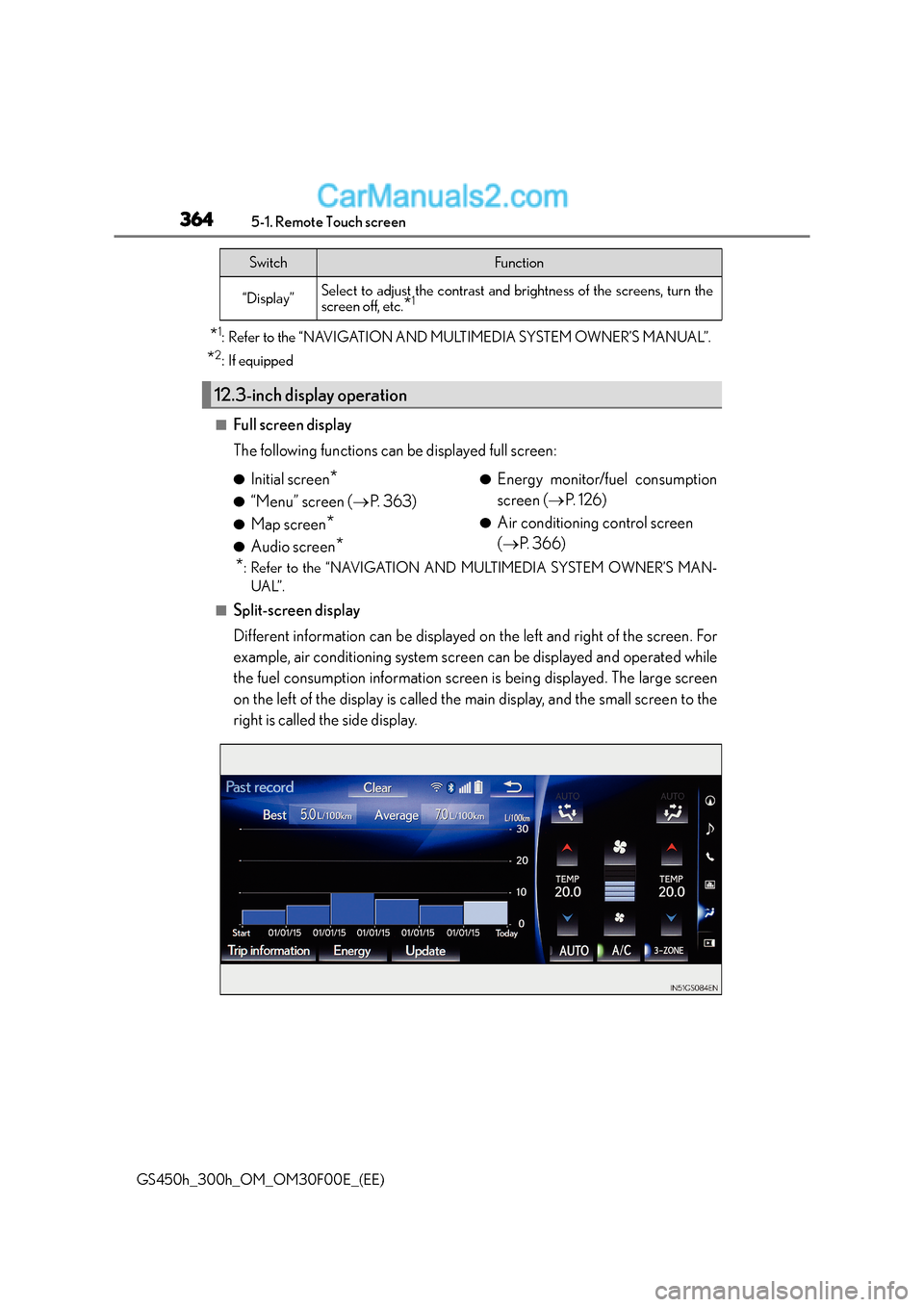
■Split-screen display
Different information can be displayed on the left and right of the screen. For
example, air conditioning system screen can be displayed and operated while
the fuel consumption information screen is being displayed. The large screen
on the left of the display is called the main display, and the small screen to the
right is called the side display.
“Display”Select to adjust the contrast and brightness of the screens, turn the
screen off, etc.*1
12.3-inch display operation
SwitchFunction
●Initial screen*
●“Menu” screen ( →P. 363)
●Map screen*
●Audio screen*
●Energy monitor/fuel consumption
screen ( →P. 1 2 6 )
●Air conditioning control screen
(→ P. 366)
Page 582 of 620

5828-2. Customization
GS450h_300h_OM_OM30F00E_(EE)
Some function settings are changed simu ltaneously with other functions being
customized. Contact any authorized Lexus dealer or repairer, or another duly
qualified and equipped professional.
Settings that can be changed using the Remote Touch
Settings that can be changed using the meter control switches
Settings that can be changed by any authorized Lexus dealer or repairer, or
another duly qualified and equipped professional
Definition of symbols: O = Available, — = Not available
■Meters and multi-information display ( →P. 1 1 1 )
Customizable features
1
2
3
FunctionDefault
settingCustomized setting
Speed warning Off On — O —
Speed warning setting 30 km/h
(20 mph) 30 to 260 km/h
(20 to 160 mph)
—O—
Language*1English
French
—O—
German
Spanish
Italian
Russian
Units*1km (L/100 km)km (km/L)OO—miles (MPG)
EV indicator On Off — O —
switch settingsDrive
information 1Desired status screen
*2—O—
Drive information screen dis-
played on the first screen of
(Drive information 1)
Current fuel
consumption
*3—O—Average fuel economy
(after reset)
Drive information screen dis-
played on the second screen of
(Drive information 2)Distance (range)
*3—O—Average speed (after reset)
123
Page 583 of 620

583
8
8-2. Customization
Vehicle specifications
GS450h_300h_OM_OM30F00E_(EE)
*1: The default setting varies according to countries.
*2: Some status screens cannot be
registered (indicated on the multi-information display)
*3: 2 of the following items: current fuel consumption, average fuel economy (after reset),
average fuel economy (after refuel), average fuel economy (after start), average vehi-
cle speed (after reset), average vehicle speed (after start), distance (driving range),
distance (after start), elapsed time (after reset), elapsed time (after start), blank
*4:Except F SPORT models
*5:F SPORT models
Drive information screen dis-
played on the third screen of (Drive information 3)
Average fuel economy
(after refuel)
*3—O—
Elapsed time (after start)
Pop-up displayOnOff—O—
Accent color*4Color 1Color 2OO—
Changeover to tachometer
when sport mode is selected Auto
Hybrid system
indicator (always)
—O—Tachometer
(always)
Clock 24-hour display 12-hour display
—O—
Needle
*5Blue Red
—O—
White
Rev indicator
*54000 r/min. 2000 to
6000 r/min. —O—
OFF
Rev peak
*5ON OFF—O—
FunctionDefault settingCustomized setting123
Page 608 of 620

608Alphabetical index
GS450h_300h_OM_OM30F00E_(EE)
Fuel ............................................................. 256Capacity ................................................ 569
Fuel gauge.............................................. 105
Information ............................................ 579
Refueling ................................................256
Type ........................................................ 569
Warning light ....................................... 478
Warning messages...........................482
Fuel consumption Average fuel consumption .............. 113
Average fuel consumption after refueling ...................................... 113
Current fuel consumption................ 113
Fuel filler door ........................................ 256
Refueling ................................................256
When the fuel filler door cannot be opened .........................258
Fuses ..........................................................453
Gauges ...................................................... 104
Glove box ................................................390
Glove box light ......................................390
Grille Shutter system
Warning message.............................482 Hands-free system
(for cellular phone)
*
Head restraints ....................................... 183
Headlight cleaner....................... 251, 253
Headlights ............................................... 236 Adaptive Front-lighting System (AFS)................................... 238
AHS (Adaptive High-beam System) ............................................... 240
Automatic High Beam system.................................................. 245
Follow me home system.................237
Headlight leveling warning message ............................................. 482
Light switch........................................... 236
Replacing light bulbs ....................... 465
Head-up display....................................... 119
Heated steering wheel........................ 381
Heaters ..................................................... 366
Air conditioning system ................. 366
Heated steering wheel ................... 382
Outside rear view mirrors .............372
Seat heaters.......................................... 382
High-voltage components ...................79
Hood............................................................ 417 Open ......................................................... 417
Warning message ............................ 482
G
H