Page 112 of 668
1122. Instrument cluster
GS350_200t_GS F_OM_OM30E87E_(EE)
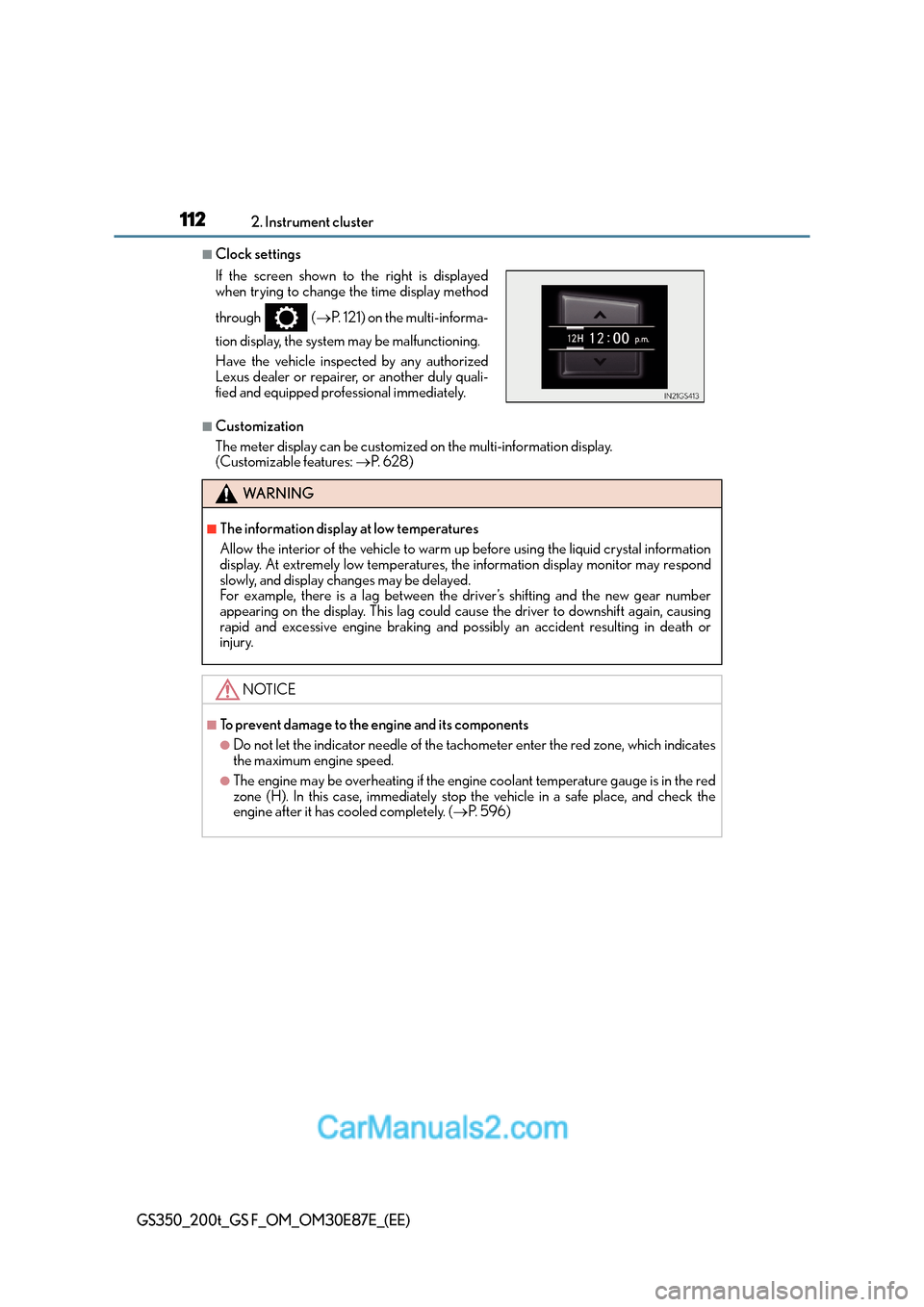
■Clock settings
■Customization
The meter display can be customized on the multi-information display.
(Customizable features: →P. 6 2 8 )
If the screen shown to the right is displayed
when trying to change the time display method
through (
→P. 121) on the multi-informa-
tion display, the system may be malfunctioning.
Have the vehicle inspected by any authorized
Lexus dealer or repairer, or another duly quali-
fied and equipped professional immediately.
WA R N I N G
■The information display at low temperatures
Allow the interior of the vehicle to warm up before using the liquid crystal information
display. At extremely low temperatures, the information display monitor may respond
slowly, and display changes may be delayed.
For example, there is a lag between the driver’s shifting and the new gear number
appearing on the display. This lag could cause the driver to downshift again, causing
rapid and excessive engine braking and possibly an accident resulting in death or
injury.
NOTICE
■To prevent damage to the engine and its components
●Do not let the indicator needle of the tachometer enter the red zone, which indicates
the maximum engine speed.
●The engine may be overheating if the engine coolant temperature gauge is in the red
zone (H). In this case, immediately stop the vehicle in a safe place, and check the
engine after it has cooled completely. ( →P. 5 9 6 )
Page 113 of 668
113
2
2. Instrument cluster
Instrument cluster
GS350_200t_GS F_OM_OM30E87E_(EE)
Gauges and meters (GS F)
If the drive mode is changed, some of the meter displays and the gauge layout
will be changed.
XNormal mode
XEco drive mode
Page 114 of 668
1142. Instrument cluster
GS350_200t_GS F_OM_OM30E87E_(EE)
XSPORT S mode*
XSPORT S+ mode*
The units used on the meters may differ depending on the target region.
*: These illustrations show the default meter display for SPORT S mode and SPORT S+mode. The meter displays for SPORT S mode and SPORT S+ mode can be changed
on the settings display of the multi-information display.
Page 115 of 668

1152. Instrument cluster
2
Instrument cluster
GS350_200t_GS F_OM_OM30E87E_(EE)
Multi-information display
Presents the driver with a variety of vehicle data (→P. 1 2 9 )
Displays warning messages in case of a malfunction ( →P. 5 1 8 )
Fuel gauge
Engine coolant temperature gauge
Displays the engine coolant temperature. If the engine coolant temperature gauge
indicator ( ) enters the red zone, a buzzer will sound and the indicator will turn red
and start flashing. Also, a warning message will be displayed.
Engine oil temperature gauge
Displays the engine oil temperature. If the engine oil temperature gauge indicator
( ) enters the red zone, the indicator will turn red and start flashing.
Outside temperature
Displays the outside temperature within the range of -40°C (-40°F) to 50°C
(122°F). Low outside temperature indicator comes on when the ambient temperature
is 3°C (37°F) or lower.
Tachometer
Displays the engine speed in revolutions per minute
Digital speedometer
Analog speedometer
Shift position and gear position
Displays the selected shift posi tion or selected shift range (→P. 2 4 5 )
Odometer and trip meter display
Odometer:
Displays the total distance the vehicle has been driven
Tr i p m e t e r :
Displays the distance the vehicle has been driven since the meter was last reset. Trip
meters “A” and “B” can be used to record and display different distances indepen-
dently.
Eco driving meter
Displays the vehicle acceleration. The more rapidly the vehicle is accelerated, the
lower the number of blue segments displayed, indicating that your driving is less eco-
friendly. This meter is designed as a guid eline to show the eco-friendliness of your
driving.
1
2
3
4
5
6
7
8
9
10
11
Page 116 of 668

1162. Instrument cluster
GS350_200t_GS F_OM_OM30E87E_(EE)
■Speed indicator
When the vehicle reaches the set
speed, the displayed unit of speed
measure will turn yellow.
The indicators will be displayed in
yellow (corresponding to a speed set
by a user) or red (fixed at 200 km/h
[125 mph]
*1 or 160 km/h [100
mph]
*2)*3.
This setting can be enabled on the
multi-information display.
*1: Except for United Kingdom
*2:For United Kingdom
*3: Always observe the legal speed limit when driving on public roads.
■Rev indicator (SPORT S mode/SPORT S+ mode)
When the shift lever is in M, an indi-
cator on the tachometer will be dis-
played in 3 steps. When the 3rd
level indicator is displayed, the indi-
cator will flash and a buzzer will
sound to notify you of shift-up timing.
The indicator may be displayed when
downshifting, depending on the
engine speed.
These illustrations show the default
meter display for SPORT S mode
and SPORT S+ mode. The meter dis-
plays for SPORT S mode and
SPORT S+ mode can be changed on
the settings display of the multi-infor-
mation display.
XSPORT S mode
XSPORT S+ mode
Page 117 of 668
1172. Instrument cluster
2
Instrument cluster
GS350_200t_GS F_OM_OM30E87E_(EE)
■Rev peak (Normal mode/SPORT S mode)
The engine speed reaches or
exceeds 3600 r/min., an afterim-
age of the tachometer will be dis-
played at the highest engine speed
for approximately 1 second.
■Odometer/Trip meter
Switches between odometer and
trip meter displays. When the trip
meter is displayed, pressing and
holding the button will reset the trip
meter.
■Meter display and layout
If the drive mode is changed, some
of the meter displays and the gauge
layout will be changed.
Changing the display
Page 118 of 668

1182. Instrument cluster
GS350_200t_GS F_OM_OM30E87E_(EE)
The brightness of the instrument panel lights can be adjusted.Darker
Brighter
■The meters and display illuminate when
The engine switch is in IGNITION ON mode.
■Welcome illumination of the analog speedometer
●When the driver’s door is opened, the analog speedometer will illuminate.
Then, when the driver’s door is closed, the analog speedometer will illuminate and go
off (pulsate) 3 times.
●In the following situations, the analog sp eedometer will not pulsate even though the
driver’s door is opened and closed:
• Within 60 seconds after the analog meter pulsation completes
• Within 60 seconds of turn ing the engine switch off
■Va r i a b l e r e d z o n e
■Eco driving meter
●The number of blue segments displayed on the eco driving meter decreases/increases
depending on the vehicle acceleration. Use this meter as a guideline when you wish to
drive in an eco-friendly manner that reduces fuel consumption.
However, on a downward grade where the vehicle can accelerate without the acceler-
ator pedal being depressed, the eco driving meter may not display the eco-driving
state correctly.
●When the shift lever is moved to P, N or R, the segments will turn gray and the eco driv-
ing meter will not operate.
Instrument panel light control
1
2
To help protect the engine, the engine speed is
controlled by changing the starting position of
the tachometer’s red zone depending on the
engine coolant temperature within a range from
370 0 r/m i n . t o 73 0 0 r/m i n .
Before driving under extremely high load condi-
tions, make sure to sufficiently warm up the
engine.
Page 119 of 668

1192. Instrument cluster
2
Instrument cluster
GS350_200t_GS F_OM_OM30E87E_(EE)
■Instrument panel brightness adjustment
The instrument panel brightness levels when the tail lights are on and off can be adjusted
individually. However, when the surroundings ar e bright (daytime, etc.), turning on the tail
lights will not change the in strument panel brightness.
■Dimming the analog speedometer lighting
The analog speedometer lighting will be dimme d when the ambient light is bright, such
as during the daytime, and SPORT S or SPORT S+ mode is selected.
■Outside temperature display
●In the following situations, the correct outside temperature may not be displayed, or the
display may take longer than normal to change.
• When stopped, or driving at low speeds (less than 20 km/h [12 mph])
• When the outside temperature has changed suddenly (at the entrance/exit of a
garage, tunnel, etc.)
●When “ − −” or “E” is displayed, the system may be malfunctioning.
Take your vehicle to any authorized Lexus de aler or repairer, or another duly qualified
and equipped professional.
■Po p - u p d i s p l a y
●In some situations, such as when a switch operation is performed, a pop-up display will
be temporarily displayed on the multi-information display.
●Some pop-up displays can be set on/off. ( →P. 6 3 1 )
■Liquid crystal display
Small spots or light spots may appear on the display. This phenomenon is characteristic
of liquid crystal displays, and there is no problem continuing to use the display.
■Customization
The meter display can be customized on the multi-information display. ( →P. 6 2 8 )
WA R N I N G
■The information display at low temperatures
Allow the interior of the vehicle to warm up before using the liquid crystal information
display. At extremely low temperatures, the information display monitor may respond
slowly, and display changes may be delayed.
For example, there is a lag between the driver’s shifting and the new gear number
appearing on the display. This lag could cause the driver to downshift again, causing
rapid and excessive engine braking and possibly an accident resulting in death or
injury.


