2015 KIA SOUL roof
[x] Cancel search: roofPage 219 of 544
Features of your vehicle
142
4
When carrying large objects on the
roof rack, make sure they do not
exceed the overall roof length or
width.
The vehicle center of gravity will be higher when items are loaded onto
the roof. Avoid sudden starts, brak-
ing, sharp turns, abrupt maneuvers
or high speeds that may result in
loss of vehicle control or rollover
resulting in an accident.
To prevent damage or loss of cargo while driving, check frequently
before or while driving to make
sure the items on the roof are
securely fastened.
WARNING- Driving with
roof load
Always drive slow and turn cor-
ners carefully when carrying
items on the roof rack. The vehi-
cle center of gravity will be
higher when items are loaded
onto the roof rack.
Page 220 of 544
4143
Features of your vehicle
If you install aftermarket HID head
lamps, your vehicle’s audio and elec-
tronic devices may malfunction.Antenna (if equipped)
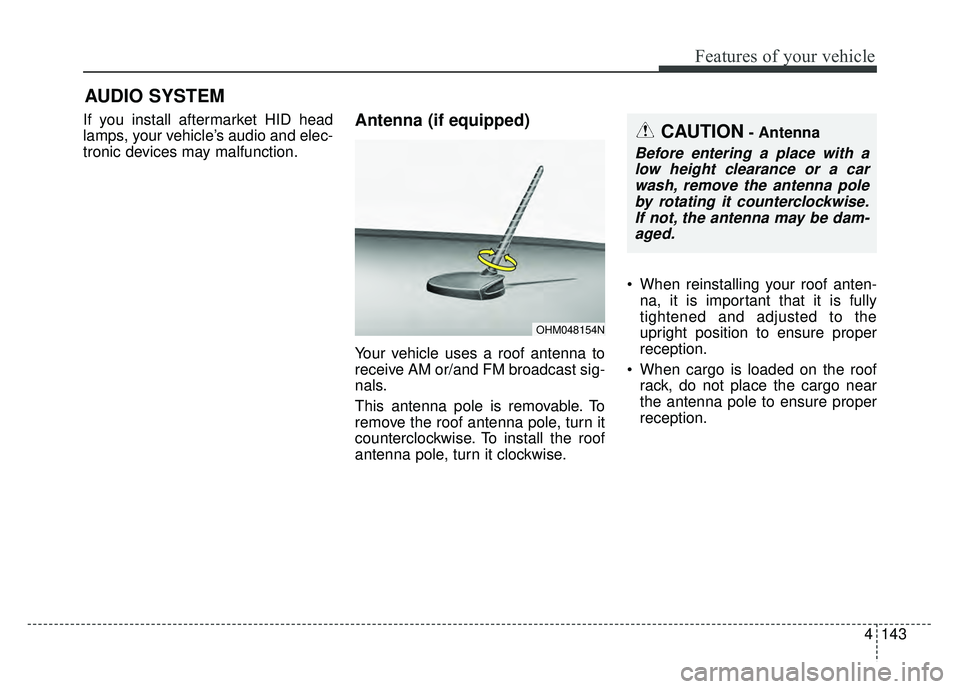
Your vehicle uses a roof antenna to
receive AM or/and FM broadcast sig-
nals.
This antenna pole is removable. To
remove the roof antenna pole, turn it
counterclockwise. To install the roof
antenna pole, turn it clockwise. When reinstalling your roof anten-
na, it is important that it is fully
tightened and adjusted to the
upright position to ensure proper
reception.
When cargo is loaded on the roof rack, do not place the cargo near
the antenna pole to ensure proper
reception.
OHM048154N
AUDIO SYSTEM
CAUTION- Antenna
Before entering a place with alow height clearance or a carwash, remove the antenna poleby rotating it counterclockwise.If not, the antenna may be dam-aged.
Page 232 of 544
4155
Features of your vehicle
Park the vehicle when connectingthe head unit with the mobile
phone.
Bluetooth®connection may
become intermittently disconnect-
ed in some mobile phones. Follow
these steps to try again.
1. Within the mobile phone, turn the
Bluetooth®function off/on
and try again.
2. Turn the mobile phone power Off/On and try again.
3. Reboot the audio system and try again.
4. Delete all paired devices, pair and try again.
Handsfree call quality and volume may differ depending on the model
of your mobile phone.
Voice Recognition
When using the voice recognitionfeature, only commands listed
within the user's manual are sup-
ported.
Be aware that during the operation of the voice recognition system,
pressing any key other than the key terminate voice recogni-
tion mode.
For superior voice recognition per- formance, position the microphone
used for voice recognition above
the head of the driver’s seat and
maintain a proper position when
saying commands.
Within the following situations, voice recognition may not function
properly due to external sound.
- When the windows and sunroof are open
- When the blower AC/heater is set to high
- When entering and passing through tunnels
(Continued)(Continued)
- When driving on rugged and uneven roads
- During severe rain (heavy rains, windstorms)
Phone related voice commands can be used only when a
Bluetooth®Wireless Technology
device is connected.
When making calls by stating a name, the corresponding contact
must be downloaded and stored
within the audio system.
After downloading the
Bluetooth®
Wireless Technology phone book,
it takes some times to convert the
phone book data into voice infor-
mation. During this time, voice
recognition may not properly oper-
ate.
Pronounce the voice commands naturally and clearly as if in a nor-
mal conversation.
Page 244 of 544
4167
Features of your vehicle
Satellite Radio channels:
SiriusXMTMSatellite Radio offers
150+ channels with 100% commer-
cial-free music, plus sports, news,
talk and entertainment, available
nationwide in your vehicle. For more
information and a complete list of
SiriusXM
TMSatellite Radio channels,
visit www
.siriusxm.comin the United
States, sir
ius-canada.cain Canada,
or call SiriusXMTMat 1-800-643-2112.
Satellite Radio reception factors:
To receive the satellite signal, your
vehicle has been equipped with a
satellite radio antenna located on the
roof of your vehicle. The vehicle roof
provides the best location for an
unobstructed, open view of the sky, a
requirement of a satellite radio sys-
tem. Like AM/FM, there are several
factors that can affect satellite radio
reception performance:
Antenna obstructions: For optimal reception performance, keep the
antenna clear of snow and ice build-
up and keep luggage and other
material as far away from the anten-
na as possible. Terrain: Hills, mountains, tall build-
ings, bridges, tunnels, freeway over-
passes, parking garages, dense
tree foliage and thunderstorms can
interfere with your reception.
SiriusXM
TMSatellite Radio service:
SiriusXMTMSatellite Radio is a sub-
scription-based satellite radio service
that broadcasts music, sports, news
and entertainment programming to
radio receivers, which are available for
installation in motor vehicles or factory
installed, as well as for the home,
portable and wireless devices, and
through an Internet connection on per-
sonal computer.
Vehicles that are equipped with a fac-
tory installed SiriusXM
TMSatellite
Radio system include:
Hardware and an introductory trial
subscription term, which begins on
the date of sale or lease of the vehicle.
For a small upgrade fee, access to SiriusXM
TMmusic channels, and other
select channels over the Internet
using any computer connected to the
Internet (U.S. customers only).
For information on extended sub-
scription terms, contact SiriusXMTM
at 1-866-635-2349. NOTE:
All SiriusXM
TMservices require a
subscription, sold separately or
as a package, after 3-month trial
included with vehicle purchase or
lease. If you decide to continue
your SiriusXM
TMservice at the end
of your trial subscription, the plan
you choose will automatically
renew and bill at then-current
rates until you call us at 1-866-
635-2349 to cancel. See our
Customer Agreement for com-
plete terms at www
.siriusxm.com.
Other fees and taxes apply. All
fees and programming are subject
to change. Sirius satellite service
is available only to those at least
18 and older in the 48 contiguous
USA, D.C., and PR (with coverage
limitations). Our Internet radio
service is available throughout
our satellite service area and in
AK and HI. Certain channels are
not available on our Internet radio
service or on mobile devices.
© 2013 Sirius XM Radio Inc. Sirius,
XM and all related marks and logos
are trademarks of SiriusXM
TM
Radio Inc. All rights reserved
SiriusXMTMSatellite Radio information
Page 288 of 544
4211
Features of your vehicle
Satellite Radio channels:
SiriusXMTMSatellite Radio offers
150+ channels with 100% commer-
cial-free music, plus sports, news,
talk and entertainment, available
nationwide in your vehicle. For more
information and a complete list of
SiriusXM
TMSatellite Radio channels,
visit www
.siriusxm.comin the United
States, sir
ius-canada.cain Canada,
or call SiriusXMTMat 1-800-643-2112.
Satellite Radio reception factors:
To receive the satellite signal, your
vehicle has been equipped with a
satellite radio antenna located on the
roof of your vehicle. The vehicle roof
provides the best location for an
unobstructed, open view of the sky, a
requirement of a satellite radio sys-
tem. Like AM/FM, there are several
factors that can affect satellite radio
reception performance:
Antenna obstructions: For optimal reception performance, keep the
antenna clear of snow and ice build-
up and keep luggage and other
material as far away from the anten-
na as possible. Terrain: Hills, mountains, tall build-
ings, bridges, tunnels, freeway over-
passes, parking garages, dense
tree foliage and thunderstorms can
interfere with your reception.
SiriusXM
TMSatellite Radio service:
SiriusXMTMSatellite Radio is a sub-
scription-based satellite radio service
that broadcasts music, sports, news
and entertainment programming to
radio receivers, which are available for
installation in motor vehicles or factory
installed, as well as for the home,
portable and wireless devices, and
through an Internet connection on per-
sonal computer.
Vehicles that are equipped with a fac-
tory installed SiriusXM
TMSatellite
Radio system include:
Hardware and an introductory trial
subscription term, which begins on
the date of sale or lease of the vehicle.
For a small upgrade fee, access to SiriusXM
TMmusic channels, and other
select channels over the Internet
using any computer connected to the
Internet (U.S. customers only).
For information on extended sub-
scription terms, contact SiriusXMTM
at 1-866-635-2349. NOTE:
All SiriusXM
TMservices require a
subscription, sold separately or
as a package, after 3-month trial
included with vehicle purchase or
lease. If you decide to continue
your SiriusXM
TMservice at the end
of your trial subscription, the plan
you choose will automatically
renew and bill at then-current
rates until you call us at 1-866-
635-2349 to cancel. See our
Customer Agreement for com-
plete terms at www
.siriusxm.com.
Other fees and taxes apply. All
fees and programming are subject
to change. Sirius satellite service
is available only to those at least
18 and older in the 48 contiguous
USA, D.C., and PR (with coverage
limitations). Our Internet radio
service is available throughout
our satellite service area and in
AK and HI. Certain channels are
not available on our Internet radio
service or on mobile devices.
© 2013 Sirius XM Radio Inc. Sirius,
XM and all related marks and logos
are trademarks of SiriusXM
TM
Radio Inc. All rights reserved
SiriusXMTMSatellite Radio information
Page 372 of 544
551
Driving your vehicle
If at all possible, avoid sharp turns or
abrupt maneuvers, do not load your
roof rack with heavy cargo, and
never modify your vehicle in any way.Rocking the vehicle
If it is necessary to rock the vehicle
to free it from snow, sand, or mud,
first turn the steering wheel right and
left to clear the area around your
front wheels. Then, shift back and
forth between 1st (First) and R
(Reverse) in vehicles equipped with
a manual transaxle or R (Reverse)
and any forward gear in vehicles
equipped with an automatic
transaxle. Do not race the engine,
and spin the wheels as little as pos-
sible. If you are still stuck after a few
tries, have the vehicle pulled out by a
tow vehicle to avoid engine overheat-
ing and possible damage to the
transaxle.The ESC system should be turned
OFF prior to rocking the vehicle.CAUTION- Vehicle rocking
Prolonged rocking may causeengine overheating, transaxledamage or failure, and tire dam-age.
WARNING- Replacement
tires
Always use the size and type of
tires recommended in the tire
section of the manual.
Installation of variant tires can
affect the safety and perform-
ance of your vehicle.
CAUTION- Spinning tires
Do not spin the wheels, espe- cially at speeds more than 35mph (56 km/h). Spinning thewheels at high speeds when thevehicle is stationary couldcause a tire to overheat whichcould result in tire damage thatmay injure bystanders.
Page 442 of 544

Maintenance
22
7
MAINTENANCE UNDER SEVERE USAGE CONDITIONS
The following items must be serviced more frequently on cars normally used under severe driving conditions. Refer
to the chart below for the appropriate maintenance intervals.
R : Replace I : Inspect and, after inspection, clean, adjust, repair or replace if neces\
sary
R
R
R
I
I
I
I
R
R
R EVERY 3,750 miles OR 6 months
MORE FREQUENTLY
MORE FREQUENTLY
MORE FREQUENTLY
MORE FREQUENTLY
MORE FREQUENTLY
EVERY 7,500 miles OR 6 months
EVERY 80,000 miles
EVERY 60,000 miles
MORE FREQUENTLYA, B, C, D, E, F, G, H, I, J, K
C, E
A, B, H, I, K
C, D, G, H
C, D, G, H
C, D, E, F, G, H, I
C, D, E, F, G, H
A, C, D, E, F, G, H, I, J
A, C, E, F, G, H, I
C, EENGINE OIL AND FILTER
AIR CLEANER FILTER
SPARK PLUGS
DISC BRAKE/ PADS, CALIPERS AND ROTORS
REAR BRAKE DRUMS/ LININGS, PARKING BRAKE
STEERING GEAR BOX, LINKAGE & BOOTS/ LOWER
ARM BALL JOINT, UPPER ARM BSALL JOINT
DRIVE SHAFTS AND BOOTS
MANUAL TRANSAXLE OIL
AUTOMATIC TRANSAXLE FLUID
CLIMATE CONTROL AIR FILTER
(FOR EVAPORATOR AND BLOWER UNIT)
MAINTENANCE ITEM
MAINTENANCE
OPERATION MAINTENANCE
INTERVALS DRIVING
CONDITION
SEVERE DRIVING CONDITIONS
A - Repeatedly driving shorts distanse of less than 5miles in normal temperature or less than 10miles in freezing temperature
B - Extensive engine idling or low speed driving for long distances
C - Driving on rough, dusty, muddy, unpaved, graveled or salt-spread roads
D - Driving in areas using salt or other corrosive materials or in very cold weather E - Driving in sandy areas
F - Driving in heavy traffic area over 90°F (32°C)
G - Driving on uphill, downhill, or mountain road
H - Towing a Trailer, or using a camper, or roof rack
I - Driving as a patrol car, taxi, other commercial use or vehicle towing
J - Driving over 100 MPH
K - Frequently driving in stop-and-go conditions
Page 465 of 544
745
Maintenance
When recharging the battery,
observe the following precautions:
The battery must be removed fromthe vehicle and placed in an area
with good ventilation.
Do not allow cigarettes, sparks, or flame near the battery.
Watch the battery during charging, and stop or reduce the charging
rate if the battery cells begin
gassing (boiling) violently or if the
temperature of the electrolyte of
any cell exceeds 120°F (49°C).
Wear eye protection when check- ing the battery during charging.
Disconnect the battery charger in the following order. 1.Turn off the battery charger main
switch.
2.Unhook the negative clamp from the negative battery terminal.
3.Unhook the positive clamp from the positive battery terminal.
Before performing maintenance or recharging the battery, turn off all
accessories and stop the engine.
The negative battery cable must be removed first and installed last
when the battery is disconnected.Reset items
Items should be reset after the bat-
tery has been discharged or the bat-
tery has been disconnected.
Auto up/down window (See chapter 4)
Sunroof (See chapter 4)
Trip computer (See chapter 4)
Climate control system (See chapter 4)
Clock (See chapter 4)
Audio (See chapter 4)