2015 KIA SOUL heater
[x] Cancel search: heaterPage 213 of 544
Features of your vehicle
136
4
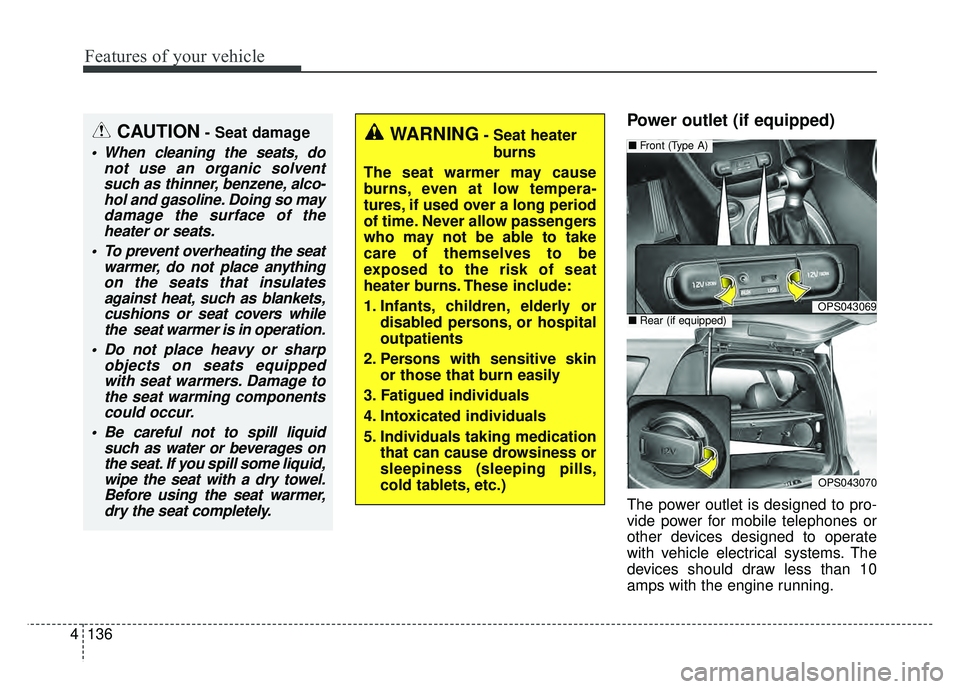
Power outlet (if equipped)
The power outlet is designed to pro-
vide power for mobile telephones or
other devices designed to operate
with vehicle electrical systems. The
devices should draw less than 10
amps with the engine running.
OPS043069
■ Front (Type A)
OPS043070
■Rear (if equipped)
CAUTION- Seat damage
When cleaning the seats, do
not use an organic solventsuch as thinner, benzene, alco-hol and gasoline. Doing so maydamage the surface of theheater or seats.
To prevent overheating the seat warmer, do not place anythingon the seats that insulatesagainst heat, such as blankets,cushions or seat covers whilethe seat warmer is in operation.
Do not place heavy or sharp objects on seats equippedwith seat warmers. Damage tothe seat warming componentscould occur.
Be careful not to spill liquid such as water or beverages onthe seat. If you spill some liquid,wipe the seat with a dry towel.Before using the seat warmer,dry the seat completely.
WARNING- Seat heater
burns
The seat warmer may cause
burns, even at low tempera-
tures, if used over a long period
of time. Never allow passengers
who may not be able to take
care of themselves to be
exposed to the risk of seat
heater burns. These include:
1. Infants, children, elderly or disabled persons, or hospital
outpatients
2. Persons with sensitive skin or those that burn easily
3. Fatigued individuals
4. Intoxicated individuals
5. Individuals taking medication that can cause drowsiness or
sleepiness (sleeping pills,
cold tablets, etc.)
Page 214 of 544
4137
Features of your vehicle
Use the power outlet only when theengine is running and remove the
accessory plug after use. Using the
accessory plug for prolonged peri-
ods of time with the engine off could
cause the battery to discharge.
Only use 12V electric accessories which are less than 10A(Driver’s
side) or 15A(Passenger’s side) in
electric capacity.
Adjust the air-conditioner or heater to the lowest operating level when
using the power outlet.
Close the cover when not in use.
Some electronic devices can cause electronic interference when
plugged into a vehicle’s power out-
let. These devices may cause
excessive audio static and malfunc-
tions in other electronic systems or
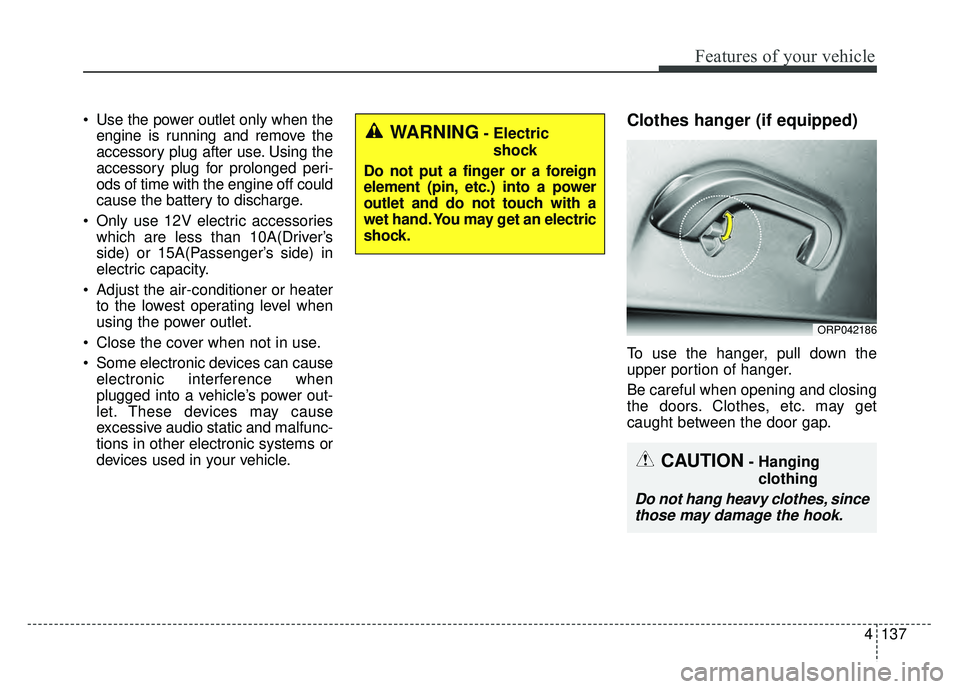
devices used in your vehicle.Clothes hanger (if equipped)
To use the hanger, pull down the
upper portion of hanger.
Be careful when opening and closing
the doors. Clothes, etc. may get
caught between the door gap.
ORP042186
WARNING- Electric
shock
Do not put a finger or a foreign
element (pin, etc.) into a power
outlet and do not touch with a
wet hand. You may get an electric
shock.
CAUTION- Hanging clothing
Do not hang heavy clothes, sincethose may damage the hook.
Page 228 of 544
4151
Features of your vehicle
USING THE USB DEVICE
To use an external USB device,make sure the device is not con-
nected when starting up the
vehicle. Connect the device after
starting up.
If you start the engine when the USB device is connected, it may
damage the USB device. (USB
flashdrives are very sensitive to
electric shock.)
If the engine is started up or turned off while the external USB
device is connected, the external
USB device may not work.
The System may not play unau- thenticated MP3 or WMA files.
1) It can only play MP3 files with the compression rate
between 8Kbps ~ 320Kbps.
2) It can only play WMA music files with the compression
rate between 8Kbps ~
320Kbps.
Take precautions for static elec- tricity when connecting or discon-
necting the external USB device.
(Continued)(Continued)
An encrypted MP3 PLAYER is
not recognizable.
Depending on the condition of the external USB device, the
connected external USB device
can be unrecognizable.
When the formatted byte/sector setting of External USB device is
not either 512BYTE or
2048BYTE, then the device will
not be recognized.
Use only a USB device format- ted to FAT 12/16/32.
USB devices without USB I/F authentication may not be recog-
nizable.
Make sure the USB connection terminal does not come in con-
tact with the human body or
other objects.
If you repeatedly connect or dis- connect the USB device in a
short period of time, it may break
the device.
(Continued)(Continued)
You may hear a strange noise when connecting or disconnect-
ing a USB device.
If you disconnect the external USB device during playback in
USB mode, the external USB
device can be damaged or may
malfunction. Therefore, discon-
nect the external USB device
when the audio is turned off or in
another mode. (e.g, Radio)
Depending on the type and capacity of the external USB
device or the type of the files
stored in the device, there is a
difference in the time for recogni-
tion the device.
Do not use the USB device for purposes other than playing
music files.
Playing videos through the USB is not supported.
Use of USB accessories such as rechargers or heaters using USB
I/F may lower performance or
cause trouble.
(Continued)
Page 232 of 544
4155
Features of your vehicle
Park the vehicle when connectingthe head unit with the mobile
phone.
Bluetooth®connection may
become intermittently disconnect-
ed in some mobile phones. Follow
these steps to try again.
1. Within the mobile phone, turn the
Bluetooth®function off/on
and try again.
2. Turn the mobile phone power Off/On and try again.
3. Reboot the audio system and try again.
4. Delete all paired devices, pair and try again.
Handsfree call quality and volume may differ depending on the model
of your mobile phone.
Voice Recognition
When using the voice recognitionfeature, only commands listed
within the user's manual are sup-
ported.
Be aware that during the operation of the voice recognition system,
pressing any key other than the key terminate voice recogni-
tion mode.
For superior voice recognition per- formance, position the microphone
used for voice recognition above
the head of the driver’s seat and
maintain a proper position when
saying commands.
Within the following situations, voice recognition may not function
properly due to external sound.
- When the windows and sunroof are open
- When the blower AC/heater is set to high
- When entering and passing through tunnels
(Continued)(Continued)
- When driving on rugged and uneven roads
- During severe rain (heavy rains, windstorms)
Phone related voice commands can be used only when a
Bluetooth®Wireless Technology
device is connected.
When making calls by stating a name, the corresponding contact
must be downloaded and stored
within the audio system.
After downloading the
Bluetooth®
Wireless Technology phone book,
it takes some times to convert the
phone book data into voice infor-
mation. During this time, voice
recognition may not properly oper-
ate.
Pronounce the voice commands naturally and clearly as if in a nor-
mal conversation.
Page 428 of 544
Maintenance
87
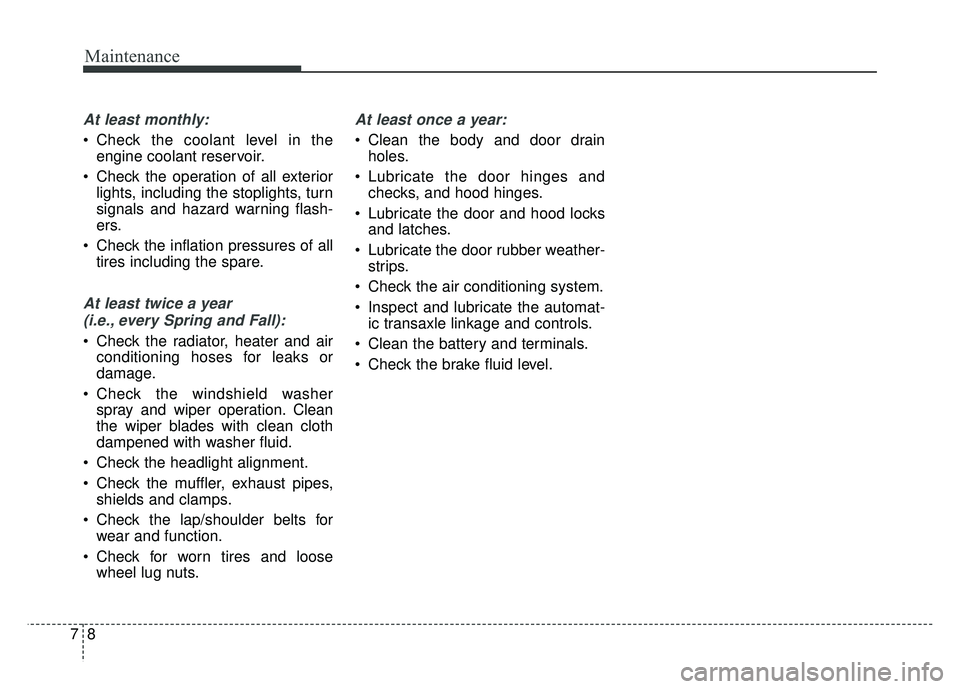
At least monthly:
Check the coolant level in theengine coolant reservoir.
Check the operation of all exterior lights, including the stoplights, turn
signals and hazard warning flash-
ers.
Check the inflation pressures of all tires including the spare.
At least twice a year
(i.e., every Spring and Fall):
Check the radiator, heater and air conditioning hoses for leaks or
damage.
Check the windshield washer spray and wiper operation. Clean
the wiper blades with clean cloth
dampened with washer fluid.
Check the headlight alignment.
Check the muffler, exhaust pipes, shields and clamps.
Check the lap/shoulder belts for wear and function.
Check for worn tires and loose wheel lug nuts.
At least once a year:
Clean the body and door drainholes.
Lubricate the door hinges and checks, and hood hinges.
Lubricate the door and hood locks and latches.
Lubricate the door rubber weather- strips.
Check the air conditioning system.
Inspect and lubricate the automat- ic transaxle linkage and controls.
Clean the battery and terminals.
Check the brake fluid level.
Page 450 of 544
Maintenance
30
7
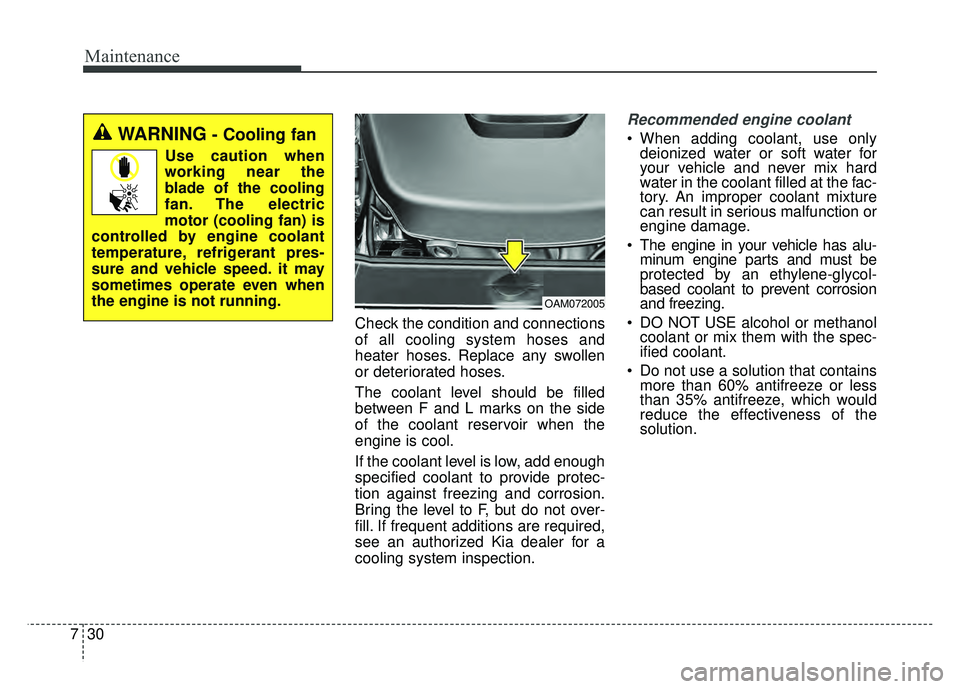
Check the condition and connections
of all cooling system hoses and
heater hoses. Replace any swollen
or deteriorated hoses.
The coolant level should be filled
between F and L marks on the side
of the coolant reservoir when the
engine is cool.
If the coolant level is low, add enough
specified coolant to provide protec-
tion against freezing and corrosion.
Bring the level to F, but do not over-
fill. If frequent additions are required,
see an authorized Kia dealer for a
cooling system inspection.
Recommended engine coolant
When adding coolant, use only
deionized water or soft water for
your vehicle and never mix hard
water in the coolant filled at the fac-
tory. An improper coolant mixture
can result in serious malfunction or
engine damage.
The engine in your vehicle has alu- minum engine parts and must be
protected by an ethylene-glycol-
based coolant to prevent corrosion
and freezing.
DO NOT USE alcohol or methanol coolant or mix them with the spec-
ified coolant.
Do not use a solution that contains more than 60% antifreeze or less
than 35% antifreeze, which would
reduce the effectiveness of the
solution.
OAM072005
WARNING- Cooling fan
Use caution when
working near the
blade of the cooling
fan. The electric
motor (cooling fan) is
controlled by engine coolant
temperature, refrigerant pres-
sure and vehicle speed. it may
sometimes operate even when
the engine is not running.
Page 488 of 544
Maintenance
68
7
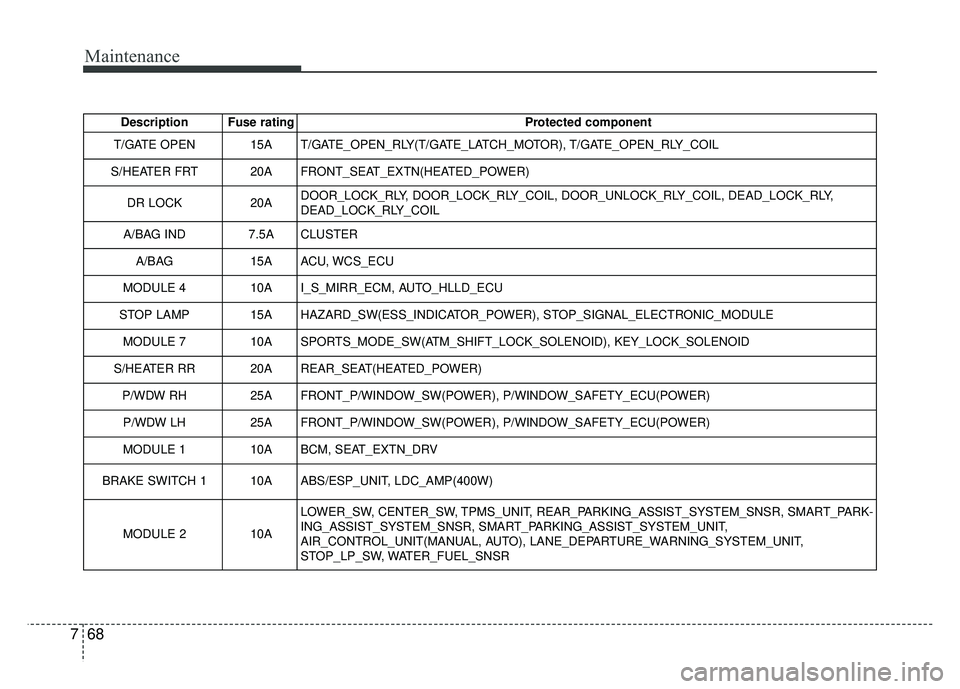
Description Fuse rating Protected component
T/GATE OPEN 15A T/GATE_OPEN_RLY(T/GATE_LATCH_MOTOR), T/GATE_OPEN_RLY_COIL
S/HEATER FRT 20A FRONT_SEAT_EXTN(HEATED_POWER)
DR LOCK 20ADOOR_LOCK_RLY, DOOR_LOCK_RLY_COIL, DOOR_UNLOCK_RLY_COIL, DEAD_LOCK_RLY,
DEAD_LOCK_RLY_COIL
A/BAG IND 7.5A CLUSTER
A/BAG 15A ACU, WCS_ECU
MODULE 4 10A I_S_MIRR_ECM, AUTO_HLLD_ECU
STOP LAMP 15A HAZARD_SW(ESS_INDICATOR_POWER), STOP_SIGNAL_ELECTRONIC_MODULE MODULE 7 10A SPORTS_MODE_SW(ATM_SHIFT_LOCK_SOLENOID), KEY_LOCK_SOLENOID
S/HEATER RR 20A REAR_SEAT(HEATED_POWER) P/WDW RH 25A FRONT_P/WINDOW_SW(POWER), P/WINDOW_SAFETY_ECU(POWER)
P/WDW LH 25A FRONT_P/WINDOW_SW(POWER), P/WINDOW_SAFETY_ECU(POWER)
MODULE 1 10A BCM, SEAT_EXTN_DRV
BRAKE SWITCH 110AABS/ESP_UNIT, LDC_AMP(400W)
MODULE 210A
LOWER_SW, CENTER_SW, TPMS_UNIT, REAR_PARKING_ASSIST_SYSTEM_SNSR, SMART_PARK-
ING_ASSIST_SYSTEM_SNSR, SMART_PARKING_ASSIST_SYSTEM_UNIT,
AIR_CONTROL_UNIT(MANUAL, AUTO), LANE_DEPARTURE_WARNING_SYSTEM_UNIT,
STOP_LP_SW, WATER_FUEL_SNSR
Page 537 of 544
Index
6I
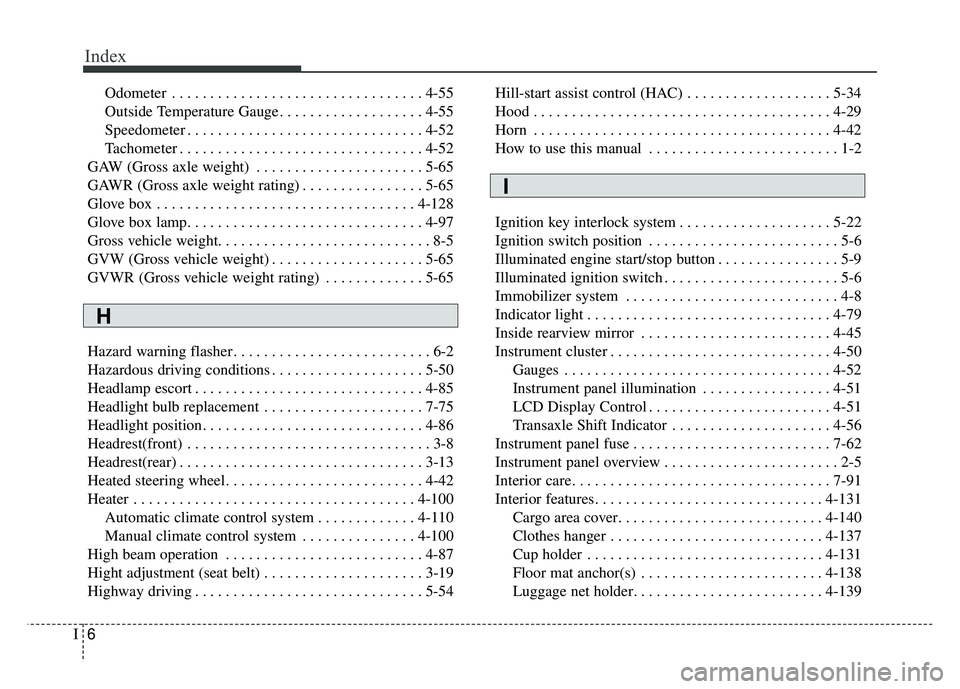
Odometer . . . . . . . . . . . . . . . . . . . . . . . . . . . . . . . . . 4-55
Outside Temperature Gauge . . . . . . . . . . . . . . . . . . . 4-55
Speedometer . . . . . . . . . . . . . . . . . . . . . . . . . . . . . . . 4-52
Tachometer . . . . . . . . . . . . . . . . . . . . . . . . . . . . . . . . 4-52
GAW (Gross axle weight) . . . . . . . . . . . . . . . . . . . . . . 5-65
GAWR (Gross axle weight rating) . . . . . . . . . . . . . . . . 5-65
Glove box . . . . . . . . . . . . . . . . . . . . . . . . . . . . . . . . . . 4-12\
8
Glove box lamp. . . . . . . . . . . . . . . . . . . . . . . . . . . . . . . 4-97
Gross vehicle weight. . . . . . . . . . . . . . . . . . . . . . . . . . . . 8-5
GVW (Gross vehicle weight) . . . . . . . . . . . . . . . . . . . . 5-65
GVWR (Gross vehicle weight rating) . . . . . . . . . . . . . 5-65
Hazard warning flasher . . . . . . . . . . . . . . . . . . . . . . . . . . 6-2
Hazardous driving conditions . . . . . . . . . . . . . . . . . . . . 5-50
Headlamp escort . . . . . . . . . . . . . . . . . . . . . . . . . . . . . . 4-85
Headlight bulb replacement . . . . . . . . . . . . . . . . . . . . . 7-75
Headlight position. . . . . . . . . . . . . . . . . . . . . . . . . . . . . 4-86
Headrest(front) . . . . . . . . . . . . . . . . . . . . . . . . . . . . . . . . 3-8
Headrest(rear) . . . . . . . . . . . . . . . . . . . . . . . . . . . . . . . . 3-13
Heated steering wheel. . . . . . . . . . . . . . . . . . . . . . . . . . 4-42
Heater . . . . . . . . . . . . . . . . . . . . . . . . . . . . . . . . . . . . \
. 4-100 Automatic climate control system . . . . . . . . . . . . . 4-110
Manual climate control system . . . . . . . . . . . . . . . 4-100
High beam operation . . . . . . . . . . . . . . . . . . . . . . . . . . 4-87
Hight adjustment (seat belt) . . . . . . . . . . . . . . . . . . . . . 3-19
Highway driving . . . . . . . . . . . . . . . . . . . . . . . . . . . . . . 5-54 Hill-start assist control (HAC) . . . . . . . . . . . . . . . . . . . 5-34
Hood . . . . . . . . . . . . . . . . . . . . . . . . . . . . . . . . . . . . \
. . . 4-29
Horn . . . . . . . . . . . . . . . . . . . . . . . . . . . . . . . . . . . . \
. . . 4-42
How to use this manual . . . . . . . . . . . . . . . . . . . . . . . . . 1-2
Ignition key interlock system . . . . . . . . . . . . . . . . . . . . 5-22
Ignition switch position . . . . . . . . . . . . . . . . . . . . . . . . . 5-6
Illuminated engine start/stop button . . . . . . . . . . . . . . . . 5-9
Illuminated ignition switch . . . . . . . . . . . . . . . . . . . . . . . 5-6
Immobilizer system . . . . . . . . . . . . . . . . . . . . . . . . . . . . 4-8
Indicator light . . . . . . . . . . . . . . . . . . . . . . . . . . . . . . . . 4-79
Inside rearview mirror . . . . . . . . . . . . . . . . . . . . . . . . . 4-45
Instrument cluster . . . . . . . . . . . . . . . . . . . . . . . . . . . . . 4-50
Gauges . . . . . . . . . . . . . . . . . . . . . . . . . . . . . . . . . . . 4-\
52
Instrument panel illumination . . . . . . . . . . . . . . . . . 4-51
LCD Display Control . . . . . . . . . . . . . . . . . . . . . . . . 4-51
Transaxle Shift Indicator . . . . . . . . . . . . . . . . . . . . . 4-56
Instrument panel fuse . . . . . . . . . . . . . . . . . . . . . . . . . . 7-62
Instrument panel overview . . . . . . . . . . . . . . . . . . . . . . . 2-5
Interior care. . . . . . . . . . . . . . . . . . . . . . . . . . . . . . . . . . 7-91\
Interior features. . . . . . . . . . . . . . . . . . . . . . . . . . . . . . 4-131 Cargo area cover. . . . . . . . . . . . . . . . . . . . . . . . . . . 4-140
Clothes hanger . . . . . . . . . . . . . . . . . . . . . . . . . . . . 4-137
Cup holder . . . . . . . . . . . . . . . . . . . . . . . . . . . . . . . 4-131
Floor mat anchor(s) . . . . . . . . . . . . . . . . . . . . . . . . 4-138
Luggage net holder. . . . . . . . . . . . . . . . . . . . . . . . . 4-139
H
I