Page 374 of 407
29
❈During cold weather, quick charg-
ing may not be available to prevent
high voltage battery degradation.
You can start charging when the Power button is in the OFF posi-
tion and the shift lever is in P
(Park).
After charging has started, you
can use electrical components
such as the radio by pressing the
Power button to ACC or ON posi-
tion.
If you move the shift lever from P (Park) to R (Reverse), N (Neutral),
D (Drive), charging stops immedi-
ately. If you want to start charging
again, place the shift lever to P
(Park) and press the Power button
to the OFF position. Unplug and
reconnect the charging cable to
start charging again.
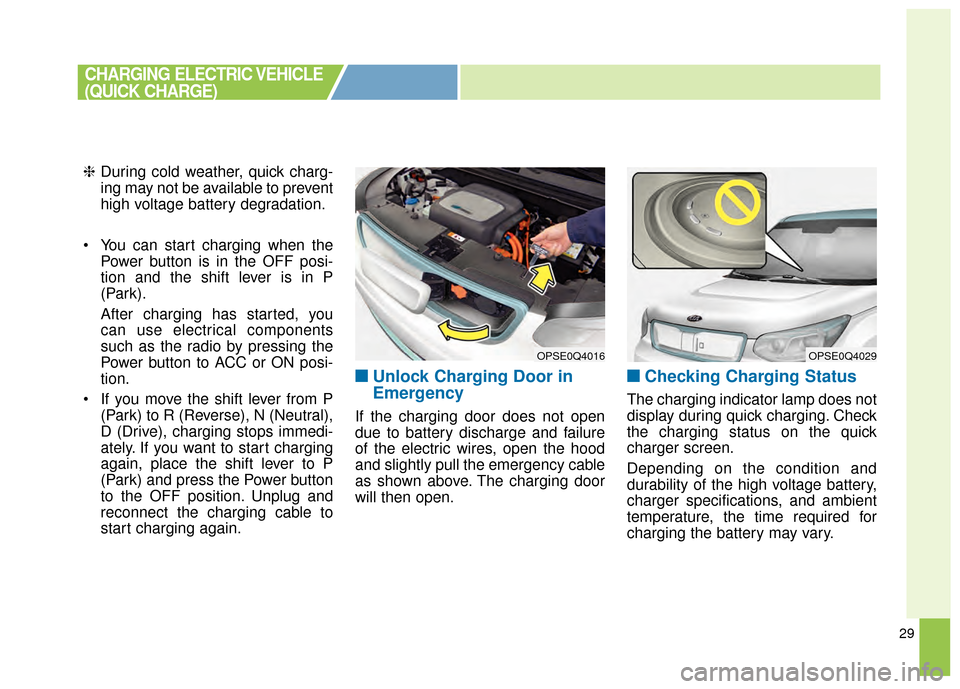
■ ■Unlock Charging Door in
Emergency
If the charging door does not open
due to battery discharge and failure
of the electric wires, open the hood
and slightly pull the emergency cable
as shown above. The charging door
will then open.
■ ■Checking Charging Status
The charging indicator lamp does not
display during quick charging. Check
the charging status on the quick
charger screen.
Depending on the condition and
durability of the high voltage battery,
charger specifications, and ambient
temperature, the time required for
charging the battery may vary.
OPSE0Q4016OPSE0Q4029
CHARGING ELECTRIC VEHICLE
(QUICK CHARGE)
Page 379 of 407
34
You can start charging when thePower button is in the OFF posi-
tion and the shift lever is in P
(Park).
After charging has started, you
can use electrical components
such as the radio by pressing the
Power button to ACC or ON posi-
tion.
If you move the shift lever from P (Park) to R (Reverse), N (Neutral),
D (Drive), charging stops immedi-
ately. If you want to start charging
again, place the shift lever to P
(Park) and press the Power button
to the OFF position. Unplug and
reconnect the charging cable to
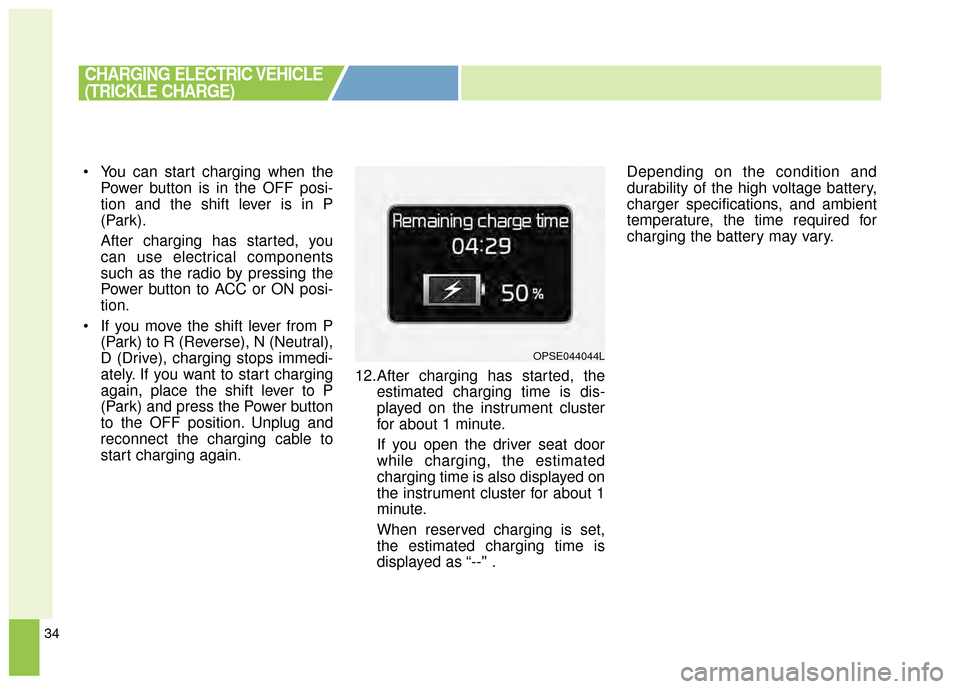
start charging again. 12.After charging has started, the
estimated charging time is dis-
played on the instrument cluster
for about 1 minute.
If you open the driver seat door
while charging, the estimated
charging time is also displayed on
the instrument cluster for about 1
minute.
When reserved charging is set,
the estimated charging time is
displayed as “--" . Depending on the condition and
durability of the high voltage battery,
charger specifications, and ambient
temperature, the time required for
charging the battery may vary.
CHARGING ELECTRIC VEHICLE
(TRICKLE CHARGE)
OPSE044044L
Page 404 of 407

I5
Index
LCD Modes . . . . . . . . . . . . . . . . . . . . . . . . . . . . . . . 4-40
Service Mode . . . . . . . . . . . . . . . . . . . . . . . . . . . . . . 4-42
User Settings Mode . . . . . . . . . . . . . . . . . . . . . . . . . 4-43
Warning Messages . . . . . . . . . . . . . . . . . . . . . . . . . . 4-46
Light bulbs . . . . . . . . . . . . . . . . . . . . . . . . . . . . . . . . . . 7-58\
Front light replacement . . . . . . . . . . . . . . . . . . . . . . 7-58
High mounted stop light bulb replacement . . . . . . . 7-65
Interior light bulb replacement. . . . . . . . . . . . . . . . . 7-67
License plate light bulb replacement . . . . . . . . . . . . 7-66
Rear combination light bulb replacement . . . . . . . . 7-63
Side repeater light bulb replacement . . . . . . . . . . . . 7-63
Lighting. . . . . . . . . . . . . . . . . . . . . . . . . . . . . . . . . . . . \
. 4-75 Abnormal lamp operation . . . . . . . . . . . . . . . . . . . . 4-76
Abnormal lamp operation due to stabilization ofelectric control system . . . . . . . . . . . . . . . . . . . . . . 4-76
Battery saver function . . . . . . . . . . . . . . . . . . . . . . . 4-75
Daytime running light . . . . . . . . . . . . . . . . . . . . . . . 4-75
Front fog light . . . . . . . . . . . . . . . . . . . . . . . . . . . . . 4-80
Headlamp escort . . . . . . . . . . . . . . . . . . . . . . . . . . . . 4-75
High beam operation . . . . . . . . . . . . . . . . . . . . . . . . 4-78
Lighting control . . . . . . . . . . . . . . . . . . . . . . . . . . . . 4-76
Turn signals and lane change signals . . . . . . . . . . . . 4-79
Luggage volume . . . . . . . . . . . . . . . . . . . . . . . . . . . . . . . 8-3 Maintenance services . . . . . . . . . . . . . . . . . . . . . . . . . . . 7-3
Owner maintenance precautions . . . . . . . . . . . . . . . . 7-4
Owner’s responsibility . . . . . . . . . . . . . . . . . . . . . . . . 7-3
Mirrors . . . . . . . . . . . . . . . . . . . . . . . . . . . . . . . . . . . . \
. 4-29 Inside rearview mirror . . . . . . . . . . . . . . . . . . . . . . . 4-29
Outside rearview mirror . . . . . . . . . . . . . . . . . . . . . . 4-30
Motor number . . . . . . . . . . . . . . . . . . . . . . . . . . . . . . . . . 8-8
Motor room compartment. . . . . . . . . . . . . . . . . . . . . . . . 2-6
Owner maintenance . . . . . . . . . . . . . . . . . . . . . . . . . . . . 7-5 Owner maintenance schedule. . . . . . . . . . . . . . . . . . . 7-6
Parking assist system . . . . . . . . . . . . . . . . . . . . . . . . . . 4-70 Non-operational conditions of parking assist system . . 4-72
Operation of the parking assist system . . . . . . . . . . 4-70
Self-diagnosis . . . . . . . . . . . . . . . . . . . . . . . . . . . . . . 4-73
POWER button . . . . . . . . . . . . . . . . . . . . . . . . . . . . . . . . 5-5 Illuminated POWER button . . . . . . . . . . . . . . . . . . . . 5-5
Pedestrian Warning System . . . . . . . . . . . . . . . . . . . . 5-8
POWER button position . . . . . . . . . . . . . . . . . . . . . . . 5-5
Starting the vehicle. . . . . . . . . . . . . . . . . . . . . . . . . . . 5-7
Turing off the Vehicle. . . . . . . . . . . . . . . . . . . . . . . . . 5-9
Power electric specifications . . . . . . . . . . . . . . . . . . . . . 8-2M
O
P