Page 129 of 447

Features of your vehicle
58
4
Warnings and indicators
All warning lights are checked by
turning the ignition switch ON (do not
start the engine). Any light that does
not illuminate should be checked by
an authorized Kia dealer.
After starting the engine, check to
make sure that all warning lights are
off. If any warning lights are still on,
this indicates a situation that needs
attention. When releasing the park-
ing brake, the brake system warning
light should go off. The fuel warning
light will stay on if the fuel level is low.
Air bag warning light
This warning light will illuminate for
approximately 6 seconds each time
you turn the ignition switch to the ON
position.
This light also comes on when the
Supplement Restraint System (SRS)
is not working properly. If the air bag
warning light does not come on, or
continuously remains on after oper-
ating for about 6 seconds when you
turned the ignition switch to the ON
position or started the engine, or if it
comes on while driving, have the
SRS inspected by an authorized Kia
dealer.
Anti-lock brake system
(ABS) warning light (if equipped)
This warning light illuminates if the
ignition switch is turned ON and goes
off in approximately 3 seconds if the
system is operating normally.
If the ABS warning light remains on,
comes on while driving, or does not
come on when the ignition switch is
turned to the ON position, this indi-
cates that the ABS may have mal-
functioned.
If this occurs, have your vehicle
checked by an authorized Kia dealer
as soon as possible. The normal
braking system will still be opera-
tional, but without the assistance of
the anti-lock brake system.
Page 137 of 447

Features of your vehicle
66
4
Cruise indicator (if equipped)
CRUISE indicator
The indicator illuminates when the
cruise control system is enabled.
The cruise indicator in the instrument
cluster is illuminated when the cruise
control ON/OFF button on the steer-
ing wheel is pushed.
The indicator goes off when the
cruise control ON/OFF button is
pushed again. For more Information,
refer to “Cruise control system” in
section 5. Cruise SET indicator
The indicator illuminates when the
cruise function switch (SET- or
RES+) is ON.
The cruise SET indicator in the
instrument cluster illuminates when
the cruise control switch (SET- or
RES+) is pushed.
The cruise SET indicator does not
illuminate when the cruise control
switch (CANCEL) is pushed or the
system is disengaged.
Key reminder warning chime
(if equipped)
If the driver’s door is opened while
the ignition key is left in the ignition
switch (ACC or LOCK position), the
key reminder warning chime will
sound. This is to prevent you from
locking your keys in the vehicle. The
chime sounds until the key is
removed from the ignition switch or
the driver’s door is closed.
SET
CRUISE
WARNING - Low tire pressure
Significantly low tire pressure
makes the vehicle unstable and
can contribute to loss of vehicle
control and increased braking
distances.
Continued driving on tires with
low pressure will cause the tires
to overheat and fail.
Page 143 of 447

Features of your vehicle
72
4
Press start button while turn steering
If the steering wheel does not unlock
normally when the engine start/stop
button is pressed, the warning illumi-
nates for 10 seconds on the LCD dis-
play. Also, the warning chime sounds
once and the engine start/stop but-
ton light blinks for 10 seconds.
When you are warned, press the
engine start/stop button while turning
the steering wheel right and left. Check steering wheel lock system
If the steering wheel does not lock
normally when the engine start/stop
button changes to the OFF position,
the warning illuminates for 10 sec-
onds on the LCD display. Also, the
warning chime sounds for 3 seconds
and the engine start/stop button light
blinks for 10 seconds.
Check stop lamp fuse (if equipped)
When the stop lamp fuse is discon-
nected, the warning illuminates for
10 seconds on the LCD display.
Replace the fuse with a new one. If
that is not possible you can start the
engine by pressing the engine
start/stop button for 10 seconds in
ACC.
OUB041082OUB041084OUB041085
Page 164 of 447

493
Features of your vehicle
Air conditioning (if equipped)
Press the A/C button to turn the air
conditioning system on (indicator
light will illuminate). Press the button
again to turn the air conditioning sys-
tem off.
System operation
Ventilation
1.Set the mode to the position.
2.Set the air intake control to the out-side (fresh) air position.
3.Set the temperature control to the desired position.
4.Set the fan speed control to the desired speed.
Heating
1.Set the mode to the position.
2.Set the air intake control to the out-side (fresh) air position.
3.Set the temperature control to the desired position.
4.Set the fan speed control to the desired speed.
5.If dehumidified heating is desired, turn the air conditioning system (if
equipped) on.
If the windshield fogs up, set the mode to the , position. Operation Tips
To prevent dust or unpleasant
fumes from entering the vehicle
through the ventilation system,
temporarily set the air intake con-
trol to the recirculated air position.
Be sure to return the control to the
fresh air position when the irritation
has passed to keep fresh air in the
vehicle. This will help keep the driv-
er alert and comfortable.
Air for the heating/cooling system is drawn in through the grilles just
ahead of the windshield. Care
should be taken that these are not
blocked by leaves, snow, ice or
other obstructions.
To prevent interior fog on the wind- shield, set the air intake control to
the fresh air position and fan speed
to the desired position, turn on the
air conditioning system, and adjust
the temperature control to desired
temperature.
OUB041111
Page 170 of 447
499
Features of your vehicle
Cool box (if equipped)
You can keep beverage cans or other
items cool in the glove box.
1.Turn on the air conditioning.
2.Slide the open/close lever of thevent installed in the glove box to
the open position.
3.When the cool box is not used, slide the lever to the closed posi-
tion.
If some items in the cool box block
the vent, the cooling effectiveness of
the coolbox is reduced.
✽ ✽
NOTICE
Do not put perishable food in the
cool box because it may not main-
tain the necessary consistent tem-
perature to keep the food fresh.
✽ ✽
NOTICE
If the temperature control knob is in
the warm or hot position, warm or
hot air will flow into the glove box.
Luggage net holder
(if equipped)
To keep items from shifting in the
cargo area, you can use the 4 hold-
ers located in the cargo area to
attach the luggage net.
OUB041143K
OUB041206K
OUB041147
■ 4 door
■5 door
Page 177 of 447
Features of your vehicle
106
4
Digital clock and calendar
(if equipped)
Whenever the battery terminals or
related fuses are disconnected, you
must reset the clock and the calen-
dar.
When the ignition switch is in the
ACC or ON position, the clock but-
tons operate as follows:
Setup the clock and calender
With audio off
1.Press the [SETUP] or [Clock] but-
ton (1) until the clock of the display
blinks.
2.Set the clock by turning the knob (2) and press it. With audio on
1.Press the [SETUP] or [Clock] but-
ton (1) until the clock adjust mode
displayed.
2.Set the clock by turning the knob (2) and press it.
OUB041161N
WARNING - ClockSetting
Distraction
Do not adjust the clock while
driving. Such adjustments may
distract you for too long from the
roadway and lead to a collision.
Page 180 of 447
4109
Features of your vehicle
If you install an aftermarket HID
head lamp, your vehicle’s audio and
electronic device may malfunction.
Antenna
Your vehicle uses a roof antenna to
receive both AM and FM broadcast
signals. This antenna can be
removed. To remove the antenna,
turn it counterclockwise. To install the
antenna, turn it clockwise.When reinstalling your antenna, it is
important that it is fully tightened and
adjusted to the upright position to
ensure proper reception. But it could
be removed when parking the vehi-
cle.
AUDIO SYSTEM
OHM048154N
CAUTION - Antenna
Before entering a place with a
low height clearance or a carwash, remove the antenna byrotating it counter-clockwise. Ifnot, the antenna may be dam-aged.
Page 184 of 447
4113
Features of your vehicle
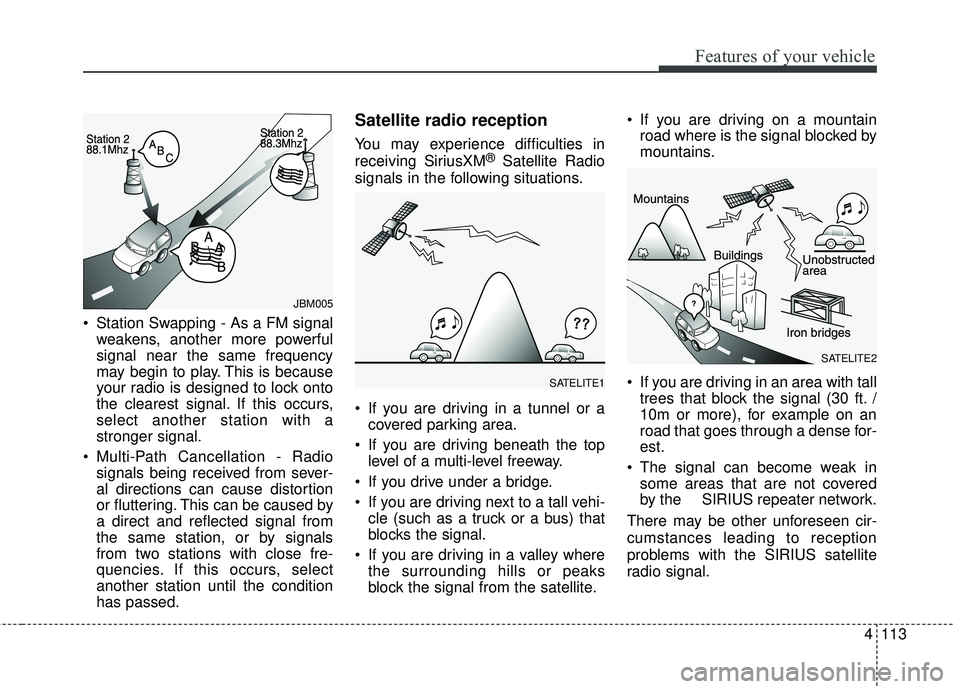
Station Swapping - As a FM signalweakens, another more powerful
signal near the same frequency
may begin to play. This is because
your radio is designed to lock onto
the clearest signal. If this occurs,
select another station with a
stronger signal.
Multi-Path Cancellation - Radio signals being received from sever-
al directions can cause distortion
or fluttering. This can be caused by
a direct and reflected signal from
the same station, or by signals
from two stations with close fre-
quencies. If this occurs, select
another station until the condition
has passed.
Satellite radio reception
You may experience difficulties in
receiving SiriusXM®Satellite Radio
signals in the following situations.
If you are driving in a tunnel or a covered parking area.
If you are driving beneath the top level of a multi-level freeway.
If you drive under a bridge.
If you are driving next to a tall vehi- cle (such as a truck or a bus) that
blocks the signal.
If you are driving in a valley where the surrounding hills or peaks
block the signal from the satellite. If you are driving on a mountain
road where is the signal blocked by
mountains.
If you are driving in an area with tall trees that block the signal (30 ft. /
10m or more), for example on an
road that goes through a dense for-
est.
The signal can become weak in some areas that are not covered
by the SIRIUS repeater network.
There may be other unforeseen cir-
cumstances leading to reception
problems with the SIRIUS satellite
radio signal.
SATELITE2
SATELITE1
JBM005


