Page 167 of 447

Features of your vehicle
96
4
WINDSHIELD DEFROSTING AND DEFOGGING
For maximum defrosting, set the
temperature control to the extreme
right/hot position and the fan speed
control to the highest speed.
If warm air to the floor is desired while defrosting or defogging, set
the mode to the floor-defrost posi-
tion.
Before driving, clear all snow and ice from the windshield, rear win-
dow, outside rear view mirrors, and
all side windows.
Clear all snow and ice from the hood and air inlet in the cowl grill to
improve heater and defroster effi-
ciency and to reduce the probabili-
ty of fogging up the inside of the
windshield.
Manual climate control system
To defog inside windshield
1.Select any fan speed except “0”position.
2.Select desired temperature.
3.Select the or position.
4.The outside (fresh) air will be selected automatically.
If the outside (fresh) air position is
not selected automatically, press the
corresponding button manually.
WARNING - Windshield heating
Do not use the or posi-
tion during cooling operation in
extremely humid weather. The
difference between the temper-
ature of the outside air and the
windshield could cause the
outer surface of the windshield
to fog up, causing loss of visi-
bility. In this case, set the mode
selection knob or button to the
position and fan speed con-
trol knob or button to a lower
speed.
OUB041133
Page 169 of 447
Features of your vehicle
98
4
These compartments can be used to
store small items.
To avoid possible theft, do not leave
valuables in the storage compart-
ment.
Always keep the storage compart-
ment covers closed while driving. Do
not attempt to place so many items
in the storage compartment that the
storage compartment cover can not
close securely.
Center console storage
(if equipped)
To open the center console storage,
pull up the lever.
Glove box
To open the glove box, pull the han-
dle and the glove box will automati-
cally open. Close the glove box after
use.
Always keep the glove box closed
while the vehicle is in operation.
STORAGE COMPARTMENT
WARNING - Flammable
materials
Do not store, propane cylinders,
or other flammable/explosive
materials in the vehicle. These
items may catch fire and/or
explode if the vehicle is
exposed to hot temperatures for
extended periods.
OUB041140
OUB041155
■Type A
■Type BOUB041142
Page 171 of 447
Features of your vehicle
100
4
If necessary, contact your authorized
Kia dealer to obtain a luggage net.
To prevent damage to the goods or
the vehicle, care should be taken
when carrying fragile or bulky objects
in the luggage compartment.
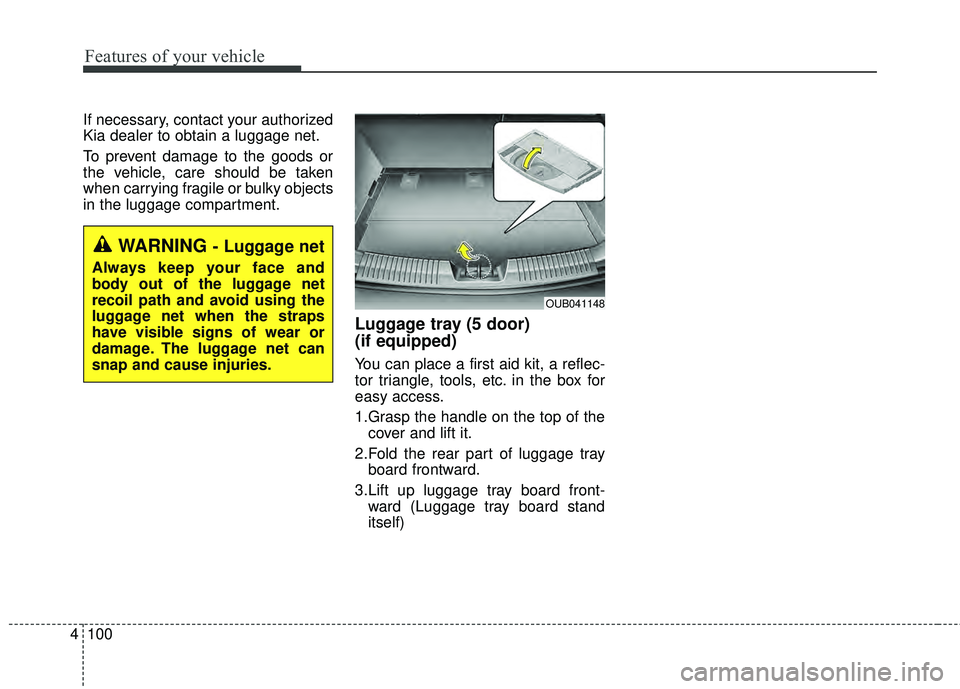
Luggage tray (5 door)
(if equipped)
You can place a first aid kit, a reflec-
tor triangle, tools, etc. in the box for
easy access.
1.Grasp the handle on the top of the
cover and lift it.
2.Fold the rear part of luggage tray board frontward.
3.Lift up luggage tray board front- ward (Luggage tray board stand
itself)
OUB041148
WARNING - Luggage net
Always keep your face and
body out of the luggage net
recoil path and avoid using the
luggage net when the straps
have visible signs of wear or
damage. The luggage net can
snap and cause injuries.
Page 173 of 447
Features of your vehicle
102
4
Cigarette lighter (if equipped)
For the cigarette lighter to work, the
ignition switch must be in the ACC or
ON position.
To use the cigarette lighter, push it all
the way into its socket. When the ele-
ment is heated, the lighter will pop
out to the “ready” position.
If it is necessary to replace the ciga-
rette lighter, use only a genuine Kia
replacement or its approved equiva-
lent. Do not hold the lighter in after it is
already heated because it will
overheat.
If the lighter does not pop out with- in 30 seconds, remove it to prevent
overheating.
Ashtray (if equipped)
To use the ashtray, open the cover.
To clean or empty the ashtray, pull it
out.
INTERIOR FEATURES
OUB041153OUB041152
CAUTION - Cigarettelighter
Do not insert accessories into
the cigarette lighter socket.Doing so can damage the lightersocket
WARNING - Ashtray use
Putting lit cigarettes or matches
in an ashtray with other com-
bustible materials may cause a
fire.
Page 174 of 447
4103
Features of your vehicle
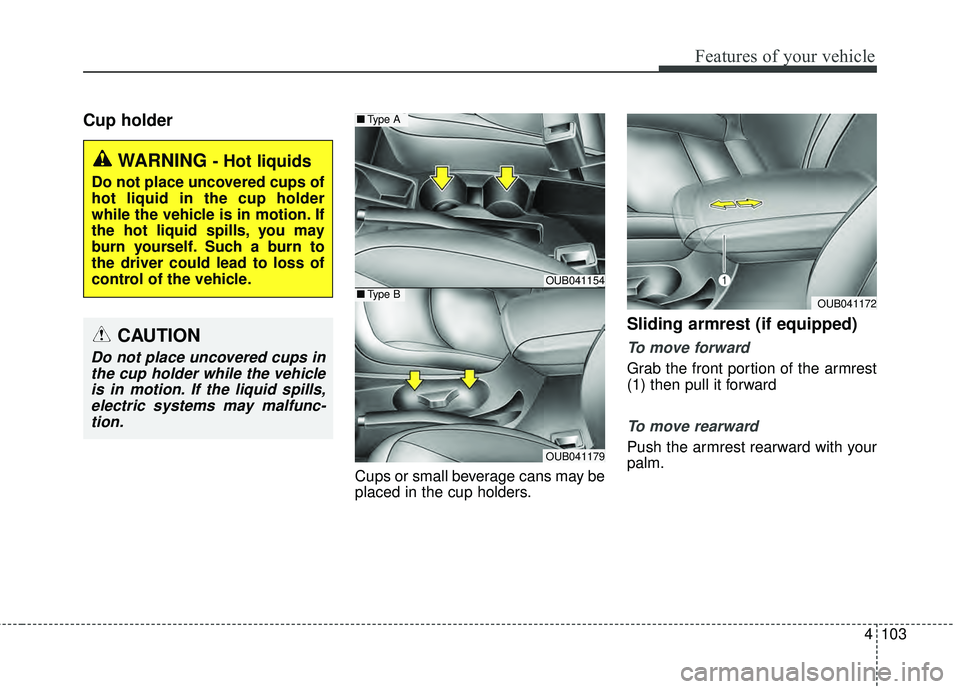
Cup holder
Cups or small beverage cans may be
placed in the cup holders.
Sliding armrest (if equipped)
To move forward
Grab the front portion of the armrest
(1) then pull it forward
To move rearward
Push the armrest rearward with your
palm.
WARNING - Hot liquids
Do not place uncovered cups of
hot liquid in the cup holder
while the vehicle is in motion. If
the hot liquid spills, you may
burn yourself. Such a burn to
the driver could lead to loss of
control of the vehicle.
OUB041154
OUB041179
■Type A
■Type BOUB041172
CAUTION
Do not place uncovered cups in
the cup holder while the vehicleis in motion. If the liquid spills,electric systems may malfunc-tion.
Page 176 of 447

4105
Features of your vehicle
Power outlet (if equipped)
The power outlet is designed to pro-
vide power for mobile telephones or
other devices designed to operate
with vehicle electrical systems. The
devices should draw less than 10
amps with the engine running.
Use the power outlet only when the
engine is running and remove the
accessory plug after use. Using the
accessory plug for prolonged periods
of time with the engine off could
cause the battery to discharge.
Only use 12V electric accessories
which are less than 10A in electric
capacity.Adjust the air-conditioner or heater to
the lowest operating level when
using the power outlet.
Close the cover when not in use.
Some electronic devices can cause
electronic interference when plugged
into a vehicle’s power outlet. These
devices may cause excessive audio
static and malfunctions in other elec-
tronic systems or devices used in
your vehicle.
Shopping bag holder (5 door)
Do not hang a bag weighing more
than 3 kg (7 lbs.). It may cause
damage to the shopping bag hold-
er.
Do not hang the frail objects when you drive rough road, the objects
may be damaged.
OUB041157
WARNING - Electricshock
Do not put a finger or a foreign
element (pin, etc.) into a power
outlet and do not touch with a
wet hand. You may get an elec-
tric shock.
OUB041159
Page 177 of 447
Features of your vehicle
106
4
Digital clock and calendar
(if equipped)
Whenever the battery terminals or
related fuses are disconnected, you
must reset the clock and the calen-
dar.
When the ignition switch is in the
ACC or ON position, the clock but-
tons operate as follows:
Setup the clock and calender
With audio off
1.Press the [SETUP] or [Clock] but-
ton (1) until the clock of the display
blinks.
2.Set the clock by turning the knob (2) and press it. With audio on
1.Press the [SETUP] or [Clock] but-
ton (1) until the clock adjust mode
displayed.
2.Set the clock by turning the knob (2) and press it.
OUB041161N
WARNING - ClockSetting
Distraction
Do not adjust the clock while
driving. Such adjustments may
distract you for too long from the
roadway and lead to a collision.
Page 178 of 447
4107
Features of your vehicle
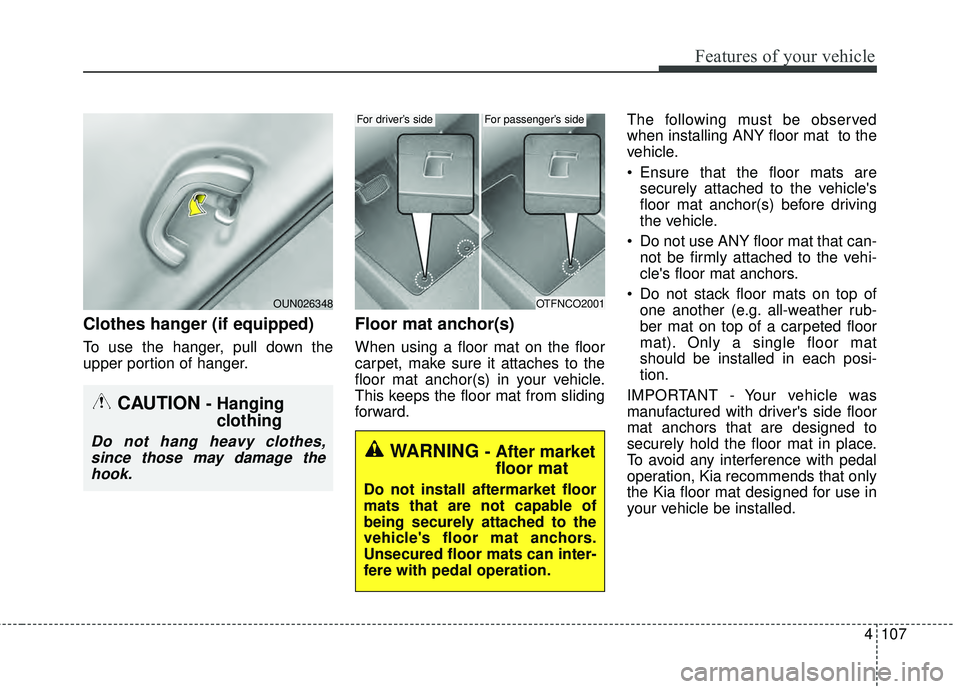
Clothes hanger (if equipped)
To use the hanger, pull down the
upper portion of hanger.
Floor mat anchor(s)
When using a floor mat on the floor
carpet, make sure it attaches to the
floor mat anchor(s) in your vehicle.
This keeps the floor mat from sliding
forward.The following must be observed
when installing ANY floor mat to the
vehicle.
Ensure that the floor mats are
securely attached to the vehicle's
floor mat anchor(s) before driving
the vehicle.
Do not use ANY floor mat that can- not be firmly attached to the vehi-
cle's floor mat anchors.
Do not stack floor mats on top of one another (e.g. all-weather rub-
ber mat on top of a carpeted floor
mat). Only a single floor mat
should be installed in each posi-
tion.
IMPORTANT - Your vehicle was
manufactured with driver's side floor
mat anchors that are designed to
securely hold the floor mat in place.
To avoid any interference with pedal
operation, Kia recommends that only
the Kia floor mat designed for use in
your vehicle be installed.
CAUTION - Hanging clothing
Do not hang heavy clothes,
since those may damage thehook.
OUN026348OTFNCO2001
WARNING - After market floor mat
Do not install aftermarket floor
mats that are not capable of
being securely attached to the
vehicle's floor mat anchors.
Unsecured floor mats can inter-
fere with pedal operation.
For driver’s sideFor passenger’s side