Page 88 of 487

415
Features of your vehicle
This system is designed to provide
protection from unauthorized entry
into the vehicle. This system is oper-
ated in three stages: the first is the
"Armed" stage, the second is the
"Theft-alarm" stage, and the third is
the "Disarmed" stage. If triggered,
the system provides an audible
alarm with blinking of the hazard
warning lights.
Armed stage
Park the vehicle and stop the engine.
Arm the system as described below.
1. Remove the ignition key from theignition switch and exit the vehicle.
2. Make sure that all doors (and trunk) and engine hood are closed
and latched.
3. door lock button on the transmit-
ter (or smart key).
After completion of the steps
above, the hazard warning lights
will blink once to indicate that the
system is armed.
If any door, trunk or engine hood
remains open, the hazard warn-
ing lights won’t operate and
theft-alarm will not arm. After
this, if all doors, trunk and engine
hood are closed, the hazard
warning lights blink once.
button of the front outside door
handles with the smart key in
your possession.
After completion of the steps
above, the hazard warning lights
will blink once to indicate that the
system is armed.
If any door remains open, the
hazard warning lights won’t oper-
ate and theft-alarm will not arm.
Close the door and try again to
lock the doors.
If trunk or engine hood remains
open, the hazard warning lights
won’t operate and theft-alarm will
not arm. Close the trunk or
engine hood. The hazard warning
lights blink once and theft-alarm
arms.
THEFT-ALARM SYSTEM (IF EQUIPPED)
Armed stage
Theft-alarm stageDisarmedstage
Page 89 of 487

Features of your vehicle
16
4
The theft-alarm system by the key
can be activated by an authorized
Kia dealer.
If you want this feature, consult an
authorized Kia dealer.
Do not arm the system until all
passengers have left the vehicle. If
the system is armed while a pas-
senger(s) remains in the vehicle,
the alarm may be activated when
the remaining passenger(s)
leaves the vehicle. If any door (or
trunk) or engine hood is opened
within 30 seconds after the sys-
tem enters the armed stage, the
system will be disarmed to pre-
vent unnecessary alarm.Theft-alarm stage
The alarm will be activated if any of
the following occurs while the system
is armed.
A front or rear door is opened with-
out using the transmitter (or smart
key).
The trunk is opened without using the transmitter (or smart key).
The engine hood is opened.
The horn will sound and the hazard
warning lights will blink continuously
for approximately 27 seconds. To
turn off the system, unlock the doors
with the transmitter (or smart key).
Disarmed stage
The system will be disarmed when:
Transmitter
- The door unlock button is pressed.
- The engine is started. (within 3 seconds)
- The ignition switch is in the “ON” position for 30 seconds or more.
Smart key
- The door unlock button is pressed.
- The button of the front outside dooris pressed while carrying the smart
key.
- The engine is started. (within 3 seconds)
After the doors are unlocked, the haz-
ard warning lights will blink twice to
indicate that the system is disarmed.
After pressing the unlock button, if
any door (or trunk) is not opened
within 30 seconds, the system will be
rearmed.
Page 90 of 487
417
Features of your vehicle
Avoid trying to start the enginewhile the alarm is activated. The
vehicle starting motor is disabled
during the theft-alarm stage.
If the system is not disarmed with
the transmitter, insert the key into
the ignition switch, turn the ignition
switch to the ON position and wait
for 30 seconds. Then the system
will be disarmed.
If you lose your keys, consult your authorized Kia dealer.
If the system is not disarmed with the transmitter, insert the key into
the ignition switch and start the
engine. Then the system will be
disarmed.
If you lose your keys, consult your authorized Kia dealer.
Page 91 of 487
Features of your vehicle
18
4
DOOR LOCKS
Operating door locks from
outside the vehicle
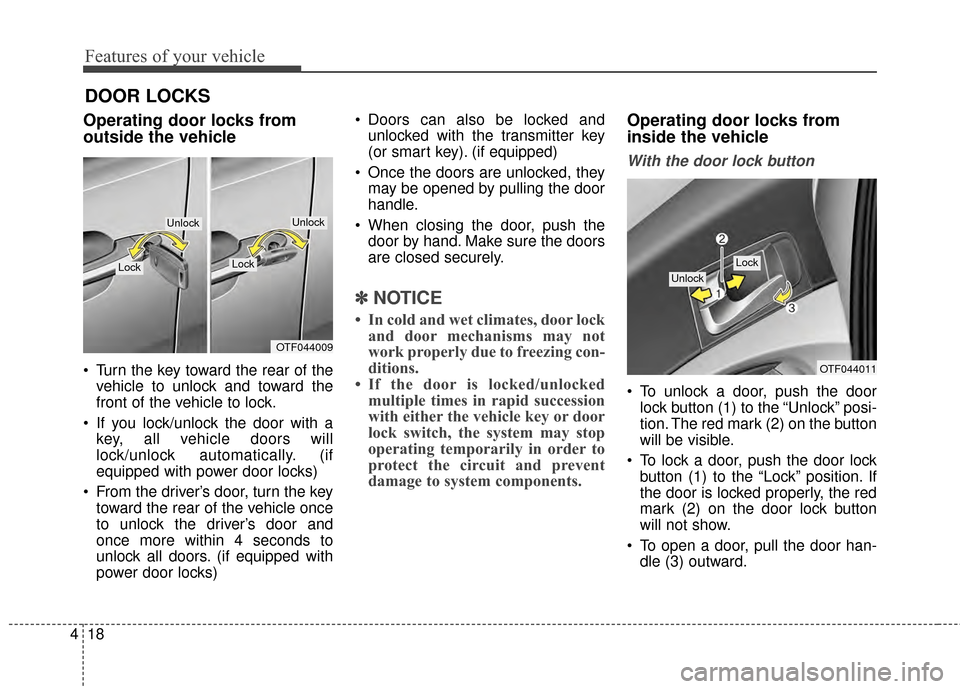
Turn the key toward the rear of the
vehicle to unlock and toward the
front of the vehicle to lock.
If you lock/unlock the door with a key, all vehicle doors will
lock/unlock automatically. (if
equipped with power door locks)
From the driver’s door, turn the key toward the rear of the vehicle once
to unlock the driver’s door and
once more within 4 seconds to
unlock all doors. (if equipped with
power door locks) Doors can also be locked and
unlocked with the transmitter key
(or smart key). (if equipped)
Once the doors are unlocked, they may be opened by pulling the door
handle.
When closing the door, push the door by hand. Make sure the doors
are closed securely.
✽ ✽ NOTICE
• In cold and wet climates, door lock
and door mechanisms may not
work properly due to freezing con-
ditions.
• If the door is locked/unlocked multiple times in rapid succession
with either the vehicle key or door
lock switch, the system may stop
operating temporarily in order to
protect the circuit and prevent
damage to system components.
Operating door locks from
inside the vehicle
With the door lock button
To unlock a door, push the door
lock button (1) to the “Unlock” posi-
tion. The red mark (2) on the button
will be visible.
To lock a door, push the door lock button (1) to the “Lock” position. If
the door is locked properly, the red
mark (2) on the door lock button
will not show.
To open a door, pull the door han- dle (3) outward.
OTF044009
LockLock
UnlockUnlock
OTF044011
Lock
Unlock
Page 93 of 487

Features of your vehicle
20
4
Press the switch to the "Unlock"
position (2), all vehicle doors will
unlock.
If the key is in the ignition switch (or if the smart key is in the vehicle)
and any front door is opened, the
doors will not lock when the “Lock”
position (1) of the central door lock
switch is pressed. (if equipped)Impact sensing door unlock
system
All doors will automatically unlock
when an impact causes the air bags
to deploy.
Auto door lock/unlock feature
All doors will automatically lockwhen the transaxle shift lever is
shifted out of P (Park).
All doors will automatically unlock when the transaxle shift lever is
shifted into P (Park). An authorized Kia dealer can acti-
vate or deactivate some auto door
lock/ unlock features as follows;
Auto door unlock by using the dri-
ver's door lock button
Auto door lock/unlock by shifting the transaxle shift lever out of P
(Park) or into P (Park)
Auto door unlock when the ignition key is removed from the ignition
switch (for smart key, when the
ENGINE START/STOP button is
turned to the OFF position)
If you want to activate or deactivate
some door lock/unlock feature, refer
to "user setting mode" in this chapter.
WARNING- Unattended children/
animals
Never leave children or animals
unattended in your vehicle.
An enclosed vehicle can
become extremely hot, causing
death or severe injury to unat-
tended children or animals who
cannot escape the vehicle.
WARNING - Doors
The doors should always be
fully closed and locked while the
vehicle is in motion to prevent
accidental opening of the door.
Page 95 of 487
Features of your vehicle
22
4
Opening the trunk
Press the trunk unlock button for
more than 1 second on the trans-
mitter (or smart key).
Press the button on the trunk han- dle with the smart key in your pos-
session.
Once the trunk is opened and then
closed, the trunk locks automati-
cally. To open the trunk from inside the
vehicle, pull the trunk lid release
button.
Once the trunk is opened and then
closed, the trunk locks automati-
cally.
✽ ✽ NOTICE
In cold and wet climates, trunk lock
and trunk mechanisms may not
work properly due to freezing condi-
tions.
TRUNK
OTF040016
OTF044015
CAUTION
Make certain that you close the
trunk before driving your vehi-cle. Possible damage may occurto the trunk lift cylinders andattached hardware if the trunk isnot closed prior to driving.
WARNING
The trunk swings upward. Make
sure no objects or people are
near the rear of the vehicle
when opening the trunk.
Page 99 of 487

Features of your vehicle
26
4
In cold and wet climates, power win-
dows may not work properly due to
freezing conditions.
Power windows
The ignition switch must be in the ON
position for power windows to oper-
ate. Each door has a power window
switch that controls the door’s win-
dow. The driver has a power window
lock switch which can block the oper-
ation of passenger windows.
The power windows can be operated
for approximately 30 seconds after
the ignition key is removed or turned
to the ACC or LOCK position.
However, if the front doors are
opened, the power windows cannot
be operated even within the 30 sec-
ond period.
✽ ✽
NOTICE
While driving with the rear windows
down or with the sunroof (if
equipped) in an open (or partially
open) position, your vehicle may
demonstrate a wind buffeting or
pulsation noise. This noise is a nor-
mal occurrence and can be reduced
or eliminated by taking the follow-
ing actions. If the noise occurs with
one or both of the rear windows
down, partially lower both front
windows approximately one inch. If
you experience the noise with the
sunroof open, slightly reduce the
size of the sunroof opening.
Window opening and closing
(if equipped)
The driver’s door has a master power
window switch that controls all the
windows in the vehicle.
To open or close a window, press
down or pull up the front portion of
the corresponding switch to the first
detent position (5).
OTF040020
Page 100 of 487

427
Features of your vehicle
Auto down window (if equipped) (Driver’s window)
Pressing the power window switch
momentarily to the second detent
position (6) completely lowers the
driver’s window even when the
switch is released. To stop the win-
dow at the desired position while the
window is in operation, momentarily
pull up the switch to the opposite
direction of the window movement.
Auto up/down window (if equipped)
Pressing or pulling up the power win-
dow switch momentarily to the sec-
ond detent position (6) completely
lowers or lifts the window even when
the switch is released. To stop the
window at the desired position while
the window is in operation, pull up or
press and release the switch to the
opposite direction of the movement. If the power window is not operated
correctly, the automatic power win-
dow system must be reset as follows:
1. Turn the ignition switch to the ON
position.
2. Close the window and continue pulling up on the driver’s power
window switch for at least 1 second
after the window is completely
closed.
OTF040021OTF040022

