2015 KIA Optima Features
[x] Cancel search: FeaturesPage 167 of 487

Features of your vehicle
94
4
The Back-Up Warning System
assists the driver during backward
movement of the vehicle by chiming
if any object is sensed within a dis-
tance of 120 cm (47 in.) behind the
vehicle. This system is a supplemen-
tal system and it is not intended to
nor does it replace the need for
extreme care and attention of the
driver. The sensing range and
objects detectable by the back sen-
sors are limited. Whenever backing-
up, pay as much attention to what is
behind you as you would in a vehicle
without the Back-Up Warning
System.
Operation of the Back-Up
Warning System
Operating condition
This system will activate when
backing up with the ignition switch
ON.
The sensing distance while the Back-Up Warning System is in
operation is approximately 120 cm
(47 in.).
When more than two objects are sensed at the same time, the clos-
est one will be recognized first.
Types of warning sound
When an object is 120 cm to 61 cm(47 in. to 24 in.) from the rear
bumper: Buzzer beeps intermittently.
When an object is 61 cm to 31 cm (23 in. to 12 in.) from the rear
bumper: Buzzer beeps more fre-
quently.
When an object is within 30 cm (11 in.) of the rear bumper:
Buzzer sounds continuously.
BACK-UP WARNING SYSTEM (IF EQUIPPED)
OTF044101Sensors
WARNING
The Back-Up Warning Systemis a supplementary function
only. The operation of the
Back-Up Warning System can
be affected by several factors
(including environmental con-
ditions). It is the responsibility
of the driver to always check
the area behind the vehicle
before and while backing up.
The Back-Up Warning System is not a substitute for proper
and safe backing-up proce-
dures. The system may not
detect every object behind the
vehicle. Always drive safely
and use caution when back-
ing up.
Page 168 of 487

495
Features of your vehicle
Non-operational conditions of
Back-Up Warning System
The Back-Up Warning System may
not operate properly when:
1. Moisture is frozen to the sensor. (Itwill operate normally when the
moisture has been cleared.)
2. The sensor is covered with foreign matter, such as snow or water, or
the sensor cover is blocked. (It will
operate normally when the materi-
al is removed or the sensor is no
longer blocked.)
3. Driving on uneven road surfaces. (unpaved roads, gravel, bumps,
gradient.)
4. Objects generating excessive noise (vehicle horns, loud motor-
cycle engines, or truck air brakes)
are within range of the sensor.
5. Heavy rain or water spray exists.
6. Wireless transmitters or mobile phones are within range of the
sensor.
7. The sensor is covered with snow.
8. Trailer towing. The detecting range may decrease
when:
1. The sensor is stained with foreign
matter such as snow or water.
(The sensing range will return to
normal when removed.)
2. Outside air temperature is extremely hot or cold.
The following objects may not be
recognized by the sensor:
1. Sharp or slim objects such as ropes, chains or small poles.
2. Objects which tend to absorb the sensor frequency such as clothes,
spongy material or snow.
3. Undetectable objects smaller than 1 m (40 in.) in height and narrower
than 14 cm (6 in.) in diameter.
Back-Up Warning System pre-
cautions
The Back-Up Warning System maynot sound sequentially depending
on the speed and shapes of the
objects detected.
The Back-Up Warning System may malfunction if the vehicle bumper
height or sensor installation has
been modified or damaged. Any
non-factory installed equipment or
accessories may also interfere with
the sensor performance.
The sensor may not recognize objects less than 30 cm (11 in.)
from the sensor, or it may sense an
incorrect distance. Use caution.
When the sensor is frozen or stained with snow, dirt, or water, the sensor
may be inoperative until the stains
are removed using a soft cloth.
Do not push, scratch or strike the sensor. Sensor damage could occur.
Page 169 of 487

Features of your vehicle
96
4
✽
✽
NOTICE
This system can only sense objects
within the range and location of the
sensors. It can not detect objects in
other areas where sensors are not
installed. Also, small or slim objects,
such as poles or objects located
between sensors may not be detected
by the sensors.
Always visually check behind the
vehicle when backing up.
Be sure to inform any drivers of the
vehicle that may be unfamiliar with
the system regarding the systems
capabilities and limitations.
Self-diagnosis
If you don’t hear an audible warning
sound or if the buzzer sounds inter-
mittently when shifting the gear to the
R (Reverse) position, this may indi-
cate a malfunction in the Back-Up
Warning System. If this occurs, have
your vehicle checked by an author-
ized Kia dealer as soon as possible.WARNING - Back-up
Warning System
Never rely solely on the parking
assist system when backing up.
Always perform a visual inspec-
tion to make sure the vehicle is
clear of all obstructions before
moving the vehicle in any direc-
tion. Stop immediately if you are
aware of a child anywhere near
your vehicle.Some objects may
not be detected by the sensors,
due to the object's size or mate-
rial.
Page 170 of 487

497
Features of your vehicle
The Rear Camera Display will acti-
vate when the back-up light is ON
with the ignition switch ON and the
shift lever in the R (Reverse) posi-
tion.Note- during initial start up, system
may not display instantly due to the
audio system booting up.
2 ~ 4 seconds may be required before
displaying during initial reverse selec-
tion. This occurs when starting and
immediately shifting to reverse.
This system is a supplemental sys-
tem that shows behind the vehicle
through the UVO audio or navigation
display backing-up.
Always keep the camera lens clean. If
lens is covered with foreign matter,
the camera may not operate normally.
Never rely solely on the Rear
Camera Display when backing.
REAR CAMERA DISPLAY (IF EQUIPPED)
OTF044102
OTF044103N
WARNING- Rear Camera
Display
The Rear-Camera Display is not
a substitute for proper and safe
backing-up procedures. Always
drive safely and use caution
when backing up. The Rear-
Camera Display may not detect
every object behind the vehicle.
Page 171 of 487
Features of your vehicle
98
4
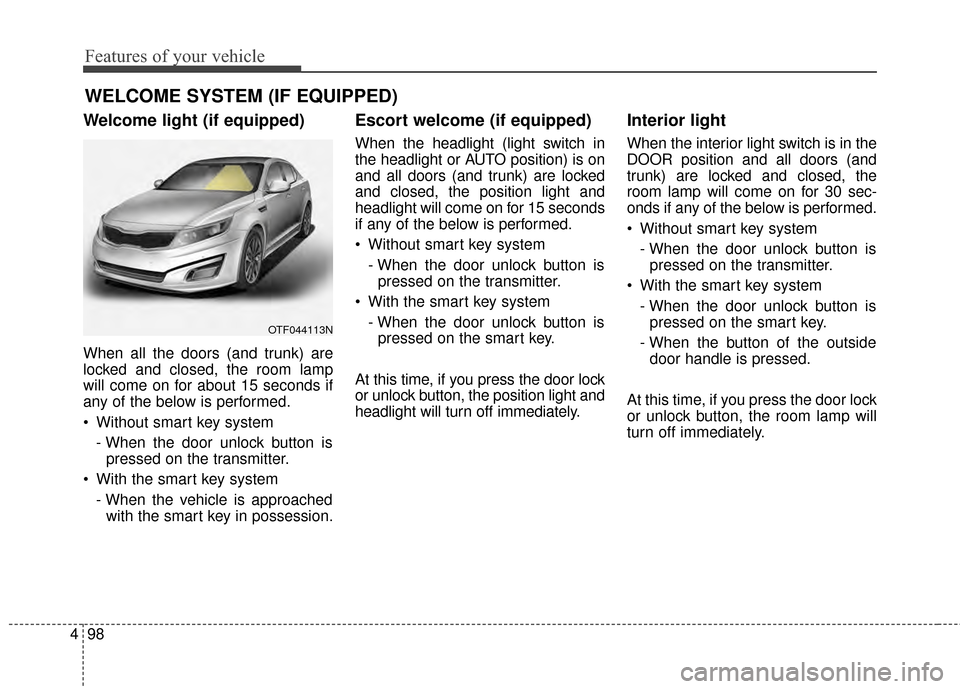
Welcome light (if equipped)
When all the doors (and trunk) are
locked and closed, the room lamp
will come on for about 15 seconds if
any of the below is performed.
Without smart key system
- When the door unlock button ispressed on the transmitter.
With the smart key system - When the vehicle is approachedwith the smart key in possession.
Escort welcome (if equipped)
When the headlight (light switch in
the headlight or AUTO position) is on
and all doors (and trunk) are locked
and closed, the position light and
headlight will come on for 15 seconds
if any of the below is performed.
Without smart key system
- When the door unlock button ispressed on the transmitter.
With the smart key system - When the door unlock button ispressed on the smart key.
At this time, if you press the door lock
or unlock button, the position light and
headlight will turn off immediately.
Interior light
When the interior light switch is in the
DOOR position and all doors (and
trunk) are locked and closed, the
room lamp will come on for 30 sec-
onds if any of the below is performed.
Without smart key system - When the door unlock button ispressed on the transmitter.
With the smart key system - When the door unlock button ispressed on the smart key.
- When the button of the outside door handle is pressed.
At this time, if you press the door lock
or unlock button, the room lamp will
turn off immediately.
WELCOME SYSTEM (IF EQUIPPED)
OTF044113N
Page 172 of 487

499
Features of your vehicle
Battery saver function
The purpose of this feature is toprevent the battery from being dis-
charged. The system automatically
turns off the parking lights when
the driver removes the ignition key
and opens the driver-side door.
With this feature, the parking lights will turn off automatically if the driv-
er parks on the side of the road at
night.
If necessary, to keep the lights on
when the ignition key is removed,
perform the following:
1) Open the driver-side door.
2) Turn the parking lights OFF and ON again using the light switch
on the steering column.
Headlight escort function
(if equipped)
The headlights (and/or taillights) will
remain on for approximately 5 min-
utes after the ignition key is removed
or turned to the ACC or LOCK posi-
tion. However, if the driver’s door is
opened and closed, the headlights
are turned off after 15 seconds.
The headlights can be turned off by
pressing the lock button on the trans-
mitter (or smart key) twice or turning
off the light switch from the headlight
or Auto light position.
If the driver gets out of the vehicle
through other doors (except driver's
door), the battery saver function
does not operate and the headlight
escort function does not turn off
automatically. Therefore, causing the
battery to be discharged. In this
case, make sure to turn off the lamp
before getting out of the vehicle.
Headlight leveling device
(if equipped)
Automatic type
It automatically adjusts the headlight
beam level according to the number
of passengers and the loading
weight in the luggage area.
And it offers the proper headlight
beam under various conditions.
If the headlights are not working
properly have your vehicle inspected
by an authorized Kia dealer.
Don't attempt to inspect or replace
the wiring yourself to prevent mal-
function.
LIGHTING
Page 173 of 487

Features of your vehicle
100
4
Daytime running light
Daytime Running Lights (DRL) can
make it easier for others to see the
front of your vehicle during the day.
DRL can be helpful in many different
driving conditions, and it is especially
helpful after dawn and before sunset.
The DRL system turns OFF when:
1. The headlights are ON.
2. The parking brake is applied.
3. Engine stops.
4. The front fog light is ON.
Lighting control
The light switch has a Headlight and
a Parking light position.
To operate the lights, turn the knob at
the end of the control lever to one of
the following positions:
(1) OFF position
(2) Parking light position
(3) Headlight position
(4) Auto light position (if equipped)
Parking light position ( )
When the light switch is in the park-
ing light position (1st position), the
tail, position, license and instrument
panel lights will turn ON.
OAM049041OXM049110
Page 174 of 487

4101
Features of your vehicle
Headlight position ( )
When the light switch is in the head-
light position (2nd position) the head,
tail, position, license and instrument
panel lights will turn ON.
The ignition switch must be in the ON
position to turn on the headlights.
Auto light position (if equipped)
When the light switch is in the AUTO
light position, the taillights and head-
lights will turn ON or OFF automati-
cally depending on the amount of
light outside the vehicle.
Never place anything over the sensor
(1) located on the instrument panel.
This will ensure better auto-light sys-
tem control.
Do not clean the sensor using a win-
dow cleaner, the cleaner may leave a
light film which could interfere with
sensor operation.If your vehicle has window tint or
other types of metallic coating on the
front windshield, the Auto light sys-
tem may not work properly.
OAM049042OVG049181