2015 KIA Optima instrument cluster
[x] Cancel search: instrument clusterPage 313 of 487

535
Driving your vehicle
3.Move the lever (1) down (to SET-),and release it at the desired speed.
The SET indicator light in the
instrument cluster will illuminate.
Release the accelerator at the
same time. The desired speed will
automatically be maintained.
On a steep grade, the vehicle mayslow down or speed up slightly whilegoing downhill.
To increase cruise control set
speed:
Follow either of these procedures:
Move the lever (1) up (to RES+) and hold it. Your vehicle will accel-
erate. Release the lever at the
speed you want.
Move the lever (1) up (to RES+) and release it immediately. The
cruising speed will increase by 2
km/h (1.0 mph) each time the lever
is operated in this manner.
To decrease the cruising
speed:
Follow either of these procedures:
Move the lever (1) down (to SET-)and hold it. Your vehicle will gradu-
ally slow down. Release the lever
at the speed you want to maintain.
Move the lever (1) down (to SET-) and release it immediately. The
cruising speed will decrease by 2
km/h (1.0 mph) each time the lever
is operated in this manner.
OTFH054021
OTFH054022OTFH054021
Page 315 of 487

537
Driving your vehicle
To resume cruising speed at
more than approximately 40
km/h (25 mph):
If any method other than the
CRUISE ON-OFF switch was used
to cancel cruising speed and the sys-
tem is still activated, the most recent
set speed will automatically resume
when you move the lever up.
It will not resume, however, if the
vehicle speed has dropped below
approximately 40 km/h (25 mph).
To turn cruise control off, do
one of the following:
Press the CRUISE button (theCRUISE indicator light in the
instrument cluster will go off).
Turn the ignition off.
Both of these actions will cancel the cruise control operation. If you wantto resume the cruise control opera-tion, repeat the steps provided in “Toset cruise control speed” on the pre-vious page.
OTFH054022
Page 323 of 487

545
Driving your vehicle
RCTA (Rear Cross Traffic Alert)
When your vehicle moves backwards
from a parking position, the sensor
detects approaching vehicles to the
left or right side direction and gives
information to the driver.
Operating conditions
Select RCTA (Rear Cross TrafficAlert) in "User Settings" under
"Driving Assist" on the instrument
cluster. The system will turn on and
standby to activate.
Select RCTA again, to turn the sys- tem off.
If the vehicle is turned off and on again, the RCTA system will return
to the state right before the vehicle
was turned off. Always turn the
RCTA system off when not in use. The system operates when the
vehicle speed is below 10 km/h
(6.2 mph) with the shift lever in R
(Reverse).
The RCTA (Rear Cross Traffic Alert) detecting range is 0.5m ~
20m based on the side direction. If
the approaching vehicle speed is
4 km/h (2.5 mph) ~ 36 km/h (22
mph) within sensing range, it is
detected. However, the system
sensing range is different base on
conditions. Always pay attention to
the surrounding.
OVI053131OTF054112N1
Page 435 of 487

Maintenance
68
7
Description Fuse Rating Protected Component
BRAKE SWITCH 10A Smart Key Control Module, Start Stop Button Switch, FOB Holder, Stop Lamp Switch
MEMORY 1 10ASEAT EXTN (IMS), DR_TRIM_EXTN (FOLD’G), CLUSTER, A/CON, ECM, AUTO FOLDING RLY,
TPMS, POWER OUTLET, A_L_PHOTO_SNSR, MUT
SUNROOF 20A Panorama Sunroof
S/HEATER(FRT)
SEAT VERNT(FRT) 20A SEAT_EXTN (HEAT/VENT)
SPARE 10A -
A/BAG IND 10A Instrument Cluster
MODULE 3 10A Sport Mode Switch, Key Solenoid (W/O Smart Key)
MODULE 4 10ADriver/Passenger CCS Control Module (With CCS), Driver/Passenger Seat Warmer Module (W/O
CCS), Front Seat Warmer & CCS Switch, Oil Pump Inverter, ISG Low DC-DC Converter, Tire Pressure
Monitoring Module
A/BAG 15A A/BAG UNIT IG1 , WCS_PASS IG1
INTERIOR LAMP 10A Driver/Passenger Smart Key Outside Handle (With Smart Key), Driver/Passenger Door Lamp, A/C
Control Module, Ignition Key ILL. & Door Warning Switch (W/O Smart Key), RF Receiver (With Smart
Key), Driver IMS Module, BCM, Data Link Connector, Driver/Passenger Door Scuff Lamp, Power
Outside Mirror Switch, Auto Light & Photo Sensor (W/O B/Alarm), Lamp Auto Cut Relay, Instrument
Cluster
CLUSTER 10A CLUSTER (IGN1)
MDPS 7.5ACrash Pad Switch, EPS Control Module (With MDPS), Steering Angle Sensor (W/O MDPS),
ATM Lever Indicator, EPB Switch, EPB Control Module
PDM 3 7.5A Smart Key Control Module (With Smart Key)
Page 436 of 487
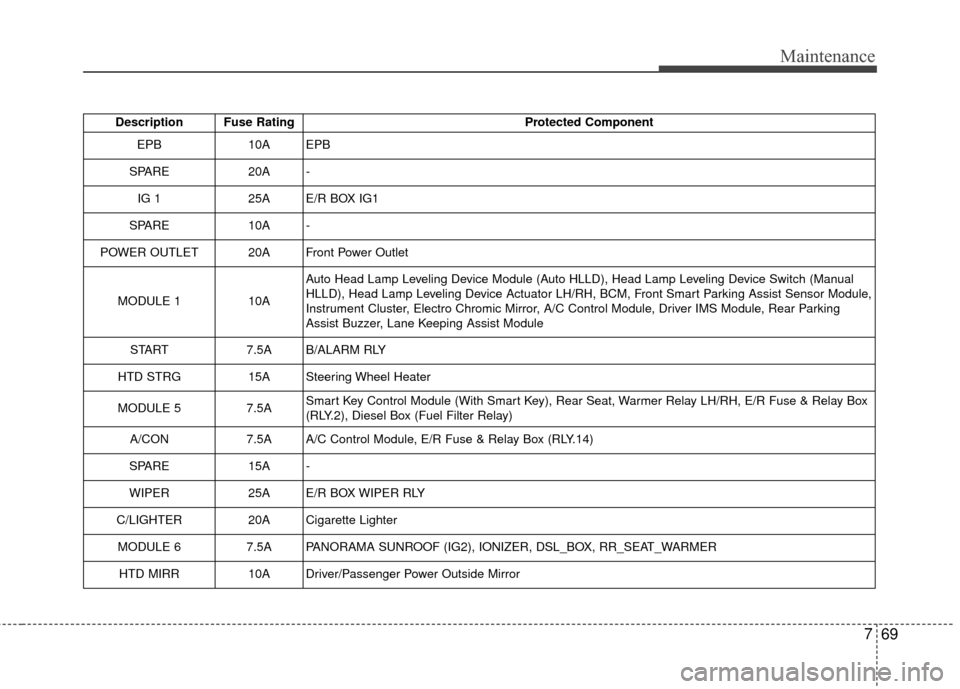
769
Maintenance
Description Fuse RatingProtected Component
EPB10AEPB
SPARE20A-
IG 125AE/R BOX IG1
SPARE 10A -
POWER OUTLET 20A Front Power Outlet
MODULE 1 10A Auto Head Lamp Leveling Device Module (Auto HLLD), Head Lamp Leveling Device Switch (Manual
HLLD), Head Lamp Leveling Device Actuator LH/RH, BCM, Front Smart Parking Assist Sensor Module,
Instrument Cluster, Electro Chromic Mirror, A/C Control Module, Driver IMS Module, Rear Parking
Assist Buzzer, Lane Keeping Assist Module
START 7.5A B/ALARM RLY
HTD STRG 15A Steering Wheel Heater
MODULE 5 7.5A Smart Key Control Module (With Smart Key), Rear Seat, Warmer Relay LH/RH, E/R Fuse & Relay Box
(RLY.2), Diesel Box (Fuel Filter Relay)
A/CON 7.5A A/C Control Module, E/R Fuse & Relay Box (RLY.14)
SPARE 15A -
WIPER 25A E/R BOX WIPER RLY
C/LIGHTER 20A Cigarette Lighter MODULE 6 7.5A PANORAMA SUNROOF (IG2), IONIZER, DSL_BOX, RR_SEAT_WARMER HTD MIRR 10A Driver/Passenger Power Outside Mirror
Page 483 of 487

I5
Index
Technical Data . . . . . . . . . . . . . . . . . . . . . . . . . . . . . 6-22
Using the Tire Mobility Kit . . . . . . . . . . . . . . . . . . . 6-20
In case of an emergency while driving . . . . . . . . . . . . . . 6-3 If engine stalls while driving . . . . . . . . . . . . . . . . . . . 6-3
If the engine stalls at a crossroad or crossing . . . . . . 6-3
If you have a flat tire while driving . . . . . . . . . . . . . . 6-3
Instrument cluster . . . . . . . . . . . . . . . . . . . . . . . . . . . . . 4-58 Gauges . . . . . . . . . . . . . . . . . . . . . . . . . . . . . . . . . . . 4-\
60
Instrument Cluster Control. . . . . . . . . . . . . . . . . . . . 4-59
LCD Display Control . . . . . . . . . . . . . . . . . . . . . . . . 4-59
Transaxle Shift Indicator . . . . . . . . . . . . . . . . . . . . . 4-63
Instrument panel overview . . . . . . . . . . . . . . . . . . . . . . . 2-5
Interior features. . . . . . . . . . . . . . . . . . . . . . . . . . . . . . 4-142 Clothes hanger . . . . . . . . . . . . . . . . . . . . . . . . . . . . 4-145
Cup holder . . . . . . . . . . . . . . . . . . . . . . . . . . . . . . . 4-142
Digital clock . . . . . . . . . . . . . . . . . . . . . . . . . . . . . 4-144
Floor mat anchor(s) . . . . . . . . . . . . . . . . . . . . . . . . 4-146
Navigation system . . . . . . . . . . . . . . . . . . . . . . . . . 4-147
Power outlet . . . . . . . . . . . . . . . . . . . . . . . . . . . . . . 4-143
Sunvisor . . . . . . . . . . . . . . . . . . . . . . . . . . . . . . . . . 4-143
Interior light . . . . . . . . . . . . . . . . . . . . . . . . . . . . . . . . 4-108 Automatic turn off function . . . . . . . . . . . . . . . . . . 4-108
Glove box lamp . . . . . . . . . . . . . . . . . . . . . . . . . . . 4-111
Map lamp . . . . . . . . . . . . . . . . . . . . . . . . . . . . . . . 4-108
Room lamp . . . . . . . . . . . . . . . . . . . . . . . . . . . . . . 4-109
Trunk room lamp . . . . . . . . . . . . . . . . . . . . . . . . . . 4-110
Vanity mirror lamp . . . . . . . . . . . . . . . . . . . . . . . . . 4-111
Interior overview. . . . . . . . . . . . . . . . . . . . . . . . . . . . . . . 2-4 Key positions . . . . . . . . . . . . . . . . . . . . . . . . . . . . . . . . . 5-6
Ignition switch position . . . . . . . . . . . . . . . . . . . . . . . 5-6
Illuminated ignition switch . . . . . . . . . . . . . . . . . . . . 5-6
Keys . . . . . . . . . . . . . . . . . . . . . . . . . . . . . . . . . . . . \
. . . . 4-4 Key operations . . . . . . . . . . . . . . . . . . . . . . . . . . . . . . 4-4
Record your key number . . . . . . . . . . . . . . . . . . . . . . 4-4
LCD Display . . . . . . . . . . . . . . . . . . . . . . . . . . . . . . . . . 4-64 A/V Mode. . . . . . . . . . . . . . . . . . . . . . . . . . . . . . . . . 4-70
LCD Modes . . . . . . . . . . . . . . . . . . . . . . . . . . . . . . . 4-64
Service Mode . . . . . . . . . . . . . . . . . . . . . . . . . . . . . . 4-65
Turn By Turn Mode . . . . . . . . . . . . . . . . . . . . . . . . 4-70
User Settings Mode . . . . . . . . . . . . . . . . . . . . . . . . . 4-67
Warning Messages . . . . . . . . . . . . . . . . . . . . . . . . . . 4-71
Light bulbs . . . . . . . . . . . . . . . . . . . . . . . . . . . . . . . . . . 7-79\
Front light replacement . . . . . . . . . . . . . . . . . . . . . . 7-79
High mounted stop light bulb replacement . . . . . . . 7-88
Interior light bulb replacement. . . . . . . . . . . . . . . . . 7-91
License plate light bulb replacement . . . . . . . . . . . . 7-88
Rear combination light bulb replacement . . . . . . . . 7-85
Side repeater light bulb replacement . . . . . . . . . . . . 7-83
Lighting. . . . . . . . . . . . . . . . . . . . . . . . . . . . . . . . . . . . \
. 4-99 Battery saver function . . . . . . . . . . . . . . . . . . . . . . . 4-99
Daytime running light . . . . . . . . . . . . . . . . . . . . . . 4-100K
L