2015 KIA CEED phone
[x] Cancel search: phonePage 864 of 1210

4 179
Features of your vehicle
USING YOUR USB DEVICE
To use an external USB device,make sure the device is not connect-
ed when starting up the vehicle.
Connect the device after starting up.
If you start the engine when the USB device is connected, it may damage
the USB device. (USB flashdrives
are very sensitive to electric shock.)
If the engine is started up or turned off whilst the external USB device is
connected, the external USB device
may not work.
It may not play inauthentic MP3 or WMA files.
1) It can only play MP3 files with the compression rate between
8Kbps~320Kbps.
2) It can only play WMA music files with the compression rate
between 8Kbps~320Kbps.
Take precautions for static electricity when connecting or disconnecting the
external USB device.
An encrypted MP3 PLAYER is not recognizable. Depending on the condition of the
external USB device, the connected
external USB device can be unrec-
ognizable.
When the formatted byte/sector set- ting of External USB device is noteither 512BYTE or 2048BYTE, then
the device will not be recognized.
Use only a USB device formatted to FAT 12/16/32.
USB devices without USB I/F authentica-
tion may not be recognizable.
Make sure the USB connection termi- nal does not come in contact with the
human body or other objects.
If you repeatedly connect or discon- nect the USB device in a short peri-
od of time, it may break the device.
You may hear a strange noise when connecting or disconnecting a USB
device.
If you disconnect the external USB device during playback in USB mode,
the external USB device can be dam-
aged or may malfunction. Therefore,
disconnect the external USB device
when the audio is turned off or in
another mode. (e.g, Radio, CD)
Depending on the type and capacity ofthe external USB device or the type of
the files stored in the device, there is a
difference in the time taken for recogni-
tion of the device.
Do not use the USB device for purposes other than playing music files.
Playing videos through the USB is not supported.
Use of USB accessories such as rechargers or heaters using USB I/F
may lower performance or cause
trouble.
If you use devices such as a USB hub purchased separately, the vehi-
cle’s audio system may not recog-
nize the USB device. In that case,
connect the USB device directly to
the multimedia terminal of the vehi-
cle.
If the USB device is divided by logi- cal drives, only the music files on the
highest-priority drive are recognized
by car audio.
Devices such as MP3 Player/ Mobile phone/Digital camera can be unrec-
ognizable by standard USB I/F can
be unrecognizable.
(Continued)
JD RHD 4b(172~).QXP 2/17/2015 11:59 AM Page 179
Page 865 of 1210

Features of your vehicle
180
4
(Continued)
Charging through the USB may not
be supported in some mobile
devices.
USB HDD or USB types that liable to connection failures due to vehicle
vibrations are not supported. (i-sticktype)
Some non-standard USB devices (METAL COVER TYPE USB) can be
unrecognizable.
Some USB flash memory readers (such as CF, SD, micro SD, etc.) or
external-HDD type devices can be
unrecognizable.
Music files protected by DRM (DIGI- TAL RIGHTS MANAGEMENT) are
not recognizable.✽✽ NOTICE - USB Jack Damage
The data in the USB memory may be lost whilst using this audio.
Always back up important data on a
personal storage device.
Please avoid using USB memory prod-
ucts which can be used as key chains
or mobile phone accessories as they
could cause damage to the USB jack.
Please make certain only to use plug
type connector products as shown
below.
JD RHD 4b(172~).QXP 2/17/2015 11:59 AM Page 180
Page 867 of 1210
Features of your vehicle
182
4
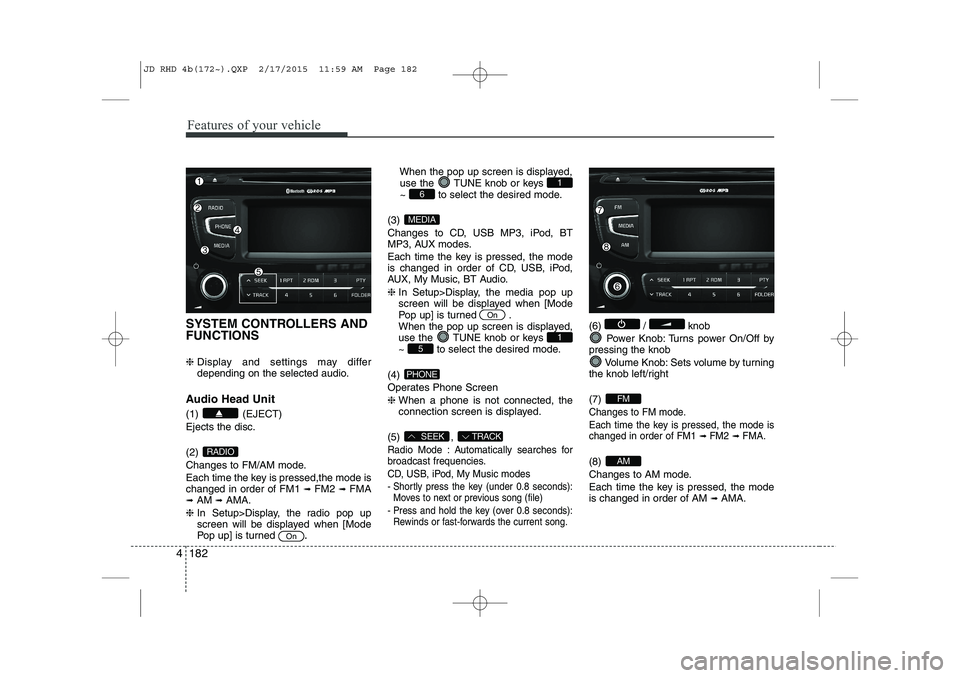
SYSTEM CONTROLLERS AND FUNCTIONS ❈ Display and settings may differ
depending on the selected audio.
Audio Head Unit (1) (EJECT) Ejects the disc. (2)
Changes to FM/AM mode.
Each time the key is pressed,the mode is changed in order of FM1 ➟
FM2 ➟FMA
➟ AM ➟AMA.
❈ In Setup>Display, the radio pop up
screen will be displayed when [Mode
Pop up] is turned .When the pop up screen is displayed,
use the TUNE knob or keys
~ to select the desired mode.
(3)
Changes to CD, USB MP3, iPod, BT
MP3, AUX modes.
Each time the key is pressed, the mode
is changed in order of CD, USB, iPod,
AUX, My Music, BT Audio. ❈ In Setup>Display, the media pop up
screen will be displayed when [Mode
Pop up] is turned .
When the pop up screen is displayed,
use the TUNE knob or keys
~ to select the desired mode.
(4)
Operates Phone Screen❈ When a phone is not connected, the
connection screen is displayed.
(5) ,
Radio Mode : Automatically searches for
broadcast frequencies.
CD, USB, iPod, My Music modes
- Shortly press the key (under 0.8 seconds): Moves to next or previous song (file)
- Press and hold the key (over 0.8 seconds): Rewinds or fast-forwards the current song.
(6) / knob
Power Knob: Turns power On/Off by
pressing the knob
Volume Knob: Sets volume by turning
the knob left/right (7)
Changes to FM mode.
Each time the key is pressed, the mode is changed in order of FM1
➟ FM2➟ FMA.
(8)
Changes to AM mode.
Each time the key is pressed, the mode is changed in order of AM ➟
AMA.AM
FM
TRACKSEEK
PHONE
51
On
MEDIA
61
On
RADIO
JD RHD 4b(172~).QXP 2/17/2015 11:59 AM Page 182
Page 868 of 1210

4 183
Features of your vehicle
(9) ~ (Preset)
Radio Mode: Saves frequencies (chan-
nels) or receives saved frequencies(channels)
CD, USB, iPod, My Music mode
- : Repeat
- : Random
In the Radio, Media, Setup, and Menu
pop up screen, the number menu isselected. (10) ,
MP3, CD, USB mode : Folder Search
FM : RDS Program Type Search (11)
Each time the button is pressed sets screen Off
➟
Screen On ➟Screen Off
❈ Audio operation is maintained and
only the screen will be turned Off.
In the screen Off state, press any key
to turn the screen On again.
(12) Radio Mode
- Press and hold the key (over 0.8 sec- onds): Previews each broadcast for 5 seconds each
CD, USB, iPod mode
- Press and hold the key (over 0.8 sec- onds): Previews each song (file) for 10 seconds each
❈ Press the key (over 0.8
seconds) again to continue listening tothe current song (file).
(13)
Displays menus for the current mode. (14)
Press the key : Moves to the
Display, Sound, Phone(Option), Systemsetting modes
❈
If the Bluetooth®Wireless Technology
feature is supported
(15) TUNE knob
Radio mode : Changes frequency by
turning the knob left/right
CD, USB, iPod mode: Searches songs
(files) by turning the knob left/right ❈ When the desired song is displayed,
press the knob to play the song.
Moves focus in all selection menus and
selects menus
SETUP
SETUP
MEMU
TA/SCAN
TA/SCAN
FOLDERPTY
2 RDM
1 RPT
61
JD RHD 4b(172~).QXP 2/17/2015 11:59 AM Page 183
Page 871 of 1210
![KIA CEED 2015 Owners Manual Features of your vehicle
186
4
PHONE SETUP (if equipped)
Press the key Select [Phone]
through TUNE knob or key
Select menu through TUNE knob
Pair Phone
To pair a
Bluetooth®Wireless Technology](/manual-img/2/57940/w960_57940-870.png "KIA CEED 2015 Owners Manual Features of your vehicle
186
4
PHONE SETUP (if equipped)
Press the key Select [Phone]
through TUNE knob or key
Select menu through TUNE knob
Pair Phone
To pair a
Bluetooth®Wireless Technology")
Features of your vehicle
186
4
PHONE SETUP (if equipped)
Press the key Select [Phone]
through TUNE knob or key
Select menu through TUNE knob
Pair Phone
To pair a
Bluetooth®Wireless Technology
enabled mobile phone, authentication and connection processes are first
required. As a result, you cannot pair
your mobile phone whilst driving the vehi-
cle. First park your vehicle before use.
Select [Pair Phone] Set through TUNE knob
➀ Search for device names as displayed
on your mobile phone and connect.
➁ Input the passkey displayed on the
screen. (Passkey : 0000)
❈ The device name and passkey will be
displayed on the screen for up to 3
minutes. If pairing is not completed
within the 3 minutes, the mobile phone
pairing process will automatically becanceled.
➂ Pairing completion is displayed.
❈ In some mobile phones, pairing will
automatically be followed by connection. ❈
It is possible to pair up to five
Bluetooth®Wireless Technology
enabled mobile phones.
3
SETUP
JD RHD 4b(172~).QXP 2/17/2015 11:59 AM Page 186
Page 872 of 1210
![KIA CEED 2015 Owners Manual 4 187
Features of your vehicle
Phone List The names of up to 5 paired phones will
be displayed.
A [ ] is displayed in front of the currently
connected phone. Select the desired name to setup the
s](/manual-img/2/57940/w960_57940-871.png "KIA CEED 2015 Owners Manual 4 187
Features of your vehicle
Phone List The names of up to 5 paired phones will
be displayed.
A [ ] is displayed in front of the currently
connected phone. Select the desired name to setup the
s")
4 187
Features of your vehicle
Phone List The names of up to 5 paired phones will
be displayed.
A [ ] is displayed in front of the currently
connected phone. Select the desired name to setup the
selected phone.
Connecting a phone
Select [Phone List] Select mobile
phone through TUNE knob Select[Connect Phone]
➀Select a mobile phone that is not cur- rently connected.
➁ Connect the selected mobile phone. ➂
Connection completion is displayed.
❈ If a phone is already connected, dis-connect the currently connected
phone and select a new phone to con-nect.
Disconnecting a connected phone
Select [Phone List] Select mobile
phone through TUNE knob Select[Disconnect Phone]
➀ Select the currently connected mobile
phone.
➁ Disconnect the selected mobile
phone.
➂ Disconnection completion is dis-
played.
Changing connection sequence
(Priority)
This is used to change the order (priori-
ty) of automatic connection for the paired
mobile phones.
Select [Phone List] Select mobile
phone through TUNE knob Select
[Priority]
➀ Select [ Phone] in the [Setup]
➁ Select [Phone List]
➂ From the paired phones, select the
phone desired for No.1 priority.
Select [ Priority]
❈ Once the connection sequence (priori-
ty) is changed, the new no. 1 prioritymobile phone will be connected.
- when the no. 1 priority cannot be con- nected: Automatically attempts to con-nect the most recently connected
phone.
- Cases when the most recently con- nected phone cannot be connected:Attempts to connect in the order inwhich paired phones are listed.
JD RHD 4b(172~).QXP 2/17/2015 11:59 AM Page 187
Page 873 of 1210
![KIA CEED 2015 Owners Manual Features of your vehicle
188
4
Delete
Select [Phone List] Select mobile
phone through TUNE knob Select[Delete]
➀ Select the desired mobile phone.
➁ Delete the selected mobile phone.
➂ Deletion](/manual-img/2/57940/w960_57940-872.png "KIA CEED 2015 Owners Manual Features of your vehicle
188
4
Delete
Select [Phone List] Select mobile
phone through TUNE knob Select[Delete]
➀ Select the desired mobile phone.
➁ Delete the selected mobile phone.
➂ Deletion")
Features of your vehicle
188
4
Delete
Select [Phone List] Select mobile
phone through TUNE knob Select[Delete]
➀ Select the desired mobile phone.
➁ Delete the selected mobile phone.
➂ Deletion completion is displayed.
❈ When attempting to delete a currently
connected phone, the phone is firstdisconnected.
When you delete a mobile phone, lt's
phone book will also be erased.
For stable
Bluetooth®Wireless Technologycommunication, delete the mobile phonefrom the audio and also delete the audio
from your mobile phone
Phone book Download
This feature is used to download a phone
book and call histories into the audio sys-tem.
Select [Phone] Select [ History]
[ P.BOOK] through
TUNEknob
The download feature may not be support-
ed in some mobile phones.
If a different operation is performed whilst a phone book is being down-
loaded, downloading will be discontin-
ued. The phone book already down-
loaded will be saved.
When downloading a new phone book,
delete all previously saved phone book
before starting download.
Auto Download
When connecting a mobile phone, it is
possible to automatically download a
new phone book and Call Histories.
Select [Auto Download] Set / through TUNE knob
Audio Streaming
Songs (files) saved in your
Bluetooth®
Wireless Technology enabledmobile phone
can be played through the audio system.
Select [Audio Streaming] Set /
through TUNE knob
The Bluetooth®Wireless Technology
audio streaming feature may not be sup-
ported in some mobile phones.
Outgoing Volume
This is used to set the volume of your
voice as heard by the other party whilston a
Bluetooth®Wireless Technology
enabled handsfree call.
Select [Outgoing Volume] Set vol- ume through
TUNEknob
Off
On
Off
On
JD RHD 4b(172~).QXP 2/17/2015 11:59 AM Page 188
Page 874 of 1210
![KIA CEED 2015 Owners Manual Bluetooth®Wireless Technology
System Off
This feature is used when you do not wish to use the
Bluetooth®Wireless
Technologysystem.
Select [Bluetooth®Wireless Technology
System Off] Set through T](/manual-img/2/57940/w960_57940-873.png "KIA CEED 2015 Owners Manual Bluetooth®Wireless Technology
System Off
This feature is used when you do not wish to use the
Bluetooth®Wireless
Technologysystem.
Select [Bluetooth®Wireless Technology
System Off] Set through T")
Bluetooth®Wireless Technology
System Off
This feature is used when you do not wish to use the
Bluetooth®Wireless
Technologysystem.
Select [Bluetooth®Wireless Technology
System Off] Set through TUNE knob
❈ If a phone is already connected, dis- connect the currently connected phone
and turn the
Bluetooth®Wireless
Technologysystem off.
Using the
Bluetooth®Wireless
Technology System
To use
Bluetooth®Wireless Technologywhen the system is currently off, follow
these next steps.
Turning On
Bluetooth®Wireless
Technologythrough the Key
Press the key Screen Guidance
❈ Moves to the screen where Bluetooth®
Wireless Technology functions can be
used and displays guidance. Turning On
Bluetooth®Wireless
Technologythrough the Key
Press the key Select [Phone]
through TUNE knob or key
➀ A screen asking whether to turn onBluetooth®Wireless Technologywill be
displayed.
➁ On the screen, select to turn on
Bluetooth®Wireless Technologyand
display guidance.
❈ If the
Bluetooth®Wireless Technologysystem is turned on, the system will
automatically try to connect the mostrecently connected
Bluetooth®
Wireless Technologymobile phone.
Bluetooth®Wireless Technology connection may become intermittently
disconnected in some mobile phones.
Follow these next steps to try again.
1) Turn the Bluetooth®Wireless Technologyfunction within the mobile phone
ON/OFF and try to connect again.
2) Turn the mobile phone power ON/OFF and
try to connect again.
3) Completely remove the mobile phone
battery, reboot, and then try to connectagain.
4) Reboot the audio system and try to con-
nect again
5) Delete all paired devices in your mobile phone and the audio system and pair
again for use.
YES
3
SETUP
SETUP
PHONE
PHONE
4 189
Features of your vehicle
JD RHD 4b(172~).QXP 2/17/2015 11:59 AM Page 189