Page 856 of 1210

4 171
Features of your vehicle
(Continued)
• Always drive slowly and turn cor-ners carefully when carrying
items on the roof rack. Severe
wind updrafts, caused by passing
vehicles or natural causes, can
cause sudden upward pressure
on items loaded on the roof rack.
This is especially true when car-
rying large, flat items such as
wood panels or mattresses. Thiscould cause the items to fall off
the roof rack and cause damage
to your vehicle or others around
you.
• To prevent damage or loss of cargo whilst driving, check fre-
quently before or whilst driving to
make sure the items on the roof
rack are securely fastened.WARNING
• The following specification is the maximum weight that can be
loaded onto the roof rack.
Distribute the load as evenly as
possible across the crossbars (if
equipped) and roof rack and
secure the load firmly.
Loading cargo or luggage in
excess of the specified weight
limit on the roof rack may dam-
age your vehicle.
• The vehicle centre of gravity will be higher when items are loaded
onto the roof rack. Avoid sudden
starts, braking, sharp turns, abrupt manoeuvres or high
speeds that may result in loss of
vehicle control or rollover result-ing in an accident.
(Continued)
ROOF 100 kg (220 lbs.)
RACK EVENLY DISTRIBUTED
JD RHD 4a(~171).QXP 4/14/2015 7:07 PM Page 171
Page 857 of 1210

Features of your vehicle
172
4
✽✽
NOTICE
If you install an aftermarket HID head lamp, your vehicle’s audio and
electronic device may malfunction.
Prevent chemicals such as perfume, cosmetic oil, sun cream, hand cleaner,
and air freshener from contacting the
interior parts because they may cause
damage or discoloration.
Antenna
Roof antenna
Your car uses a roof antenna to receive
both AM and FM broadcast signals. This
antenna is a removable type. To remove
the antenna, turn it counterclockwise. To
install the antenna, turn it clockwise.
AUDIO SYSTEM
CAUTION
• Before entering a place with a low
height clearance or a car wash,
remove the antenna by rotating itcounterclockwise. If not, theantenna may be damaged.
When reinstalling your antenna, it is important that it is fully tight-ened and adjusted to the upright position to ensure proper recep-tion. But it could be removed
when parking the vehicle or whenloading cargo on the roof rack.
When cargo is loaded on the roof rack, do not place the cargo near
the antenna pole to ensure proper reception.
OHM048154N
JD RHD 4b(172~).QXP 2/17/2015 11:59 AM Page 172
Page 891 of 1210

Features of your vehicle
206
4
VOICE COMMAND (if equipped)
The voice recognition feature of this
product supports recognition of the
commands listed within this user’s
manual.
Whilst using voice recognition, operating the steering remote control or the device
will terminate voice recognition and allow
you to manually operate desired func-
tions.
Position of the microphone is above the head of the driver’s seat.
Voice recognition may not function properly due to outside noise. The fol-
lowing conditions can affect the per-
formance of Voice Recognition:
- When the windows and sunroof are open
- When the heating/cooling system is on
- When passing a tunnel
- When driving on rugged and uneven roads
After downloading
Bluetooth®Wireless
Technology phone book, the system
requires some times to convert the
phone book into voice information.
During this time, voice recognition may
not operate properly. Upon inputting your phone book, spe-
cial symbols and numbers cannot be
recognized by voice. For example, “#
John Doe%&” will be recognized as“John Doe”. Starting Voice Command
To start voice command, shortly press
the key on the steering wheel
remote controller.
If voice command is in [Normal Mode], then the system will say “Please say a
command. Beep”
❈ If voice command is in [Expert Mode],
then the system will only say a “Beep-”
❈ Setting Voice command [Normal
Mode]/[Expert Mode]:
Press the key Select [ System]
through the TUNE knob or key
Select [Prompt Feedback] through
the TUNE knob Set [Normal
Mode]/[Expert Mode]
Say the voice command.
For proper voice recognition, say the
voice command after the guidance
message and the “Beep” sound.
4
SETUP
JD RHD 4b(172~).QXP 2/17/2015 11:59 AM Page 206
Page 935 of 1210

Features of your vehicle
250
4
✽✽
NOTICE - USING THE Voice Recognition
When using the voice recognition fea- ture, only commands listed within the
user's manual are supported.
Be aware that during the operation of the voice recognition system, pressing
any key other than the key or
touching the screen will terminate
voice recognition mode.
For superior voice recognition per-
formance, position the microphone
used for voice recognition above the
head of the driver’s seat and maintain
a proper position when saying com-
mands.
Within the following situations, voice
recognition may not function properly
due to external sound.
- When the windows and sunroof areopen
- When the wind of the cooling / heat- ing device is strong
- When entering and passing through tunnels
- When driving on rugged and uneven roads
- During severe rain (heavy rains, windstorms) Phone related voice commands can be
used only when a Bluetooth®
Wireless Technology device is con-
nected.
When making calls by stating a name, the corresponding contact must be
downloaded and stored within the
audio system.
After downloading the Bluetooth®
Wireless Technology phone book, it
takes some times to convert the phone
book data into voice information.
During this time, voice recognition
may not properly operate.
Pronounce the voice commands natu-
rally and clearly as if in a normal con-
versation.
JD RHD 4c(212~).QXP 2/17/2015 11:07 AM Page 250
Page 1085 of 1210
Maintenance
22
7
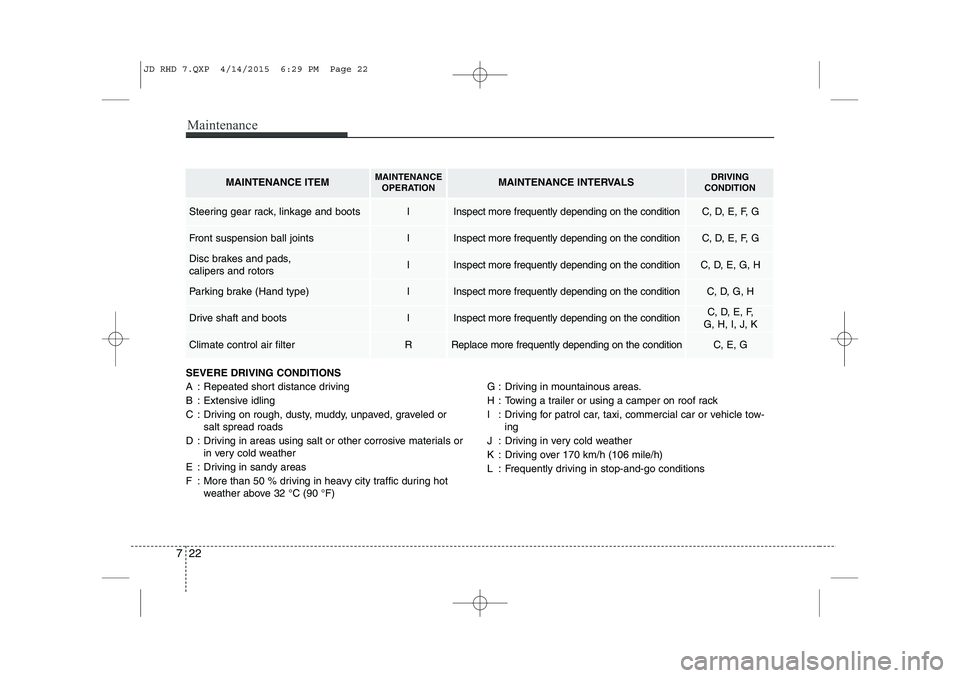
SEVERE DRIVING CONDITIONS
A : Repeated short distance driving
B : Extensive idling
C : Driving on rough, dusty, muddy, unpaved, graveled or
salt spread roads
D : Driving in areas using salt or other corrosive materials or in very cold weather
E : Driving in sandy areas
F : More than 50 % driving in heavy city traffic during hot weather above 32 °C (90 °F) G : Driving in mountainous areas.
H : Towing a trailer or using a camper on roof rack
I : Driving for patrol car, taxi, commercial car or vehicle tow-
ing
J : Driving in very cold weather
K : Driving over 170 km/h (106 mile/h)
L : Frequently driving in stop-and-go conditions
MAINTENANCE ITEMMAINTENANCE OPERATIONMAINTENANCE INTERVALSDRIVING
CONDITION
Steering gear rack, linkage and bootsIInspect more frequently depending on the conditionC, D, E, F, G
Front suspension ball jointsIInspect more frequently depending on the conditionC, D, E, F, G
Disc brakes and pads, calipers and rotorsIInspect more frequently depending on the conditionC, D, E, G, H
Parking brake (Hand type)IInspect more frequently depending on the conditionC, D, G, H
Drive shaft and bootsIInspect more frequently depending on the conditionC, D, E, F,
G, H, I, J, K
Climate control air filter RReplace more frequently depending on the conditionC, E, G
JD RHD 7.QXP 4/14/2015 6:29 PM Page 22
Page 1097 of 1210
Maintenance
34
7
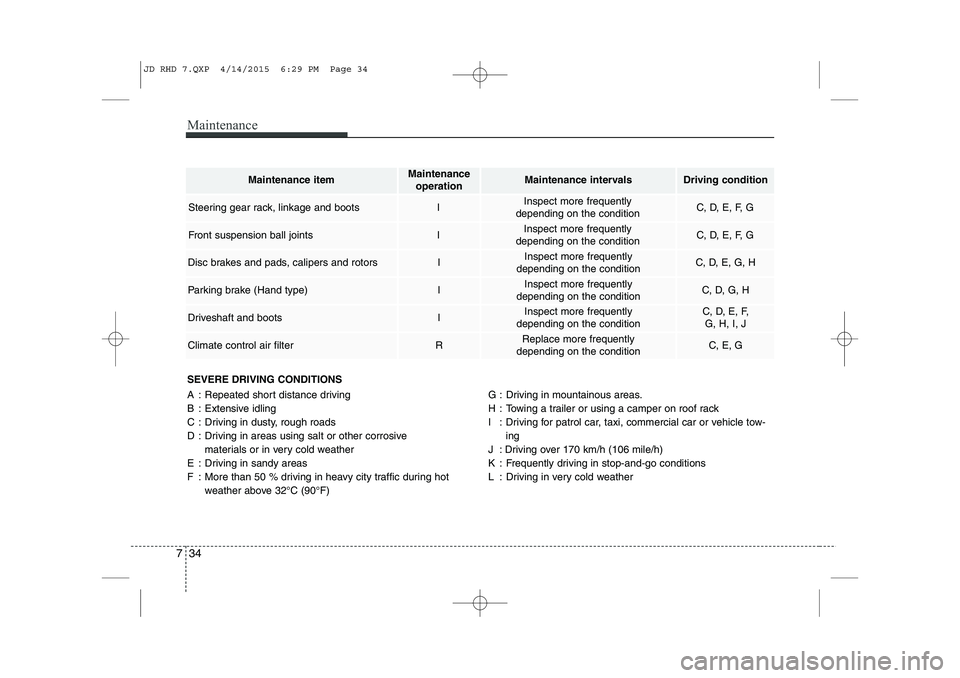
SEVERE DRIVING CONDITIONS
A : Repeated short distance driving
B : Extensive idling
C : Driving in dusty, rough roads
D : Driving in areas using salt or other corrosive
materials or in very cold weather
E : Driving in sandy areas
F : More than 50 % driving in heavy city traffic during hot weather above 32°C (90°F) G : Driving in mountainous areas.
H : Towing a trailer or using a camper on roof rack
I : Driving for patrol car, taxi, commercial car or vehicle tow-
ing
J : Driving over 170 km/h (106 mile/h)
K : Frequently driving in stop-and-go conditions
L : Driving in very cold weather
Maintenance itemMaintenance operationMaintenance intervalsDriving condition
Steering gear rack, linkage and bootsIInspect more frequently
depending on the conditionC, D, E, F, G
Front suspension ball jointsIInspect more frequently
depending on the conditionC, D, E, F, G
Disc brakes and pads, calipers and rotorsIInspect more frequently
depending on the conditionC, D, E, G, H
Parking brake (Hand type)IInspect more frequently
depending on the conditionC, D, G, H
Driveshaft and bootsIInspect more frequently
depending on the conditionC, D, E, F, G, H, I, J
Climate control air filterRReplace more frequently
depending on the conditionC, E, G
JD RHD 7.QXP 4/14/2015 6:29 PM Page 34
Page 1118 of 1210
755
Maintenance
Reset items
Items should be reset after the battery
has been discharged or the battery hasbeen disconnected.
Auto up/down window (See section 4)
Sunroof (See section 4)
Trip computer (See section 4)
Climate control system (See section 4)
Audio (See section 4)(Continued)
Wear eye protection when check- ing the battery during charging.
Disconnect the battery charger in the following order.
1. Turn off the battery charger
main switch.
2. Unhook the negative clamp from the negative battery ter- minal.
3. Unhook the positive clamp from the positive battery termi-nal.
Before performing maintenance or recharging the battery, turn offall accessories and stop the
engine.
The negative battery cable must be removed first and installed
last when the battery is discon-nected.
JD RHD 7.QXP 4/14/2015 6:30 PM Page 55
Page 1138 of 1210
775
Maintenance
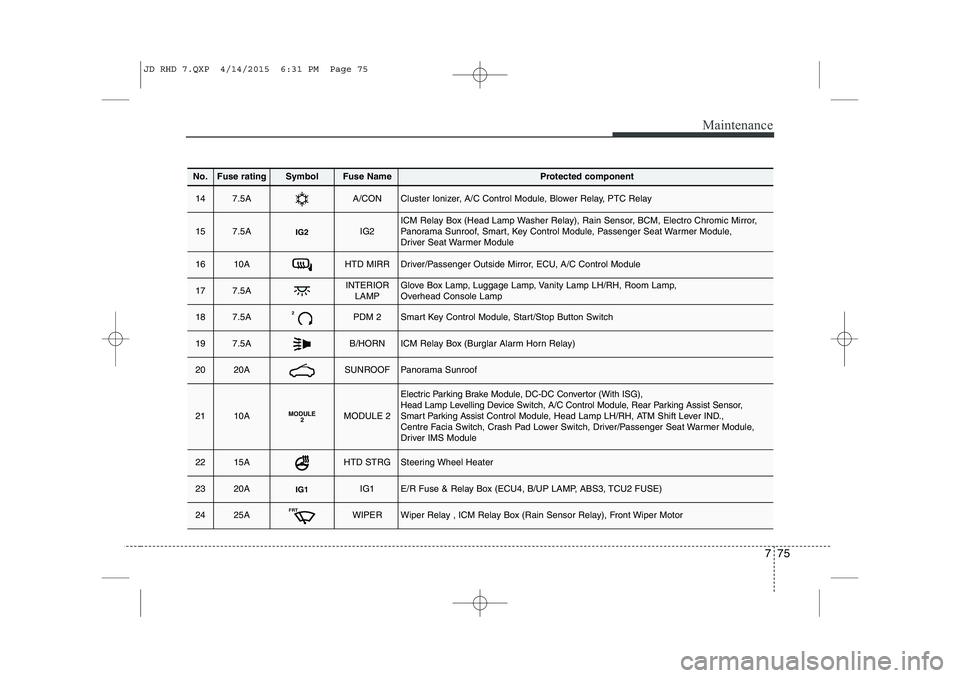
No.Fuse ratingSymbolFuse NameProtected component
147.5AA/CONCluster Ionizer, A/C Control Module, Blower Relay, PTC Relay
157.5AIG2IG2ICM Relay Box (Head Lamp Washer Relay), Rain Sensor, BCM, Electro Chromic Mirror,
Panorama Sunroof, Smart, Key Control Module, Passenger Seat Warmer Module,
Driver Seat Warmer Module
1610AHTD MIRRDriver/Passenger Outside Mirror, ECU, A/C Control Module
177.5AINTERIORLAMPGlove Box Lamp, Luggage Lamp, Vanity Lamp LH/RH, Room Lamp,
Overhead Console Lamp
187.5A2PDM 2Smart Key Control Module, Start/Stop Button Switch
197.5AB/HORNICM Relay Box (Burglar Alarm Horn Relay)
2020ASUNROOFPanorama Sunroof
2110AMODULE 2MODULE 2
Electric Parking Brake Module, DC-DC Convertor (With ISG),
Head Lamp Levelling Device Switch, A/C Control Module, Rear Parking Assist Sensor,
Smart Parking Assist Control Module, Head Lamp LH/RH, ATM Shift Lever IND.,
Centre Facia Switch, Crash Pad Lower Switch, Driver/Passenger Seat Warmer Module,
Driver IMS Module
2215AHTD STRGSteering Wheel Heater
2320AIG1IG1E/R Fuse & Relay Box (ECU4, B/UP LAMP, ABS3, TCU2 FUSE)
2425AFRTWIPERWiper Relay , ICM Relay Box (Rain Sensor Relay), Front Wiper Motor
JD RHD 7.QXP 4/14/2015 6:31 PM Page 75