2015 KIA CEED steering
[x] Cancel search: steeringPage 190 of 1210

4 109
Features of your vehicle
Additional instructions(messages)
When the Smart Parking Assist System
is operating, a message may appear
regardless of the parking order. The messages will appear according to
the circumstances. Follow the instruc-
tions provided while parking your vehicle
with the Smart Parking Assist System.
✽NOTICE
• In the below conditions the system will be cancelled. Park your vehicle
manually.
1. Search for parking space
- When the ABS/ESC is activated
- When the vehicle speed is over
40km/h (24.8mph)
- When you press the Smart Parking
Assist System button (the front and
rear Parking Assist System operates)
- When you shift the shift lever to R
(Reverse)
2. Steering wheel control
- When the ABS/ESC is activated
- When the vehicle speed is over7km/h (4.3 mph)
- When you press the Smart Parking Assist System button (the front and
rear Parking Assist System operates)
- When you shift the shift lever to D
(Drive) before entering the parking
space
- When you hold the steering wheel
firmly
System malfunction
• If there is a problem with the system, when the system is turned on, the
above message will appear. Also, the
indicator on the button will not light up and a beep sound will be heard 3
times.
• If there is a problem with only the Smart Parking Assist System, the
Parking Assist System will operate
after 2 seconds.
If you notice any problem, have your
vehicle checked by an authorized Kia
dealer as soon as possible.
OJD042227/OJD042229OJD042228
JD eng 4a.QXP 3/4/2015 4:28 PM Page 109
Page 192 of 1210

4 111
Features of your vehicle
Battery saver function
• The purpose of this feature is to pre-vent the battery from being dis-
charged. The system automatically
turns off the parking lights when the
driver removes the ignition key (Smart
key : turns off the engine) and opens
the driver- side door.
• With this feature, the parking lights will be turned off automatically if the driver
parks on the side of road at night.
If necessary, to keep the lights on
when the ignition key is removed, per-
form the following :
1) Open the driver-side door.
2) Turn the parking lights OFF and ON
again using the light switch on the
steering column. Headlamp delay function (if equipped) The headlamps (and/or taillights) remain
on for same minutes (Type A: 20 minutes,
Type B: 5 minutes) after the ignition key
is removed or turned to the ACC or
LOCK position. However, if the driver’s door is opened and closed, the head-
lights are turned off after 15 seconds.
The headlights can be turned off by
pressing the lock button on the transmit-
ter or smart key twice or turning off the
light switch from the headlight or Autolight position.
You can activate or deactivate the head-
lamp delay fuction. Refer to “User setting”
in this chapter.
Headlight (Headlamp) welcome function (if equipped)
When the headlight switch is in the ON or
AUTO position and all doors (and tail-
gate) are closed and locked, if you press
the door unlock button on the transmitter
or smart key, the headlights will come on
for about 15 seconds.
If the headlight switch is in the AUTO
position, the function can only operate atnight.
At this time, if you press the door unlock
button again or door lock button on the
transmitter or smart key, the headlights
will turn off immediately.
You can activate or deactivate the head-
lamp welcome fuction. Refer to “User set-
ting” in this chapter.
✽NOTICE
There can be turned on front fog light
and the fail light when you turn on the
headlight switch ON. In this case we rec-
ommend that you the system checked by
an authorized Kia dealer.
LIGHTING
CAUTION
If the driver gets out of the vehicle through other doors (except driver’s
door), the battery saver function does not operate and the headlampdelay function does not turn off
automatically. Therefore, it causesthe battery to be discharged. In this case, make sure to turn off the lamp
before getting out of the vehicle.
JD eng 4a.QXP 3/4/2015 4:28 PM Page 111
Page 193 of 1210

Features of your vehicle
112
4
Static bending light (if equipped)
While driving the corner, for your sight
and safety, the static bending light turns
on automatically. The system will operate
automatically as follows:
• When vehicle speed is under 10km/h
and steering wheel angle approximate-
ly 80 degrees.
• When vehicle speed is over 10km/h and steering wheel angle approximate-
ly 35 degrees.
• When the vehicle is at a standstill.
• When moving rearwards with one of the above conditions satisfied the lights will light up the opposite direction. Lighting control
The light switch has a Headlight and a
Parking light position.
To operate the lights, turn the knob at the
end of the control lever to one of the fol-
lowing positions:
(1) OFF position
(2) Position light position (3) Headlight position
(4) Auto light position (if equipped)
Position light position ( )
When the light switch is in the position light position, the tail, position, license
and instrument panel lights are ON.
OED040045OED040046
JD eng 4a.QXP 3/4/2015 4:28 PM Page 112
Page 199 of 1210

Features of your vehicle
118
4
Adaptive Front Lighting System (AFLS) (if equipped)
Adaptive front lighting system uses the
steering angle and vehicle speed, to
keep your field of vision wide by swiveling
and leveling the headlamp.
Change the switch to the AUTO position
when the engine is running. The adaptive
front lighting system will operate when
the headlamp is ON. To turn off the
AFLS, change the switch to other posi-
tions. After turning the AFLS off, head-
lamp swiveling no longer occurs, but lev-
eling operates continuously. If the AFLS malfunction indicator comes
on, the AFLS is not working properly.
Drive to the nearest safe location and
restart the engine. If the indicator contin-
uously remains on, we recommend that
the system be checked by an authorized
Kia dealer.
OJD042090OYN049201
JD eng 4a.QXP 3/4/2015 4:28 PM Page 118
Page 254 of 1210

4 173
Features of your vehicle
Audio remote control (if equipped)
The steering wheel audio remote control
button is installed to promote safe driving.
VOL (+/ -) (1)
• Push up the lever to increase volume.
Push down the lever to decrease vol-ume.
SEEK ( / ) (2)
The SEEK/PRESET button has different
functions base on the system mode. For
the following functions the button should
be pressed for 0.8 seconds or more.
RADIO mode
It will function as the AUTO SEEK select
button.
CDP mode
It will function as the FF/REW button.
If the SEEK button is pressed for less
than 0.8 second, it will work as follows in
each mode. RADIO mode
It will function as the PRESET STATION
select buttons.
CDP mode
It will function as the TRACK UP/DOWN
button.
Detailed information for audio control
buttons are described in the followingpages in this section.
MUTE (3)
Press the MUTE button to cancel the
sound.
Press the MUTE button again to acti- vate the sound.
MODE (4)
Press the button to select Radio or CD (compact disc).
CAUTION
Do not operate the audio remote
control buttons simultaneously.
OJD042149
■ Type B OJD042147
■
Type A
JD eng 4b(~211).QXP 3/4/2015 4:39 PM Page 173
Page 283 of 1210
Features of your vehicle
202
4
PHONE (if equipped)
Before using the
Bluetooth®Wireless
Technology
phone features
In order to use
Bluetooth®Wireless
Technologyphone, you must first pair
and connect the Bluetooth®Wireless
Technologymobile phone.
If the mobile phone is not paired or con- nected, it is not possible to enter Phone
mode. Once a phone is paired or con-nected, the guidance screen will be dis-
played.
If Priority is set upon vehicle ignition (IGN/ACC ON), the
Bluetooth®Wireless
Technologyphone will be automatically
connected. Even if you are outside, the
Bluetooth®Wireless Technologyphone
will be automatically connected once
you are in the vicinity of the vehicle. If
you do not want automatic
Bluetooth®
Wireless Technologyphone connection,
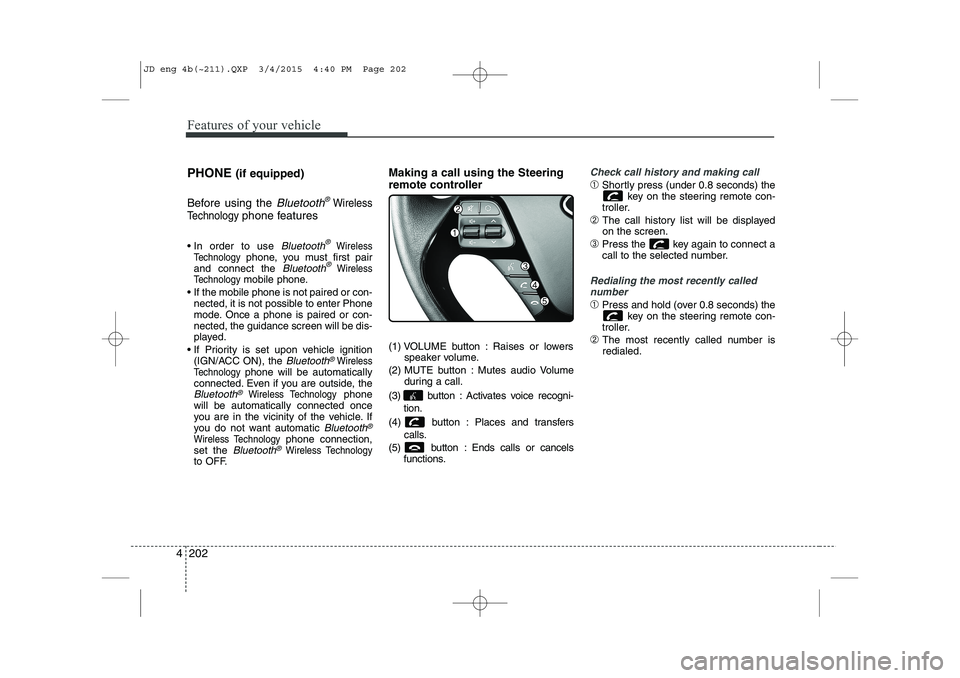
set the Bluetooth®Wireless Technologyto OFF. Making a call using the Steering
remote controller
(1) VOLUME button : Raises or lowers
speaker volume.
(2) MUTE button : Mutes audio Volume during a call.
(3) button : Activates voice recogni- tion.
(4) button : Places and transfers calls.
(5) button : Ends calls or cancels functions.
Check call history and making call
➀Shortly press (under 0.8 seconds) the
key on the steering remote con-
troller.
➁ The call history list will be displayed on the screen.
➂ Press the key again to connect a
call to the selected number.
Redialing the most recently called
number
➀ Press and hold (over 0.8 seconds) the
key on the steering remote con-
troller.
➁ The most recently called number is redialed.
JD eng 4b(~211).QXP 3/4/2015 4:40 PM Page 202
Page 287 of 1210

Features of your vehicle
206
4
VOICE COMMAND (if equipped)
The voice recognition feature of this
product supports recognition of the
commands listed within this user’s
manual.
While using voice recognition, operating the steering remote control or the device
will terminate voice recognition and allow
you to manually operate desired func-
tions.
Position of the microphone is above the head of the driver’s seat.
Voice recognition may not function properly due to outside noise. The fol-
lowing conditions can affect the per-
formance of Voice Recognition:
- When the windows and sunroof are open
- When the heating/cooling system is on
- When passing a tunnel
- When driving on rugged and uneven roads
After downloading
Bluetooth®Wireless
Technology phone book, the system
requires some times to convert the
phone book into voice information.
During this time, voice recognition may
not operate properly. Upon inputting your phone book, spe-
cial symbols and numbers cannot be
recognized by voice. For example, “#
John Doe%&” will be recognized as“John Doe”. Starting Voice Command
To start voice command, shortly press
the key on the steering wheel
remote controller.
If voice command is in [Normal Mode], then the system will say “Please say a
command. Beep”
❈ If voice command is in [Expert Mode],
then the system will only say a “Beep-”
❈ Setting Voice command [Normal
Mode]/[Expert Mode]:
Press the key Select [ System]
through the TUNE knob or key
Select [Prompt Feedback] through the
TUNE knob Set [Normal Mode]/[ExpertMode]
Say the voice command.
For proper voice recognition, say the
voice command after the guidance
message and the “Beep” sound.
4
SETUP
JD eng 4b(~211).QXP 3/4/2015 4:40 PM Page 206
Page 288 of 1210

4 207
Features of your vehicle
Skipping the Guidance Message While the guidance message is being
stated, shortly press the key (under
0.8 seconds) to discontinue the guidance
message and sound the “beep”.
After the “beep”, say the voice command.Ending Voice Command
While using voice command, press and
hold the key (over 0.8 seconds) to
end voice command.
While using voice command, pressing the steering wheel remote controller or
a different key will end voice command.
In a state where the system is waiting for your voice command, say “cancel” or
“end” to end voice command.
In a state where the system is waiting for your voice command, shortly press
the key (under 0.8 seconds) to end
voice command.
JD eng 4b(~211).QXP 3/4/2015 4:40 PM Page 207