Page 233 of 1210

Features of your vehicle
152
4
Center console storage
To open the center console storage, push
the lever and then lift up the cover. Sliding armrest (if equipped)
To move forward
Grab the front portion of the armrest (1)
then pull it forward
To move rearward
Push the armrest rearward with your palm.
STORAGE COMPARTMENT
WARNING
- Flammable
materials
Do not store cigarette lighters,
propane cylinders, or other flamma-
ble/explosive materials in the vehi-
cle. These items may catch fire
and/or explode if the vehicle is
exposed to hot temperatures for
extended periods.
CAUTION
• To avoid possible theft, do not leave valuables in the storagecompartment.
• Always keep the storage com- partment covers closed while
driving. Do not attempt to placeso many items in the storagecompartment that the storagecompartment cover can not close
securely.
OJD042130OJD042131
WARNING
Do not grab the front portion of the
armrest (1) when moving the arm-
rest rearward. It may pinch your fin-
gers.
JD eng 4a.QXP 3/4/2015 4:31 PM Page 152
Page 236 of 1210

4 155
Features of your vehicle
Luggage side tray (if equipped)
The luggage side tray can be used for
storing small items.
To open the cover, pull up the handle and
lift the cover.Cigarette lighter (if equipped)
For the cigarette lighter to work, the igni-
tion switch must be in the ACC positionor the ON position.
To use the cigarette lighter:
Push the lighter all the way into the socket. When the element has heated, the lighter will pop out to the "ready" position.
We recommend that you use parts for
replacement from an authorized Kia
dealer.
OJD042153
OGDE042310
■
3 Door and 5 Door
■Wagon
INTERIOR FEATURES
OJD042134
CAUTION
The use of plug-in accessories
(shavers, hand-held vacuums, andcoffee pots, etc.) may damage the
socket or cause electrical failure.
WARNING
• Holding the lighter in after it is heated will cause it to overheat.
• If the lighter does not pop out within 30 seconds, remove it to
prevent overheating.
• Do not insert foreign objects into the socket of the cigarette lighter.
It may damage the cigarette
lighter.
JD eng 4a.QXP 3/4/2015 4:32 PM Page 155
Page 238 of 1210

4 157
Features of your vehicle
Cup holder✽NOTICE
• Keep your drinks sealed while driving to prevent spilling your drink. If liq-
uid spills, it may get into the vehicle's
electrical/electronic system and dam-
age electrical/electronic parts.
• When cleaning spilled liquids, do not dry the cup holder at high tempera-
ture. This may damage the cup holder.
Cups or small beverage cans may be
placed in the cup holders.
Type B
To use the cup holder, open the cover.
WARNING - Hot liquids
• Do not place uncovered cups of hot liquid in the cup holder while
the vehicle is in motion. If the hot
liquid spills, you may burn your-
self. Such a burn to the driver
could lead to loss of control of
the vehicle.
• To reduce the risk of personal injury in the event of sudden stop
or collision, do not place uncov-
ered or unsecured bottles, glass-
es, cans, etc., in the cup holder
while the vehicle is in motion.
WARNING
Keep cans and bottles out of direct
sunlight. Placing them in a hot vehi-
cle can cause them to explode.
OJD042137
OJD042138
■ Front
• Type A
• Type B
CAUTION
Do not place uncovered cups in the
cup holder while the vehicle is in motion. If the liquid spills, electricsystems may malfunction.
JD eng 4a.QXP 3/4/2015 4:32 PM Page 157
Page 239 of 1210
Features of your vehicle
158
4
Rear
To use the cup holder, pull down the arm- rest. Bottle holder
Bottles may be placed in the holder.
✽NOTICE
Only bottles should be placee in the
holder as it is written in the vehicle
“BOTTLE ONLY”.
Sunvisor
Use the sunvisor to shield direct light
through the front or side windows.
To use a sunvisor, pull it downward.
To use a sunvisor for a side window, pull
it downward, unsnap it from the bracket
(1) and swing it to the side. (2)
To use the vanity mirror, pull down the
visor and open the mirror cover (3).
To use the vanity mirror lamp, switch it
on. (if equipped)
The ticket holder (4) is provided for hold-
ing a tollgate ticket. (if equipped)
OMD040167KOJD042139
■ Rear (if equipped)
OJD042162
JD eng 4a.QXP 3/4/2015 4:32 PM Page 158
Page 240 of 1210
4 159
Features of your vehicle
✽NOTICE
Close the vanity mirror cover securely
and return the sunvisor to its original
position after use.
❈ To learn how to use the vanity mirror
lamp, refer to "Interior light" in this
chapter.
CAUTION - Vanity mirror
lamp (if equipped)
Always have the switch in the off position when the vanity mirror lamp is not in use. If the sunvisor is
closed without the lamp off, it may discharge the battery or damagethe sunvisor.
WARNING
For your safety, do not obstruct your
vision when using the sunvisor.
OJD042140
OJD042154
■ Front
• Type A
• Type B
OJD042155
OJD042243
■Rear (if equipped)
• Type A
• Type B
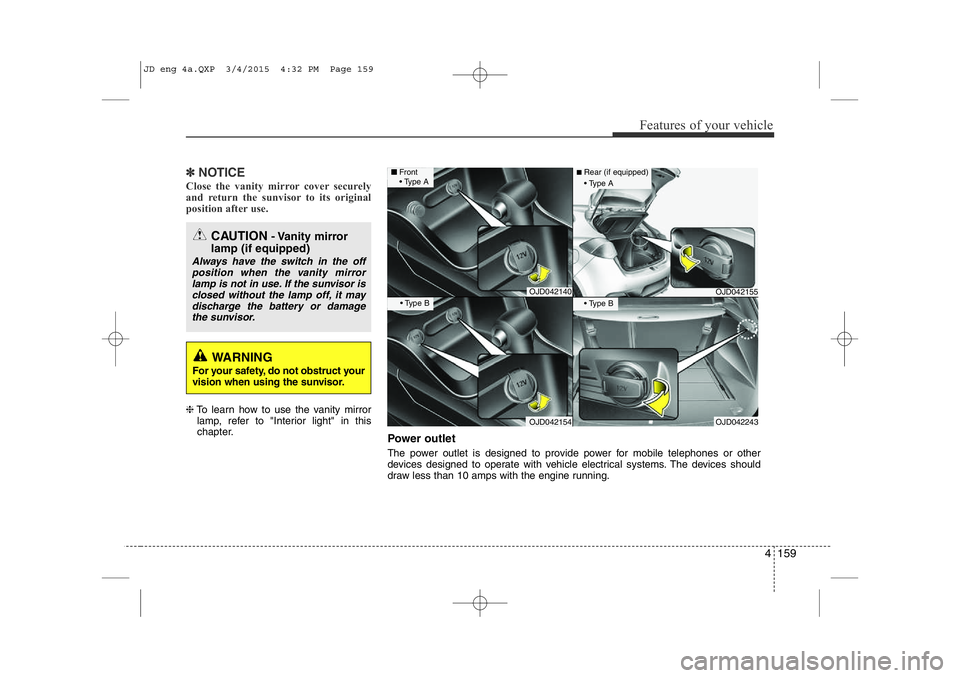
Power outlet
The power outlet is designed to provide power for mobile telephones or other
devices designed to operate with vehicle electrical systems. The devices should
draw less than 10 amps with the engine running.
JD eng 4a.QXP 3/4/2015 4:32 PM Page 159
Page 257 of 1210

Features of your vehicle
176
4
CAUTION
Operating the device while driv-
ing could lead to accidents due to
a lack of attention to external sur- roundings. First park the vehiclebefore operating the device.
Adjust the volume to levels that allow the driver to hear soundsfrom outside of the vehicle. Driving in a state where external sounds cannot be heard may lead
to accidents.
Pay attention to the volume set- ting when turning the device on.A sudden output of extreme vol-
ume upon turning the device oncould lead to hearing impairment. (Adjust the volume to a suitablelevels before turning off the
device.)
If you want to change the position of device installation, pleaseinquire with your place of pur-chase or service maintenance
center. Technical expertise isrequired to install or disassemble the device.
(Continued)
WARNING
Do not stare at the screen whiledriving. Staring at the screen for
prolonged periods of time couldlead to traffic accidents.
Do not disassemble, assemble, or modify the audio system. Such
acts could result in accidents, fire, or electric shock.
Using the phone while driving may lead to a lack of attention of trafficconditions and increase the likeli-
hood of accidents. Use the phone feature after parking thevehicle.
Heed caution not to spill water or introduce foreign objects into thedevice. Such acts could lead tosmoke, fire, or product malfunc-tion.
Please refrain from use if the screen is blank or no sound canbe heard as these signs may indi-cate product malfunction.Continued use in such conditions
could lead to accidents(fires,electric shock) or product mal-functions.
(Continued)
(Continued) Do not touch the antenna during thunder or lightening as suchacts may lead to lightninginduced electric shock.
Do not stop or park in parking- restricted areas to operate theproduct. Such acts could lead to traffic accidents.
Use the system with the vehicle ignition turned on. Prolonged usewith the ignition turned off could result in battery discharge.
JD eng 4b(~211).QXP 3/4/2015 4:39 PM Page 176
Page 313 of 1210

Features of your vehicle
232
4
Using iPod Mode
Playing/Pausing iPod Songs
Once an iPod is connected, the
mode will automatically start and
begin playing an iPod song.
While playing, press the button
to pause and press button to
play.
✽✽
NOTICE
iPods with unsupported communication
protocols may not properly operate in
the audio system.
Changing Songs
Press the key to move to the
previous or next song.
✽✽ NOTICE
Pressing the key after the song has been playing for 1 seconds
will start the current song from the
beginning.
Pressing the key before the song has been playing for 1 seconds
will start the previous song.
Slight time differences may exist
depending your iPod product.
Rewinding / Fast-forwarding Songs
While playing, press and hold the
key (over 0.8 seconds) to
rewind or fast-forward the current song.
Searching Categories
Turn the TUNE knob left/right to
search for the desired category.
Once you find the desired category,
press the TUNE knob to select and
play.
✽✽ NOTICE
There are eight categories that can be
searched, including Playlists, Artists,
Albums, Genres, Songs, Composers,
Audiobooks and Podcasts.
SEEK
TRACK
SEEK
TRACK
SEEK
TRACK
SEEK
TRACK
JD eng 4c(~265).QXP 3/4/2015 4:48 PM Page 232
Page 350 of 1210

Driving your vehicle
4
5
Before entering vehicle
• Be sure that all windows, outside mir-
ror(s), and outside lights are clean.
Check the condition of the tires.
Check under the vehicle for any sign of leaks.
Be sure there are no obstacles behind you if you intend to back up. Necessary inspections
Fluid levels, such as engine oil, engine
coolant, brake fluid, and washer fluid
should be checked on a regular basis,
with the exact interval depending on the
fluid. Further details are provided in
chapter 7, “Maintenance”.
Before starting
Close and lock all doors.
Position the seat so that all controls are
easily reached.
Adjust the inside and outside rearview mirrors.
Be sure that all lights work.
Check all gauges.
Check the operation of warning lights when the ignition switch is turned to the ON position.
Release the parking brake and make sure the brake warning light goes out.
For safe operation, be sure you are famil-
iar with your vehicle and its equipment.
BEFORE DRIVING
WARNING
All passengers must be properly
belted whenever the vehicle is mov-
ing. Refer to “Seat belts” in chapter
3 for more information on their
proper use.
WARNING
Always check the surrounding areas
near your vehicle for people, espe-
cially children, before putting a vehi-
cle into “D (Drive)” or “R (Reverse)”.
WARNING
Driving while distracted can result
in a loss of vehicle control, that
may lead to an accident, severe
personal injury, and death. The dri-
ver’s primary responsibility is in
the safe and legal operation of a
vehicle, and use of any handheld
devices, other equipment, or vehi-
cle systems which take the driver’s
eyes, attention and focus away
from the safe operation of a vehicle
or which are not permissible by law
should never be used during oper-
ation of the vehicle.
JD eng 5.QXP 3/4/2015 2:50 PM Page 4