Page 434 of 695
Only shift from DRIVE to PARK or REVERSE when the
accelerator pedal is released and the vehicle is stopped.
Be sure to keep your foot on the brake pedal when
shifting between these gears.
The transmission shift lever has only PARK, REVERSE,
NEUTRAL, and DRIVE shift positions. Manual shifts can
be made using the Autostick shift control (refer to
#AutoStick#in this section). Moving the shift lever to the
left or right (-/+) while in the DRIVE position will
manually select the transmission gear and will display
the current gear in the instrument cluster as 1, 2, 3, etc.
Shift Lever
432 STARTING AND OPERATING
Page 441 of 695

Overdrive Operation
The automatic transmission includes an electronically
controlled Overdrive (fifth gear). The transmission will
automatically shift into Overdrive if the following con-
ditions are present:
•The shift lever is in the DRIVE position.
•Vehicle speed is sufficiently high.
•The driver is not heavily pressing the accelerator.
AUTOSTICK
AutoStick is a driver-interactive transmission feature
providing manual shift control, giving you more control
of the vehicle. AutoStick allows you to maximize engine
braking, eliminate undesirable upshifts and downshifts,
and improve overall vehicle performance.
This system can also provide you with more control
during passing, city driving, cold slippery conditions,
mountain driving, trailer towing, and many other situa-
tions.
Operation
When the shift lever is in the DRIVE position, the
transmission will operate automatically, shifting between
the five available gears. To engage AutoStick, simply tap
the shift lever to the right or left (+/-) while in the DRIVE
position. Tapping (-) to enter AutoStick mode will down-
shift the transmission to the next lower gear, while using
(+) to enter AutoStick mode will retain the current gear.
When AutoStick is active, the current transmission gear is
displayed in the instrument cluster.
In AutoStick mode, the transmission will shift up or
down when (+/-) is manually selected by the driver,
unless an engine lugging or overspeed condition would
5
STARTING AND OPERATING 439
Page 444 of 695

The transfer case is intended to be driven in the 2H
position for normal street and highway conditions such
as hard-surfaced roads.
In the event that additional traction is required, the
transfer case 4H and 4L positions can be used to lock the
front and rear driveshafts together, forcing the front and
rear wheels to rotate at the same speed. The 4H and 4L
positions are intended for loose, slippery road surfaces
only and not intended for normal driving. Driving in the
4H and 4L positions on hard-surfaced roads will cause
increased tire wear and damage to the driveline compo-
nents. Refer to “Shifting Procedures” in this section for
further information on shifting into 4H or 4L.
The “4WD Indicator Light” (located in the instrument
cluster) alerts the driver that the vehicle is in four-wheel
drive, and the front and rear driveshafts are locked
together. The light will illuminate when the transfer case
is shifted into the 4H position.
NOTE:Do not attempt to shift when only the front or
rear wheels are spinning. The transfer case is not
equipped with a synchronizer, and the front and rear
driveshaft speeds must be equal for a shift to take place.
Shifting while the front or rear wheels are spinning at
different speeds can cause damage to the transfer case.
Four-Wheel Drive Shift Controls
442 STARTING AND OPERATING
Page 446 of 695

4H Position
This range locks the front and rear driveshafts together,
forcing the front and rear wheels to rotate at the same
speed. This range (4H) provides additional traction for
loose, slippery road surfaces and should not be used on
dry pavement.
The “4WD Indicator Light” (located in the instrument
cluster) will illuminate when the transfer case is shifted
into the 4H position.
N (Neutral) Position
This range disengages the front and rear driveshafts from
the powertrain. It is to be used for flat towing behind
another vehicle. Refer to “Recreational Towing” in “Start-
ing and Operating” for further information.
4L Position
This range locks the front and rear driveshafts together,
forcing the front and rear wheels to rotate at the same
speed. This range (4L) provides additional traction and
maximum pulling power for loose, slippery road surfaces
only. Do not exceed 25 mph (40 km/h).
CAUTION!
Exceeding 25 mph (40 km/h) while the transfer case is
engaged in 4L may result in an engine overspeed
condition and engine damage.
The “4WD Indicator Light” (located in the instrument
cluster) will illuminate when the transfer case is shifted
into the 4L position.
NOTE:When in 4WD, the “ESC Off Indicator Light” will
display in the instrument cluster.
444 STARTING AND OPERATING
Page 450 of 695

Press the SWAY BAR switch to activate the system. Press
the switch again to deactivate the system. The “Sway Bar
Indicator Light” (located in the instrument cluster) will
illuminate when the bar is disconnected. The “Sway Bar
Indicator Light” will flash during activation transition, or
when activation conditions are not met. The stabilizer/
sway bar should remain in on-road mode during normal
driving conditions.
WARNING!
Do not disconnect the stabilizer bar and drive on
hard-surfaced roads or at speeds above 18 mph
(29 km/h); you may lose control of the vehicle, which
could result in serious injury. The front stabilizer bar
enhances vehicle stability and is necessary for main-
taining control of the vehicle. The system monitors
vehicle speed and will attempt to reconnect the
stabilizer bar at speeds over 18 mph (29 km/h). This is
indicated by a flashing or solid “Sway Bar Indicator
Light.” Once vehicle speed is reduced below 14 mph
(22 km/h), the system will once again attempt to
return to off-road mode.
Sway Bar Switch
448 STARTING AND OPERATING
Page 451 of 695

To disconnect the stabilizer/sway bar, shift to either 4H
or 4L and press the SWAY BAR switch to obtain the
off-road position. Refer to “Four-Wheel Drive Operation”
in “Starting and Operating” for further information. The
“Sway Bar Indicator Light” will flash until the stabilizer/
sway bar has been fully disconnected.
NOTE:The stabilizer/sway bar may be torque locked
due to left and right suspension height differences. This
condition is due to driving surface differences or vehicle
loading. In order for the stabilizer/sway bar to
disconnect/reconnect, the right and left halves of the bar
must be aligned. This alignment may require that the
vehicle be driven onto level ground or rocked from side
to side.
To return to on-road mode, press the SWAY BAR switch
again.
WARNING!
If the stabilizer/sway bar will not return to on-road
mode, the “Sway Bar Indicator Light” will flash in
the instrument cluster and vehicle stability is greatly
reduced. Do not attempt to drive the vehicle over
18 mph (29 km/h). Driving faster than 18 mph
(29 km/h) may cause loss of control of the vehicle,
which could result in serious injury. Contact your
local authorized dealer for assistance.
ON-ROAD DRIVING TIPS
Utility vehicles have higher ground clearance and a
narrower track to make them capable of performing in a
wide variety of off-road applications. Specific design
characteristics give them a higher center of gravity than
ordinary cars.
5
STARTING AND OPERATING 449
Page 468 of 695
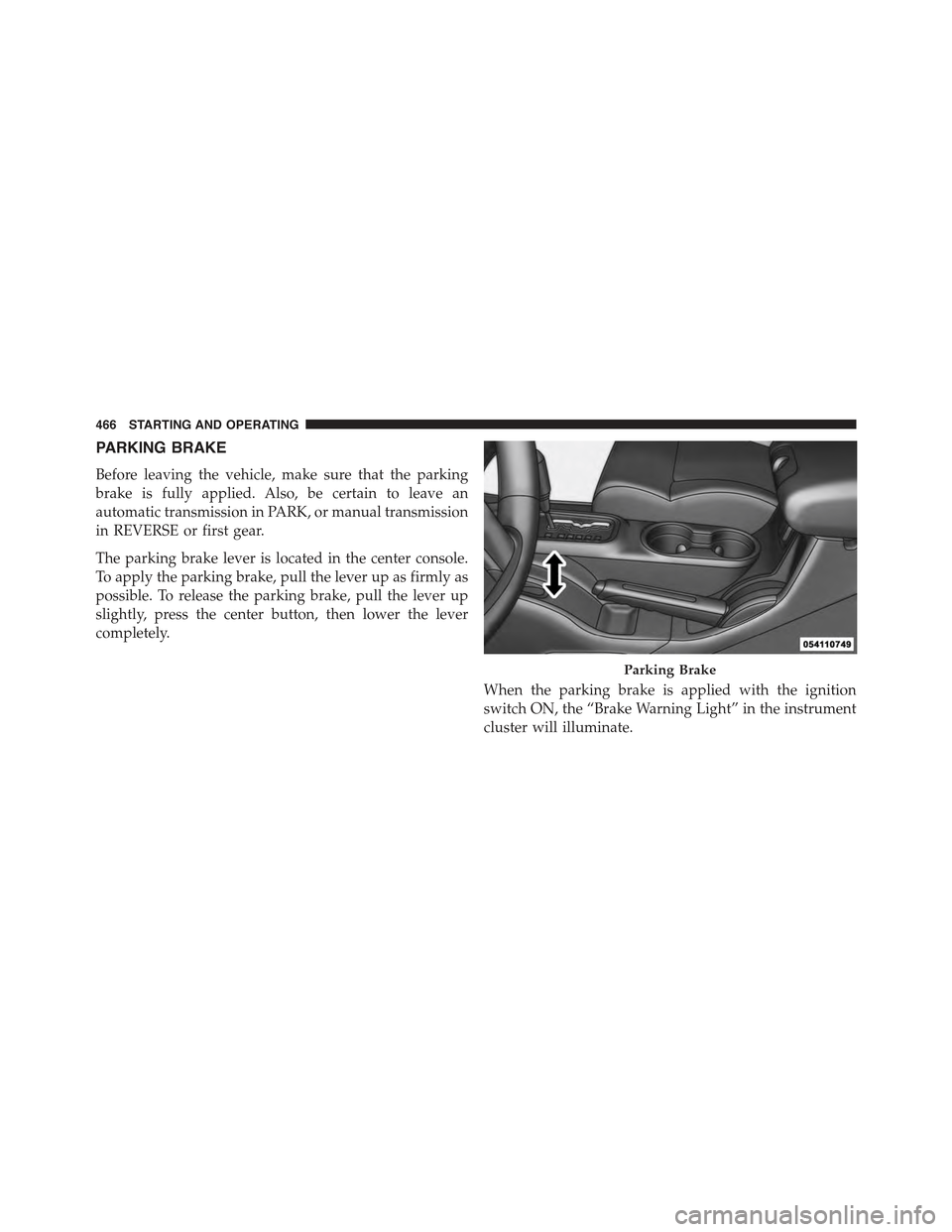
PARKING BRAKE
Before leaving the vehicle, make sure that the parking
brake is fully applied. Also, be certain to leave an
automatic transmission in PARK, or manual transmission
in REVERSE or first gear.
The parking brake lever is located in the center console.
To apply the parking brake, pull the lever up as firmly as
possible. To release the parking brake, pull the lever up
slightly, press the center button, then lower the lever
completely.
When the parking brake is applied with the ignition
switch ON, the “Brake Warning Light” in the instrument
cluster will illuminate.
Parking Brake
466 STARTING AND OPERATING
Page 479 of 695

WARNING!(Continued)
capabilities of an ERM-equipped vehicle must never
be exploited in a reckless or dangerous manner
which could jeopardize the user’s safety or the safety
of others.
Electronic Stability Control (ESC)
This system enhances directional control and stability of
the vehicle under various driving conditions. The ESC
corrects for over/under steering of the vehicle by apply-
ing the brake of the appropriate wheel to assist in
counteracting the over/under steer condition. Engine
power may also be reduced to help the vehicle maintain
the desired path.
ESC uses sensors in the vehicle to determine the vehicle
path intended by the driver and compares it to the actual
path of the vehicle. When the actual path does not match
the intended path, ESC applies the brake of the appro-
priate wheel to assist in counteracting the oversteer or
understeer condition.
•Oversteer - when the vehicle is turning more than
appropriate for the steering wheel position.
•Understeer - when the vehicle is turning less than
appropriate for the steering wheel position.
The “ESC Activation/Malfunction Indicator Light” (lo-
cated in the instrument cluster), starts to flash as soon as
the tires lose traction and the ESC system becomes active.
The “ESC Activation/Malfunction Indicator Light” also
flashes when TCS is active. If the “ESC Activation/
Malfunction Indicator Light” begins to flash during ac-
celeration, ease up on the accelerator and apply as little
throttle as possible. Be sure to adapt your speed and
driving to the prevailing road conditions.
5
STARTING AND OPERATING 477