Page 125 of 678

The automatically controlled functions are:
•Air temperature at the driver/front passenger side
vents.
•Blower speed (continuous variation of the air flow).
•Compressor engagement (for cooling/dehumidifying
the air).
•Air recirculation.
All these functions can be adjusted manually by operat-
ing the system, selecting one or more functions and
modifying their parameters.
Automatic control of the functions will be suspended: the
system will only override the settings for safety reasons.
Manual selections always take priority over automatic
ones and are stored until the AUTO button is pushed or
the system itself intervenes for specific safety reasons.
The amount of air introduced into the passenger com-
partment is not affected by car speed; it is regulated by
the fan, which is controlled electronically.
The air temperature is always automatically controlled
according to the temperature set on the display (except
for when the system is off or in certain conditions when
the compressor is not running).
The system allows the following to be set or adjusted
manually:
•Driver/passenger side air temperature
•Blower speed (continuous variation)
•Air distribution to seven positions
•Compressor activation
•Rapid defrosting/demisting function
•Air recirculation
4
GETTING TO KNOW YOUR VEHICLE 123
Page 151 of 678

Closing
Hold up the hood with one hand and with the other hand
remove the support rod from its seat and reinsert it into
the locking tab.
Lower the hood to approximately 6 inches (15 cm) from
the engine compartment and drop it. Make sure that the
hood is completely closed.
CAUTION!
To prevent possible damage, do not slam the hood to
close it. Lower the hood until it is open approxi-
mately 6 inches (15 cm), and then drop it. This should
secure both latches. Never drive your vehicle unless
the hood is fully closed, with both latches engaged.
WARNING!
Be sure the hood is fully latched before driving your
vehicle. If the hood is not fully latched, it could open
when the vehicle is in motion and block your vision.
Failure to follow this warning could result in serious
injury or death.
LIFTGATE
Opening
To unlock the liftgate, use the Remote Keyless Entry
(RKE) transmitter or activate the power door lock
switches located on the driver door handle.
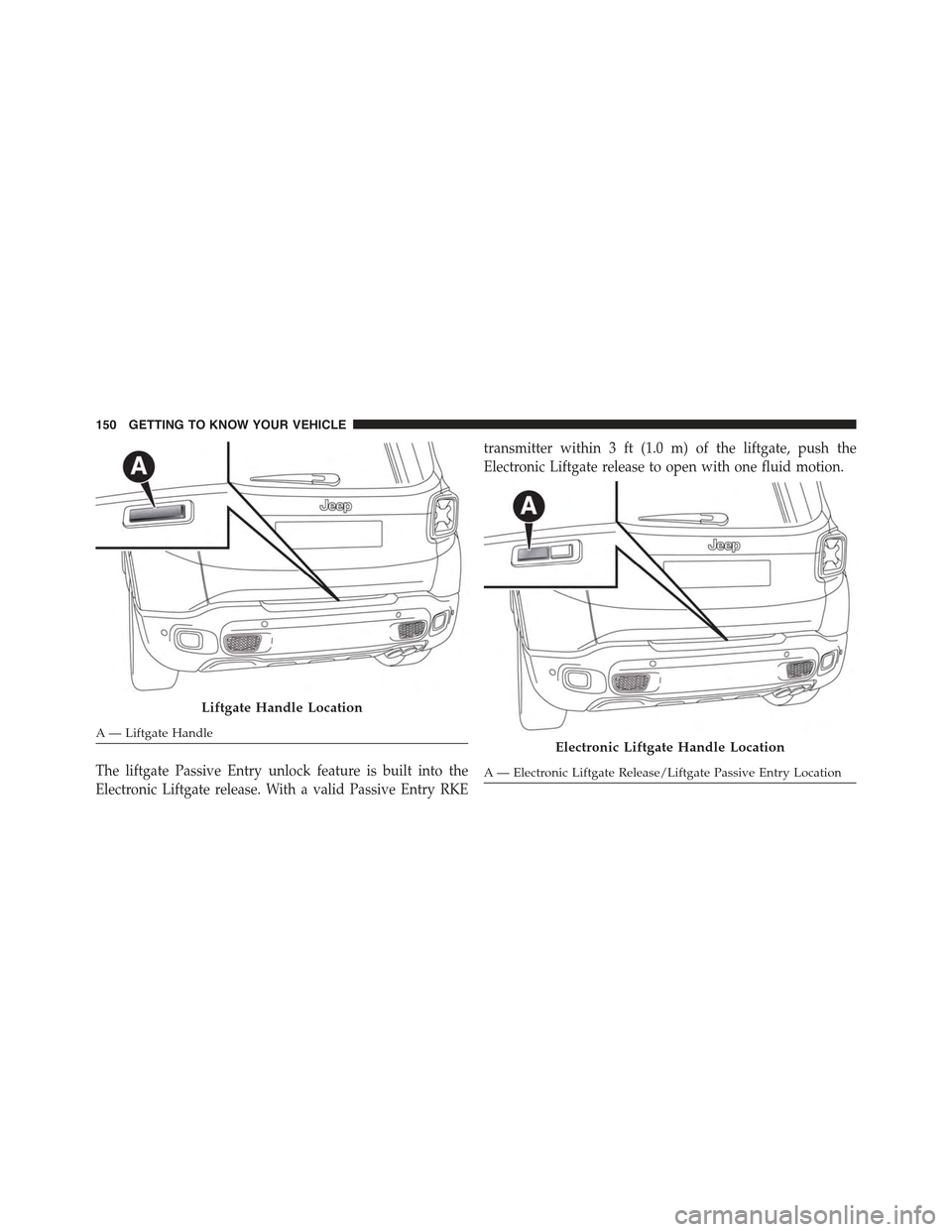
To open the liftgate, squeeze the electronic liftgate release
and pull the liftgate open with one fluid motion.
4
GETTING TO KNOW YOUR VEHICLE 149
Page 152 of 678
The liftgate Passive Entry unlock feature is built into the
Electronic Liftgate release. With a valid Passive Entry RKE
transmitter within 3 ft (1.0 m) of the liftgate, push the
Electronic Liftgate release to open with one fluid motion.
Liftgate Handle Location
A — Liftgate HandleElectronic Liftgate Handle Location
A — Electronic Liftgate Release/Liftgate Passive Entry Location
150 GETTING TO KNOW YOUR VEHICLE
Page 167 of 678

CAUTION!
Do not connect devices with power higher than 180
Watts (15 Amps) to the socket. Do not damage the
socket by using unsuitable adaptors. If the 180 Watt
(15 Amp) power rating is exceeded the fuse protect-
ing the system will need to be replaced.
WARNING!
To avoid serious injury or death:
•Only devices designed for use in this type of outlet
should be inserted into any 12 Volt outlet.
•Do not touch with wet hands.
•Close the lid when not in use and while driving the
vehicle.
•If this outlet is mishandled, it may cause an electric
shock and failure.
Power Inverter — If Equipped
There is a 115 Volt, 150 Watt Power Inverter outlet located
on the back of the center console to convert DC current to
AC current. The Power Inverter can power cellular
phones, electronics and other low power devices requir-
ing up to 150 Watts. Certain high-end video game
consoles, such as Playstation®4 and XBox One will
exceed this power limit, as will most power tools.
4
GETTING TO KNOW YOUR VEHICLE 165
Page 177 of 678
GETTING TO KNOW YOUR INSTRUMENT PANEL
CONTENTS
!INSTRUMENT CLUSTER.................177
▫Instrument Cluster With Multi-Functional Display
(EVIC).............................177
▫Instrument Cluster With Reconfigurable
Multi-Functional Display (DID)............178
▫Speedometer (EVIC)....................179
▫Speedometer (DID)....................180
▫Odometer...........................181
▫Tachometer..........................181
▫Fuel Gauge..........................181
▫Engine Coolant Temperature Gauge.........182
!WARNING LIGHTS AND MESSAGES........183
▫Telltales On The EVIC/DID Instrument
Cluster............................184
▫Symbols Displayed In The EVIC/DID......193
!ELECTRONIC VEHICLE INFORMATION CENTER
(EVIC) / DRIVER INFORMATION
DISPLAY (DID)........................201
▫EVIC/DID Description..................201
▫Mapping And Reconfigurable Zone Display
(EVIC) — (If Equipped).................201
5
Page 179 of 678
INSTRUMENT CLUSTER
Instrument Cluster With Multi-Functional Display (EVIC)
Electronic Vehicle Information Center (EVIC) Cluster
A — TachometerB—DigitalIndicatorEngineCoolantTemperatureWarningLightWith Maximum TemperatureC — Multi-functional Display
D — Digital Indicator Fuel Level Indicator With The Reserve (thetriangle symbol pointing toward the right indicates where thefuel filler door is located)E — Speedometer (speed indicator)
5
GETTING TO KNOW YOUR INSTRUMENT PANEL 177
Page 193 of 678

System Failure Hill Start Assist:The warning light
comes on to indicate a failure of the system Hill Start
Assist.
•What To Do
Please contact your authorized dealer as soon as
possible.
ESC System Disabled
•What Does It Mean
By placing the ignition in the MAR/RUN
position, the indicator light illuminates, but
should go out as soon as the engine is started.
The warning light will come on to indicate the safety
systems have been partially or totally disabled. For
more information of the system, refer to#Electronic
Stability Control (ESC)#in the#Safety#section.
By reactivating the ESC system, the light goes out.
Engine Malfunction
•What Does It Mean
The light is an integral part of the diagnostic
system of the vehicle, called OBD II. This
system monitors the performance of the emissions,
engine, and automatic transmission control systems.
The light comes on briefly (as a bulb check) when the
ignition is turned to the MAR/RUN. If the light does
not illuminate, it means that there is a failure.
In some conditions, such as the poor quality of the fuel,
the light may come on only after starting the engine.
•What To Do
Under these conditions, you can continue driving.
Avoid heavy efforts to the engine or high speeds. The
prolonged use of the car with the light illuminated
can cause damage to the engine.
Please contact your authorized dealer as soon as
possible.
5
GETTING TO KNOW YOUR INSTRUMENT PANEL 191
Page 194 of 678

LaneSense System
•What Does It Mean
Electronic Vehicle Information Center
(EVIC) — If Equipped
The light comes on in the following ways:
Light illuminated (white):indicates that the system
is active and both of the lane markings have been
detected (the lines of the aisle are gray in color).
Light on as flashing light (amber):indicates that the
vehicle is going to cross over the lane marking.
Light illuminated (green):indicates that both lane
markings have been detected, and the system is
“armed.” The system will provide a torque warning
in the steering wheel if an unintentional lane depar-
ture occurs.
Driver Information Display (DID) — If Equipped
On the vehicles equipped with DID, the light on the
side of the screen will be replaced by an icon in the
upper left area of the display.
These icons are displayed in the same way as vehicles
equipped with EVIC (see as previously described).
Park/Headlight ON Indicator
•What Does It Mean
The light comes on by activating the park-
ing lights or headlights.
This feature allows you to maintain the lights for a
period of 30, 60, or 90 seconds after placing the
ignition in the STOP position.
In some conditions, such as the poor quality of the
fuel, the light may come on only after starting the
engine.
192 GETTING TO KNOW YOUR INSTRUMENT PANEL