Page 316 of 636
OK button to enter the submenus and follow the prompts
on the screen as needed. The Screen Setup feature allows
you to change what information is displayed in the
instrument cluster as well as the location that information
is displayed.
Screen Setup Driver Selectable Items
Current Gear
•On
•Off
Upper Left
•None
•Compass
•Outside Temp (default setting)
•Time•Range To Empty (RTE)
•Fuel Economy Average
•Fuel Economy Current
•Trip A
•Trip B
Upper Right
•None
•Compass (default setting)
•Outside Temp
•Time
•Range To Empty (RTE)
•Fuel Economy Average
•Fuel Economy Current
314 UNDERSTANDING YOUR INSTRUMENT PANEL
Page 374 of 636

NOTE:In Sync mode, this button will also automatically
adjust the passenger temperature setting at the same
time.
14. Driver Temperature Control Up Button
Provides the driver with independent temperature con-
trol. Push the button on the faceplate for warmer tem-
perature settings or on the touchscreen, press and slide
the temperature bar towards the red arrow button on the
touchscreen for warmer temperature settings.
NOTE:In Sync mode, this button will also automatically
adjust the passenger temperature setting at the same
time.
Climate Control Functions
A/C (Air Conditioning)
The Air Conditioning (A/C) button allows the operator
to manually activate or deactivate the air conditioning
system. When the air conditioning system is turned on,cool dehumidified air will flow through the outlets into
the cabin. For improved fuel economy, press the A/C
button to turn off the air conditioning and manually
adjust the blower and airflow mode settings. Also, make
sure to select only Panel, Bi-Level or Floor modes.
NOTE:
•For Manual Climate Controls, if the system is in Mix,
Floor or Defrost Mode, the A/C can be turned off, but
the A/C system shall remain active to prevent fogging
of the windows.
•If fog or mist appears on the windshield or side glass,
select Defrost mode and adjust blower speed if
needed.
•If your air conditioning performance seems lower than
expected, check the front of the A/C condenser (lo-
cated in front of the radiator), for an accumulation of
dirt or insects. Clean with a gentle water spray from
372 UNDERSTANDING YOUR INSTRUMENT PANEL
Page 394 of 636
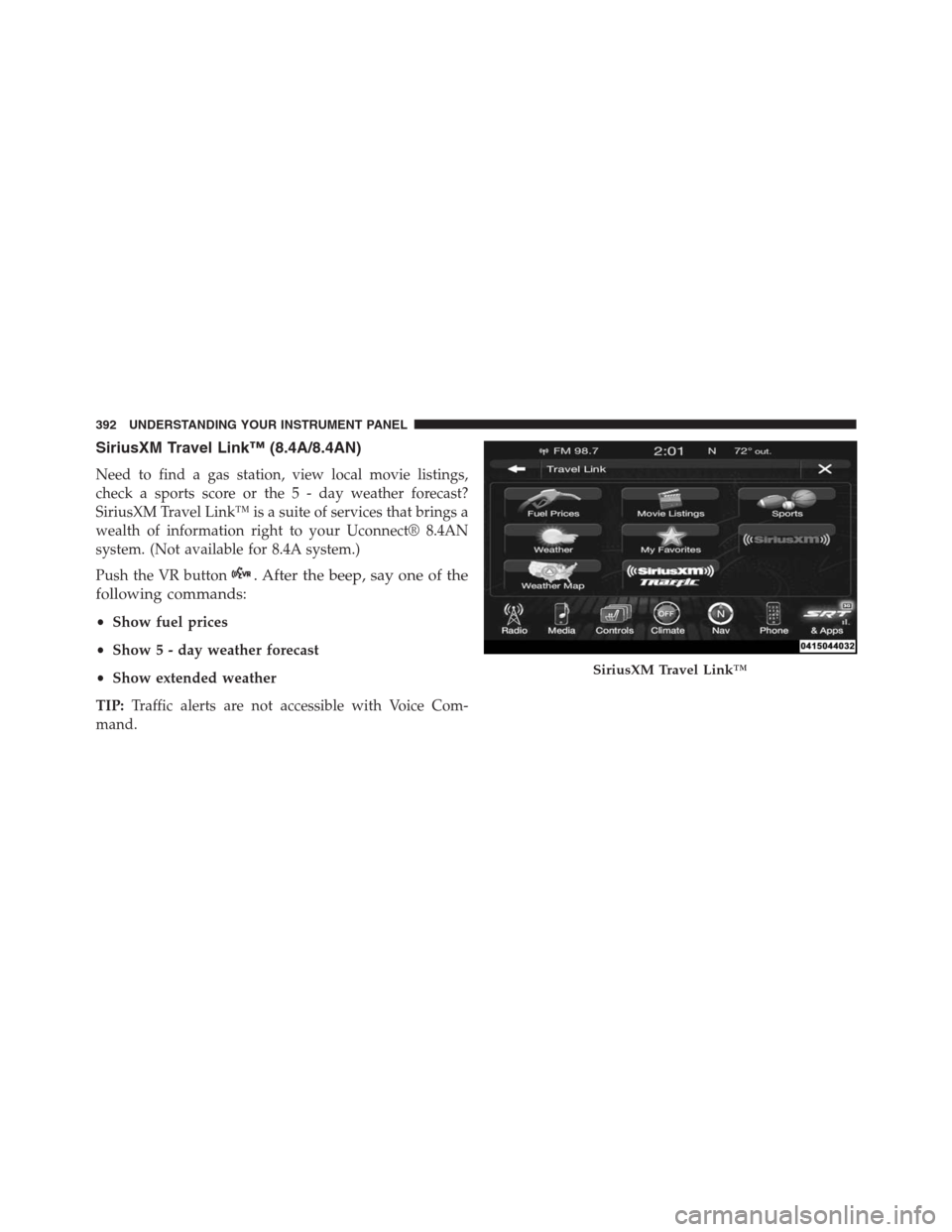
SiriusXM Travel Link™ (8.4A/8.4AN)
Need to find a gas station, view local movie listings,
check a sports score or the 5 - day weather forecast?
SiriusXM Travel Link™ is a suite of services that brings a
wealth of information right to your Uconnect® 8.4AN
system. (Not available for 8.4A system.)
Push the VR button
. After the beep, say one of the
following commands:
•Show fuel prices
•Show 5 - day weather forecast
•Show extended weather
TIP:Traffic alerts are not accessible with Voice Com-
mand.
SiriusXM Travel Link™
392 UNDERSTANDING YOUR INSTRUMENT PANEL
Page 397 of 636
STARTING AND OPERATING
CONTENTS
�STARTING PROCEDURES................399
▫Automatic Transmission................399
▫Keyless Enter-N-Go™..................400
▫Normal Starting.......................400
▫Extreme Cold Weather
(Below –20°F Or 29°C)................402
▫If Engine Fails To Start.................402
▫After Starting........................403
�AUTOMATIC TRANSMISSION............403
▫Key Ignition Park Interlock...............405▫Brake/Transmission Shift Interlock System . . .405
▫Fuel Economy (ECO) Mode..............405
▫Eight–Speed Automatic Transmission.......407
�PADDLE SHIFT MODE..................414
▫Operation...........................415
�SELEC-TRACK® — IF EQUIPPED...........416
▫Description..........................416
▫Active Damping System.................418
▫Launch Mode — If Equipped.............419
�DRIVING THROUGH WATER.............420
5
Page 398 of 636

▫Flowing/Rising Water..................420
�POWER STEERING.....................422
�FUEL SAVER TECHNOLOGY — IF
EQUIPPED...........................423
�PARKING BRAKE......................423
�BRAKE SYSTEM.......................425
�ELECTRONIC BRAKE CONTROL SYSTEM. . . .426
▫Anti-Lock Brake System (ABS)............426
▫Traction Control System (TCS)............426
▫Brake Assist System (BAS)...............427
▫Electronic Roll Mitigation (ERM)..........428
▫Electronic Stability Control (ESC)..........429
▫ESC Activation/Malfunction Indicator Light And
ESC OFF Indicator Light................433▫Trailer Sway Control (TSC)..............435
�TIRE SAFETY INFORMATION.............436
▫Tire Markings........................436
▫Tire Identification Number (TIN)...........440
▫Tire Terminology And Definitions..........442
▫Tire Loading And Tire Pressure...........443
�TIRES — GENERAL INFORMATION........448
▫Tire Pressure........................448
▫Tire Inflation Pressures.................449
▫Tire Pressures For High Speed Operation. . . .451
▫Radial Ply Tires......................451
▫Tire Types...........................452
▫Run Flat Tires — If Equipped.............454
396 STARTING AND OPERATING
Page 399 of 636

▫Spare Tires — If Equipped...............454
▫Tire Spinning........................457
▫Tread Wear Indicators..................457
▫Life Of Tire.........................458
▫Replacement Tires.....................458
�TIRE CHAINS (TRACTION DEVICES).......460
�TIRE ROTATION RECOMMENDATIONS.....461
�TIRE PRESSURE MONITOR SYSTEM (TPMS) . .463
▫Premium System......................465
▫Tire Pressure Monitoring Low Pressure
Warnings...........................467
▫General Information...................470
�FUEL REQUIREMENTS..................471▫6.4L Engine..........................471
▫Reformulated Gasoline.................471
▫Gasoline/Oxygenate Blends..............471
▫E-85 Usage In Non-Flex Fuel Vehicles.......472
▫MMT In Gasoline.....................472
▫Materials Added To Fuel................473
▫Fuel System Cautions...................473
▫Carbon Monoxide Warnings.............474
�ADDING FUEL........................475
▫Emergency Fuel Filler Door Release.........478
�VEHICLE LOADING....................479
▫Certification Label....................479
�TRAILER TOWING.....................481
5
STARTING AND OPERATING 397
Page 404 of 636

and START. To change the ignition positions without
starting the vehicle and use the accessories follow these
steps:
•Starting with the ignition in the OFF position,
•Push the ENGINE START/STOP button once to place
the ignition to the ACC position (DID will display
“ACC”),
•Push the ENGINE START/STOP button a second time
to place the ignition to the RUN position (DID will
display “ON/RUN”),
•Push the ENGINE START/STOP button a third time to
return the ignition to the OFF position (DID will
display “OFF”).Extreme Cold Weather (Below –20°F Or 29°C)
To ensure reliable starting at these temperatures, use of
an externally powered electric engine block heater (avail-
able from your authorized dealer) is recommended.
If Engine Fails To Start
WARNING!
•Never pour fuel or other flammable liquid into the
throttle body air inlet opening in an attempt to start
the vehicle. This could result in flash fire causing
serious personal injury.
•
Do not attempt to push or tow your vehicle to get it
started. Vehicles equipped with an automatic transmis-
sion cannot be started this way. Unburned fuel could
enter the catalytic converter and once the engine has
started, ignite and damage the converter and vehicle.
(Continued)
402 STARTING AND OPERATING
Page 405 of 636

WARNING!(Continued)
•If the vehicle has a discharged battery, booster
cables may be used to obtain a start from a booster
battery or the battery in another vehicle. This type
of start can be dangerous if done improperly. Refer
to “Jump Starting” in “What To Do In Emergen-
cies” for further information.
Clearing A Flooded Engine (Using ENGINE
START/STOP Button)
If the engine fails to start after you have followed the
“Normal Starting” or “Extreme Cold Weather�proce-
dures, it may be flooded. To clear any excess fuel:
1. Press and hold the brake pedal.
2. Press the accelerator pedal all the way to the floor and
hold it.3. Push and release the ENGINE START/STOP button
once.
The starter motor will engage automatically, run for 10
seconds, and then disengage. Once this occurs, release
the accelerator pedal and the brake pedal, wait 10 to 15
seconds, then repeat the “Normal Starting” procedure.
After Starting
The idle speed is controlled automatically and it will
decrease as the engine warms up.
AUTOMATIC TRANSMISSION
WARNING!
•It is dangerous to shift out of PARK or NEUTRAL
if the engine speed is higher than idle speed. If
your foot is not firmly pressing the brake pedal, the
(Continued)
5
STARTING AND OPERATING 403